
Product Overview
The Phanteks Glacier One 360D30 X2 AIO Liquid CPU Cooler is a high-performance all-in-one liquid cooling solution designed for efficient heat dissipation from central processing units. It features an integrated pump and radiator with three D30-120 D-RGB fans, optimized for both cooling performance and aesthetic appeal.
Key features include:
- High-performance cooling solution designed for gamers and PC enthusiasts.
- Equipped with D30 fans that can interconnect into a single frame for easier cable management.
- A large copper base and fin array ensures efficient cooling for high-end CPUs.
- Maximum clearance design for compatibility with motherboard and RAM components.
- Evolv X2-design aluminum pump cover with integrated fan cools surrounding VRMs and M.2 SSD.
- Supports Intel LGA 1700, 1200, 115x, and AMD AM4, AM5 sockets.

Image: The Phanteks Glacier One 360D30 X2 AIO Liquid CPU Cooler, showcasing the radiator with three D-RGB fans and the pump block.
Package Contents
Verify that all components are present before beginning installation.
- Glacier One 360D30 X2 AIO Liquid CPU Cooler (PH-GO360D30_Dxx02)
- Mounting hardware for Intel sockets (LGA 115x, 1200, 1700, 1851)
- Mounting hardware for AMD sockets (AM4, AM5)
- 3x Tube clips
- Thermal paste (pre-applied + Phanteks PH-NDC)
- User Manual (this document)
Setup and Installation
This section provides step-by-step instructions for installing the Glacier One 360D30 X2 AIO Liquid CPU Cooler. Ensure your system is powered off and unplugged before proceeding.
1. Prepare the Motherboard
Identify the correct backplate and standoffs for your CPU socket (Intel or AMD). Secure the backplate to the motherboard from the rear, aligning it with the CPU cooler mounting holes.

Image: Illustration showing the cooler installed in a PC case, highlighting compatibility with Intel and AMD sockets and clearance for motherboard and RAM components.
2. Install Radiator and Fans
Mount the radiator to an available fan mounting location in your PC case (e.g., top, front, or rear). The D30 fans are designed to interconnect, simplifying their installation and cable management. Use the provided screws to secure the radiator and fans.

Image: Close-up view of the D30 fans, demonstrating their linking system with bridge connectors and screw cover plates to reduce visible cables.

Image: Vertical orientation of the Phanteks Glacier One 360D30 X2 AIO Liquid CPU Cooler, showing the radiator and pump block.
3. Mount the Pump Block
Ensure the pre-applied thermal paste on the copper cold plate is intact. If not, apply a small amount of the included Phanteks PH-NDC thermal paste to the center of your CPU's integrated heat spreader (IHS). Carefully place the pump block onto the CPU, aligning the mounting holes with the standoffs. Secure the pump block using the provided thumb screws or nuts, tightening them in a cross pattern until snug.
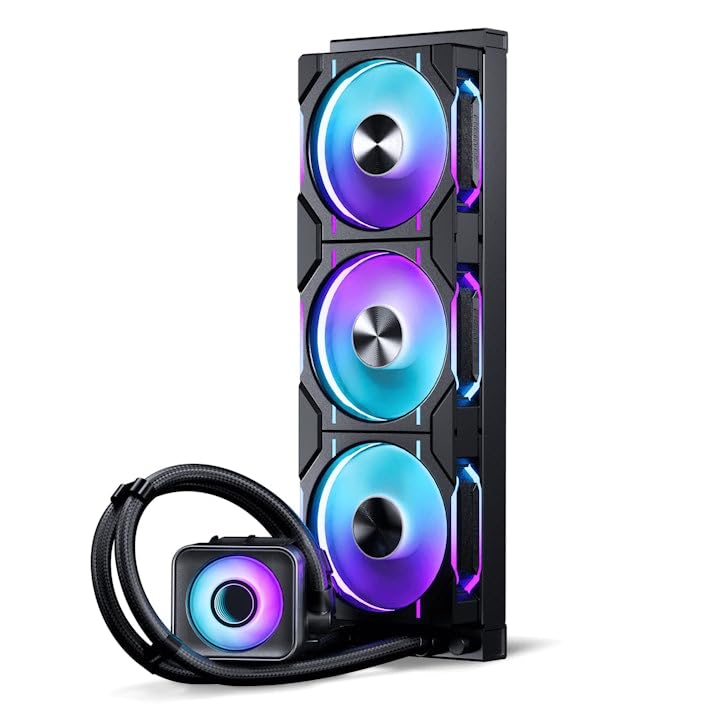
Image: Diagram illustrating the pump block's cooling effect on the CPU, VRM, and M.2 SSD, emphasizing the large copper base and integrated fan.
4. Cable Management
Connect the pump's 3-pin DC cable to an available fan header on your motherboard (typically labeled "PUMP_FAN" or "CPU_OPT"). Connect the D-RGB PWM Pump Fan 6-pin cable to the appropriate D-RGB header on your motherboard or a compatible D-RGB controller. Utilize the included tube clips to guide the tubing and fan cables for a clean setup.

Image: View of the D30-120 fans installed, showcasing their integrated D-RGB lighting with an infinity mirror hub.

Image: The cooler installed within a PC case, demonstrating its aesthetic integration with other Phanteks Evolv X2 and NexLinq products.
Operating Instructions
Once installed, the Glacier One 360D30 X2 AIO Liquid CPU Cooler operates automatically, controlled by your motherboard's fan and pump headers. Ensure your motherboard's BIOS/UEFI settings are configured to manage fan speeds based on CPU temperature for optimal performance and noise levels.
D-RGB Lighting Control
The D-RGB lighting can be controlled via compatible motherboard software (if connected to a D-RGB header) or through a dedicated Phanteks D-RGB controller (sold separately). Refer to your motherboard's manual or the Phanteks website for specific software instructions.
Maintenance
Regular maintenance ensures optimal performance and longevity of your AIO cooler.
- Dust Removal: Periodically clean dust from the radiator fins and fans using compressed air. Ensure the fans are not spinning during cleaning to prevent damage.
- Tubing Inspection: Visually inspect the tubing for any signs of kinks, leaks, or damage.
- Fan Blades: Gently wipe fan blades with a soft, dry cloth if dust accumulation is visible.
- Coolant: The AIO cooler is a closed-loop system and does not require coolant refills or maintenance.
Troubleshooting
| Problem | Possible Cause | Solution |
|---|---|---|
| High CPU Temperatures | Improper pump block mounting; insufficient thermal paste; dust accumulation on radiator; fans not spinning. | Re-seat pump block, reapply thermal paste; clean radiator and fans; check fan connections and BIOS settings. |
| Fans Not Spinning / D-RGB Not Lighting Up | Loose cable connections; incorrect header connection; software/driver issue. | Verify all power and D-RGB cables are securely connected to the correct headers; update motherboard BIOS/drivers; check D-RGB software settings. |
| Unusual Noise from Pump/Fans | Air bubbles in loop (pump); fan bearing noise; fan hitting cables. | Orient radiator higher than pump (if possible) to allow air to settle; check for cable interference with fans; if noise persists, contact support. |
Specifications
| Component | Specification |
|---|---|
| Product Name | Glacier One 360D30 X2 |
| Product Type | AIO Liquid CPU Cooler |
| Socket Compatibility | Intel LGA 115x, 1200, 1700, 1851; AMD AM4, AM5 |
| Pump Block Dimensions (LxWxH) | 85.5 x 80.9 x 65.9 mm |
| Radiator Dimensions (LxWxH) | 397 x 120 x 27 mm |
| Tubing Length | 400mm ± 10mm |
| Cold Plate Material | Copper 1100 |
| Radiator Material | Aluminum (AL3003) |
| Tubing Material | CIIR rubber with black braided sleeves |
| Cooling Liquid | Deionized Water and Propylene Glycol mix |
| Pump Speed | 3100 ± 10% RPM |
| Pump Noise | 20 dBA |
| Fan Type | PH-F120D30_DRGB_PWM_BK01 |
| Fan Dimensions | 120 x 120 x 30mm |
| Fan Speed | 250 - 2000 ± 10% RPM |
| Air Flow | 64.3 CFM |
| Fan Static Pressure | 3.01 mm-H2O |
| Fan Noise | 30.2 dBA |
| D-RGB LED Quantity (per fan) | 30 pcs |
Warranty Information
Phanteks products are covered by a limited warranty. For detailed warranty terms and conditions, please refer to the official Phanteks website or contact Phanteks customer support. Keep your proof of purchase for warranty claims.
Support and Contact
For further assistance, technical support, or inquiries regarding your Phanteks Glacier One 360D30 X2 AIO Liquid CPU Cooler, please visit the official Phanteks website:
You may also find helpful resources, FAQs, and driver downloads on their support page.


