
1. Introduction and Overview
The LOUISWARE Digital Caliper is a high-precision measuring instrument designed for accurate dimensional measurements. Constructed with durable zinc alloy and thickened stainless steel, it offers IP54 protection, making it waterproof, dust-proof, oil-proof, and rust-proof. This tool is ideal for a variety of applications, from household DIY projects to professional industrial and automotive tasks.
Key features include a large LCD screen for clear readings, seamless conversion between inch and millimeter units, and the capability to perform four distinct types of measurements: external diameter, internal diameter, depth, and step measurements. Its robust design ensures reliable performance and a long service life.

Figure 1: LOUISWARE Digital Caliper with LCD display, showing millimeter, inch, and fractional readings, alongside its protective case. The image also depicts water splashing, indicating its IP54 waterproof rating.
2. Product Components
Familiarize yourself with the various parts of your digital caliper to ensure proper operation and maintenance.

Figure 2: A detailed diagram illustrating the key components of the digital caliper.
- Inside Diameter Jaws: Used for measuring internal dimensions.
- Inch & Metric & Fraction Switch: Button to toggle between measurement units (mm, inch, fractions).
- Slider Clamp Screw: Locks the slider in place for stable readings.
- Origin Switch: Resets the absolute zero point.
- Battery Compartment: Houses the CR2032 battery.
- On/Off Switch: Powers the device on or off.
- Zero Switch: Sets the current position as a temporary zero point for differential measurements.
- Thumb Roller: Provides fine adjustment for precise positioning of the slider.
- Outside Diameter Jaws: Used for measuring external dimensions.
- Inch Metric Scale: The main scale for reading measurements.
- Depth Blade: Extends from the end of the slider for depth measurements.
3. Setup
Before first use, ensure the battery is correctly installed.
3.1 Battery Installation
The digital caliper uses a 3V CR2032 button cell battery. The package includes extra batteries for convenience.
- Locate the battery compartment cover on the back of the LCD display unit.
- Use a small Phillips head screwdriver (often included in the package) to loosen the screw on the battery cover.
- Remove the cover and insert the CR2032 battery with the positive (+) side facing upwards.
- Replace the battery cover and tighten the screw.

Figure 3: Battery compartment of the digital caliper, showing the CR2032 battery and included spares.
3.2 Initial Cleaning
Wipe the measuring surfaces with a clean, dry, lint-free cloth before first use to remove any manufacturing residues or dust.
4. Operating Instructions
4.1 Power On/Off
- Press the ON/OFF button to turn the caliper on.
- To turn off, press the ON/OFF button again. The caliper will automatically shut down after 6 minutes of inactivity to conserve battery life.
4.2 Zero Function
The Zero function allows you to set a temporary zero point at any position, which is useful for differential measurements or measuring relative distances.
- Turn on the caliper.
- Move the slider to the desired starting point for your measurement.
- Press the ZERO button. The display will reset to 0.00, and subsequent movements will be measured from this new zero point.
4.3 Unit Conversion
Easily switch between measurement units (millimeters, inches, and fractions) with the press of a button.
- Press the mm/in/F button to cycle through millimeters (mm), inches (in), and fractional inch (F) displays.

Figure 4: Demonstrates the Zero function, Unit Conversions, Origin function, and the Knurled Thumb Wheel.
4.4 Measurement Methods
The LOUISWARE Digital Caliper supports four primary measurement types:
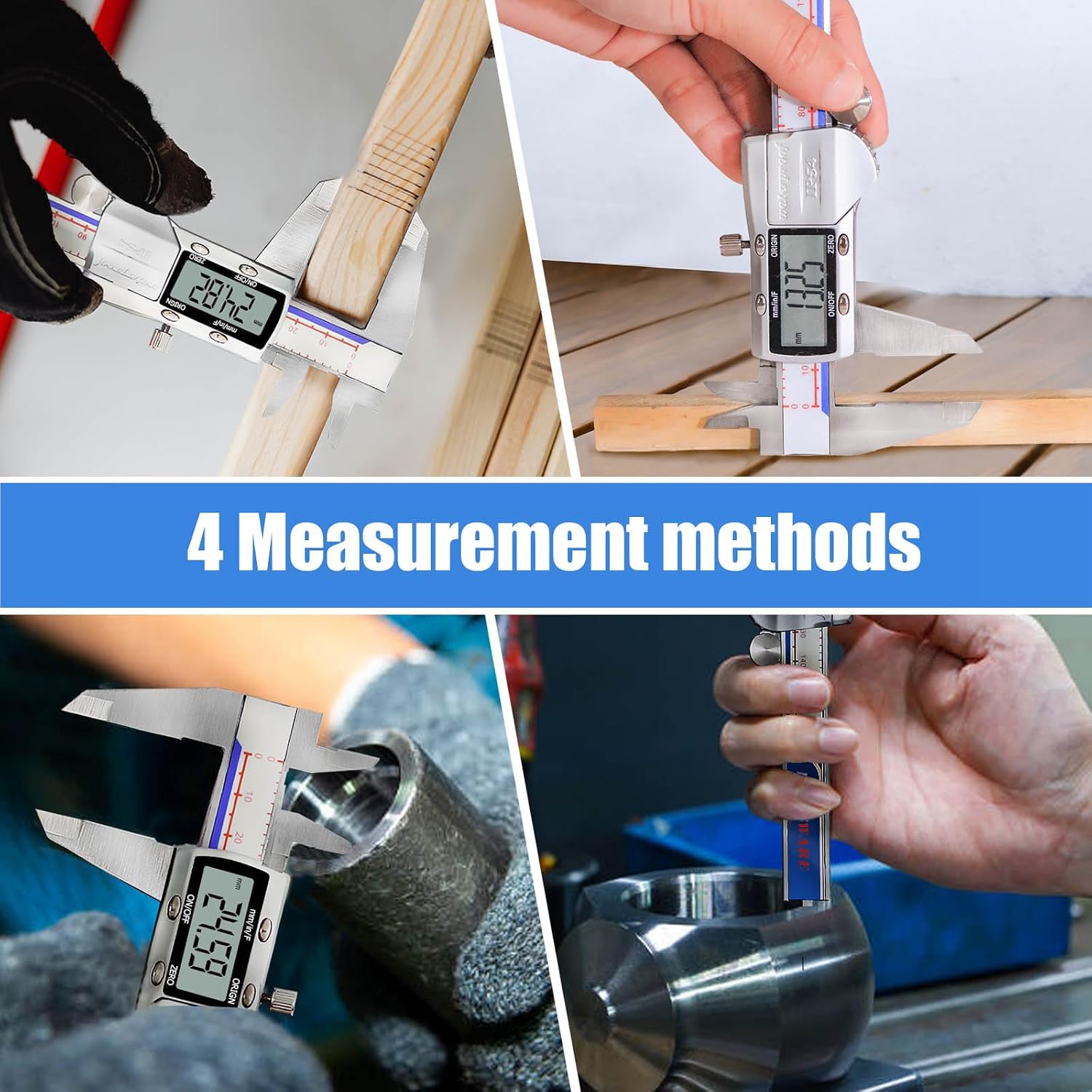
Figure 5: Composite image illustrating external, internal, step, and depth measurement methods.
4.4.1 External Measurement
Use the large outside jaws to measure the external dimensions of an object.

Figure 6: Caliper being used for external measurement (top) and internal measurement (bottom).
4.4.2 Internal Measurement
Use the small inside jaws to measure the internal dimensions of an object, such as the diameter of a hole or pipe.
4.4.3 Depth Measurement
Extend the depth blade from the end of the slider into a hole or recess to measure its depth.
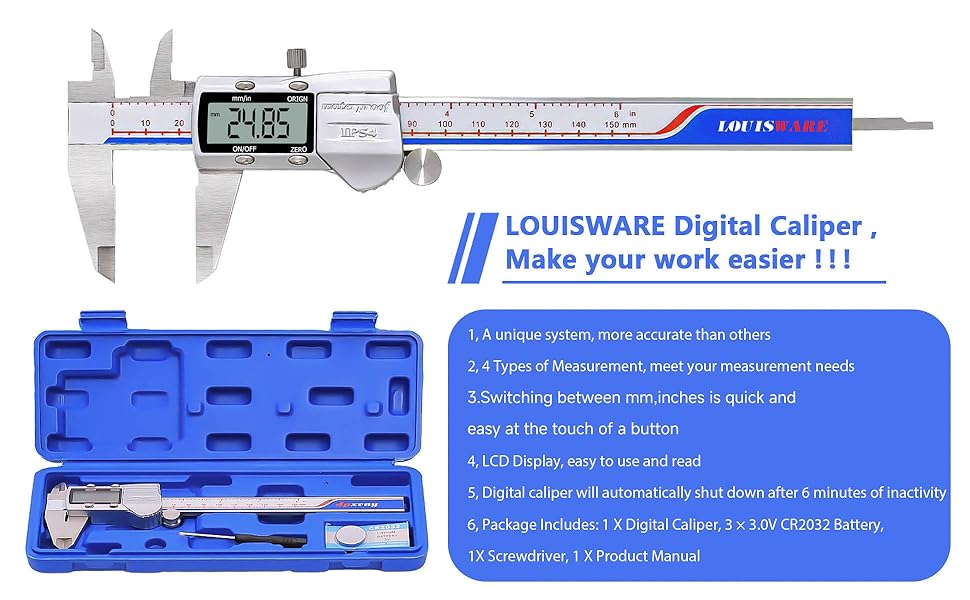
Figure 7: Caliper being used for depth measurement (top) and step measurement (bottom).
4.4.4 Step Measurement
Use the stepped faces of the jaws to measure the height or depth of a step on an object.
4.5 Using the Thumb Roller and Clamp Screw
- The Thumb Roller allows for smooth and precise movement of the slider, enabling fine adjustments for accurate measurements.
- Once the desired measurement is achieved, tighten the Slider Clamp Screw to lock the slider in place, preventing accidental movement and ensuring the reading remains stable.
5. Maintenance
Proper maintenance will extend the life and accuracy of your digital caliper.
- Cleaning: Despite its IP54 rating, always wipe the caliper clean with a dry, lint-free cloth after each use, especially the measuring surfaces and the scale. Avoid using solvents or harsh chemicals.
- Storage: Store the caliper in its protective case when not in use to prevent damage from impacts, dust, and moisture. Keep it in a dry environment away from direct sunlight and extreme temperatures.
- Battery Replacement: Replace the battery when the display becomes dim or shows erratic readings. Refer to section 3.1 for battery installation instructions.
- Handling: Avoid dropping the caliper or subjecting it to strong impacts, as this can affect its accuracy and internal components.
6. Troubleshooting
If you encounter issues with your digital caliper, refer to the following common problems and solutions:
| Problem | Possible Cause | Solution |
|---|---|---|
| Display is blank or dim. | Low or dead battery. | Replace the CR2032 battery (refer to section 3.1). |
| Inaccurate or inconsistent readings. |
|
|
| Slider movement is not smooth. | Dust or debris on the sliding mechanism. | Clean the sliding surfaces with a dry, lint-free cloth. Avoid lubricants. |
| Caliper does not turn on. | Battery incorrectly installed or dead. | Check battery orientation and replace if necessary. |
7. Specifications
Detailed technical specifications for the LOUISWARE Digital Caliper (Model MBF4-1):
| Specification | Value |
|---|---|
| Model Number | MBF4-1 |
| Measurement Range | 0 - 6 inches / 0 - 150 mm |
| Accuracy | ±0.001 inches / ±0.02 mm |
| Resolution | 0.0005 inches / 0.01 mm |
| Material | Stainless Steel (ruler), Zinc Alloy (body) |
| Protection Rating | IP54 (Waterproof, Dust-proof, Oil-proof, Rust-proof) |
| Display | Large LCD Screen |
| Battery Type | CR2032 3V Lithium Battery |
| Automatic Shut-off | After 6 minutes of inactivity |
| Package Dimensions | 10.35 x 4.41 x 1.42 inches |
| Item Weight | 13.76 ounces |
| Country of Origin | China |
8. Warranty and Support
LOUISWARE stands behind the quality of its products. Your Digital Caliper (Model MBF4-1) comes with the following:
- 30-Day Money-Back Guarantee: For any reason, you can return the product within 30 days for a full refund.
- 12-Month Warranty: A 12-month warranty is provided for quality-related issues.
For warranty claims, technical support, or any inquiries, please refer to the contact information provided with your purchase or visit the official LOUISWARE store on Amazon.