
Product Overview
The INXING Jingbo 60V45A Electric Scooter Controller Kit is designed for electric scooters with dual motors, supporting power outputs up to 5800W-6000W for enhanced speed and acceleration. This kit includes a 60V45A-AB scooter brushless motor controller (front+rear) and a TF-100 electric scooter throttle with an LCD display panel.
It features a dual-mode control design, offering stable starting, comfortable driving, strong climbing performance, low operating noise, and intelligent identification with self-learning capabilities. The brushless motor controller is compatible with both sinusoidal and Hall motors.
Advanced protection features are integrated, including overheat protection, short-circuit protection, and overcurrent protection, to safeguard both the motor and battery, ensuring reliable and safe operation.

Image: Overview of the INXING Jingbo 60V45A Electric Scooter Controller Kit, showing the two controllers and the TF-100 display.
Package Contents
- 1 x 60V45A-AB Scooter Brushless Motor Controller (Front)
- 1 x 60V45A-AB Scooter Brushless Motor Controller (Rear)
- 1 x TF-100 Electric Scooter Throttle with LCD Display Panel

Image: All components included in the kit, featuring the two controllers and the TF-100 display with wiring harnesses.
Installation Guide
The scooter controller features multiple wires with distinct colors and functions. Connect only the required functions; unnecessary wires can be left unconnected without affecting performance. This design simplifies connection and installation.
Wiring Overview
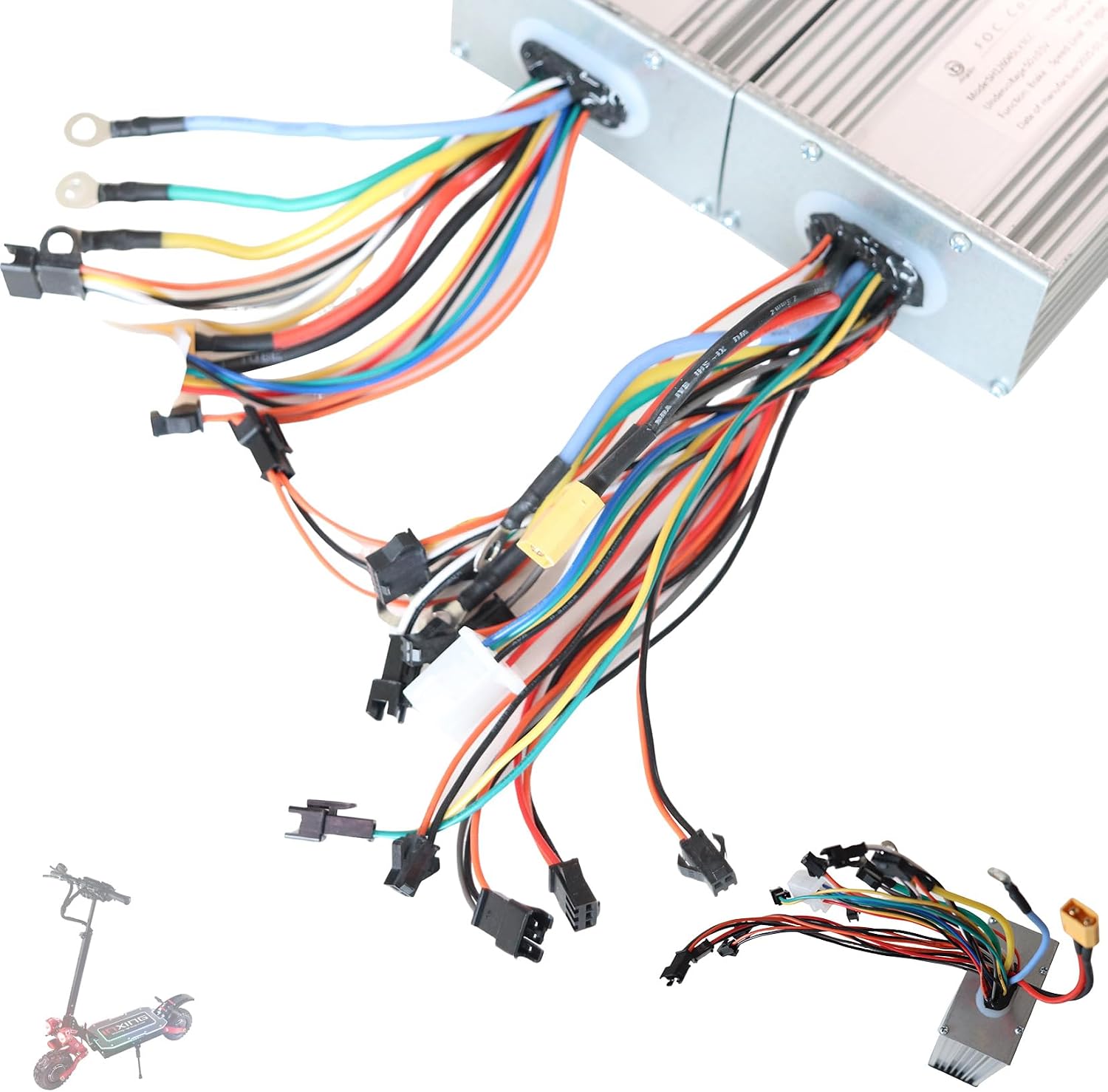
Image: Detailed view of the various wiring harnesses extending from the controller, showing different connectors and wire colors.

Image: A different angle showing the wiring connections, highlighting the robust construction of the cables.
Front Wheel Controller (Controller A) Wiring
This controller is typically designated for the front wheel motor. Refer to the diagram below for specific connections.
- Motor Line (1, 2, 3): Connect to the motor's phase wires.
- Battery Line (5): Connect to the scooter's main battery power.
- Hall Sensor (Motor) (6): Connect to the motor's Hall sensor wires.
- Single/Double Drive Switch (7): Connect to the switch for selecting single or dual motor operation.
- Connect to Rear Controller B (4): This connection links Controller A to Controller B for synchronized dual motor operation.

Image: Detailed wiring diagram for the JB JingBo 60v45A-A (Front wheel) controller, with numbered labels for each connection point.
Rear Wheel Controller (Controller B) Wiring
This controller is typically designated for the rear wheel motor. Refer to the diagram below for specific connections.
- Power Supply (2, 3): Connect to the scooter's main battery power.
- Power Lock (4): Connect to the scooter's ignition or power switch.
- Low Brake (5): Connect to the low-level brake signal wire.
- Brake Lights (6): Connect to the brake light circuit.
- Battery Line (7): Connect to the scooter's main battery power.
- Motor Line (8, 9, 10): Connect to the motor's phase wires.
- Hall Sensor (Motor) (11): Connect to the motor's Hall sensor wires.
- Speed Limit (13): Connect to the speed limit function wire.
- Connect Big Screen (12): Connect to the main display unit.
- Instrument Power Supply (14): Provides power to the instrument panel.
- Instrument Line (15): Data line for the instrument panel.
- Connect to Rear Controller A (1): This connection links Controller B to Controller A for synchronized dual motor operation.

Image: Detailed wiring diagram for the JB JingBo 60v45A-B (Rear wheel) controller, with numbered labels for each connection point.
TF-100 Display Connection
The TF-100 display connects to the controller via a 5-pin wire. Ensure this connection is secure for proper display functionality and throttle control.

Image: The complete set including both controllers, the TF-100 display, and an extension cable, illustrating how they connect.
Controller Identification

Image: Close-up view of the labels on FOC Controller A and FOC Controller B, showing model numbers, voltage, undervoltage, and manufacturing dates.
Controller Dimensions

Image: Side profile of the controller, illustrating its compact design and heat sink fins.
Operating Instructions
Once installed, the controller kit operates seamlessly with your electric scooter. The TF-100 LCD display panel provides real-time information such as speed, battery level, and other relevant metrics.
TF-100 LCD Display Panel
The TF-100 display serves as your primary interface for monitoring scooter performance and adjusting settings. It is waterproof, ensuring durability in various weather conditions. Use the buttons on the display to cycle through different modes and view data.
Dual-Mode Control
The controller supports a dual-mode control design, allowing for flexible operation. This enables stable starting, smooth acceleration, and efficient power delivery, adapting to different riding conditions and preferences.
Maintenance and Care
To ensure the longevity and optimal performance of your INXING controller kit, follow these general maintenance guidelines:
- Keep Clean: Regularly wipe down the controllers and display panel with a dry, soft cloth to prevent dust and dirt buildup.
- Inspect Connections: Periodically check all wiring connections to ensure they are secure and free from corrosion. Loose connections can lead to intermittent performance or damage.
- Avoid Extreme Conditions: While the TF-100 display is waterproof, avoid submerging the controllers in water. Protect the components from extreme temperatures and direct sunlight for prolonged periods.
- Ventilation: Ensure the controllers have adequate airflow, especially during extended use, to prevent overheating. The design includes heat dissipation features, but proper mounting is crucial.
Troubleshooting
If you encounter issues with your controller kit, consider the following common troubleshooting steps:
- No Power/Display Off: Check all power connections, including the battery line and power lock wire. Ensure the battery is charged.
- Motor Not Responding: Verify motor phase wire connections and Hall sensor connections. Check for any loose or damaged wires.
- Intermittent Operation: Inspect all wiring for secure connections. This could indicate a loose wire or a faulty sensor.
- Overheat Protection: If the controller shuts down during operation, it may be due to overheating. Allow it to cool down. Ensure proper ventilation and avoid overloading the system.
- Short-Circuit/Overcurrent Protection: If the system immediately shuts down or fails to power on, there might be a short circuit or overcurrent condition. Disconnect power and carefully inspect all wiring for any exposed wires or incorrect connections.
- Abnormal Noise: While the controller is designed for noiseless operation, any unusual sounds from the motor or controller could indicate a wiring issue or a motor problem.
For persistent issues, refer to the detailed wiring diagrams in the Installation Guide section to double-check all connections. If problems persist, contact customer support.
Technical Specifications
| Feature | Specification |
|---|---|
| Brand | INXING |
| Model Number | jingbo60v45a brushless motor controller |
| Voltage | 60 Volts |
| Current | 45A |
| Display Type | LCD (TF-100) |
| Material | Plastic (Display), Metal (Controller Casing) |
| Color | Black |
| Item Weight | 2.65 pounds |
| Package Dimensions | 11 x 11 x 3.9 inches |
| Manufacturer | inxing |
| UPC | 788111417855 |
| Country of Origin | China |
Customer Support
For any questions, technical assistance, or warranty inquiries regarding your INXING Jingbo 60V45A Electric Scooter Controller Kit, please contact the manufacturer or your point of purchase. Ensure you have your product model number and purchase details ready when contacting support.
For additional protection, consider available extended protection plans.