
1. Introduction
Thank you for choosing the Aoxun 10000 BTU Portable Air Conditioner. This unit is designed to provide efficient cooling, dehumidification, and air circulation for your home, office, or dorm. With smart control options and a user-friendly design, it offers versatile comfort for various environments. Please read this manual thoroughly before operation to ensure proper use, maintenance, and safety.

Figure 1: Aoxun 10000 BTU Portable Air Conditioner with remote control and smartphone app interface.
2. Safety Information
To reduce the risk of fire, electrical shock, or injury, always follow basic safety precautions when operating this appliance.
- Ensure the unit is plugged into a properly grounded electrical outlet.
- Do not operate the unit with a damaged cord or plug.
- Keep the air intake and exhaust clear of obstructions.
- Do not insert fingers or objects into the air outlets.
- Always turn off and unplug the unit before cleaning or servicing.
- Do not use the unit in wet areas like bathrooms or laundry rooms.
- Keep children and pets away from the unit during operation.
3. Package Contents
Verify that all items listed below are included in your package:
- Aoxun 10000 BTU Portable Air Conditioner Unit
- Exhaust Hose
- Window Kits (adjustable)
- Hose Connector
- Remote Control
- Water Pipe (for continuous drainage)
- User Manual
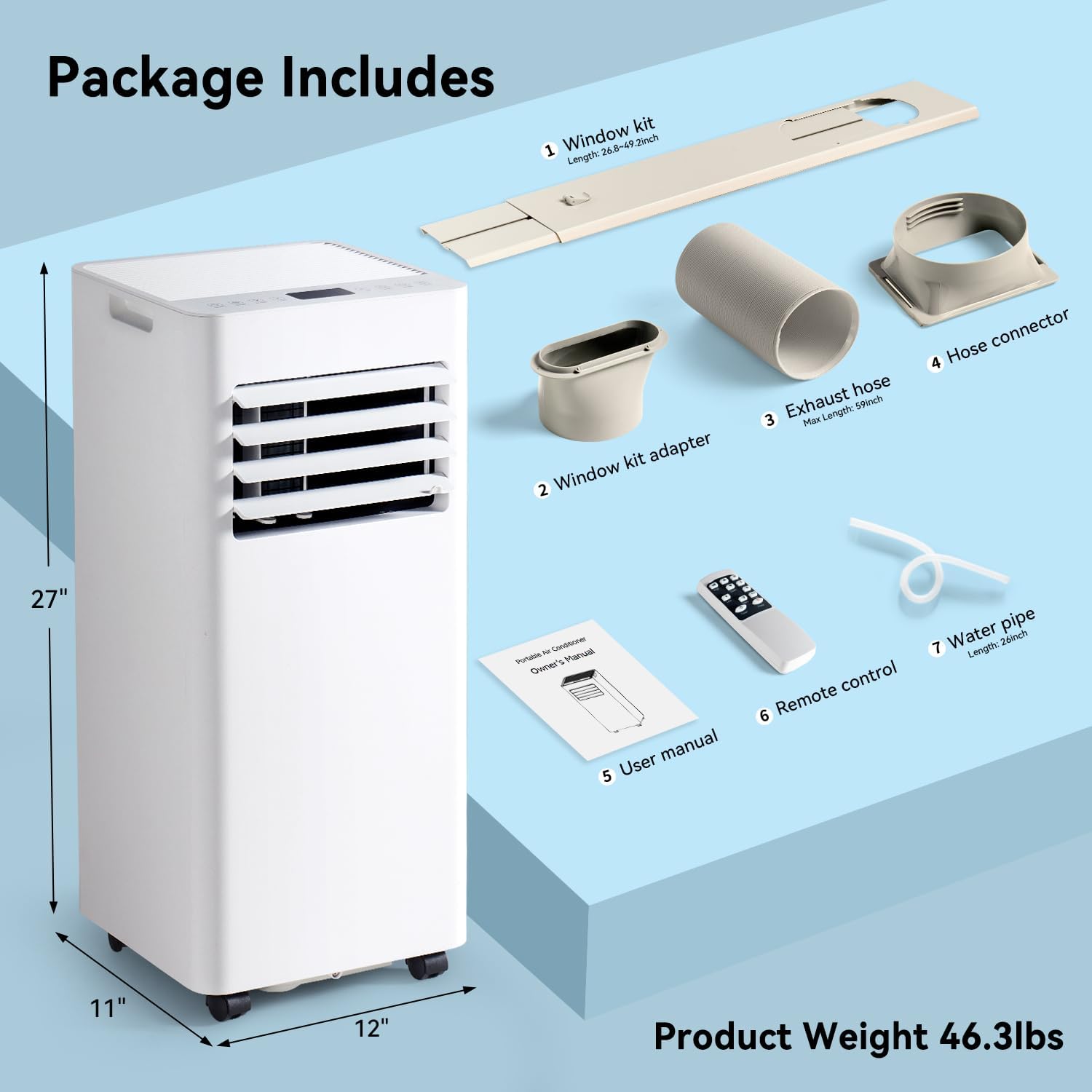
Figure 2: All components included in the Aoxun Portable Air Conditioner package.
4. Product Features
- Smart Control & Mobility Boost: Adjust settings via touch panel, remote control, or Smart Life APP WiFi control. Built-in handles and 360° wheels allow for effortless movement.
- Powerful Cooling & Wide Coverage: Delivers rapid cooling for rooms up to 300 sq.ft., maintaining temperatures between 61°F-90°F.
- 4-in-1 All-Season Comfort: Functions as a cooler, dehumidifier, fan, and features a quiet sleep mode for year-round use.
- Quiet Night Mode & Safety Features: Operates at ≤55dB, with sleep mode further reducing noise. Includes a 24H timer and child lock.
- Easy Setup & Low Maintenance: Features a removable washable filter and dual drainage holes. Adjustable window kit allows for quick installation.
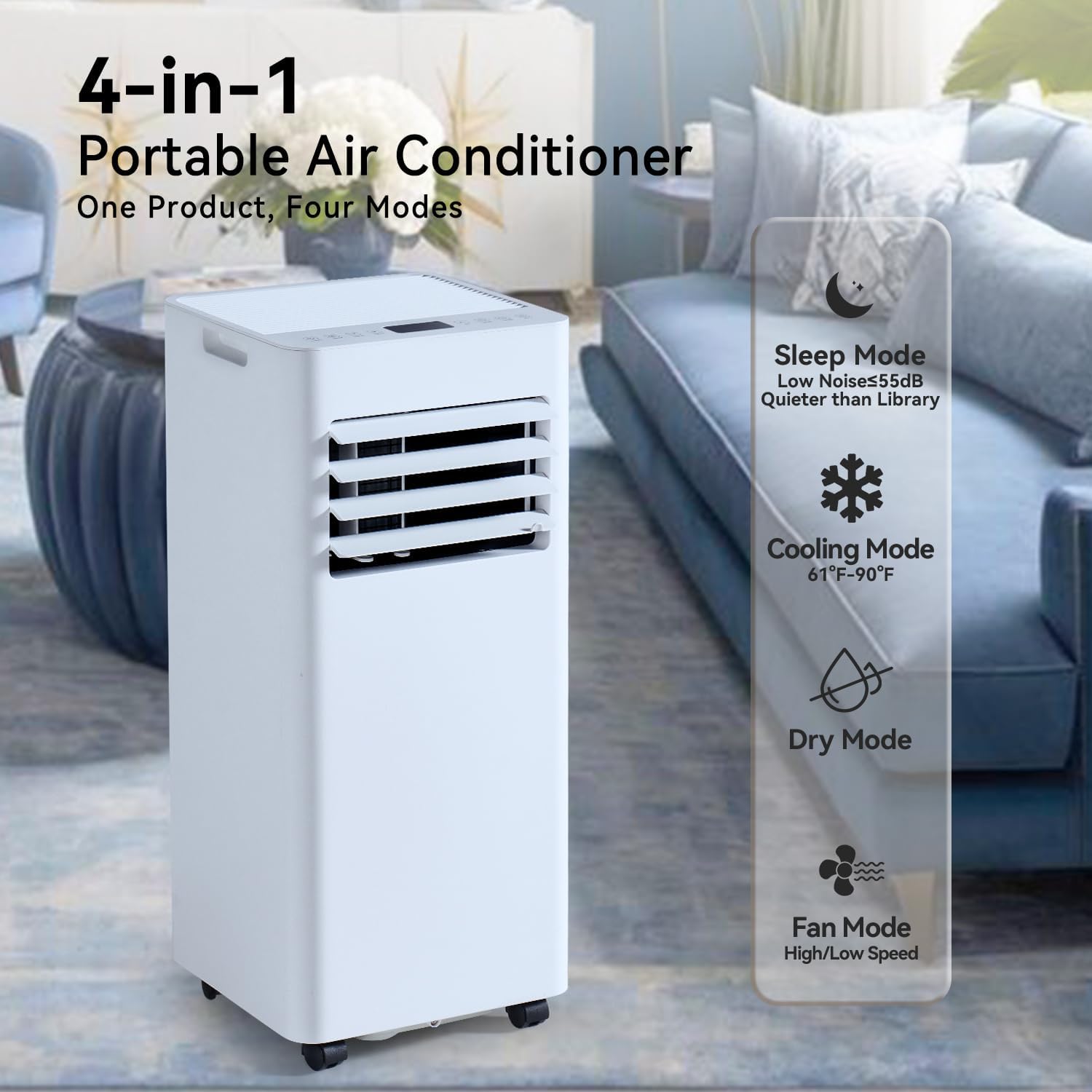
Figure 3: The 4-in-1 functionality of the Aoxun Portable Air Conditioner.
5. Setup & Installation
Follow these steps for quick and efficient setup:
- Positioning the Unit: Place the portable AC unit on a flat, stable surface near a window and a grounded electrical outlet. Ensure there is at least 20 inches of space around the unit for proper airflow.
- Window Kit Installation:
- Adjust the window kit panels to fit your window opening (suitable for sliding or double/single-hung windows).
- Secure the window kit in place. For proper ventilation, ensure the distance from the unit to the window is more than 27.6 inches, and the height from the exhaust hose to the floor is more than 35.4 inches.
- Exhaust Hose Connection:
- Attach one end of the exhaust hose to the hose connector.
- Connect the other end of the exhaust hose to the adapter on the window kit.
- Ensure the exhaust hose is stretched to its maximum length of 59 inches and is not kinked or bent to maintain optimal performance.
- Drainage Setup:
- For continuous drainage (recommended in high humidity environments), connect the provided water pipe to the lower drainage hole and direct it to a suitable drain or container.
- For intermittent drainage, the internal water tank will collect condensate. The unit will stop operating when the tank is full, and you will need to manually drain it using the lower drainage hole.
- Power Connection: Plug the unit into a 115-volt grounded electrical outlet.
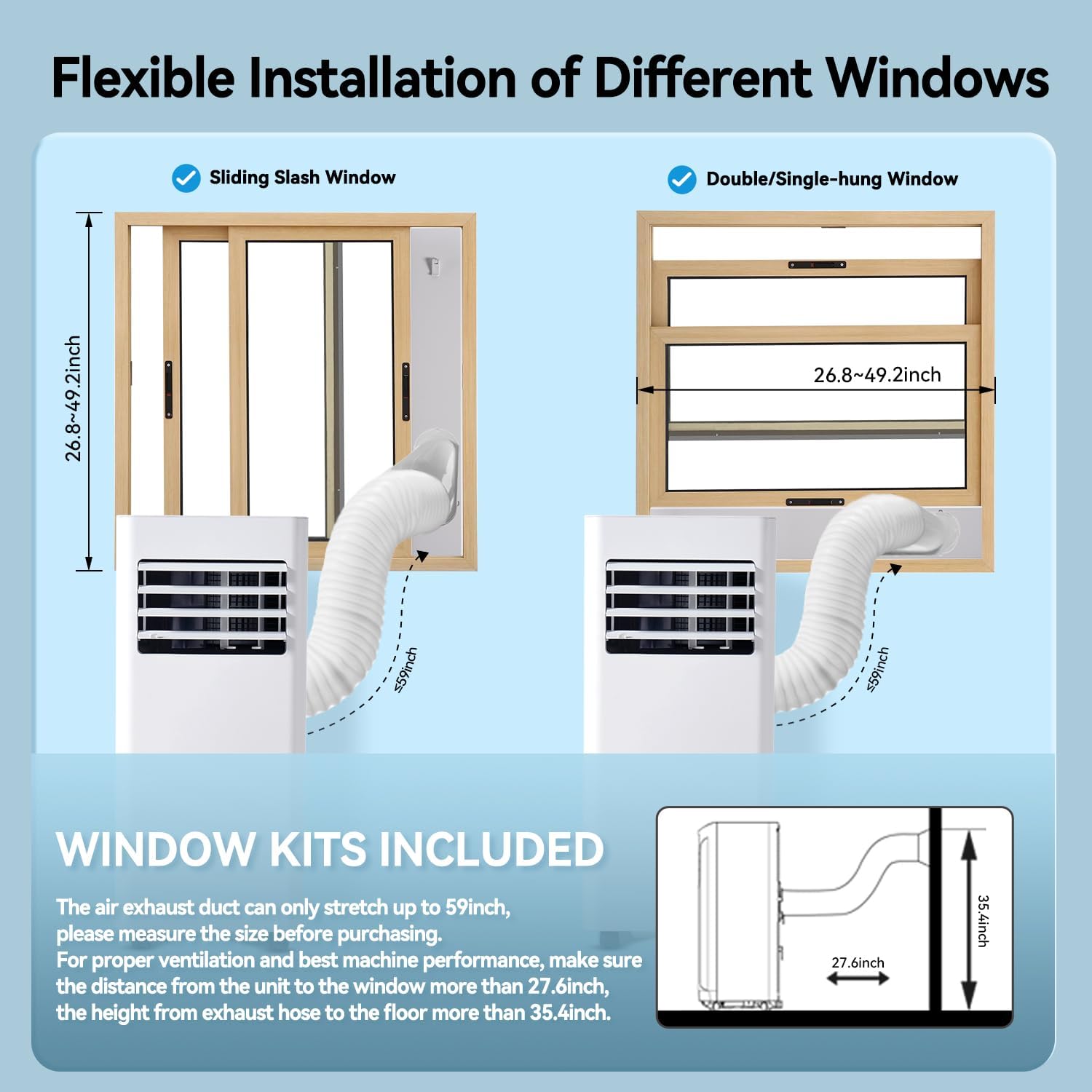
Figure 4: Flexible installation options for various window types.
6. Operating Instructions
Your Aoxun Portable Air Conditioner offers multiple control methods for convenience.
6.1 Control Panel
The touch control panel on top of the unit allows direct access to all functions.
- Power Button: Turns the unit on or off.
- Mode Button: Cycles through Cooling, Dehumidifier, Fan, and Sleep modes.
- Up/Down Arrows: Adjusts the desired temperature setting (61°F-90°F) or timer duration.
- Speed Button: Selects fan speed (Low, High).
- Swing Button: Activates or deactivates the automatic swing of the louvers.
- Timer Button: Sets the 24-hour on/off timer.
- Sleep Button: Activates sleep mode for quieter operation.
- Lock Button: Engages child lock to prevent accidental changes.
6.2 Remote Control
The included remote control provides convenient operation from a distance. All functions available on the control panel can be accessed via the remote.
6.3 WiFi APP Smart Control
Download the Smart Life APP to control your unit from anywhere using your smartphone. Refer to the separate Smart Life APP guide for detailed pairing and operation instructions.
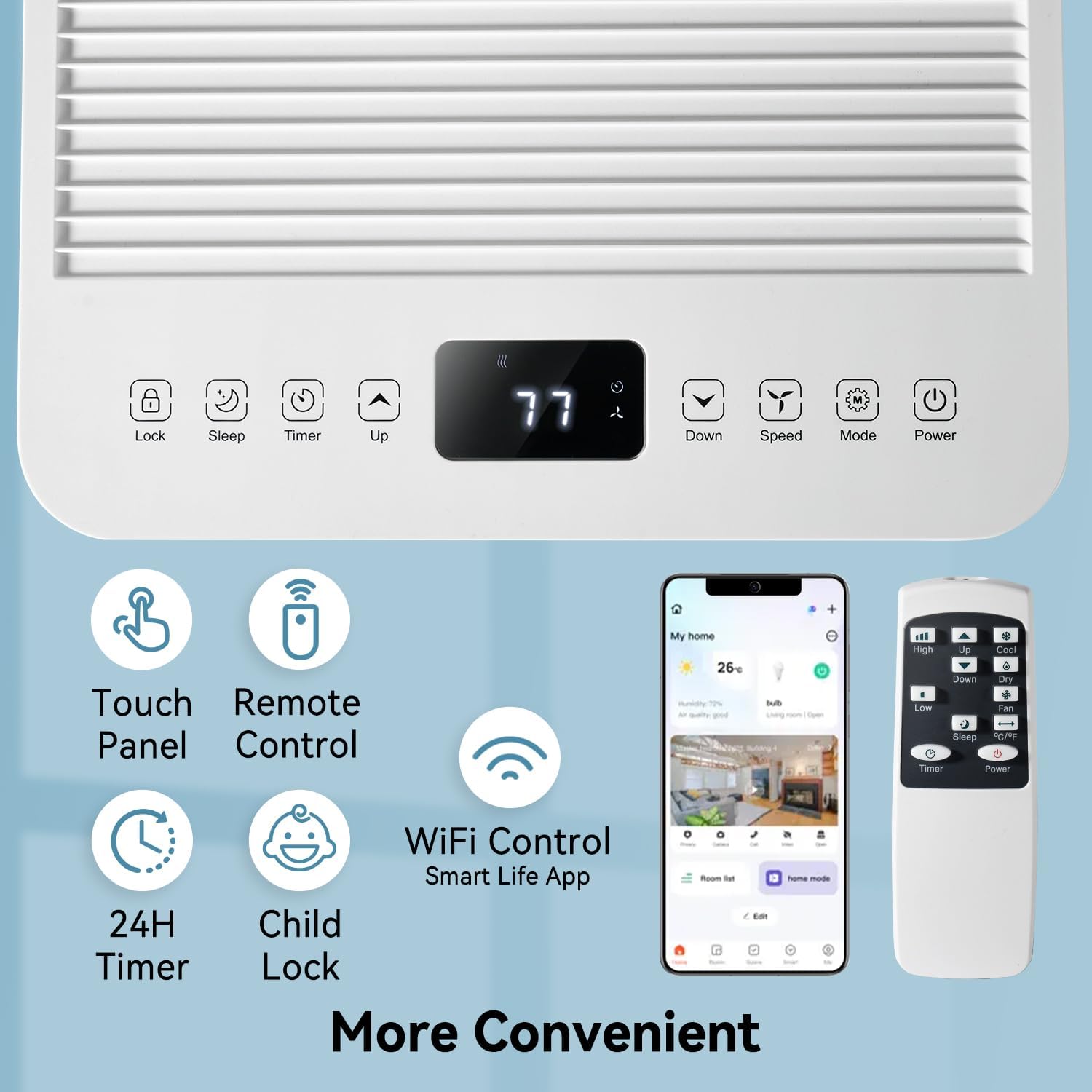
Figure 5: Overview of the control panel, remote control, and WiFi app for convenient operation.
7. Modes of Operation
The Aoxun Portable Air Conditioner offers four distinct modes:
- Cooling Mode: Provides powerful cooling to lower room temperature. Set your desired temperature using the Up/Down arrows.
- Dehumidifier Mode: Removes excess moisture from the air, ideal for humid environments. Continuous drainage is recommended in this mode.
- Fan Mode: Circulates air without cooling, offering two fan speeds (Low, High).
- Sleep Mode: Operates at a lower fan speed and reduced noise level for undisturbed rest. The temperature may gradually increase during this mode.

Figure 6: The Aoxun Portable Air Conditioner effectively cools rooms up to 300 sq.ft.
8. Maintenance
Regular maintenance ensures optimal performance and longevity of your unit.
8.1 Cleaning the Air Filter
The unit features a removable and washable air filter. Clean the filter every two weeks or more frequently if used in dusty environments.
- Turn off and unplug the unit.
- Remove the filter from the back of the unit.
- Wash the filter with warm, soapy water. Rinse thoroughly.
- Allow the filter to air dry completely before reinserting.
8.2 Draining the Unit
If using intermittent drainage, the internal water tank will need to be emptied when the 'Full' indicator lights up on the display.
- Turn off and unplug the unit.
- Place a shallow pan or container under the lower drainage hole.
- Remove the drain plug to allow water to flow out.
- Once drained, replace the drain plug securely.

Figure 7: Product details highlighting the removable washable filter and dual drainage holes.
9. Troubleshooting
Before contacting customer service, try these common troubleshooting steps:
- Unit does not turn on: Check if the power cord is securely plugged in and the outlet is functioning. Ensure the internal water tank is not full.
- Unit is not cooling: Verify the mode is set to 'Cool'. Check if the air filter is clean. Ensure the exhaust hose is properly installed and not blocked. Close all windows and doors in the room.
- Unit is noisy: Ensure the unit is on a flat, stable surface. Check for any obstructions in the fan or air vents.
- Water leakage: Check if the drain plug is securely in place. If using continuous drainage, ensure the water pipe is not blocked or kinked.
- Remote control not working: Check and replace batteries. Ensure there are no obstructions between the remote and the unit.
10. Specifications
| Specification | Value |
|---|---|
| Brand | Aoxun |
| Model Name | A15001WH01A-OL |
| Cooling Power | 10000 British Thermal Units |
| Coverage Area | Up to 300 sq.ft. |
| Temperature Range | 61°F-90°F |
| Noise Level | ≤55 Decibels |
| Product Dimensions | 11"D x 12"W x 27"H |
| Item Weight | 57.3 pounds |
| Voltage | 115 Volts |
| Material Type | Metal, Plastic |
| Special Features | Dehumidifier, Fast Cooling, Remote Controlled, Sleep Mode |
11. Warranty & Support
For warranty information, technical support, or service assistance, please refer to the warranty card included in your product packaging or visit the official Aoxun website. Keep your purchase receipt for any warranty claims.


