
1. Introduction
Thank you for choosing the EUQQ YYKQ16-01 Open Ear Bluetooth 5.4 Earbuds. These earbuds are designed to provide a comfortable listening experience with an open-ear design, advanced Bluetooth 5.4 connectivity, and extended battery life. This manual provides detailed instructions on how to set up, operate, and maintain your earbuds.
2. Package Contents
Please check the package to ensure all items are present:
- 2 x Open Air Conduction Earphones
- 1 x Charging Case
- 1 x User Manual
- 1 x Type-C Charging Cable
- 1 x Box

Image: Contents of the EUQQ YYKQ16-01 product package.
3. Product Overview
The EUQQ YYKQ16-01 earbuds feature an open-ear design for comfort and situational awareness. They are equipped with Bluetooth 5.4 for stable connectivity and 14.2mm dynamic drivers for clear audio.

Image: EUQQ YYKQ16-01 Open Ear Earbuds and Charging Case.

Image: Internal view showing Bluetooth 5.4 technology.

Image: Diagram of the 14.2mm dynamic speaker driver.
4. Setup
4.1 Charging the Earbuds and Case
Before first use, fully charge the earbuds and charging case.
- Connect the provided Type-C charging cable to the charging case and a power source.
- The LED digital display on the charging case will show the battery level.
- Place the earbuds into the charging case. The case will charge the earbuds automatically.
- A full charge for the case takes approximately 1.5 hours. Earbuds provide up to 10 hours of playtime on a single charge, extending to 50 hours with the charging case.
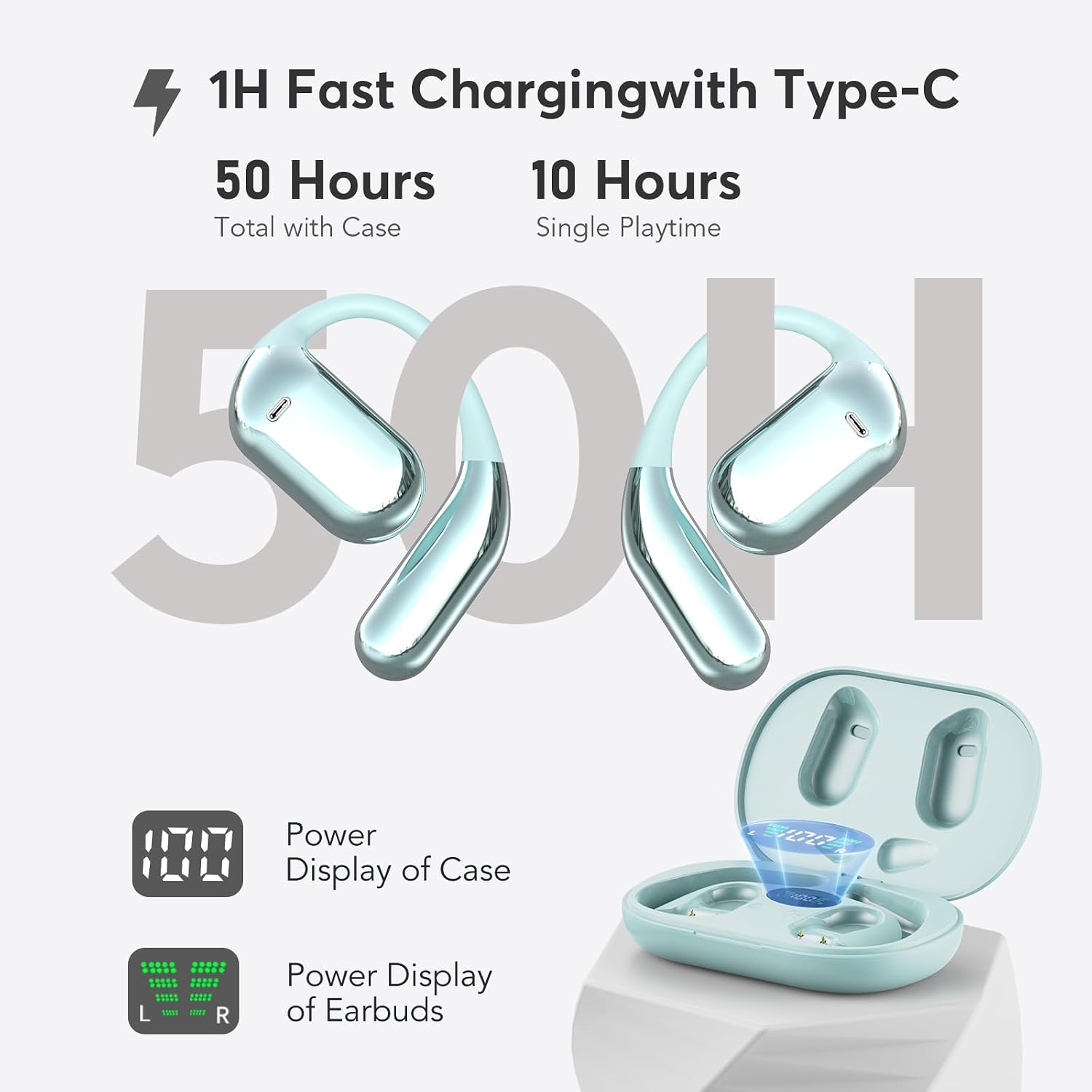
Image: Earbuds in charging case with LED display.
4.2 Bluetooth Pairing
- Open the charging case. The earbuds will automatically enter pairing mode.
- On your device (smartphone, tablet, etc.), enable Bluetooth.
- Search for available Bluetooth devices and select "YYK-Q16" from the list.
- Once connected, you will hear a confirmation tone, and the earbuds will be ready for use.
- The earbuds support multi-point connection, allowing seamless transmission between two paired devices.
5. Wearing Instructions
Follow these steps for a secure and comfortable fit:
- Take out the earphones from the charging case.
- Hang the end of the earphones over your ear bone.
- Turn the earphones and slide them behind your ear.
- Adjust the ear hook and gently pull it down for a secure fit.

Image: Step-by-step guide for wearing the earbuds.

Image: Open Air Conduction design for comfortable listening.
6. Operating Instructions
The earbuds feature flexible touch controls for various functions:

Image: Touch Control Functions.
6.1 Music Control
- Play/Pause: Single tap (L/R earbud).
- Next Song: Single tap (R earbud) for 1 second.
- Previous Song: Single tap (L earbud) for 1 second.
- Volume +: Double tap (R earbud).
- Volume -: Double tap (L earbud).
6.2 Call Control
- Answer Call: Single tap (L/R earbud).
- Reject Call/Hang Up: Single tap (L/R earbud) for 1 second.
6.3 Voice Assistant
- Activate Siri/Voice Assistant: Triple tap (L/R earbud).
6.4 Reset Earbuds
- Reset: Disconnect from your phone, then quickly press the left button 5 times and the right button 5 times simultaneously to reset.
7. Maintenance
- Clean the earbuds and charging case regularly with a soft, dry cloth.
- Avoid exposing the earbuds to extreme temperatures, humidity, or corrosive liquids.
- Store the earbuds in their charging case when not in use to protect them and keep them charged.
- The earbuds are IPX7 waterproof, meaning they can withstand immersion in water up to 1 meter for 30 minutes. However, avoid prolonged exposure to water and ensure they are dry before charging.
8. Troubleshooting
8.1 Earbuds not pairing or connecting
- Ensure the earbuds are charged.
- Turn off and on Bluetooth on your device.
- Forget the device "YYK-Q16" from your device's Bluetooth list and try pairing again.
- Perform a factory reset on the earbuds (refer to section 6.4).
8.2 No sound or low volume
- Check the volume levels on both your device and the earbuds.
- Ensure the earbuds are properly connected to your device.
- Clean any debris from the earbud speakers.
8.3 Charging issues
- Ensure the charging cable is securely connected to both the case and the power source.
- Try using a different charging cable or power adapter.
- Ensure the charging contacts on the earbuds and inside the case are clean and dry.
9. Specifications
| Feature | Detail |
|---|---|
| Model Number | YYKQ16-01 |
| Bluetooth Version | 5.4 |
| Earbud Weight | 0.25 oz (per earbud) |
| Total Playtime | Up to 50 hours (with charging case) |
| Single Charge Playtime | Up to 10 hours |
| Charging Time (Case) | Approx. 1.5 hours (Type-C) |
| Driver Size | 14.2mm Dynamic Speaker |
| Waterproof Rating | IPX7 |
| Material | Plastic, Skin-friendly silicone |
| Color | Light Blue |
| Compatible Devices | Almost all Bluetooth devices (e.g., iPhone, Samsung Galaxy, Moto, SONY Xperia, Xiaomi, Huawei, LG) |

Image: Wide Compatibility.

Image: Comparison of earbud types.
10. Warranty and Support
For warranty information or technical support, please refer to the contact details provided on the product packaging or the official EUQQ website. Keep your purchase receipt as proof of purchase.

