
1. Introduction
This manual provides detailed instructions for the installation, operation, and maintenance of your KUNFINE 10.25-inch Android Auto Navigation Stereo, designed specifically for Audi Q7 models from 2005 to 2009 with MMI 2G systems. Please read this manual thoroughly before use to ensure proper functionality and to maximize your product experience.
2. Product Overview
Key Features:
- CarPlay/Android Auto: Seamless integration with iOS and Android devices for navigation, music, and communication. Supports voice assistant for hands-free operation.
- Android System: Octa Core processor with 8GB RAM and 64GB ROM, running on an Android operating system. Provides access to various applications, navigation, video, music, Bluetooth, and Wi-Fi.
- High-Resolution Display: 10.25-inch IPS touchscreen with multi-touch support, offering clear visuals.
- Connectivity: Supports USB input, internal Bluetooth for stereo music streaming, and internal Wi-Fi for internet access and hotspot sharing.
- Vehicle Integration: Supports steering wheel controls and can integrate with aftermarket RCA type backup cameras.
- Multilingual Support: OSD language options include English, French, German, Spanish, Italian, and over 20 other languages.
Package Contents:
- 1x Car Android Head Unit with Mask
- 1x GPS Antenna
- 1x Power Cable (Plug & Play)
- 2x USB Port Cable
- 1x RCA Expand Cable
- 1x RCA Connector for Reverse Camera
- 1x Install Kit (GIFT)
- 1x External Mic (GIFT)
- 1x AHD 720 Reverse Camera (GIFT)
3. Compatibility
This head unit is designed for Audi Q7 models manufactured between 2005 and 2009, specifically those equipped with the MMI 2G system. It is crucial to verify your vehicle's MMI system type before installation.

Image Description: This image illustrates the visual differences between the Audi Q7 MMI 2G (2005-2009) and MMI 3G (2010-2015) systems. The MMI 2G system typically features a smaller, non-color screen in the dashboard, while the MMI 3G has a larger, color display. Ensure your vehicle matches the MMI 2G configuration shown for proper compatibility.
Important Note: If your original unit is an MMI 2G Basic version with an analog screen (smaller, non-color display), this unit will not be compatible with your car. Please refer to the image above to confirm your MMI system type.
4. Setup & Installation
Installation of this head unit requires technical knowledge and careful handling of vehicle electronics. It is recommended that installation be performed by a qualified professional. Incorrect installation can lead to damage to the product or your vehicle.
Wiring Diagram (MMI 2G 2005-2009):
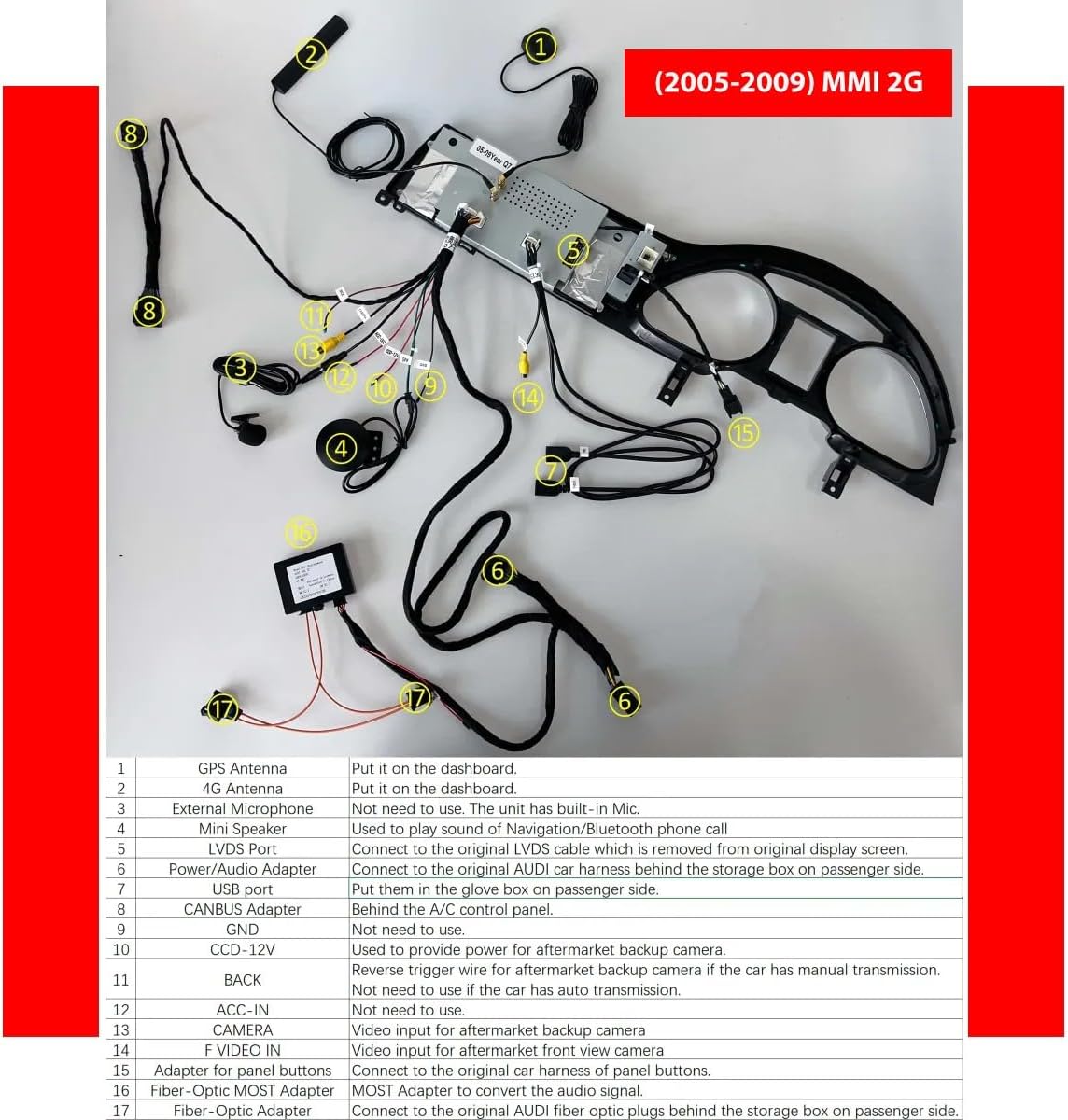
Image Description: This detailed wiring diagram shows the connections for the KUNFINE head unit in an Audi Q7 with MMI 2G (2005-2009). Key connections include GPS Antenna, 4G Antenna, External Microphone, Mini Speaker, LVDS Port, Power/Audio Adapter, USB Port, CANBUS Adapter, GND, CCD-12V, BACK, ACC-IN, CAMERA, VIDEO IN, Adapter for panel buttons, MOST Adapter, and Fiber-Optic Adapter. Each connection is numbered and described in the accompanying table for clarity.
Wiring Connection Guide:
| No. | Connection | Description |
|---|---|---|
| 1 | GPS Antenna | Place on the dashboard. |
| 2 | 4G Antenna | Place on the dashboard. |
| 3 | External Microphone | Not needed. The unit has a built-in microphone. |
| 4 | Mini Speaker | Used to play sound of Navigation/Bluetooth phone call. |
| 5 | LVDS Port | Connect to the original LVDS cable which is removed from the original display screen. |
| 6 | Power/Audio Adapter | Connect to the original AUDI car harness behind the storage box on the passenger side. |
| 7 | USB Port | Put them in the glove box on the passenger side. |
| 8 | CANBUS Adapter | Behind the A/C control panel. |
| 9 | GND | Not needed to use. |
| 10 | CCD-12V | Used to provide power for aftermarket backup camera. |
| 11 | BACK | Reverse trigger wire for aftermarket backup camera if the car has manual transmission. |
| 12 | ACC-IN | Not needed to use if the car has auto transmission. |
| 13 | CAMERA | Video input for aftermarket backup camera. |
| 14 | VIDEO IN | Video input for aftermarket front view camera. |
| 15 | Adapter for panel buttons | Connect to the original car harness of panel buttons. |
| 16 | MOST Adapter | MOST Adapter to convert the audio signal. |
| 17 | Fiber-Optic Adapter | Connect to the original AUDI fiber optic plugs behind the storage box on the passenger side. |
5. Operating Instructions
5.1. Basic Navigation and Interface
The unit operates on an Android system, providing a familiar touchscreen interface. Swipe left or right to navigate between home screens and access applications. Tap icons to launch apps or settings.

Image Description: This image displays the Android system interface of the head unit, showing various pre-installed and downloadable applications such as Spotify, Netflix, YouTube, Google Maps, and social media apps. This demonstrates the unit's capability to run a wide range of Android applications.
5.2. CarPlay and Android Auto
The unit supports both wireless and wired CarPlay and Android Auto for seamless smartphone integration.
For CarPlay (Wireless & Wired):
- Establish a Bluetooth connection between your car stereo and your iPhone.
- Open the "Zlink5" application on the car stereo.
- Enjoy Wireless Apple CarPlay.
For Android Auto (Wireless & Wired):
- Download the Android Auto app on your Android phone.
- Establish a Bluetooth connection between your car stereo and your Android phone.
- Open the "Zlink5" application on the car stereo.
- Enjoy Wireless Android Auto. (Note: Some Samsung phones may not be supported for wireless Android Auto.)

Image Description: This image demonstrates the user interfaces for both Apple CarPlay and Android Auto as displayed on the head unit. It highlights the wireless and wired connection methods for each, showing how smartphone applications are mirrored and controlled through the car's display.
5.3. Navigation
The unit supports various navigation applications. You can use pre-installed maps or download your preferred navigation apps from the Google Play Store.

Image Description: This image shows the head unit displaying various navigation applications, including Google Maps and iGO. It also illustrates the use of voice commands (e.g., "Hey Siri, navigate to the park" or "Play some pop music") for hands-free control, enhancing safety while driving.
5.4. Media Playback
The unit supports all formats of audio playback and can play stereo music via Bluetooth from your mobile phone. Video playback is also supported.
5.5. Rear View Camera Integration
The system supports aftermarket RCA type backup cameras. An AHD 720 reverse camera is included as a gift. Connect the camera to the designated RCA input and the reverse trigger wire (if applicable for manual transmission vehicles).

Image Description: This image illustrates an optional 360-degree rear view camera system, showing views from front, back, left, and right cameras, along with a combined top-down view on the head unit display. This feature enhances parking and maneuvering safety.
5.6. Original Car Settings Support
The head unit is designed to maintain and support original car functions, including steering wheel control, original car knob control, and the original rear camera (if compatible). It also preserves the original MMI system and CD player functionality.

Image Description: This image highlights the integration of the KUNFINE head unit with existing Audi Q7 features. It shows support for steering wheel controls, original car knob control, original rear camera, maintaining the original MMI system, keeping the original CD player, and preserving the original stereo.
6. Maintenance
6.1. Cleaning the Screen
To clean the touchscreen, power off the unit. Use a soft, lint-free cloth slightly dampened with water or a screen-cleaning solution. Avoid harsh chemicals, abrasive materials, or excessive moisture.
6.2. Software Updates
Periodically check for software updates to ensure optimal performance and access to new features. Updates can typically be found in the system settings menu or on the manufacturer's support website. Follow the on-screen instructions carefully during the update process.
6.3. General Care
- Avoid exposing the unit to extreme temperatures or direct sunlight for prolonged periods.
- Do not attempt to disassemble or repair the unit yourself, as this will void the warranty.
- Ensure all cables are securely connected to prevent intermittent issues.
7. Troubleshooting
This section addresses common issues you might encounter. For problems not listed here, please contact customer support.
| Problem | Possible Cause | Solution |
|---|---|---|
| No power/Unit does not turn on | Loose power connection, blown fuse, incorrect wiring. | Check all power cable connections. Verify vehicle fuses. Ensure correct wiring as per installation guide. |
| No sound output | Incorrect audio settings, loose audio cables, MOST adapter issue. | Check volume levels and audio output settings. Ensure all audio cables, especially the MOST adapter, are correctly connected. |
| CarPlay/Android Auto not connecting | Bluetooth not paired, "Zlink5" app not open, phone compatibility. | Ensure Bluetooth is paired. Open the "Zlink5" app on the head unit. Check phone compatibility (e.g., some Samsung phones may not support wireless Android Auto). Try a wired connection. |
| Touchscreen unresponsive or inaccurate | Software glitch, screen protector interference, physical damage. | Restart the unit. Remove any screen protectors that might be causing interference. If the issue persists, contact support. |
| Original car functions not working | CANBUS adapter issue, incorrect wiring. | Verify the CANBUS adapter connection and ensure all original car harness connections are correct. |
8. Specifications
| Feature | Detail |
|---|---|
| Brand | KUNFINE |
| Model | Octa Core 8G+64G (for Audi Q7 2005-2009 MMI 2G) |
| Operating System | Android System |
| CPU | Octa Core |
| RAM | 8 GB |
| ROM (Internal Storage) | 64 GB |
| Screen Size | 10.25 Inches |
| Display Type | IPS LCD |
| Touch Screen Type | Capacitive Multi-touch |
| Connectivity | USB, Bluetooth, Wi-Fi |
| Voice Command | Touch Pad, Touchscreen (via integrated CarPlay/Android Auto) |
| Map Type | North America (pre-installed, supports others via app store) |
| Mounting Type | Dashboard Mount, Panel Mount |
| Vehicle Service Type | Car (Audi Q7 2005-2009 MMI 2G) |

Image Description: This image visually compares the display resolution of the KUNFINE head unit (1920*720 pixels) against a standard unit (1280*480 pixels). It highlights the KUNFINE unit's ultra-high screen resolution, offering approximately 1,368,000 pixels, which is an increase of approximately 120% compared to the standard resolution.
9. Warranty & Support
9.1. Warranty Information
This product comes with a one-year warranty covering manufacturing defects and non-human damage. Please retain your proof of purchase for warranty claims.
9.2. Customer Support
For any questions, technical assistance, or warranty claims, please contact the seller directly. Your consultation is always welcomed, and the seller is committed to providing support.
Contact information can typically be found on your purchase receipt or the seller's page on the platform where the product was purchased.