
1. Introduction
Thank you for choosing the JAGJOG JT31 Walking Pad Treadmill. This manual provides essential information for the safe and efficient operation, setup, and maintenance of your new fitness equipment. Please read this manual thoroughly before first use and retain it for future reference.
2. Safety Information
Your safety is paramount. Please observe the following precautions:
- Consult a physician before starting any new exercise program.
- Ensure the treadmill is placed on a flat, stable surface.
- Keep children and pets away from the treadmill during operation.
- Wear appropriate athletic footwear.
- Do not use the treadmill if you feel dizzy, faint, or experience pain.
- Maximum user weight capacity: 120 kg (264 lbs).
- Always unplug the treadmill when not in use or before cleaning/maintenance.
3. Product Overview
Components Included:
- JAGJOG JT31 Walking Pad Treadmill
- Remote Control
- Power Cable
- User Manual (this document)
Key Features:
- Manual Incline Adjustment: Features a 15° manual incline for varied workout intensity.
- Powerful Motor: Equipped with a 2.5 HP motor for stable performance.
- Speed Range: Adjustable speed from 0.97 km/h to 6.11 km/h (0.6 mph to 3.8 mph).
- LED Display: Real-time display of speed, distance, workout duration, and calories burned.
- Wireless Remote Control: Conveniently adjust speed and settings during exercise.
- Quiet Operation: Designed for low noise levels, typically below 40dB.
- Shock Absorption: Features 8 silicone shock absorbers and a multi-layer anti-slip running belt for joint protection.
- Compact & Portable: Foldable design with front wheels for easy storage and movement.
4. Setup
4.1 Unpacking and Placement
- Carefully remove the treadmill from its packaging.
- Place the treadmill on a firm, level surface, ensuring adequate space around it for safe operation.
- Ensure the power cable is not pinched or damaged during placement.

Image: The JAGJOG JT31 Walking Pad Treadmill is designed for quiet operation, making it suitable for use in various environments, including under a standing desk in an office or home setting. Its low noise level (below 40dB) ensures minimal disturbance.
4.2 Manual Incline Adjustment
The JT31 treadmill features a manual incline adjustment to increase workout intensity. To adjust the incline:
- Ensure the treadmill is powered off and unplugged.
- Locate the adjustable feet or incline mechanism at the rear of the treadmill.
- Carefully lift the rear of the treadmill and adjust the feet to the desired incline angle, up to 15 degrees. Ensure both sides are adjusted evenly and securely.
- Lower the treadmill gently back onto the floor.

Image: The treadmill offers a 15-degree manual incline setting, allowing users to increase the challenge of their workout and burn more calories. The image shows two users engaging in an inclined walk.
5. Operating Instructions
5.1 Powering On/Off
- To Power On: Plug the power cable into a suitable electrical outlet. The LED display will illuminate.
- To Power Off: Press the power button on the treadmill or remote control. For complete power disconnection, unplug the power cable from the outlet.
5.2 Using the Remote Control
The wireless remote control allows for convenient adjustment of treadmill settings during your workout.
- Start/Stop Button: Press to start or stop the treadmill belt.
- Speed +/- Buttons: Use to increase or decrease the treadmill speed.
- Mode Button: (If applicable) Cycle through different pre-set modes or display metrics.

Image: The intelligent LED display provides real-time feedback on time, distance, speed, and calories. The wireless remote control allows for easy adjustment of settings without interrupting your exercise.
5.3 LED Display Functions
The integrated LED display provides key workout metrics:
- Time: Duration of your workout.
- Distance: Total distance covered.
- Speed: Current speed of the treadmill belt.
- Calories: Estimated calories burned.
5.4 Workout Modes and Speed Adjustment
The treadmill offers a versatile speed range to accommodate various exercise intensities:
- Walking Mode: Approximately 0.97 - 2.41 km/h (0.6 - 1.5 mph)
- Strolling Mode: Approximately 0.97 - 2.90 km/h (0.6 - 1.8 mph)
- Jogging Mode: Approximately 4.02 - 6.11 km/h (2.5 - 3.8 mph)
- Climbing Mode: Utilizes the 15° manual incline for a more challenging workout.
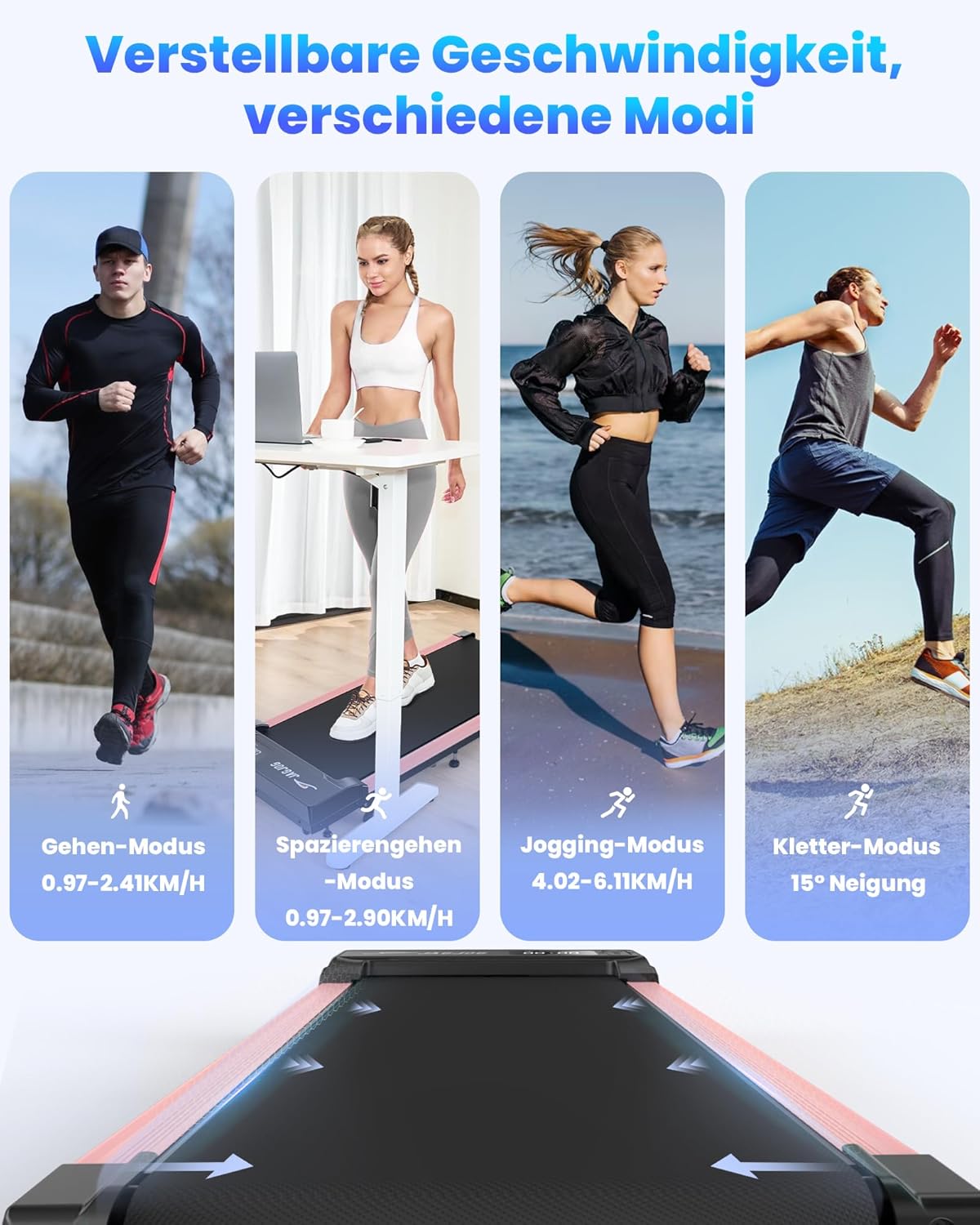
Image: The treadmill supports various exercise modes, from gentle walking to brisk jogging, and includes a climbing mode utilizing the 15-degree manual incline for enhanced cardiovascular benefits.
6. Maintenance
Regular maintenance ensures the longevity and optimal performance of your treadmill.
6.1 Cleaning
- Always unplug the treadmill before cleaning.
- Wipe down the display and exterior surfaces with a soft, damp cloth. Avoid abrasive cleaners or solvents.
- Periodically vacuum under the treadmill to prevent dust buildup.
6.2 Running Belt Lubrication and Adjustment
The running belt may require lubrication and adjustment over time. Refer to the specific instructions provided with your treadmill's lubrication kit (if included) or contact customer support for guidance.

Image: The treadmill features a 5-layer anti-slip running belt and 8 silicone shock absorbers, designed to provide strong cushioning and protect your knee joints during exercise. Regular inspection of the belt is recommended.
6.3 Automatic Belt Alignment
The JAGJOG JT31 treadmill features an automatic belt alignment system to prevent the running belt from shifting during use, ensuring a consistent and safe workout experience.

Image: This illustration highlights the automatic belt centering mechanism, which ensures the running belt remains precisely aligned, unlike conventional treadmills that may require manual adjustment.
7. Troubleshooting
If you encounter any issues with your treadmill, please refer to the following common problems and solutions:
| Problem | Possible Cause | Solution |
|---|---|---|
| Treadmill does not power on. | Power cable not connected; power outlet issue; main power switch off. | Ensure power cable is securely plugged in. Check the power outlet with another device. Verify the main power switch (if present) is in the 'ON' position. |
| Belt stops or slows down during use. | Overload (user weight exceeds limit); belt friction too high (lack of lubrication); motor issue. | Ensure user weight is within 120 kg limit. Lubricate the running belt as per maintenance instructions. If problem persists, contact customer support. |
| Unusual noise from the treadmill. | Loose components; belt misalignment; motor issue. | Check for any loose screws or parts and tighten them. The automatic alignment system should prevent belt misalignment, but if noise persists, contact customer support. |
| Remote control not responding. | Dead batteries; remote out of range; interference. | Replace batteries in the remote control. Ensure you are within effective range of the treadmill. Remove any potential sources of interference. |
8. Specifications
| Feature | Detail |
|---|---|
| Model Number | JT31 |
| Brand | JAGJOG |
| Motor Horsepower | 2.5 HP |
| Speed Range | 0.97 - 6.11 km/h (0.6 - 3.8 mph) |
| Maximum Incline | 15% (Manual Adjustment) |
| Maximum User Weight | 120 kg (264 lbs) |
| Display Type | LED (Time, Distance, Speed, Calories) |
| Dimensions (L x W x H) | 106 x 48.5 x 10.6 cm (41.7 x 19.1 x 4.2 inches) |
| Product Weight | 17 kg (37.5 lbs) |
| Main Material | Acrylonitrile Butadiene Styrene (ABS) |
| Frame Material | Steel |
| Color | White |
9. Warranty and Support
For warranty information and customer support, please refer to the warranty card included with your product or visit the official JAGJOG website. Do not attempt to repair the treadmill yourself, as this may void your warranty and pose a safety risk.