
Dabbsson DBS1400Pro
Dabbsson DBS1400Pro Solar Generator User Manual
Model: DBS1400Pro | Brand: Dabbsson
Introduction
The Dabbsson DBS1400Pro Solar Generator is a versatile and powerful portable energy solution designed for various applications, including home backup, outdoor adventures, and job site power. This manual provides essential information for the safe and efficient operation, maintenance, and troubleshooting of your DBS1400Pro unit.
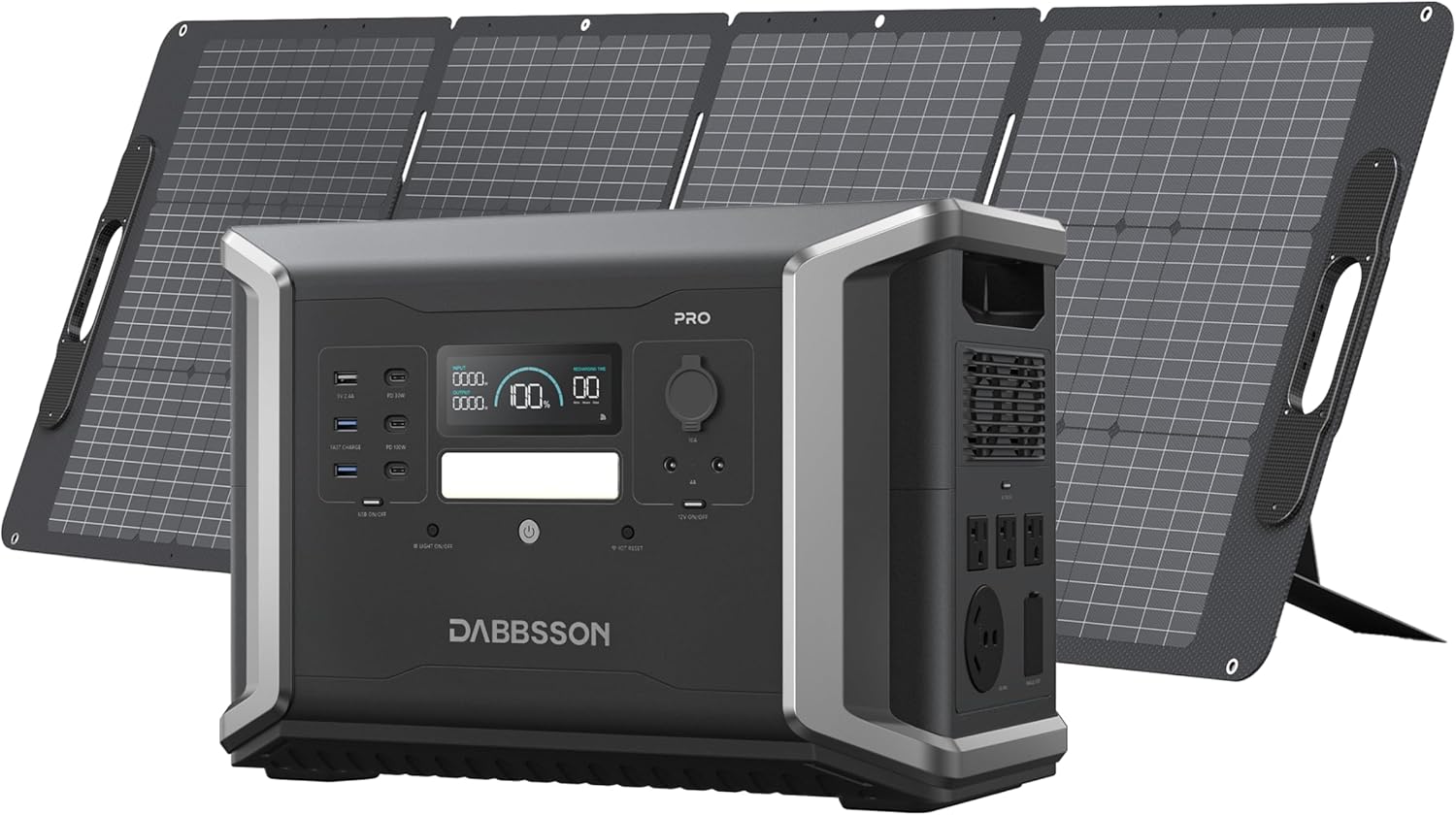
Figure 1: Dabbsson DBS1400Pro Solar Generator with included solar panel.
What's in the Box
Upon unboxing your Dabbsson DBS1400Pro, please verify that all the following components are included:
- DBS1400 Pro Pure Sine Wave Portable Power Station x1
- DBS 210W Solar Panel x1
- AC Charging Cable x1
- Solar Charging Cable x1
- Car Charging Cable x1
- User Manual x1

Figure 2: All components included in the DBS1400Pro package.
Product Overview
Front Panel Interface
The front panel of the DBS1400Pro features a clear display and various output ports for convenient access:
- Display Screen: Shows real-time information including battery percentage, input/output wattage, and remaining recharge/discharge time.
- USB-A Ports (x3): Standard USB ports for charging smaller devices.
- USB-C Ports (x2): Includes one 100W Power Delivery (PD) port and one 30W PD port for fast charging compatible devices like laptops and smartphones.
- Car Power Outlet (12V/10A): For powering 12V DC devices.
- DC5521 Ports (x2): For connecting DC-powered devices.
- Main Power Button: Activates the unit and the display.
- LED Light: Integrated light for illumination in low-light conditions.

Figure 3: Front panel layout and port details.
Rear Panel Interface
The rear panel provides robust AC output options and input ports for charging:
- AC Outlets (x3): Three 120V, 2400W Pure Sine Wave AC outlets for household appliances.
- NEMA TT-30 Outlet: A 30 Amp outlet for RVs and heavy-duty appliances.
- AC Input Port: For charging the unit via a wall outlet.
- Solar/Car Input Port: For charging via solar panels or a car charger.
- Extra Battery Ports (x2): For connecting optional expansion batteries to increase capacity.
- Overload Protection Button: Resettable circuit breaker.
Setup
Before first use, or after extended storage, fully charge your DBS1400Pro. The unit offers multiple charging methods:
- AC Wall Outlet: Connect the included AC charging cable to the unit's AC input port and a standard wall outlet. The unit can achieve 80% charge in approximately 42 minutes with 1800W AC charging.
- Solar Charging: Connect compatible solar panels (like the included DBS 210W) to the Solar/Car input port using the provided solar charging cable. The unit supports up to 1200W solar input, allowing for 80% charge in about 32 minutes when combined with AC charging.
- Car Charging: Use the car charging cable to connect the unit to your vehicle's 12V cigarette lighter port. This method is ideal for charging on the go.

Figure 4: Multiple charging options for the DBS1400Pro.
Operating Instructions
Powering On/Off
To power on the unit, press and hold the main power button on the front panel until the display illuminates. To power off, press and hold the same button until the display turns off.
Connecting Devices
Simply plug your devices into the appropriate output ports (AC, USB-A, USB-C, 12V DC). The unit automatically detects and provides power. For AC output, ensure the AC button is toggled on.
Using the Dabbsson App
The DBS1400Pro can be controlled and monitored via the Dabbsson mobile app (available for iOS and Android). The app allows you to:
- Check battery status and remaining runtime.
- Monitor charging and discharging speeds.
- Schedule off-peak charging to optimize energy costs.
- Manage output ports and set timers.

Figure 5: Dabbsson app interface for smart control.
Expandable Capacity
The DBS1400Pro's capacity can be expanded from 1.3kWh up to 11.3kWh by connecting additional DBS2100B expansion batteries. This allows for extended power supply during prolonged outages or for higher power demands.
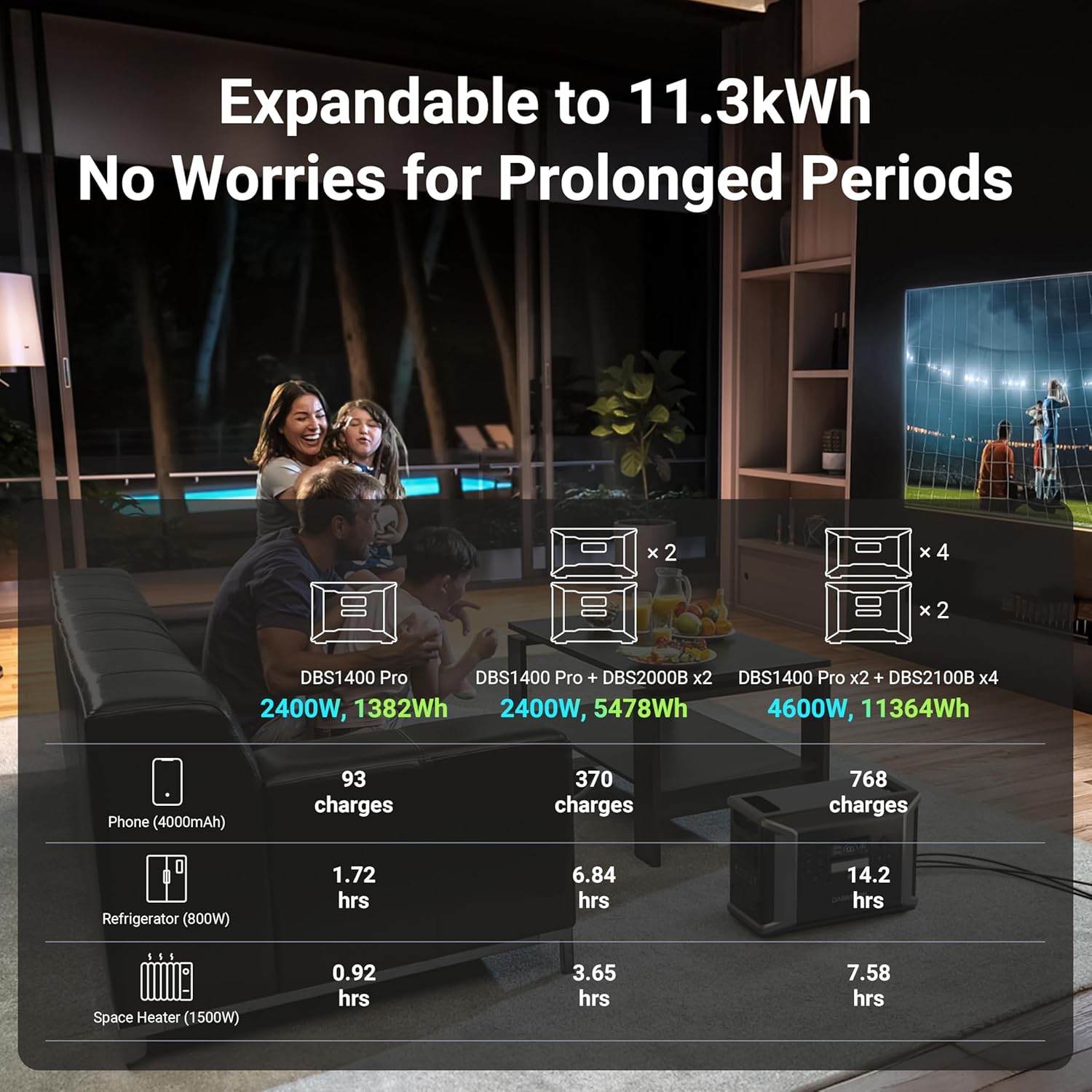
Figure 6: Expandable capacity options for the DBS1400Pro.
Maintenance
To ensure the longevity and optimal performance of your Dabbsson DBS1400Pro, follow these maintenance guidelines:
- Battery Longevity: The unit uses a semi-solid LiFePO4 battery, designed to retain 80% capacity after 4500 cycles, equivalent to over 15 years of typical use. Regular charging and discharging within recommended ranges will help maintain battery health.
- Storage: Store the unit in a dry, well-ventilated area within the recommended storage temperature range of 0°C to 45°C (32°F to 113°F). For long-term storage, charge the unit to approximately 50-60% every 3-6 months.
- Cleaning: Use a dry, soft cloth to clean the exterior of the unit. Do not use harsh chemicals or abrasive materials.

Figure 7: Semi-solid State LiFePO4 Battery technology for extended lifespan.
Troubleshooting
If you encounter issues with your DBS1400Pro, refer to the following common problems and solutions:
- Unit Not Powering On: Ensure the unit is charged. If the battery is completely depleted, it may take a few minutes of charging before the display activates.
- No Output from Ports: Verify that the specific output (AC, USB, DC) is enabled via its respective button on the front panel. Check the display for any error codes.
- App Connectivity Issues: Ensure Bluetooth and Wi-Fi are enabled on your mobile device. Try restarting the app and the DBS1400Pro unit. Refer to the app section in the user manual for detailed connection steps.
- Overload Protection Triggered: If the unit shuts down unexpectedly, it may be due to an overload. Reduce the number or wattage of connected devices and press the overload protection button on the rear panel to reset.
- Power Button Responsiveness: If the power button is unresponsive, ensure you are pressing and holding it for the required duration (typically a few seconds) to power on/off the unit.
For persistent issues not covered here, please contact Dabbsson customer support.
Specifications
| Feature | Specification |
|---|---|
| Brand | Dabbsson |
| Model Name | DBS1400Pro |
| Capacity | 1382Wh (51.2V, 27Ah) |
| Rated Power | 2400W (Pure Sine Wave) |
| Surge Power | 4800W |
| Battery Type | Semi-solid LiFePO4 |
| Cycle Life | 4500+ cycles to 80% capacity |
| AC Input Voltage | 100-120V ~ 15A Max, 50/60Hz |
| AC Charging Speed | 1800W Max |
| Solar Charging Input | 12-60V ~ 25A Max, 1200W Max |
| Item Weight | 45 Pounds |
| Product Dimensions | 17"L x 10"W x 11.9"H |
| Optimal Operating Temperature | 20°C-30°C (68°F-86°F) |
| Discharge Temperature | -10°C-45°C (14°F-113°F) |
| Charging Temperature | -10°C-45°C (14°F-113°F) |
| Storage Temperature | 0°C-45°C (32°F-113°F) |
| Protection Features | Over Voltage, Over Temperature, Low Temperature, Overcurrent, Overload, Short Circuit, Low Voltage, Over Charge Protection |
Warranty & Support
The Dabbsson DBS1400Pro comes with a 3-year warranty, with an additional 2 years of extended warranty available, totaling 5 years of quality service. Dabbsson provides 24/7 customer support and lifetime technical assistance for your product.
For any inquiries or support needs, please refer to the contact information provided in your product packaging or visit the official Dabbsson website.
Ask a question about this manual
Ask about setup, troubleshooting, compatibility, parts, safety, or missing instructions. Manuals+ will review the question and use this page’s manual context to help answer it.