
1. Introduction
Thank you for choosing the Fanttik S2 Pro Electric Screwdriver. This manual provides essential information for the safe and efficient operation, maintenance, and troubleshooting of your new tool. Please read this manual thoroughly before first use and retain it for future reference.
2. Safety Information
Always observe basic safety precautions when using electrical tools to reduce the risk of fire, electric shock, and personal injury.
- Keep the work area clean and well-lit. Cluttered or dark areas invite accidents.
- Do not operate power tools in explosive atmospheres, such as in the presence of flammable liquids, gases, or dust. Power tools create sparks which may ignite the dust or fumes.
- Keep children and bystanders away while operating a power tool. Distractions can cause you to lose control.
- Avoid accidental starting. Ensure the switch is in the off-position before connecting to battery pack, picking up or carrying the tool.
- Do not overreach. Keep proper footing and balance at all times. This enables better control of the power tool in unexpected situations.
- Dress properly. Do not wear loose clothing or jewelry. Keep your hair and clothing away from moving parts. Loose clothes, jewelry or long hair can be caught in moving parts.
- Use safety equipment. Always wear eye protection. Dust mask, non-skid safety shoes, hard hat, or hearing protection must be used for appropriate conditions.
- Store idle tools out of reach of children and other untrained persons.
- Use only accessories that are recommended by the manufacturer for your model.
3. Package Contents
The Fanttik S2 Pro Electric Screwdriver package includes the following items:

Image: Contents of the Fanttik S2 Pro package.
- Fanttik S2 Pro Electric Screwdriver
- L-Shaped Angle Adapter
- Premium Integrated Storage Box
- 20 x 1/4" Hex Shank Bits (5 long, 15 short)
- Extension Rod
- USB-C Charging Cable
- User Manual
4. Product Overview
The Fanttik S2 Pro is a versatile electric screwdriver designed for various household and assembly tasks. It features a powerful motor, adjustable torque settings, and convenient accessories.
4.1 Key Features
- Powerful MagnaStorm™ Motor: Delivers up to 6N·m of torque with a rotational speed of 250 RPM.
- Precision Torque Control: 7 adjustable torque settings (0.5, 1, 2, 3, 4, 5, 6N·m) for diverse applications.
- Integrated Storage Case: Magnetic design for easy access and organization of bits.
- Long-Lasting Battery: 2000mAh rechargeable battery with 5V/2A Type-C fast charging.
- Smart Lighting Interaction: LED work light and charging indicator ring.
- 90° Angle Adapter: For accessing screws in tight or awkward spaces.
4.2 Components

Image: Fanttik S2 Pro Electric Screwdriver and its accessory case.
- Screwdriver Body: Main unit with motor, battery, and controls.
- Torque Adjustment Ring: Located on the screwdriver body to select desired torque.
- Forward/Reverse Switch: To change rotation direction.
- LED Work Light: Illuminates the work area.
- Charging Port: USB-C port for recharging the battery.
- Bit Holder: Magnetic holder for screwdriver bits.
5. Setup
5.1 Initial Charging
Before first use, fully charge the Fanttik S2 Pro electric screwdriver.
- Connect the provided USB-C charging cable to the screwdriver's charging port.
- Connect the other end of the cable to a 5V/2A USB power adapter (not included).
- The charging indicator ring will illuminate to show charging status. A full charge is indicated when the light changes or turns off (refer to the device's specific indicator behavior).

Image: Charging the Fanttik S2 Pro Electric Screwdriver.
5.2 Inserting Screwdriver Bits
The S2 Pro uses 1/4" hex shank bits. The included bits are stored magnetically in the premium case.
- Select the appropriate bit for your task from the storage case.
- Insert the hex end of the bit firmly into the magnetic bit holder on the front of the screwdriver until it clicks into place.
- To remove, simply pull the bit straight out.

Image: Assortment of 20 S2 steel bits.
5.3 Attaching the 90° Angle Adapter
For working in confined spaces, attach the 90° angle adapter.
- Ensure the screwdriver is off.
- Align the adapter with the bit holder and push it on until it is securely seated.
- Insert the desired bit into the adapter's bit holder.
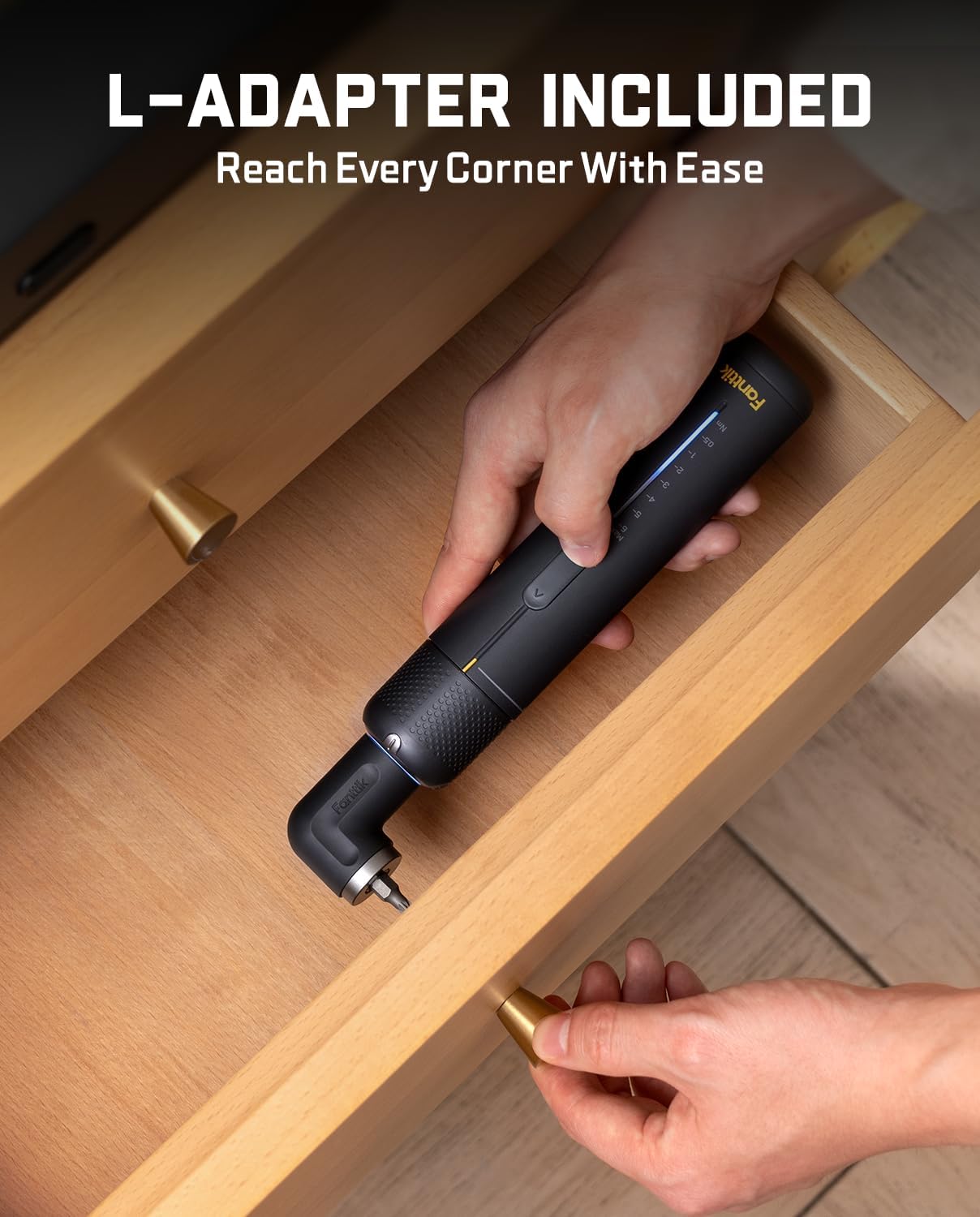
Image: Using the L-Adapter to reach tight spaces.
6. Operating Instructions
6.1 Powering On/Off and Direction Control
- The S2 Pro features a slide switch for forward, reverse, and lock positions.
- Slide the switch forward for tightening screws (clockwise rotation).
- Slide the switch backward for loosening screws (counter-clockwise rotation).
- Set the switch to the middle position to lock the tool and prevent accidental operation.
6.2 Adjusting Torque Settings
The S2 Pro offers 7 torque settings, indicated by a gradient bar on the tool, allowing for precise control for different materials and screw sizes.

Image: 7 Torque Settings with Gradient Indicator Bar.
- Rotate the torque adjustment ring on the screwdriver body to select the desired torque level (0.5, 1, 2, 3, 4, 5, 6N·m).
- Use lower torque settings (e.g., 0.5N·m) for delicate electronics or soft materials to prevent stripping screws or damaging surfaces.
- Use higher torque settings (e.g., 6N·m) for larger screws or tougher materials like furniture assembly.
6.3 Using the LED Work Light
The integrated LED work light automatically illuminates when the screwdriver is in operation, providing shadowless illumination in dim workspaces.

Image: Circular LED Light for shadowless illumination.
6.4 Application Examples
The Fanttik S2 Pro is suitable for a wide range of tasks:

Image: Various applications of the Fanttik S2 Pro.
- 0.5 - 1.0 N·m: Delicate electronics, small gadgets, computer assembly.
- 2.0 - 3.0 N·m: 3D printers, small home appliances, toys.
- 4.0 - 5.0 N·m: Furniture assembly, cabinet installation.
- 6.0 N·m: Bed frames, larger furniture, general household repairs requiring higher torque.
7. Maintenance
Proper maintenance ensures the longevity and optimal performance of your Fanttik S2 Pro.
- Cleaning: Wipe the screwdriver body and bits with a clean, dry cloth after each use. Do not use harsh chemicals or abrasive cleaners.
- Storage: Store the screwdriver and its accessories in the provided premium storage case in a cool, dry place, away from direct sunlight and moisture.
- Battery Care: For long-term storage, charge the battery to approximately 50% every 3-6 months to maintain battery health.
- Bit Inspection: Periodically inspect bits for wear or damage. Replace worn bits to ensure effective and safe operation.
8. Troubleshooting
If you encounter issues with your Fanttik S2 Pro, refer to the following common problems and solutions:
| Problem | Possible Cause | Solution |
|---|---|---|
| Screwdriver does not turn on. | Battery is depleted. | Charge the battery fully using the USB-C cable. |
| Screwdriver lacks power or stops during use. | Low battery. | Recharge the battery. |
| Screw head is stripping. | Incorrect bit size or torque setting too high. | Ensure the correct bit is used and reduce the torque setting. |
| Bit falls out of holder. | Bit not fully inserted or magnetic holder is dirty. | Push bit firmly into holder. Clean the magnetic holder if necessary. |
| 90° Angle Adapter feels loose. | Adapter not fully seated. | Ensure the adapter is pushed firmly onto the screwdriver's bit holder. |
If the problem persists after trying these solutions, please contact Fanttik customer support.
9. Specifications
Detailed technical specifications for the Fanttik S2 Pro Electric Screwdriver:
| Feature | Specification |
|---|---|
| Brand | Fanttik |
| Model | S2 Pro |
| Power Source | Battery Powered |
| Maximum Rotational Speed | 250 RPM |
| Voltage | 3.7 Volts (DC) |
| Amperage | 2000 Milliamps |
| Color | Grey |
| Included Components | 20 bits (5 long, 15 short), extension rod, 90° angle adapter |
| Special Features | 90° Angle Adapter, LED Light, Magnetic Tip |
| Maximum Torque | 6 Newton Meters |
| Number of Speeds | 7 |
| Battery Capacity | 2000 Milliamp Hours |
| Charging Port | USB-C (5V/2A) |
| Item Weight | 2.44 pounds |
| Product Dimensions | 1.46 x 1.46 x 7.09 inches |
| Battery Type | Lithium Ion |
10. Warranty and Support
Fanttik stands behind the quality of its products. For information regarding warranty coverage, product registration, or technical support, please visit the official Fanttik website or contact their customer service department.
Fanttik Official Website: www.fanttik.com
For additional assistance, refer to the contact information provided on the product packaging or the Fanttik website.


