
1. Introduction
The Gantch Universal 433MHz 4-Button Cloning Remote Control Key Fob is designed to duplicate existing fixed code remote controls for various applications such as garage doors, electric gates, and other wireless control systems operating at 433MHz. This device offers a convenient solution for creating backup remotes or consolidating multiple remotes into one.
2. Product Overview
This universal cloning remote control features a compact design with four independent buttons, allowing you to clone up to four different remote functions. It operates on a 433MHz radio frequency and is capable of transmitting signals up to 50 meters in open areas. The remote is lightweight and includes a 12V battery.
Key Features:
- 4-Button Design: Each button operates independently, allowing for up to four distinct cloned functions.
- Wide Coding Range: Compatible with various fixed code chips including 2260, 2262 (e.g., PT2262, SC2262), 1527 (e.g., EV1527, HS1527), PT2264, PT2240, CS5211, SMC918, AX5026, SMC926, AX5326-3, AX5326-4, FP527, HT600, HT680, HT6207, HT6010, HT6012, HT6013, HT6014, HT12D, HT46F49E, PIC16F630, ULN2003.
- Strong Signal: Capable of passing through walls, floors, and doors.
- Reset Functionality: The remote can be reset and reprogrammed multiple times.
Applications:
This cloning remote is suitable for a wide range of devices, including:
- Garage doors
- Electric gates and retractable doors
- Shutter doors
- Car alarm systems
- Home security systems
- Electric curtains
- Fans, lamps, and lighting control
- Ventilation devices

Image: The Gantch remote control shown with icons illustrating its diverse applications, such as controlling doors, lights, and various equipment.
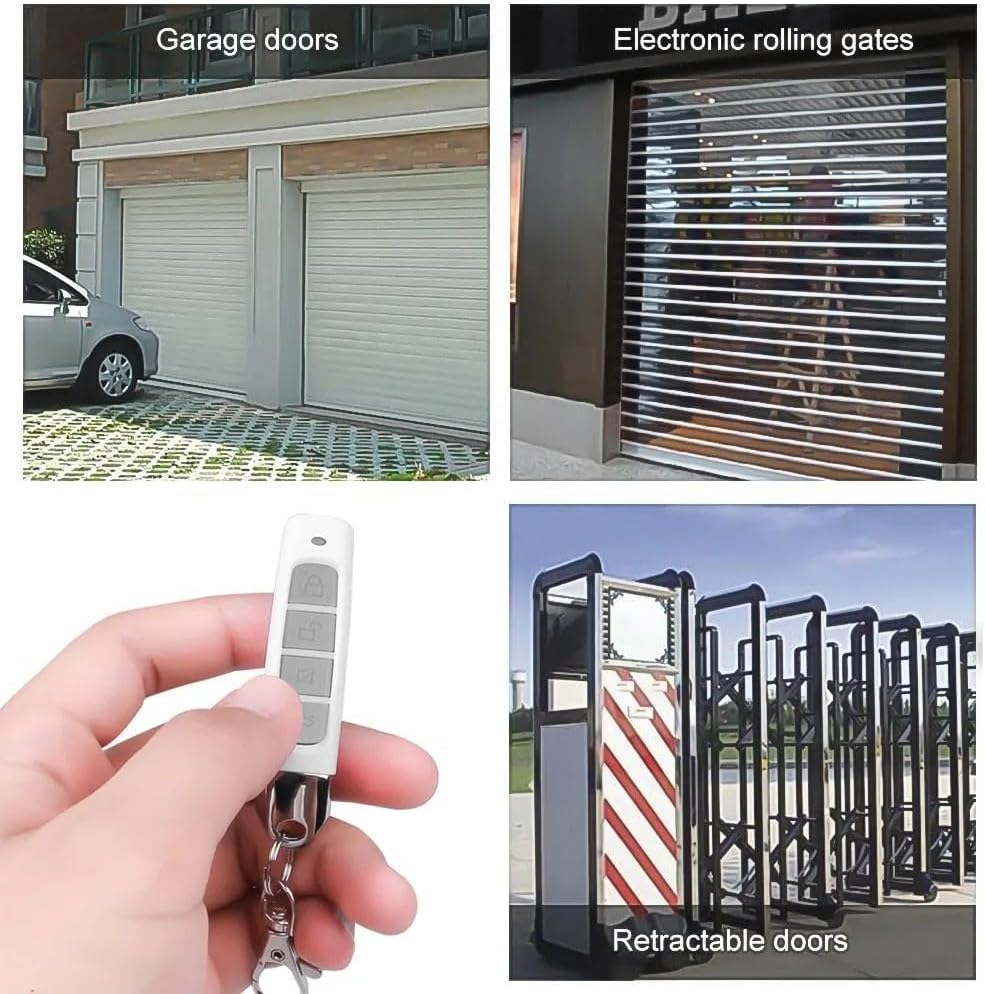
Image: Examples of the remote control's use with garage doors, electronic rolling gates, and retractable doors, demonstrating its practical applications.
3. Setup and Cloning Instructions
Before attempting to clone, ensure your original remote control meets the following conditions:
- The original remote control must be fully functional.
- The original remote's frequency must be 433.92MHz.
- The original remote's chip code (encoder chip) must be one of the compatible types listed in the 'Product Overview' section.
To identify the frequency and chip code, you may need to open your original remote. Look for a silver-sound table with 'R433' or '433MHz' for frequency, and a clearly coded chip for the model number.

Image: Detailed view of remote control circuit boards, indicating the location of the frequency crystal (e.g., R433) and the encoding chip for identification.
Important Compatibility Note:
This cloning remote cannot copy rolling code, hopping code, jumping code, or encrypted chips. It is designed for fixed code remotes only.

Image: Visual explanation highlighting that only fixed code remotes can be copied, with frequency and IC chip locations marked.
Cloning Procedure:
- Step 1: Delete Existing Code (Clear Memory)
- Press and hold the 'LOCK' (A) and 'UNLOCK' (B) buttons simultaneously on the cloning remote. The LED will flash three times.
- While continuing to hold the 'LOCK' (A) button, release the 'UNLOCK' (B) button.
- Press the 'UNLOCK' (B) button three times while still holding 'LOCK' (A). The LED will start flashing non-stop. This indicates the memory has been cleared. Release all buttons.

Image: Visual guide for clearing the cloning remote's memory, showing which buttons to press and the expected LED behavior.
- Step 2: Clone Your Original Remote
- Place the original remote control and the cloning remote side-by-side or back-to-back. Ensure they are very close.
- Press and hold a button on your original remote (e.g., button A).
- Simultaneously, press and hold the corresponding button on the cloning remote (e.g., button A).
- Keep holding both buttons until the LED on the cloning remote flashes three times, then quickly flashes continuously. This indicates successful cloning.
- Repeat this process for each button you wish to clone.

Image: Step-by-step visual for cloning, showing the original and new remotes positioned for copying and the buttons to press.
- Remark: Restore Deleting Code (If Mistake Occurs)
- If you accidentally delete the code or make a mistake during Step 1, you can restore the last deleted code.
- Press the 'MUTE' (C) and 'FLASHING' (D) buttons simultaneously. The LED light will flash (blue), and then flash three times. This indicates the code has been successfully restored.

Image: Instructions for restoring a deleted code, showing the 'MUTE' (C) and 'FLASHING' (D) buttons to press.
4. Operating Instructions
After successful cloning, operate the Gantch Universal 4-Button Cloning Remote Control just as you would your original remote. Simply press the corresponding button on the cloning remote that you have programmed for a specific function (e.g., opening a garage door, activating a gate).
- Ensure you are within the effective range (up to 50 meters in open areas) of the receiver.
- Point the remote towards the receiver for optimal signal transmission.
5. Maintenance
To ensure the longevity and optimal performance of your remote control, follow these maintenance guidelines:
- Battery Replacement: The remote uses one 12V battery. When the remote's range decreases significantly or the LED indicator becomes dim, it's time to replace the battery. To replace, carefully open the remote casing and insert a new 12V battery, ensuring correct polarity.
- Cleaning: Wipe the remote with a soft, dry cloth. Avoid using harsh chemicals or abrasive cleaners.
- Storage: Store the remote in a dry place, away from extreme temperatures and direct sunlight.
- Avoid Impact: Do not drop the remote or subject it to strong impacts, as this can damage internal components.

Image: The remote control with its keychain, highlighting that a battery is included for immediate use.
6. Troubleshooting
- Remote not cloning:
- Ensure your original remote is functional and has a fresh battery.
- Verify the frequency of your original remote is 433.92MHz.
- Confirm the chip code of your original remote is compatible (not rolling/hopping/encrypted code).
- Make sure the cloning remote's memory was cleared successfully (LED flashes non-stop after Step 1).
- Ensure the original and cloning remotes are placed very close during the cloning process.
- Hold the buttons for a sufficient duration until the LED on the cloning remote indicates success.
- Short operating range:
- Replace the battery in the cloning remote.
- Ensure there are no significant obstructions between the remote and the receiver.
- Avoid strong electromagnetic interference sources.
- Buttons not responding after cloning:
- Repeat the cloning process for the specific button.
- If issues persist, clear the entire cloning remote's memory (Step 1) and re-clone all desired buttons.
7. Specifications
| Feature | Specification |
|---|---|
| Model Number | GC-MZ-LOCK-433 |
| Operating Frequency | 433.92 MHz |
| Number of Buttons | 4 |
| Max Supported Devices | 4 (one per button) |
| Operating Distance | Up to 50 meters (open area) |
| Battery Type | 1 x 12V (included) |
| Product Dimensions | 2.6 x 0.6 x 0.6 inches |
| Item Weight | 0.988 ounces |
| Special Features | Lightweight, No Programming Required (after cloning), Universal, Weatherproof |
8. Warranty and Support
For warranty information or technical support, please refer to the retailer's return policy or contact Gantch customer service through the platform where the product was purchased. Keep your purchase receipt as proof of purchase.