
1. Introduction
This manual provides detailed instructions for the safe installation, operation, and maintenance of your GLOBE Electric Veloria 52-inch Ceiling Fan. Please read all instructions carefully before beginning installation and retain this manual for future reference.
The Veloria ceiling fan features a 52-inch span, an integrated 24W LED light, a remote control, and a WhisperQuiet DC motor with 6 speeds. Its reversible blades offer both black and wood-grain finishes, allowing for customization to match your interior decor. The fan is designed for medium to large rooms and is compatible with sloped or vaulted ceilings.
2. Safety Information
WARNING: To reduce the risk of fire, electric shock, or personal injury, always turn off the main power supply at the circuit breaker before installation or maintenance.
- Ensure all electrical connections comply with local codes and ordinances.
- Consult a qualified electrician if you are unsure about wiring procedures.
- Mount the fan only to an outlet box marked 'Acceptable for Fan Support of 35 lbs (15.9 kg) or less'.
- Keep hands, clothing, and other objects clear of the fan blades when the fan is operating.
- Do not operate the fan if any part is damaged.
3. Package Contents
Verify that all components are present before beginning installation. If any parts are missing or damaged, contact Globe Electric customer service.
- Ceiling Fan Motor Assembly
- Fan Blades (5)
- Integrated LED Light Kit
- Remote Control with Magnetic Wall Mount
- Mounting Hardware
- Downrod
- Instruction Manual
4. Setup and Installation
The GLOBE Electric Veloria fan is designed for easy installation with included easy bracketing and a quick-connect design. It can be installed on both flat and sloped/vaulted ceilings.
4.1 Mounting the Fan
Attach the mounting bracket to the ceiling outlet box. Ensure the outlet box is securely fastened and capable of supporting the fan's weight. Connect the downrod to the fan motor assembly and then hang the assembly from the mounting bracket.
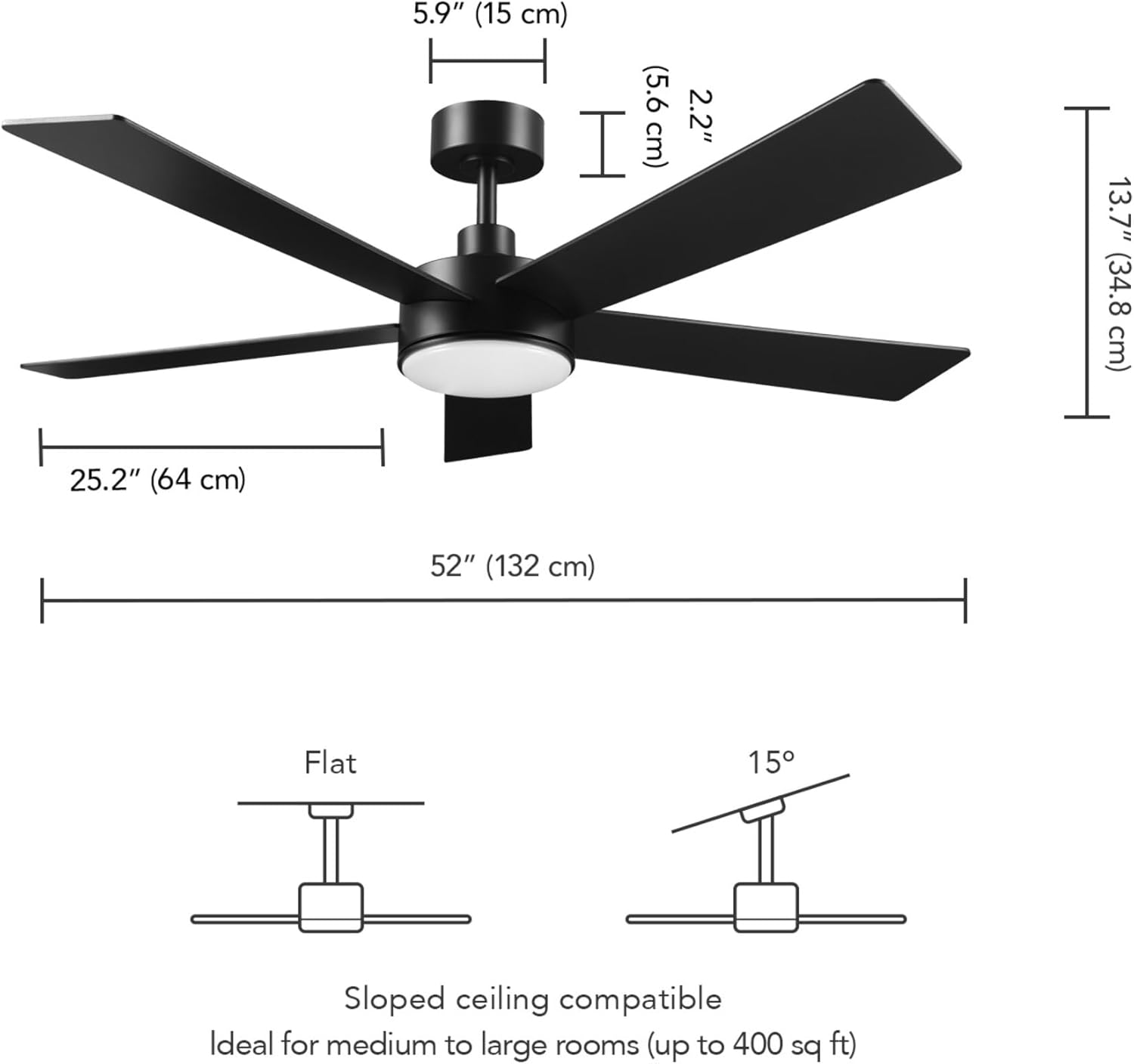
Figure 4.1: Fan dimensions and sloped ceiling compatibility. The fan measures 52 inches in diameter and 13.7 inches (34.8 cm) in height from the ceiling to the bottom of the light. The downrod is 5.9 inches (15 cm) long.
4.2 Wiring Connections
Follow the wiring diagram provided in the full installation guide to connect the fan's electrical wires to your household wiring. This fan uses a power rectifier box for DC conversion, which must be properly seated within the base.
4.3 Attaching Blades and Light Kit
Securely attach the five fan blades to the motor housing. The blades are reversible, offering a black finish on one side and a wood-grain finish on the other. Install the integrated LED light kit according to the instructions.

Figure 4.2: The Veloria ceiling fan installed in a bedroom setting.
5. Operating Instructions
Your Veloria ceiling fan is controlled by the included remote control. The remote allows you to adjust fan speed, light settings, and fan direction.
5.1 Remote Control Functions
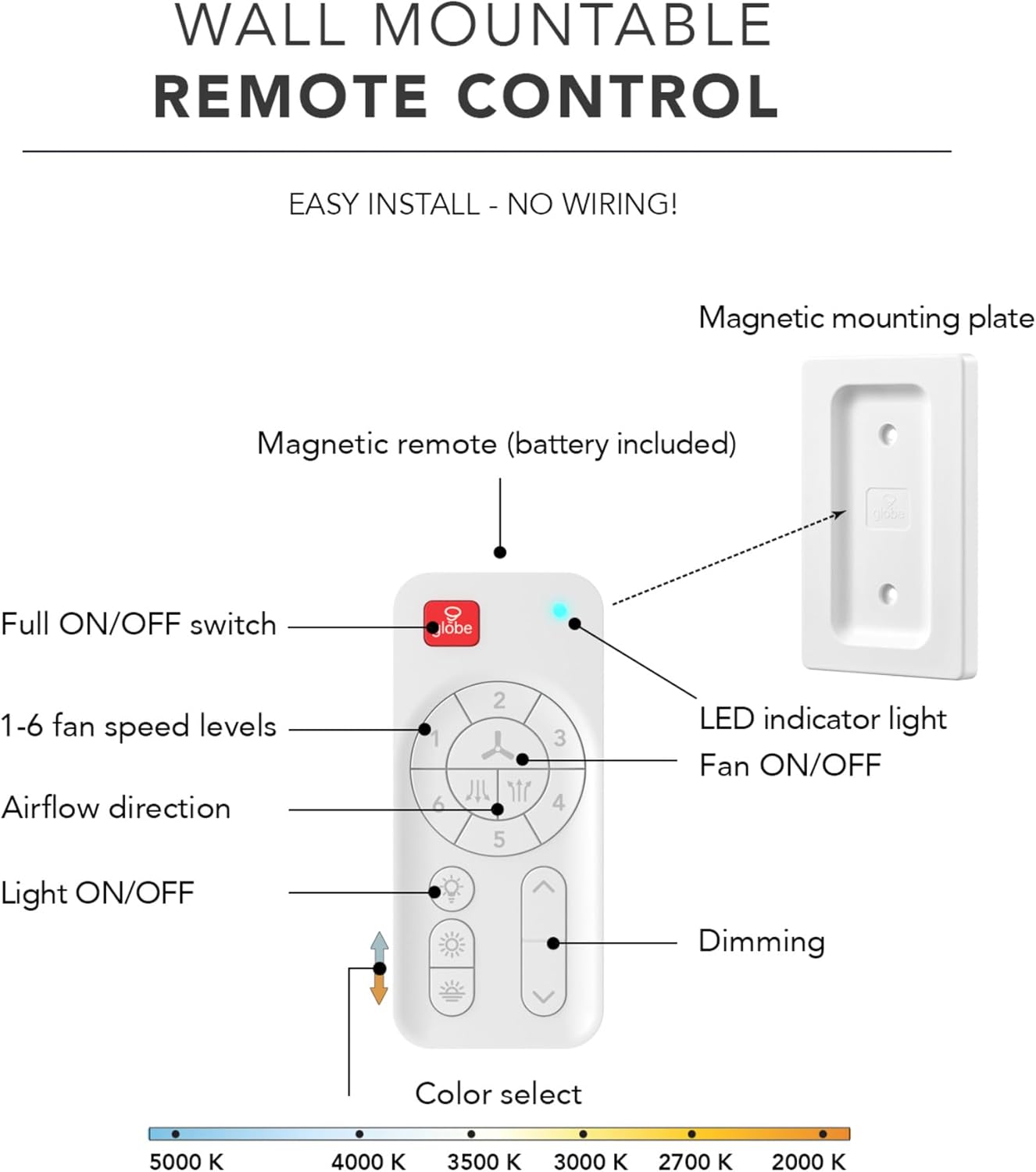
Figure 5.1: Remote control layout and functions.
- Fan ON/OFF: Press the fan icon button to turn the fan on or off.
- Fan Speed: Select from 6 different speed levels (1-6) using the numbered buttons.
- Airflow Direction: Use the reversible airflow button to switch between downdraft (summer) and updraft (winter) modes.
- Light ON/OFF: Press the light bulb icon to turn the integrated LED light on or off.
- Dimming: Use the up/down arrow buttons to adjust the light brightness (10%-100%).
- Color Select: Cycle through adjustable color temperatures from 2000K (Soft White) to 5000K (Daylight) using the color select button.

Figure 5.2: AmbianceSelect feature for adjustable color temperature.
5.2 Reversible Airflow
The fan features reversible blades to optimize air circulation for all seasons. In summer, the fan rotates counter-clockwise to create a cooling downdraft. In winter, it rotates clockwise to circulate rising warm air, helping to distribute heat more evenly.

Figure 5.3: Reversible airflow for year-round comfort.
6. Maintenance
Regular maintenance ensures optimal performance and longevity of your ceiling fan.
- Cleaning: Periodically clean the fan blades and motor housing with a soft, damp cloth. Do not use abrasive cleaners or solvents.
- Blade Inspection: Check fan blade screws for tightness at least twice a year. Loose screws can cause wobbling and noise.
- Light Source: The LED light is integrated and not user-replaceable. If the light fails, contact customer service.
7. Troubleshooting
If you experience issues with your fan, refer to the following common problems and solutions:
| Problem | Possible Cause | Solution |
|---|---|---|
| Fan does not start | No power to the fan; loose wire connections; remote control battery low. | Check circuit breaker; ensure all connections are secure; replace remote battery. |
| Fan wobbles | Loose blade screws; unbalanced blades; improper mounting. | Tighten blade screws; use balancing kit (not included) if needed; re-check mounting. |
| Light does not work | Loose wire connection; integrated LED failure. | Check light kit wiring; contact customer service for integrated LED issues. |
| Remote control not working | Low battery; remote not paired with fan. | Replace battery; refer to pairing instructions in the full manual. |
8. Specifications
| Feature | Detail |
|---|---|
| Brand | Globe Electric |
| Model Name | Veloria |
| Model Number | 37000111 |
| Product Dimensions | 52"D x 52"W x 13.8"H (132cm D x 132cm W x 35cm H) |
| Item Weight | 10.8 Pounds (4.9 kg) |
| Material | Metal |
| Color | Matte Black (Reversible Blades: Black/Wood-grain) |
| Power Source | Corded Electric |
| Voltage | 120 Volts |
| Wattage (Light) | 24 watts |
| Lumen Output | 1200 Lumens |
| Color Temperature | Adjustable 2000K - 5000K |
| Number of Speeds | 6 |
| Air Flow Capacity | 4400 Cubic Feet Per Minute (CFM) |
| Control Method | Remote Control |
| Special Features | Integrated LED Light, Quiet Operation, Remote Controlled, Reversible Airflow, Energy-Saving DC Motor |
| Indoor/Outdoor Usage | Indoor |
9. Warranty and Support
This GLOBE Electric Veloria 52-inch Ceiling Fan comes with a 3-year manufacturer's limited warranty. This warranty covers defects in materials and workmanship under normal use.
For warranty claims, technical support, or to order replacement parts, please contact Globe Electric customer service. Keep your proof of purchase for warranty validation.
Visit the official Globe Electric website for additional product information and support: Globe Electric Store


