1. Introduction
Thank you for choosing the ACHAZEL 9,000 BTU 19 SEER2 Wifi Enabled Mini Split Air Conditioner & Heater. This manual provides essential information for the safe operation, installation, maintenance, and troubleshooting of your new unit. Please read this manual thoroughly before installation and use, and keep it for future reference.
This energy-efficient system is designed to provide optimal comfort for spaces up to 450 sq. ft., offering both cooling and heating functionalities with advanced features like WiFi control and various operational modes.
2. Important Safety Information
Always follow basic safety precautions when using electrical appliances to reduce the risk of fire, electric shock, or injury to persons.
- Professional Installation Recommended: Installation of this unit requires specialized skills and tools. Professional installation is highly recommended for optimal performance and safety.
- Electrical Safety: Ensure the power supply matches the unit's specifications (115V). Do not use extension cords.
- Grounding: The unit must be properly grounded to prevent electric shock.
- Clearances: Maintain adequate clearances around the indoor and outdoor units for proper airflow and maintenance.
- Maintenance: Disconnect power before performing any maintenance or cleaning.
- Children: Keep children away from the unit and do not allow them to operate the controls.
- Flammable Materials: Do not store or use flammable gases or liquids near the unit.
3. Package Contents
Upon unpacking, verify that all components listed below are present and undamaged. If any items are missing or damaged, contact customer service immediately.

Figure 3.1: Package Contents Overview. The package includes the indoor fan coil section, outdoor condenser section, wireless remote controller with holder, 16 ft. L line set, installation accessories, and vibration absorber feet for the condensing unit. Note: The item comes in 3 separate boxes, so delivery times may vary.
- Indoor Fan Coil Unit (1)
- Outdoor Condenser Unit (1)
- Wireless Remote Controller with Holder (1)
- 16 ft. L Line Set (1)
- Installation Accessories (e.g., drainage hose, electrical wire, insulation tape)
- Vibration Absorber Feet for Condensing Unit (4)
- User Manual (This document)
4. Product Overview and Features
The ACHAZEL Mini Split system is designed for efficient and versatile climate control.
4.1 Key Features
- Efficient Cooling and Heating: 9000 BTU capacity with 0.75 ton heat pump, adjustable from 61℉ to 88℉.
- Energy-Saving Technology: 19 SEER2, 8.5 HSPF2 rating, ETL Listed, AHRI Certified. Variable frequency technology saves up to 30% on energy costs. Automatic defrost function.
- Enhanced Comfort: Quiet operation, WiFi control, 4D airflow, I Feel mode, 24-hour timer, sleep mode.
- Multiple Modes: Eco-friendly, energy-saving, multiple fan speeds, turbo function, auto mode.
- Smart Control: Control via wireless remote or smartphone app.
- 4-in-1 Functionality: Cooling, Heating, Dehumidification, and Ventilation.

Figure 4.1: Considerate Features of the ACHAZEL Mini Split System.

Figure 4.2: 4-in-1 Multifunctional Operation.
4.2 Components

Figure 4.3: ACHAZEL Mini Split System Components.
- Indoor Unit: Wall-mounted unit that circulates conditioned air.
- Outdoor Unit: Condenser unit responsible for heat exchange.
- Remote Control: Wireless controller for adjusting settings.
- Line Set: Pre-charged copper tubing for refrigerant connection.
- Installation Kit: Includes various parts for mounting and connecting the units.
5. Setup and Installation
Important: Professional installation is strongly recommended for this mini split system. Improper installation can lead to reduced efficiency, damage to the unit, or safety hazards. Refer to the detailed installation guide provided with your unit for step-by-step instructions.
5.1 Pre-Installation Checklist
- Ensure the installation area meets space and structural requirements.
- Verify power supply compatibility (115V).
- Gather necessary tools and safety equipment.
- Unpack all components and check for damage.
5.2 Installation Steps (Summary)
- Mounting the Indoor Unit: Secure the mounting plate to the wall, ensuring it is level and has adequate clearance.
- Drilling the Wall Hole: Create a hole for the line set and drainage hose to pass through the wall.
- Installing the Outdoor Unit: Place the outdoor unit on a stable, level surface, ensuring proper drainage and airflow. Use the provided vibration absorber feet.
- Connecting Refrigerant Lines: Connect the pre-charged line set between the indoor and outdoor units. Ensure connections are tight to prevent leaks.
- Electrical Wiring: Connect the power supply and communication wires according to the wiring diagram. This step must be performed by a qualified electrician.
- Drainage Connection: Connect the drainage hose from the indoor unit to ensure proper condensate removal.
- Vacuuming and Leak Check: Evacuate the refrigerant lines to remove air and moisture, then perform a leak check.
- Insulation and Finishing: Insulate all exposed refrigerant lines and electrical connections. Seal the wall hole.

Figure 5.1: Unit Dimensions and Installation Diagram. The indoor unit measures approximately 32.28" x 12.05" x 7.68", and the outdoor unit measures approximately 28.66" x 21.65" x 12.01". Professional installation is required.
6. Operating Instructions
Your ACHAZEL mini split system can be controlled using the wireless remote controller or a smartphone application.
6.1 Remote Control Operation

Figure 6.1: Control Options: Remote Control and Smart Control via App.
The remote control allows you to adjust temperature, change modes, set fan speed, and access special functions.
- Power Button: Turns the unit ON/OFF.
- Mode Button: Cycles through modes: Auto, Cool, Heat, Dry (Dehumidify), Fan.
- Temperature Buttons (▲/▼): Adjusts the desired temperature.
- Fan Speed Button: Selects fan speed (Auto, Low, Medium, High).
- Swing Button: Controls the louver swing for airflow direction.
- Timer Button: Sets ON/OFF timers.
- Sleep Button: Activates Sleep Mode for quiet, energy-efficient operation during sleep.
- I Feel Button: Activates "I Feel" mode, which senses the temperature at the remote's location for more precise comfort.
- Turbo Button: Activates maximum cooling or heating for rapid temperature change.
6.2 Smart Control (WiFi App)

Figure 6.2: Smartphone App Interface for Smart Control.
The ACHAZEL mini split can be controlled remotely via a smartphone app. Download the app from the App Store (for iOS) or Google Play Store (for Android).
- Download and install the "ACHAZEL Smart AC" app (or similar, refer to unit's specific app name).
- Register an account and log in.
- Follow the in-app instructions to connect your mini split unit to your home WiFi network.
- Once connected, you can control all functions of the unit from anywhere with an internet connection.
6.3 Operating Modes
- Cool Mode: Provides cooling. Set desired temperature and fan speed.
- Heat Mode: Provides heating. Set desired temperature and fan speed.
- Dry (Dehumidify) Mode: Reduces humidity in the room. Fan speed is automatically controlled.
- Fan Mode: Circulates air without cooling or heating. Fan speed can be adjusted.
- Auto Mode: The unit automatically selects cooling or heating based on the ambient temperature and your set temperature.
- Sleep Mode: Adjusts temperature and fan speed for comfortable sleep while saving energy. Operates quietly (low noise < 42dB).

Figure 6.3: Sleep Mode for Quiet and Comfortable Operation.
7. Maintenance
Regular maintenance ensures optimal performance and extends the lifespan of your mini split system. Always disconnect power to the unit before performing any maintenance.
7.1 Air Filter Cleaning
Clean the air filters every two weeks or more frequently if the unit is used heavily or in dusty environments.
- Open the front panel of the indoor unit.
- Remove the air filters.
- Clean the filters with a vacuum cleaner or wash them with lukewarm water and mild detergent.
- Rinse thoroughly and allow them to dry completely before reinserting.
7.2 Indoor Unit Cleaning
Wipe the indoor unit's surface with a soft, damp cloth. Do not use harsh chemicals or abrasive cleaners.
The unit features a self-cleaning process, including high temperature sterilization, to remove unwanted particles and ensure cleaner air.
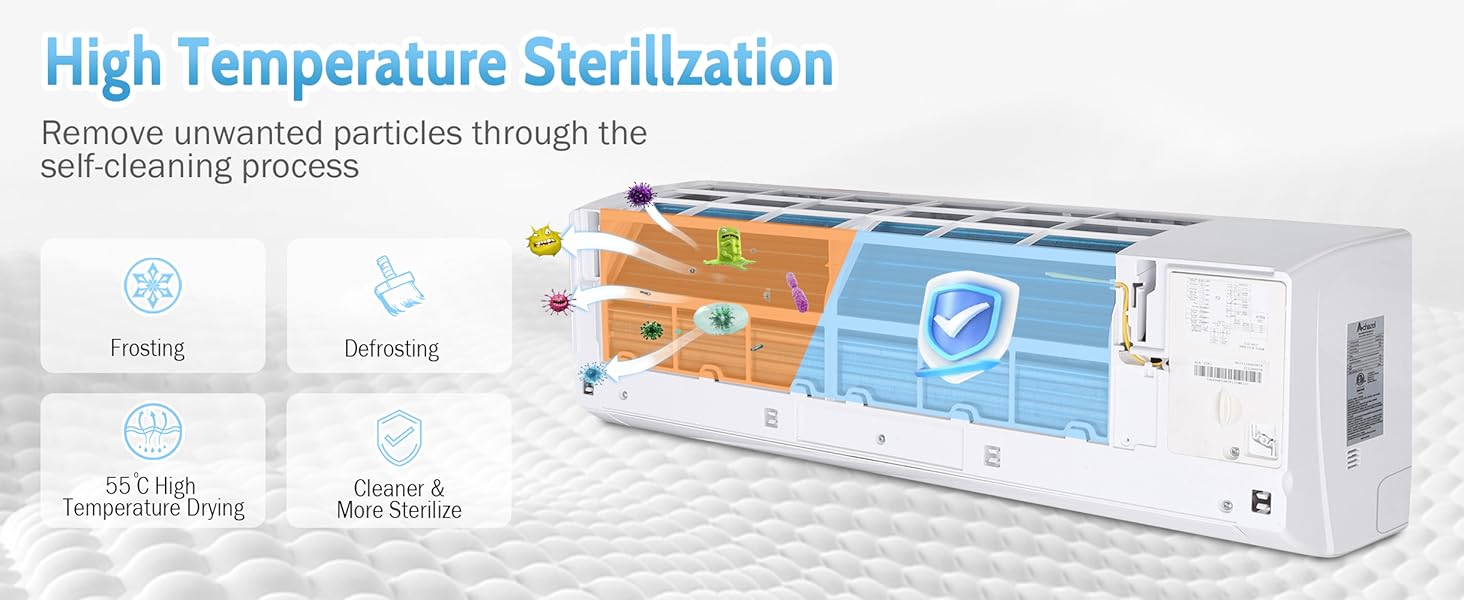
Figure 7.1: High Temperature Sterilization and Self-Cleaning Process.
7.3 Outdoor Unit Cleaning
Periodically clean the outdoor unit's coils and fins to remove dirt, leaves, and debris. Use a soft brush or a low-pressure hose. Ensure the area around the outdoor unit is clear of obstructions.
7.4 Seasonal Maintenance
- Before Cooling Season: Check refrigerant lines for leaks, clean coils, and ensure proper drainage.
- Before Heating Season: Verify heating function, check for any unusual noises.
- Professional Check-up: Consider an annual professional inspection and tune-up to ensure optimal performance and efficiency.
8. Troubleshooting
Before contacting customer service, refer to the following table for common issues and their solutions.
| Problem | Possible Cause | Solution |
|---|---|---|
| Unit does not turn ON. | No power supply; Remote control batteries dead. | Check circuit breaker; Replace remote control batteries. |
| Insufficient cooling/heating. | Dirty air filters; Obstruction to airflow; Incorrect mode/temperature setting; Low refrigerant. | Clean air filters; Remove obstructions; Adjust settings; Contact professional for refrigerant check. |
| Water leaking from indoor unit. | Clogged drain hose; Improper installation angle. | Clear drain hose; Re-evaluate installation (professional assistance recommended). |
| Unusual noises. | Loose parts; Fan obstruction; Compressor issue. | Check for loose parts; Clear obstructions; If compressor issue, contact professional. |
| WiFi connection issues. | Router too far; Incorrect WiFi password; App issues. | Move router closer; Re-enter password; Reinstall app or check app settings. |
If the problem persists after attempting these solutions, please contact ACHAZEL customer support.
9. Specifications
| Attribute | Value |
|---|---|
| Model | 9000BTU-19SEER2-115V |
| Cooling Capacity | 9,000 BTU |
| Heating Capacity | 0.75 Ton Heat Pump |
| SEER2 Rating | 19 |
| HSPF2 Rating | 8.5 |
| Voltage | 115 Volts |
| Coverage Area | Up to 450 Sq. Ft. |
| Control Method | App, Remote |
| Item Weight | 76 pounds |
| Certifications | ETL Listed, AHRI Certified, Energy Star |
10. Warranty and Customer Support
ACHAZEL offers a 3-year compressor warranty. We are dedicated to delivering top-quality products and exceptional customer service. Purchase with confidence knowing our mini split AC heating system is durable and dependable. We provide a 100% satisfaction guarantee for your peace of mind.
For warranty claims, technical assistance, or any questions regarding your ACHAZEL product, please contact our customer support team. Refer to your purchase documentation or the official ACHAZEL website for contact details.
Online Support: Visit the ACHAZEL Store on Amazon for FAQs and additional resources.


