
1. Introduction
This manual provides essential information for the safe and efficient operation of your Dometic CFF 18 portable compressor cooler. Please read these instructions carefully before initial use and keep them for future reference. The Dometic CFF 18 is designed to provide reliable cooling and freezing for mobile applications, suitable for use in vehicles, camping, and other outdoor activities.

Image 1.1: Dometic CFF 18 portable compressor cooler with its lid open, revealing various food items and beverages stored within. This image illustrates the cooler's capacity and typical use.
2. Safety Instructions
Observe all safety warnings and instructions to prevent injury or damage to the product.
- Ensure the power supply voltage matches the rating on the cooler's label.
- Do not operate the cooler if it is visibly damaged.
- Keep ventilation openings clear of obstructions to ensure proper airflow.
- Do not use electrical devices inside the cooler unless recommended by the manufacturer.
- Avoid touching exposed cables or plugs with wet hands.
- If the power cable is damaged, it must be replaced by the manufacturer, service agent, or similarly qualified persons to avoid a hazard.
- This appliance can be used by children aged 8 years and above and persons with reduced physical, sensory or mental capabilities or lack of experience and knowledge if they have been given supervision or instruction concerning use of the appliance in a safe way and understand the hazards involved.
3. Product Overview
The Dometic CFF 18 features a robust design for portable use, offering both refrigeration and freezing capabilities. Key components include:
- Cooler Unit: The main body housing the compressor and insulation.
- Lid: Removable for easy access and cleaning.
- Control Panel: Digital display and buttons for temperature adjustment and power.
- Handles: Ergonomic handles for portability.
- Power Inputs: Connections for 12V/24V DC and 100V/240V AC power.
- Interior Light: For visibility inside the cooler.

Image 3.1: Front view of the Dometic CFF 18 cooler, showing its compact design and closed lid.

Image 3.2: Detailed view of the control panel, featuring a digital temperature display and buttons for setting the desired temperature.
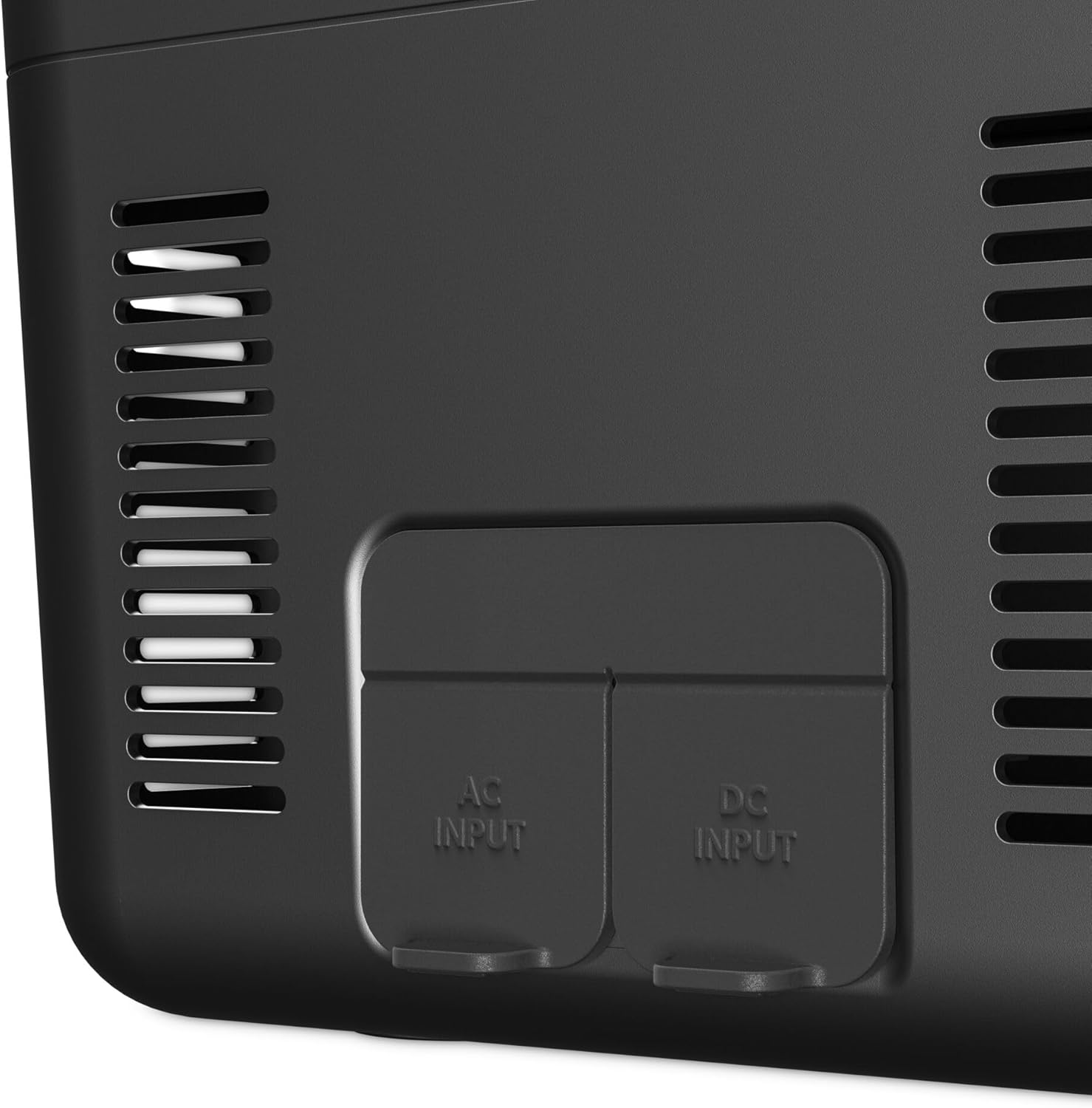
Image 3.3: Power input section, showing clearly labeled AC and DC ports for versatile power options.
4. Setup
- Unpacking: Carefully remove the cooler from its packaging. Retain packaging materials for potential future transport or storage.
- Attaching Handles: The CFF 18 comes with sturdy handles for easy carrying. Attach them securely to the designated points on the cooler body.

Image 4.1: Detail of the robust handle, designed for comfortable and secure transport.
- Initial Cleaning: Before first use, wipe the interior and exterior surfaces with a damp cloth and mild detergent. Rinse thoroughly and dry completely.
- Power Connection:
- 12V/24V DC (Vehicle): Connect the DC power cable to the 12V/24V socket in your vehicle (cigarette lighter or dedicated power outlet). Ensure the connection is firm.
- 100V/240V AC (Mains): Connect the AC power cable to a standard wall outlet.
The cooler automatically detects the input voltage. Ensure adequate ventilation around the unit, especially near the air intake and exhaust grilles.
5. Operating Instructions
- Powering On/Off: Press the power button on the control panel to turn the cooler on or off. The digital display will illuminate when the unit is active.
- Setting Temperature:
- Use the '+' and '-' buttons on the control panel to adjust the desired temperature.
- The temperature range is typically from -18°C to +20°C (0°F to 68°F).
- The display will show the set temperature, then revert to showing the current internal temperature.
- Loading the Cooler:
- For optimal performance, pre-chill items before placing them in the cooler.
- Arrange items to allow for air circulation.
- The CFF 18 has a capacity of 19 liters, suitable for approximately 24 standard 33cl cans or 4 x 1.5L bottles.

Image 5.1: Interior view of the cooler, illustrating the spacious compartment and removable divider for organized storage.

Image 5.2: Detail of the interior LED light, providing illumination for easy access to contents in low-light conditions.
6. Maintenance
- Cleaning: Regularly clean the interior and exterior with a damp cloth. Use a mild detergent if necessary. Avoid abrasive cleaners or solvents.
- Ventilation Grilles: Periodically clean the ventilation grilles to ensure proper airflow and prevent overheating. Use a soft brush or vacuum cleaner.
- Storage: When not in use for extended periods, ensure the cooler is clean and dry. Store with the lid slightly ajar to prevent odors and mold growth.
7. Troubleshooting
| Problem | Possible Cause | Solution |
|---|---|---|
| Cooler does not turn on. | No power supply; faulty cable; blown fuse. | Check power connection; inspect cables; check vehicle fuse or mains circuit breaker. |
| Cooler is not cooling effectively. | Insufficient ventilation; lid not closed properly; ambient temperature too high; too many warm items added. | Ensure clear ventilation; check lid seal; allow more time for cooling; pre-chill items. |
| Unusual noise from the cooler. | Cooler not level; fan obstruction; normal compressor operation. | Place cooler on a flat surface; check for obstructions in fan; some compressor noise is normal. |
| Digital display not working. | Power issue; display fault. | Check power supply; if problem persists, contact Dometic service. |
If you encounter problems not listed here or if solutions do not resolve the issue, please contact Dometic customer support.
8. Specifications
| Feature | Detail |
|---|---|
| Model | CFF 18 |
| Brand | Dometic |
| Capacity | 19 Liters |
| Dimensions (L x W x H) | 54.4 cm x 35.9 cm x 46.6 cm |
| Weight | 12.29 kg |
| Power Input | 12V/24V DC, 100V/240V AC |
| Temperature Range | -18°C to +20°C |
| Material | Polyurethane (PU) |
| Color | Black and Grey |
9. Warranty and Support
Your Dometic CFF 18 portable compressor cooler is covered by a manufacturer's warranty. Please refer to the warranty card included with your purchase for specific terms and conditions. For technical support, spare parts, or service inquiries, please visit the official Dometic website or contact their customer service department. Keep your proof of purchase for warranty claims.
For more information, visit: www.dometic.com


