
HW HAOWORKS S93 Pro
HW HAOWORKS S93 Pro Voice Amplifier Instruction Manual
Model: S93 Pro | Brand: HW HAOWORKS
Introduction
Thank you for choosing the HW HAOWORKS S93 Pro Voice Amplifier. This portable PA system is designed to provide clear and powerful sound amplification for various applications, including teaching, presentations, public speaking, and outdoor events. This manual will guide you through the setup, operation, and maintenance of your device to ensure optimal performance and longevity.

Image: The HW HAOWORKS S93 Pro Voice Amplifier with its accompanying wireless handheld microphone.
What's in the Box
- 1 x Amplifier Speaker
- 1 x Wireless Handheld Microphone
- 1 x Adjustable Waistband
- 1 x 3.5mm Audio Cable
- 1 x Charging Cable

Image: All components included in the S93 Pro Voice Amplifier package.
Product Overview
The S93 Pro is a compact and powerful voice amplifier designed for clarity and portability. It delivers 30W of sound, capable of covering areas up to 20,000 sq ft, making it suitable for gatherings of up to 150 people. Its lightweight design (2.2 pounds) and adjustable strap ensure comfortable use for extended periods. The system features a user-friendly interface with intuitive controls and multiple input options for versatile audio playback.

Image: Visual representation of the S93 Pro's compact design and 30W power output.
Setup
1. Charging the Device
Before first use, fully charge the amplifier and microphone. The amplifier features a 2900mAh rechargeable battery, providing 5-6 hours of continuous use. A full charge typically takes about 3 hours.
- Connect the provided charging cable to the Type-C port on the amplifier and a suitable USB power adapter.
- Connect the microphone to its charging port using the provided cable.
- The charging indicator will show the charging status and turn off when fully charged.

Image: Information on the S93 Pro's built-in rechargeable battery and its usage duration.
2. Microphone Pairing
The UHF wireless handheld microphone is designed for easy one-touch pairing with the amplifier.
- Turn on both the amplifier and the wireless microphone.
- The microphone should automatically pair with the amplifier. A successful connection is usually indicated by a stable light on the microphone.

Image: Close-up of the wireless handheld microphone, highlighting its HD pickup and controls.
Operating Instructions
1. Basic Controls
The S93 Pro features three adjustable knobs for independent control over echo, microphone volume, and speaker volume. A digital keypad allows for quick song switching during audio playback, and an instant recording feature is also available.
- Power Switch: Press to turn the device on/off.
- Echo Knob: Adjusts the echo effect for the microphone.
- Mic Volume Knob: Controls the volume of the microphone.
- Speaker Volume Knob: Adjusts the overall output volume of the speaker.
- Digital Keypad: Use to select specific tracks or navigate audio files.
- Record Button: Initiates instant recording.
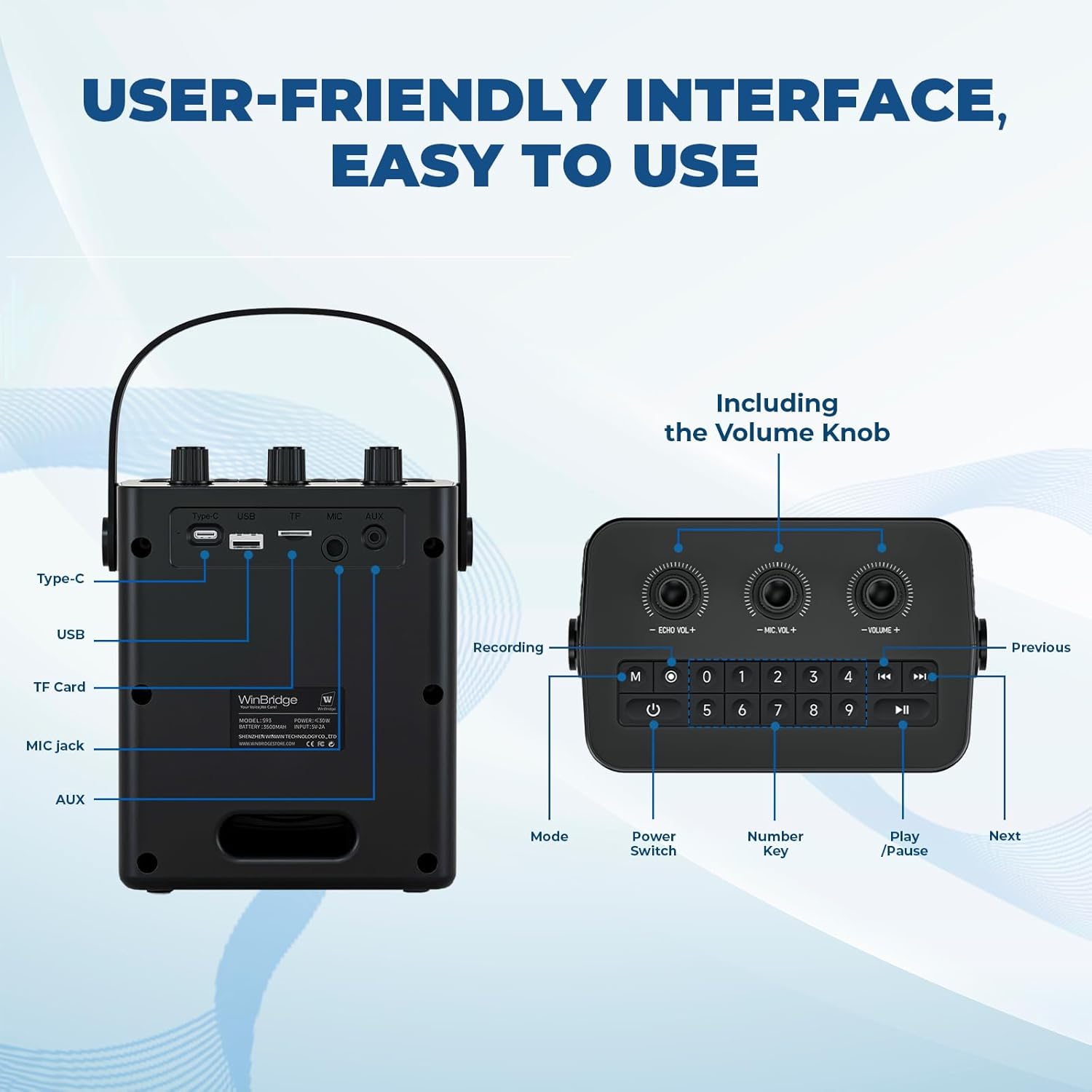
Image: The top panel of the S93 Pro, illustrating the control knobs and digital keypad.
2. Versatile Input Options
The S93 Pro offers multiple ways to play audio, enhancing your experience.
- Bluetooth 5.3: Seamlessly pair with smartphones, tablets, and other Bluetooth-enabled devices for wireless audio streaming.
- USB Input: Play audio files directly from a USB drive.
- TF Card Input: Insert a TF (MicroSD) card to play stored audio.
- AUX Input: Connect external audio sources using the 3.5mm audio cable.
- 6.35mm Mic Jack: Supports additional wired or wireless microphones with an adapter for simultaneous use.

Image: The rear panel of the S93 Pro, showing the Type-C, USB, TF, Mic, and AUX ports.
3. Sound Modes
The S93 Pro includes four distinct sound effect modes to suit different environments and preferences:
- Acoustic Mode: Provides a natural and clear sound profile.
- Popular Mode: Enhances vocals and music for a lively experience.
- Profession Mode: Optimized for professional speaking and presentations.
- Hip-hop Mode: Boosts bass and rhythm for a dynamic sound.

Image: Icons representing the four available sound effect modes.
Portability
Weighing only 2.2 pounds, the S93 Pro is designed for maximum portability. Its ultra-light build, soft-grip handle, and adjustable strap make it easy to carry and use for hours, whether you're moving between classrooms, presenting at an event, or guiding a tour.

Image: A person holding the S93 Pro, illustrating its compact size and ease of transport.
Maintenance
- Keep the device dry and away from extreme temperatures.
- Clean the exterior with a soft, dry cloth. Avoid using harsh chemicals or abrasive materials.
- Store the amplifier and microphone in a safe place when not in use to prevent damage.
- Ensure all ports are free from dust and debris.
Troubleshooting
No Power
- Ensure the device is fully charged.
- Check if the power button is pressed correctly.
No Sound from Microphone
- Verify the microphone is powered on and successfully paired with the amplifier.
- Adjust the microphone volume knob on the amplifier.
- Ensure the amplifier's main volume is not set to minimum.
Distorted Sound
- Reduce the microphone or main volume to prevent feedback.
- Ensure the microphone is not too close to the speaker.
- Check for any obstructions between the microphone and amplifier.
Bluetooth Connectivity Issues
- Ensure Bluetooth is enabled on your external device.
- Make sure the amplifier is in Bluetooth mode.
- Unpair and re-pair the device if connection fails.
Specifications
| Feature | Detail |
|---|---|
| Power Source | Battery Powered |
| Output Power | 30W |
| Connectivity Technology | AUX, Bluetooth 5.3, USB, Wireless (UHF) |
| Connector Type | Aux, USB, Type-C (Charging), 6.35mm Mic Jack |
| Material | Acrylonitrile Butadiene Styrene (ABS) |
| Item Weight | 2.2 pounds (approximately 1.0 kg) |
| Battery Capacity | 2900mAh |
| Battery Life | 5-6 hours (approximate) |
| Charging Time | 3 hours (approximate) |
| Number of Channels | 1 |
| Audio Input | Microphone |
| Recommended Uses | Meeting, Presentation, Public Speaking, Singing, Teaching, Tour Guiding, Fitness Coaching |
| Color | Black |
| Mounting Type | Floor Standing, Tabletop |
Warranty and Support
HW HAOWORKS is committed to providing high-quality products and excellent customer service. Your S93 Pro Voice Amplifier is backed by lifetime after-sales support. Our dedicated support team is available to assist you with any questions or concerns, ensuring a reliable and hassle-free experience with a 24-hour response time.
For assistance, please refer to the contact information provided on the product packaging or visit the official HW HAOWORKS website.
Related documentsS93 Pro


Ask a question about this manual
Ask about setup, troubleshooting, compatibility, parts, safety, or missing instructions. Manuals+ will review the question and use this page’s manual context to help answer it.