
Introduction
This manual provides essential instructions for setting up, operating, maintaining, and troubleshooting your AT&T 6723D Cingular Flex 2 unlocked phone. Please read this guide thoroughly to ensure optimal performance and longevity of your device.
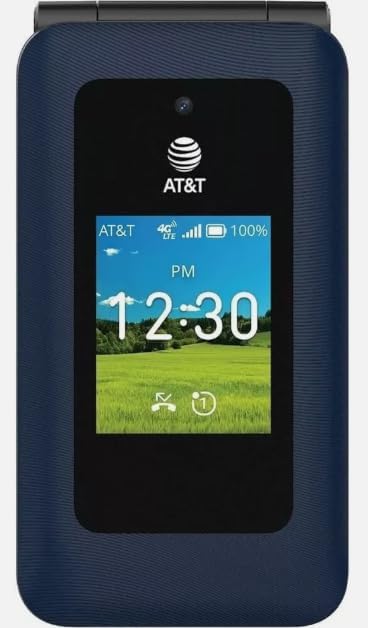
Image: Front view of the AT&T 6723D Cingular Flex 2 phone in Classic Navy, showing the external display with time and network status.
Setup
1. Unboxing and Initial Inspection
Carefully remove all items from the packaging. Verify that the phone and the included power adapter are present and undamaged.
2. SIM Card Installation
- Locate the SIM card slot, typically on the side or under the battery cover.
- Insert your activated Nano-SIM card into the designated slot with the gold contacts facing down. Ensure it clicks into place.
3. Battery Charging
- Connect the power adapter to the USB Type C port on your phone.
- Plug the power adapter into a wall outlet.
- Allow the phone to charge fully before first use. The battery indicator on the screen will show charging status.
4. Powering On and Initial Configuration
- Press and hold the Power button until the screen lights up.
- Follow the on-screen prompts to select your language, region, and connect to a Wi-Fi network.
- Complete any necessary KaiOS account setup or updates.
Operating Instructions
1. Basic Navigation
- Directional Pad: Use the up, down, left, and right keys to navigate through menus and options.
- Center Key: Selects highlighted items.
- Soft Keys: The keys directly below the screen perform functions indicated by the on-screen labels.
- Back/Clear Key: Returns to the previous screen or deletes characters.
2. Making and Receiving Calls
- To Make a Call: Open the phone application, dial the number using the keypad, and press the Call key (green button).
- To Answer a Call: When the phone rings, press the Call key.
- To End a Call: Press the End Call key (red button).
3. Sending and Receiving Messages
- Navigate to the Messages application.
- Select 'New Message' or 'Compose'.
- Enter the recipient's number or select from contacts.
- Type your message using the keypad.
- Press 'Send'.
4. Connecting to Networks
- Wi-Fi: Go to Settings > Network & Connectivity > Wi-Fi. Turn Wi-Fi on, select your desired network, and enter the password if required.
- Mobile Data (4G/LTE): Ensure your SIM card is active and has a data plan. Go to Settings > Network & Connectivity > Cellular & Data to enable mobile data.
5. Camera Usage
- Open the Camera application from the main menu.
- Frame your shot using the screen as a viewfinder.
- Press the Center key to capture a photo.

Image: Back view of the AT&T 6723D Cingular Flex 2 phone, showing the textured Classic Navy finish and speaker grille.
Maintenance
1. Cleaning the Device
Use a soft, lint-free cloth to gently wipe the screen and body of the phone. Avoid using harsh chemicals or abrasive materials.
2. Battery Care
- Avoid exposing the phone to extreme temperatures.
- Do not leave the phone charging for extended periods after it is fully charged.
- Use only the original or certified compatible power adapter.
3. Software Updates
Regularly check for and install software updates to ensure your phone has the latest features and security enhancements. Go to Settings > Device > Software Update.
4. Storage Management
With 64 GB of internal storage, regularly review and delete unnecessary files, photos, and applications to maintain optimal performance. You can check storage usage in Settings > Storage.
Troubleshooting
1. Phone Not Turning On
- Ensure the battery is charged. Connect the phone to the charger for at least 15 minutes.
- Press and hold the Power button for 10-15 seconds.
2. No Network Connection
- Check if the SIM card is properly inserted.
- Verify that mobile data is enabled in Settings.
- Restart the phone.
- Contact your service provider to confirm your SIM card and plan are active.
3. Charging Issues
- Ensure the power adapter and cable are securely connected to both the phone and the power outlet.
- Try using a different compatible charger and cable.
- Check the charging port for any debris.
4. Phone Freezing or Unresponsive
- Press and hold the Power button for approximately 10 seconds to force a restart.
- If the issue persists, consider performing a factory reset (Warning: This will erase all data on your phone. Back up important information first).
Specifications
| Feature | Detail |
|---|---|
| Model Name | Cingular Flex 2 |
| Item Model Number | 6723D |
| Brand | AT&T |
| Operating System | KaiOS |
| Wireless Carrier | Unlocked |
| Cellular Technology | 4G, LTE |
| Display Resolution | 720 x 1280 |
| Memory Storage Capacity | 64 GB |
| Battery Capacity | 1400 Milliamp Hours |
| Audio Jack | USB Type C |
| Color | Classic Navy |
| What's in the box | Power Adapter |
Warranty Information
For specific warranty details, please refer to the documentation provided with your purchase or contact the seller directly. Standard manufacturer warranties typically cover defects in materials and workmanship under normal use.
Support
If you encounter issues not covered in this manual or require further assistance, please contact your point of purchase or the AT&T customer support for your region. Have your device model number (6723D) and purchase information ready.


