
FLYCOLOR LD2801
FLYCOLOR LD2801 Mini RC Drift Car User Manual
Model: LD2801
Introduction
This manual provides essential instructions for the setup, operation, and maintenance of your FLYCOLOR LD2801 Mini RC Drift Car. Please read this manual thoroughly before operating the vehicle to ensure safe and optimal performance. The LD2801 is a 1/28 scale, 4WD Ready-To-Run (RTR) remote control car designed for drifting and racing enthusiasts.

Image: The LD2801 Mini RC Drift Car, showcasing its 1/28 scale and 4-wheel drive capabilities.
Safety Information
Always operate the RC car in a safe environment, away from people, pets, and obstacles. Avoid operating near water or in wet conditions. Adult supervision is recommended for users under 15 years of age. Do not modify the product as this may lead to malfunction or injury. Ensure batteries are charged correctly and handled with care.
Package Contents
Verify that all items listed below are included in your package:
- 1 x LD2801 RC Car
- 1 x Remote Control
- 2 x 3.7V 500mAh Battery (for car)
- 1 x USB Charging Cable
- 1 x Sticker Sheet
- 9 x Road Blocks
- 1 x Accessory Pack (including extra replacement tires)
- 1 x User Manual

Image: All components included in the LD2801 Mini RC Drift Car package.
Setup
1. Charging the Car Battery
- Connect the 3.7V 500mAh car battery to the USB charging cable.
- Plug the USB charging cable into a standard USB power adapter (not included) or a computer USB port.
- The charging indicator light on the USB cable will show the charging status (refer to charger instructions for specific light behavior).
- Once fully charged, disconnect the battery from the charger.
Note: Charging time may vary. Do not leave batteries charging unattended.
2. Installing Remote Control Batteries
- Open the battery compartment on the back of the remote control.
- Insert 2 x 1.25V AAA batteries (not included) into the compartment, ensuring correct polarity.
- Close the battery compartment securely.

Image: Remote control layout with labeled functions for operation and battery installation.
3. Installing Car Battery
- Locate the battery compartment on the underside of the RC car.
- Connect the charged 3.7V 500mAh battery to the car's power connector.
- Carefully place the battery into the compartment and secure the cover.
4. Pairing the Remote Control and Car
- Turn on the RC car's power switch. The LED light on the car will flash.
- Turn on the remote control's power switch.
- The remote control and car will automatically pair. The LED light on the car will become solid once paired.
5. Swapping Tires
The LD2801 comes with both drift tires and racing tires, allowing for different driving experiences.
- To remove a tire, gently pull it off the axle.
- To install a new tire, align it with the axle and push firmly until it is securely in place.

Image: Illustration of the interchangeable drift and racing tires for varied driving performance.
Operating Instructions
Basic Controls
- Forward/Backward: Use the trigger on the remote control. Pull the trigger to move forward, push it to move backward. The throttle is fully proportional, allowing for precise speed control based on finger pressure.
- Steering: Use the steering wheel on the remote control to turn left or right. The steering is fully proportional, providing precise control over turning angles.
- Fine-tune Left/Right: If the car does not drive in a straight line, use the fine-tune adjustment knob/button on the remote control to calibrate the steering.
- LED Searchlight: The car is equipped with LED headlights. These will illuminate when the car is powered on.

Image: Demonstrating the full proportional throttle control for precise speed management.
Drifting Techniques
The LD2801 is designed for optimal drifting performance. Practice the following techniques:
- U-Drift: Approach a turn, initiate a slide by turning sharply and applying throttle, then counter-steer to maintain the drift through the turn.
- O-Drift: Maintain a continuous circular drift by balancing throttle and steering input.
- Figure-8 Drift: Combine U-drifts in a continuous figure-eight pattern.
Tip: Experiment with different speeds and steering angles to master various drifting maneuvers. The 2.4GHz technology ensures stable, interference-free control up to 30 meters.
Maintenance
Cleaning
Regularly clean your RC car to ensure longevity and performance.
- Use a soft, dry cloth to wipe down the car body and chassis.
- Remove any debris from the wheels and axles.
- Avoid using water or chemical cleaners, as these can damage electronic components.
Body Replacement
The LD2801 features a removable high-tenacity body for easy replacement or access to internal components.
- Gently unclip or unscrew the body mounts to remove the car body.
- To reattach, align the body with the chassis and secure the mounts.

Image: The car body detached from the chassis, demonstrating its removable design for maintenance.
Battery Care
- Always disconnect the battery from the car when not in use.
- Store batteries in a cool, dry place.
- Do not overcharge or over-discharge batteries.
- If the remote control indicates a low power alert, replace the AAA batteries promptly.
Troubleshooting
| Problem | Possible Cause | Solution |
|---|---|---|
| Car does not respond to remote. |
|
|
| Car drives crooked. | Steering trim needs adjustment. | Use the fine-tune left/right adjustment on the remote control. |
| Short operating time. | Battery not fully charged or aging battery. | Ensure battery is fully charged. Consider replacing the battery if it's old. |
| Loss of control/interference. | Operating beyond range or signal interference. | Operate within 30-meter range. Avoid areas with strong electromagnetic interference. |
Specifications
| Feature | Detail |
|---|---|
| Model | LD2801 |
| Scale | 1:28 |
| Drive System | 4-Wheel Drive (4WD) |
| Motor | 150 Brushed Motor |
| Steering Servo | 4.3g Servo |
| Car Battery | 3.7V 500mAh (included) |
| Charging Method | USB Charging |
| Remote Control Battery | 2 x 1.25V AAA Battery (not included) |
| Remote Control Frequency | 2.4GHz |
| Remote Control Distance | More than 30 meters |
| Playing Time | Approximately 20 minutes |
| Lighting | LED Headlights |
| Product Dimensions | 6.61 x 2.68 x 2.24 inches |
| Item Weight | 1.26 pounds |
| Recommended Age | 15 years and up |
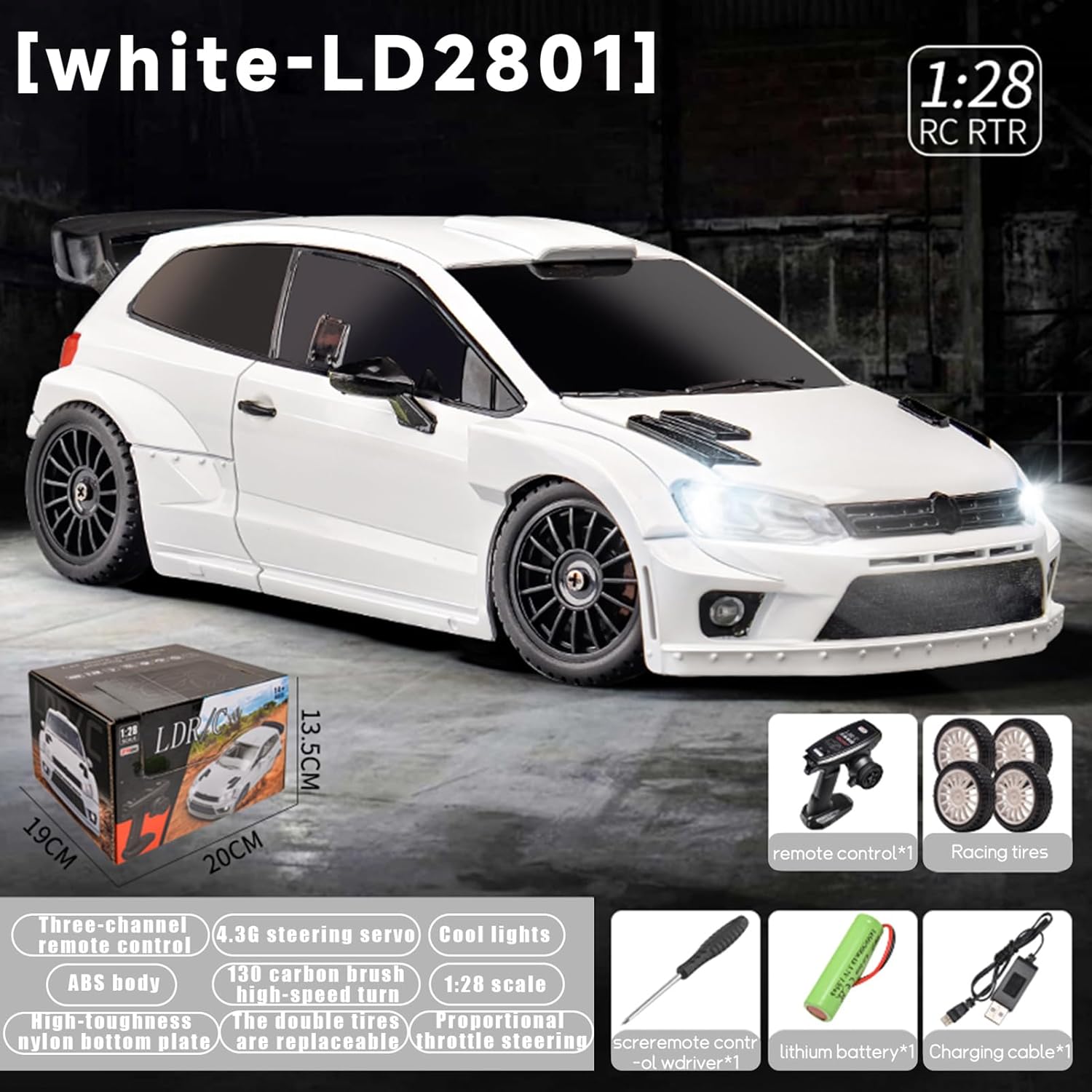
Image: Overview of the LD2801's features and dimensions.
Warranty and Support
FLYCOLOR products are manufactured to high-quality standards. For specific warranty information, please refer to the documentation included with your purchase or contact the retailer. For technical support or inquiries, please visit the official FLYCOLOR store or contact customer service through your purchase platform.
Ask a question about this manual
Ask about setup, troubleshooting, compatibility, parts, safety, or missing instructions. Manuals+ will review the question and use this page’s manual context to help answer it.