
Important Safety Instructions
Please read this manual carefully before operating the appliance and retain it for future reference. Failure to follow these instructions may result in electric shock, fire, or serious injury.
- Always ensure the appliance is placed on a stable, level surface.
- Do not immerse the appliance, power cord, or plug in water or other liquids.
- Unplug the appliance from the power outlet when not in use, before filling or emptying the water tank, and before cleaning.
- Keep the appliance out of reach of children and pets.
- Do not block air inlets or outlets.
- Use only the voltage specified on the rating label.
- Do not operate the appliance with a damaged cord or plug, or after the appliance malfunctions or has been damaged in any manner.
- Do not tilt the unit when the water tank is full to avoid water spillage.
- Ensure the water tank is properly seated before operation.
Product Overview
The Midea MAC25JRB is a versatile 3-in-1 appliance designed to provide cooling, ventilation, and humidification for your indoor environment.
Key Features
- 3-in-1 Functionality: Operates as an air cooler, fan, and humidifier.
- Powerful Airflow: Maximum airflow of 1600m³/h and flow speed of 6m/s for rapid cooling.
- Evaporative Cooling: Utilizes Cascade Flow technology with a large wet curtain for efficient cooling.
- Air Purification: Releases 2500cm³ of negative ions to remove dust and refresh the air. The water tank features a silver ion coating for continuous fresh air.
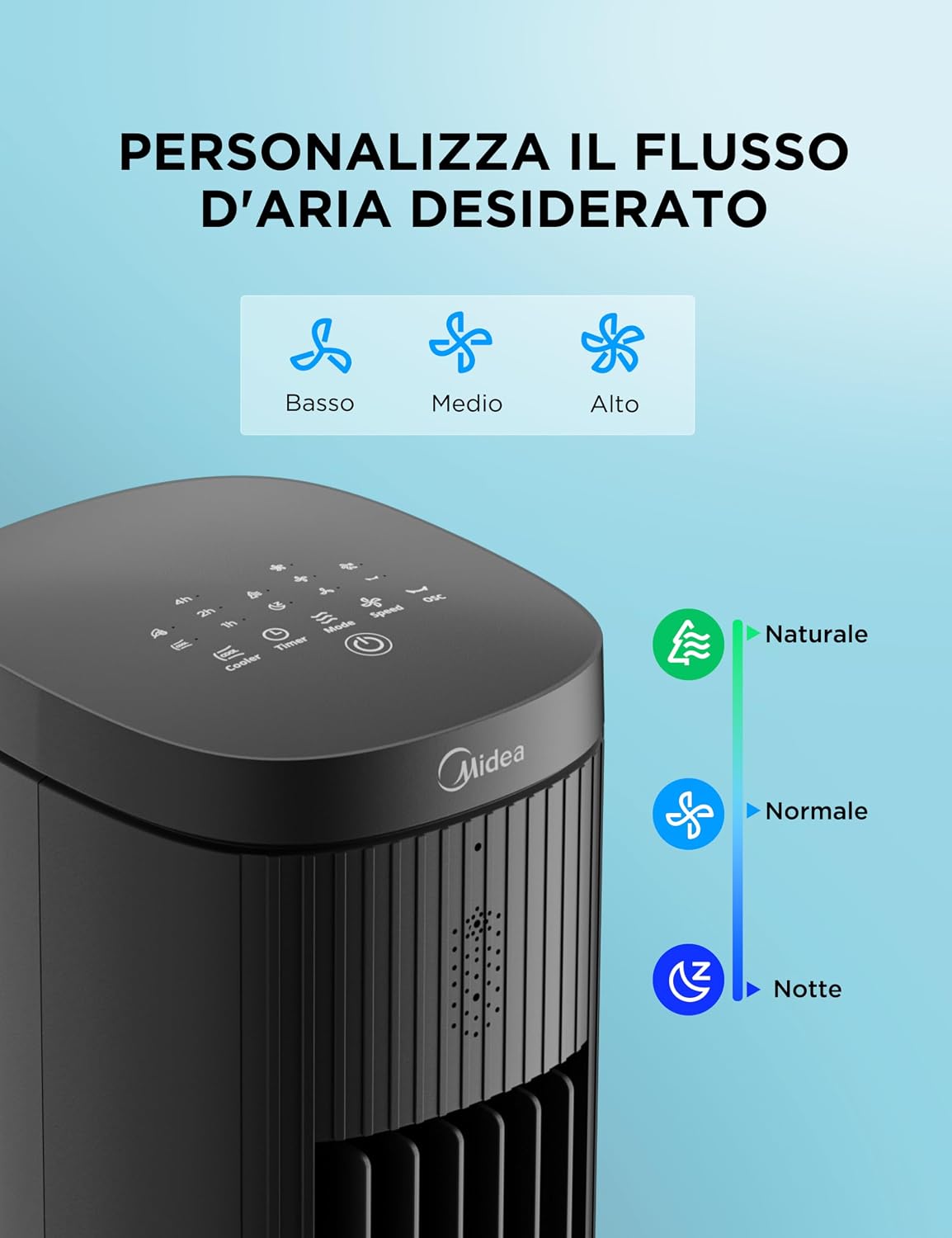
- Customizable Settings: 3 fan speeds (Low, Medium, High) and 3 operating modes (Normal, Natural, Sleep).
- Wide Oscillation: 75° automatic oscillation for even air distribution.
- 7-Hour Timer: Allows for scheduled operation.
- Flexible Control: Intuitive touch panel, LED display, and remote control for convenience.
- Portable Design: Integrated handle and compact tower design for easy mobility.
- Low Noise Operation: Designed for quiet performance, especially in Sleep mode.
- Safety Grille Design: Enhanced safety features.
- Memory Function: Retains previous settings after power off.
Package Contents
- Midea MAC25JRB Air Cooler Unit
- Remote Control
- Ice Packs (2 included)
- Instruction Manual
Product Diagram
The image below illustrates the Midea MAC25JRB 3-in-1 Portable Air Cooler, highlighting its primary functions: cooling, ventilation, and humidification, along with the 7-hour timer feature.

This diagram details the internal Cascade Flow technology, showing how warm air passes over ice-cooled water to provide rapid, refreshing air. It also indicates the impressive airflow volume of 1600m³/h and evaporation rate of 600ml/h.

The image below highlights the advanced air purification system, which releases 2500cm³ of negative ions to clean the air. It also shows the silver ion coating inside the water tank, contributing to continuous fresh air.

Setup
Unpacking
- Carefully remove the air cooler from its packaging.
- Check that all components listed in the 'Package Contents' section are present and undamaged.
- Place the unit on a firm, level surface away from direct sunlight and heat sources.
Water Tank Filling
The unit features a 5-liter high-capacity water tank. For cooling and humidification functions, the water tank must be filled.
- Ensure the appliance is unplugged from the power outlet.
- Gently pull out the water tank from the bottom rear of the unit.
- Fill the tank with clean, cool water. Do not exceed the 'MAX' fill line indicated on the tank.
- Carefully slide the water tank back into the unit until it clicks securely into place.
- Do not tilt the unit while filling or when the tank is full to prevent spills.
This image demonstrates the correct way to fill the 5-liter water tank, showing the 'MAX' fill line and warnings against tilting or overfilling.

Ice Pack Usage
For enhanced cooling, you can use the included ice packs:
- Place the ice packs in a freezer until completely frozen.
- Once frozen, place them directly into the filled water tank.
- The ice packs will help to cool the water, providing a colder airflow.
Operating Instructions
The Midea MAC25JRB can be operated using the touch control panel on top of the unit or the provided remote control.
Control Panel and Remote Control
The control panel and remote allow you to adjust various settings including fan speed, operating mode, oscillation, and timer. The image below shows the intuitive touch panel and the remote control, along with other features like the 7-hour timer and removable filter.
Power On/Off
- Press the Power button (P) on the control panel or remote to turn the unit on or off.
Fan Speed Settings
Choose from three fan speeds: Low, Medium, or High, to suit your comfort level. The image below illustrates the three speed settings.
- Press the Speed button to cycle through Low, Medium, and High settings.
Operating Modes
The unit offers three distinct operating modes: Normal, Natural, and Sleep. The image below shows the icons for these modes.
- Press the Mode button to select your desired mode:
- Normal Mode: Provides a constant, steady airflow at the selected speed.
- Natural Mode: Simulates natural breeze by varying fan speed intermittently.
- Sleep Mode: Operates at a lower, quieter speed for undisturbed sleep. The image below demonstrates the low noise level during sleep mode.

Oscillation Function
Activate the oscillation function to distribute air evenly across a wider area. The unit oscillates up to 75 degrees. The image below illustrates the wide-angle airflow distribution.

- Press the Oscillation button (O) to start or stop the automatic 75° oscillation.
Timer Function
Set the timer for automatic shut-off after a specified period.
- Press the Timer button to set the desired operating duration (up to 7 hours). Each press increases the timer by one hour.
- The unit will automatically turn off once the set time has elapsed.
Maintenance
Regular cleaning and maintenance will ensure optimal performance and extend the lifespan of your Midea Air Cooler.
Cleaning the Exterior
- Always unplug the appliance before cleaning.
- Wipe the exterior surfaces with a soft, damp cloth.
- Do not use abrasive cleaners, waxes, or solvents as these may damage the finish.
Cleaning the Water Tank
The water tank should be cleaned regularly to prevent mold and mildew growth.
- Unplug the unit and remove the water tank.
- Empty any remaining water.
- Clean the inside of the tank with a soft brush or cloth and a mild detergent. Rinse thoroughly with clean water.
- Allow the tank to air dry completely before reinserting it into the unit.
Filter Maintenance
The air cooler is equipped with a removable filter for easy cleaning. Regular cleaning of the filter helps maintain air quality and cooling efficiency. The image below shows the removable filter.

- Unplug the appliance.
- Locate the filter cover, usually at the back of the unit, and remove it.
- Carefully pull out the filter.
- Rinse the filter under running water to remove dust and debris. For stubborn dirt, use a soft brush.
- Allow the filter to dry completely before reinserting it.
- Reattach the filter cover.
Troubleshooting
If you encounter any issues with your Midea Air Cooler, please refer to the following common problems and solutions:
| Problem | Possible Cause | Solution |
|---|---|---|
| Unit does not turn on | No power supply Power button not pressed | Check if the power cord is securely plugged in. Press the Power button on the unit or remote. |
| Weak airflow | Air filter is dirty Air inlets/outlets blocked | Clean the air filter as per maintenance instructions. Ensure nothing is obstructing the air vents. |
| No cooling effect | Water tank is empty Cooling function not activated No ice packs or warm water | Fill the water tank with cold water. Ensure the cooling function is selected. Add frozen ice packs to the water tank. |
| Unusual noise | Unit not on a level surface Foreign object inside | Place the unit on a flat, stable surface. Unplug and check for any obstructions. |
| Water leakage | Water tank not properly installed Overfilled water tank Unit tilted | Ensure the water tank is securely in place. Do not fill water above the MAX line. Keep the unit upright and stable. |
If the problem persists after checking these points, please contact Midea customer support.
Specifications
| Feature | Specification |
|---|---|
| Brand | Midea |
| Model Name | MAC25JRB |
| Material | Plastic |
| Color | Black |
| Mounting Type | Freestanding |
| Dimensions (D x W x H) | 31P x 31l x 100H cm (approx. 12.2 x 12.2 x 39.4 inches) |
| Item Weight | 6 Kilograms (approx. 13.2 lbs) |
| Water Tank Capacity | 5 Liters |
| Airflow Capacity | 942 Cubic Feet per Minute (1600 m³/h) |
| Max Flow Speed | 6 m/s |
| Evaporation Rate | 600 ml/h |
| Negative Ion Concentration | 2500 cm³ |
| Number of Speeds | 3 |
| Operating Modes | Normal, Natural, Sleep |
| Oscillation | 75° Automatic |
| Timer | Up to 7 hours |
| Control Type | Touch, Remote |
| Electrical Power | 45 Watts |
| Voltage | 220 Volts |
| Noise Level | 47 Decibels (max) |
| Recommended Floor Area | 70 square meters |
Warranty and Support
Product Warranty
This Midea MAC25JRB Air Cooler comes with a 3-year warranty from the date of purchase. Please retain your proof of purchase for warranty claims. The warranty covers manufacturing defects and malfunctions under normal use conditions.
The warranty does not cover damage caused by:
- Improper installation or use not in accordance with this manual.
- Accidental damage, misuse, abuse, or neglect.
- Unauthorized repairs or modifications.
- Normal wear and tear.
Customer Support
For technical assistance, warranty service, or any questions regarding your Midea Air Cooler, please contact Midea customer support through their official website or the retailer where the product was purchased.


