
Introduction
Thank you for choosing the FLEXISPOT 71x32 Inch Dual Motor Electric Standing Desk. This manual provides essential information for the safe and efficient assembly, operation, and maintenance of your new standing desk. Please read all instructions carefully before use and retain this manual for future reference.
This electric standing desk is designed to provide a versatile and ergonomic workspace, allowing seamless transitions between sitting and standing positions. Its dual-motor system ensures stable and quiet height adjustments, supporting a heavy-duty capacity suitable for various professional and creative setups.
Safety Guidelines
- Always follow the assembly instructions carefully.
- Ensure the desk is properly anchored to the floor to prevent tipping, especially when fully extended.
- Do not exceed the maximum weight capacity of 198 pounds (90 kg) to maintain stability and safety.
- Keep the work surface clear of items that could fall or cause obstruction during height adjustment.
- Keep children and pets away from the desk during operation.
- Avoid placing liquids directly on the control panel or near electrical components.
- Do not attempt to disassemble or repair the motor or control system yourself. Contact qualified service personnel if issues arise.
Warning: Anti-Collision System
The desk is equipped with an anti-collision system. If the desk encounters an obstacle during height adjustment, it will stop and reverse slightly to prevent damage. Ensure the area around the desk is clear before operation.

This image illustrates the desk's quiet operation (less than 50dB) and anti-collision system, showing the desk stopping and reversing when an obstacle (a pet) is detected.
Setup and Assembly
The FLEXISPOT 71x32 Inch Dual Motor Electric Standing Desk requires assembly. While some tools may be included, an electric drill can expedite the process. It is recommended to have two people for assembly due to the size and weight of the components.
Unpacking and Preparation:
- Carefully unpack all components and verify against the parts list in your included manual.
- Place the desktop upside down on a soft, clean surface (e.g., carpet or packaging foam) to prevent scratches.
- Ensure all cables and electrical components are free from damage before proceeding.
Assembly Steps (General Overview):
- Attach the lifting columns to the desktop using the provided screws.
- Connect the foot supports to the lifting columns.
- Install the control box and connect all motor and control panel cables. Ensure cables are neatly managed to avoid interference with desk movement.
- Carefully flip the desk upright.
- Plug the power cord into a grounded outlet.
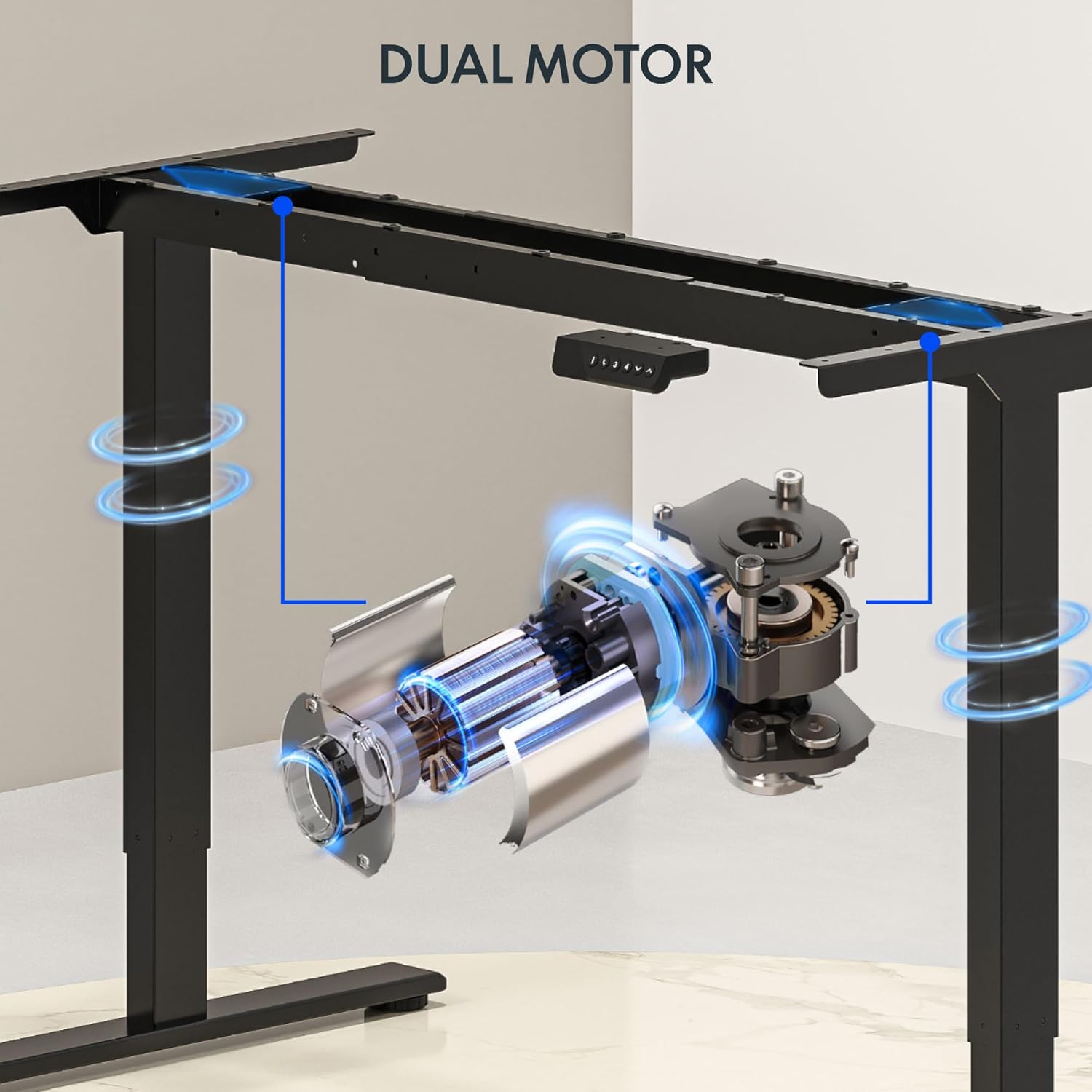
This image illustrates the dual motor system integrated into the desk frame, highlighting its robust design for stable lifting.
Tip:
Consider using cable management accessories (not included) to keep wires organized and prevent them from snagging during height adjustments.
Operating Instructions
The FLEXISPOT standing desk features an intuitive control panel for easy height adjustment and memory presets.
Control Panel Overview:

This image displays the desk's control panel, featuring an LED display, up/down arrows, and four programmable memory preset buttons.
- Up/Down Arrows (▲ / ▼): Press and hold to manually adjust the desk height. Release to stop at the desired height.
- LED Display: Shows the current desk height in inches.
- Memory Presets (1, 2, 3, 4): Store and recall your preferred sitting and standing heights.
- 'i' Button: Information or settings button (refer to detailed manual for specific functions).
Setting Memory Presets:
- Adjust the desk to your desired height using the Up/Down arrows.
- Press the 'i' button (or 'M' button if present) once. The display may flash.
- Within 3 seconds, press one of the number buttons (1, 2, 3, or 4) to save the current height to that preset. The display will confirm the setting.
Recalling Memory Presets:
- Simply press the desired number button (1, 2, 3, or 4). The desk will automatically move to the saved height.
Video: FLEXISPOT Dual-Motor Strength. More Space to Create.
This video demonstrates the smooth and stable operation of the FLEXISPOT dual-motor system, highlighting its capacity and the ample workspace it provides for various setups.
Maintenance
- Cleaning: Wipe the desktop and frame with a soft, damp cloth. Avoid harsh chemicals or abrasive cleaners.
- Cable Management: Periodically check and reorganize cables to ensure they do not interfere with the desk's movement or become pinched.
- Fasteners: Occasionally check all screws and bolts to ensure they are tight. Retighten if necessary.
- Motor Inspection: Listen for any unusual noises during operation. If you hear grinding or straining, discontinue use and contact support.
Troubleshooting
| Problem | Possible Cause | Solution |
|---|---|---|
| Desk does not move | Power cord unplugged; circuit breaker tripped; control panel not connected. | Check power connection; reset circuit breaker; ensure all cables are securely connected. |
| Desk moves unevenly or makes noise | Overload; loose fasteners; obstruction. | Reduce weight on desk (ensure it's below 198 lbs); check and tighten all fasteners; remove any obstructions. |
| Anti-collision system frequently activates | Sensitivity too high; frequent obstructions. | Ensure clear path for desk movement; consult the full manual for adjusting anti-collision sensitivity if available. |
| Memory presets not working | Presets not properly saved. | Re-save your desired heights following the 'Setting Memory Presets' instructions. |
If you encounter issues not listed here or if solutions do not resolve the problem, please contact FLEXISPOT customer support.
Specifications
- Brand: FLEXISPOT
- Model: 71x32 (Black Top + Black Frame)
- Desktop Dimensions: 71"W x 32"D (180.34 cm x 81.28 cm)
- Height Range: 28.3" to 47.6" (71.9 cm to 120.9 cm)
- Maximum Weight Capacity: 198 lbs (90 kg)
- Motor Type: Dual Motor
- Lift Speed: Up to 1 inch per second (2.54 cm/s)
- Control Panel: Memory Controller with 4 programmable presets, LED display, Up/Down arrows.
- Frame Material: Alloy Steel
- Top Material: Wood (Painted Wood Finish)
- Special Features: Dual Motor, Heavy-Duty Capacity, Memory Controller, Anti-Collision System.
- Assembly: Required (Assembly tools not fully included, electric drill recommended).

This image provides a visual representation of the desk's key dimensions and performance specifications, including its adjustable height range, maximum speed, and load capacity.
Warranty Information
The FLEXISPOT 71x32 Inch Dual Motor Electric Standing Desk comes with a limited warranty:
- Frame and Motor: 5-year limited warranty.
- Electronics: 2-year limited warranty.
Please retain your proof of purchase for warranty claims. For detailed terms and conditions, refer to the official FLEXISPOT website or contact customer support.
Customer Support
For any questions, technical assistance, or warranty claims regarding your FLEXISPOT standing desk, please visit the official FLEXISPOT website or contact their customer service department. Contact information can typically be found on the product packaging or the brand's official website.
Online Resources: www.flexispot.com


