
Introduction
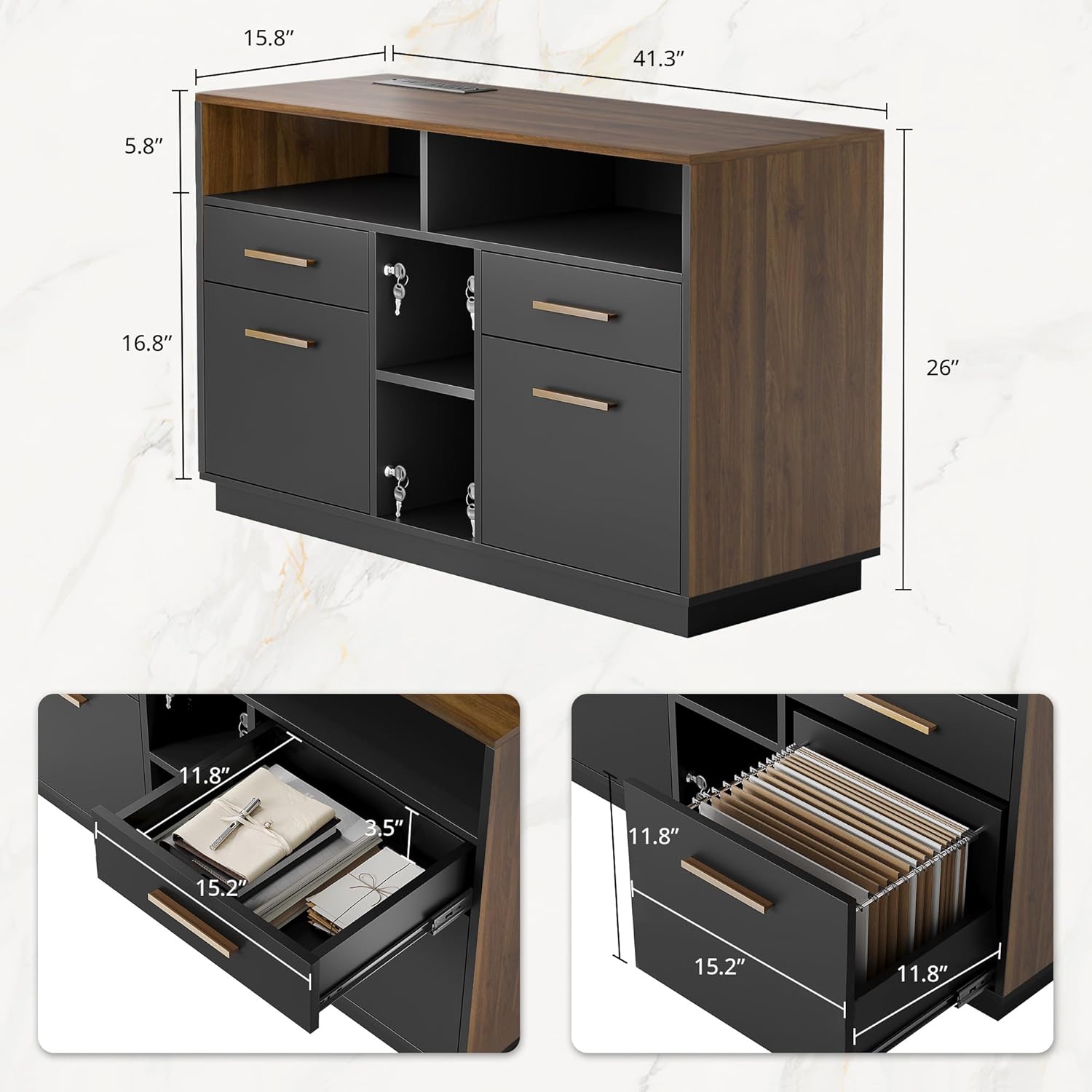
This manual provides instructions for the assembly, operation, and maintenance of your ModernMate 4 Drawer File Cabinet, Model F1. This versatile cabinet is designed for home office use, offering four drawers of two sizes for organizing stationery, miscellaneous items, and letter or A4-sized documents. It includes a built-in power strip with two AC sockets and two USB ports, and features adjustable shelves for flexible storage. The cabinet's design combines a vintage walnut finish with modern black accents.

Safety Information
Always use appropriate gear when assembling the cabinet due to its weight. Be cautious when opening and closing the drawers to prevent injury from pinch points. Do not overload the cabinet, as it may tip over and cause injury or damage. Keep the cabinet away from heat sources and do not place heavy objects on top of it.
Setup and Assembly
The ModernMate 4 Drawer File Cabinet requires assembly. Please follow the detailed instructions provided in the product packaging. Ensure all components are present before beginning assembly.
- Unpack Components: Carefully remove all parts from the packaging and lay them out on a clean, soft surface to prevent scratches. Verify all hardware and panels are accounted for against the parts list.
- Assemble Frame: Follow the step-by-step diagrams to connect the main frame components. Ensure all screws and fasteners are tightened securely.
- Install Drawers and Shelves: Insert drawer slides into the cabinet frame. Assemble the drawers according to the instructions and then install them into the slides. Position the adjustable shelves at your desired height.
- Connect Power Strip: Ensure the power strip is correctly integrated into the designated slot.
- Final Check: Once assembled, gently test the stability of the cabinet and the smooth operation of all drawers.

Operating Instructions
Drawer Usage
The cabinet features four drawers. The two larger drawers are designed to accommodate both letter and A4-sized hanging files. Adjust the file bars as needed for your document size.

Locking Mechanism
The cabinet includes a locking system for security. Insert the key into the lock on the side of the cabinet and turn to secure or unlock the drawers. Each key is universal for all locks on this unit.

Power Strip
The integrated power strip provides two AC outlets and two USB ports. Plug your devices into these ports for convenient charging directly from the cabinet.
Adjustable Shelves
The internal shelves can be adjusted to different heights. To adjust, remove the shelf, reposition the shelf pins to the desired level, and place the shelf back onto the pins.

Product Overview Video
Maintenance
To ensure the longevity and appearance of your ModernMate file cabinet, follow these maintenance guidelines:
- Cleaning: Wipe surfaces with a soft, damp cloth. Avoid abrasive cleaners or harsh chemicals that may damage the finish.
- Spills: Immediately wipe up any spills to prevent staining or water damage to the engineered wood.
- Sunlight: Avoid prolonged exposure to direct sunlight to prevent fading or discoloration.
- Weight Distribution: Distribute weight evenly across shelves and drawers to maintain stability and prevent warping.
Troubleshooting
Drawers Stick or Don't Close Smoothly:
- Check if the drawer slides are properly aligned and free of obstructions.
- Ensure the cabinet is on a level surface. Adjust leveling feet if necessary.
- Verify that the drawer contents are not overloaded or obstructing the closing mechanism.
Power Strip Not Working:
- Ensure the cabinet's power cord is securely plugged into a functional wall outlet.
- Check if the power strip's circuit breaker (if present) has tripped. Reset if needed.
- Test the wall outlet with another device to confirm it is supplying power.
Cabinet Instability:
- Confirm all assembly screws and fasteners are tightened.
- Ensure the cabinet is placed on a flat, stable surface.
- Do not overload the cabinet, especially the top surface or upper shelves.
Specifications
| Feature | Detail |
| Brand | ModernMate |
| Model Number | F1 |
| Color | Black Walnut |
| Material | Engineered Wood |
| Product Dimensions (D x W x H) | 15.8"D x 41.3"W x 26"H |
| Item Weight | 89.1 Pounds |
| Number of Drawers | 4 |
| Number of Shelves | 4 (Adjustable) |
| Power Strip | 2 AC Outlets, 2 USB Ports |
| File Compatibility | A4/Letter Size |
| Assembly Required | Yes |
Warranty and Support
For any questions regarding assembly, operation, or if you encounter any issues with your ModernMate file cabinet, please refer to the contact information provided in your product packaging or visit the official ModernMate website for customer support. Our customer service team is available to assist you.
