
Fanbulous GN-01
User Manual for Fanbulous 56" Ceiling Fan with Lights
Model: GN-01 | Brand: Fanbulous
Product Overview
The Fanbulous 56-inch Ceiling Fan with Lights is a versatile and efficient fixture designed for both indoor and covered outdoor spaces. It features a rustic design with dual-finish blades, a dimmable LED light with adjustable color temperature, and convenient control options via remote and a mobile application. The fan's reversible DC motor ensures optimal air circulation for both summer and winter seasons, providing powerful yet quiet airflow.

Figure 1: Fanbulous 56-inch Ceiling Fan with included remote control and mobile application interface.
Safety Information
- Always turn off the power at the circuit breaker before installation or maintenance.
- Ensure all electrical connections comply with local codes and ordinances.
- Mount the fan securely to a ceiling joist or a suitable support structure capable of holding the fan's weight.
- Do not bend the blade holders during installation or cleaning.
- Keep children and pets away from the fan during operation.
Components List
Verify that all components are present before beginning installation:
- Ceiling Fan Motor Assembly
- Fan Blades (5)
- Light Kit with Dimmable LED
- Remote Control (2 AAA batteries included)
- Downrods (4-inch and 8-inch options)
- Mounting Bracket and Hardware
- Instruction Manual
Setup and Installation
Proper installation is crucial for the safe and efficient operation of your ceiling fan. It is recommended to have a qualified electrician perform the installation if you are not familiar with electrical wiring.
1. Mounting Options
This fan supports various mounting options including low ceiling, high ceiling, and slanted ceiling (up to 15 degrees) installations. Select the appropriate downrod (4" or 8") based on your ceiling height and preference.

Figure 2: Fan dimensions and available mounting configurations.
2. Blade Installation
The fan blades feature a dual-finish design (walnut wood color and oak grain color). You can choose your preferred finish by flipping the blades during installation. Attach the blades securely to the motor assembly using the provided screws.
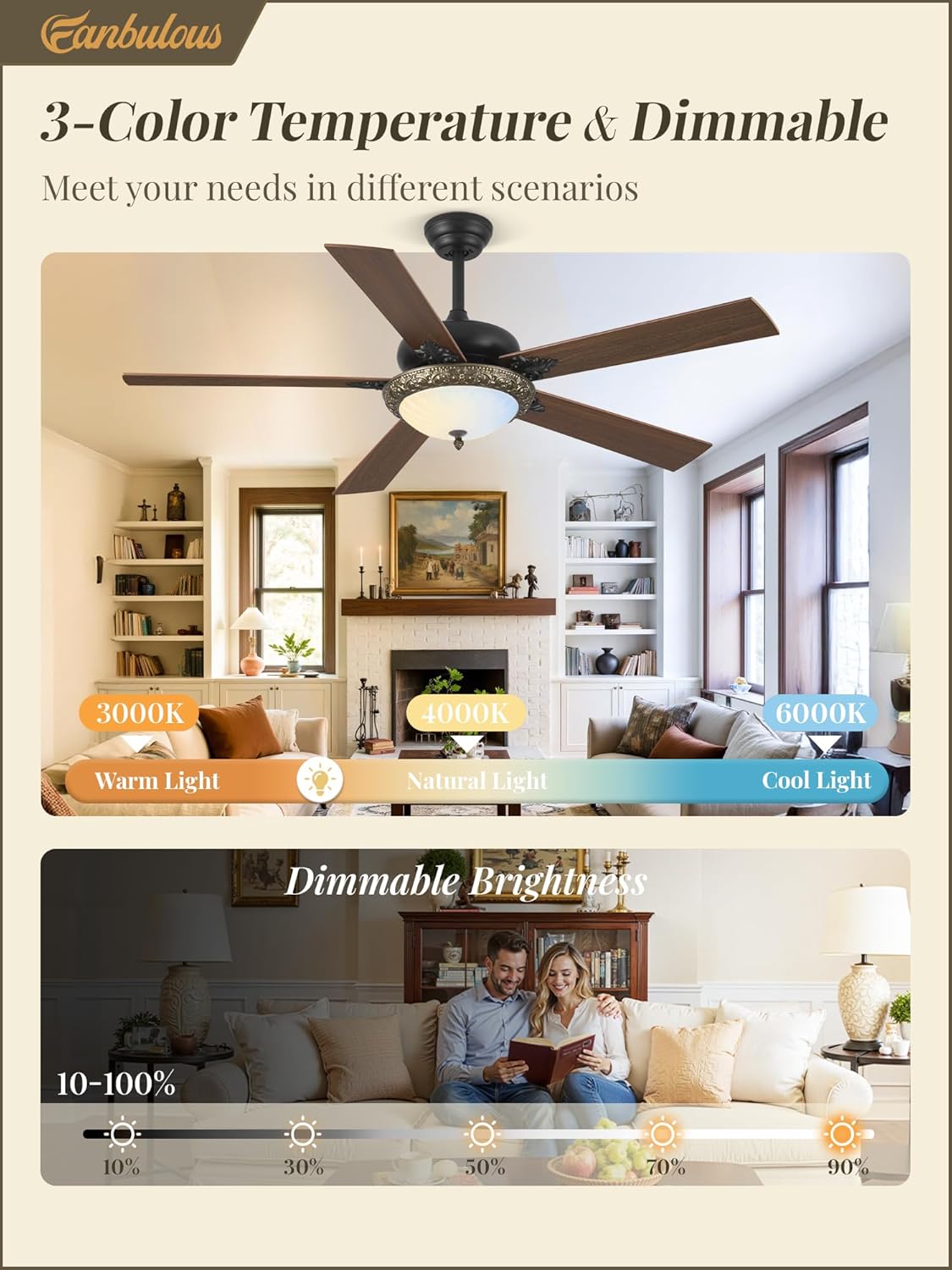
Figure 3: Illustration of the double-sided fan blades, allowing for two distinct aesthetic choices.
3. Electrical Connection
Connect the fan's wiring to your household electrical system according to the wiring diagram in the full manual. Ensure all connections are tight and secure. The LED light kit connects via a specific wire and clip; ensure it is properly seated.
Operating Instructions
1. Remote Control and APP Control
Your Fanbulous ceiling fan can be controlled using the included remote control or via a dedicated mobile application. The remote offers 6-speed wind control, 1/4-hour timing, and independent control for the fan and light. For APP control, ensure Bluetooth is enabled on your device. Pair the fan by turning on the power and, within 5 seconds of the lights coming on, clicking the pairing button in the APP.
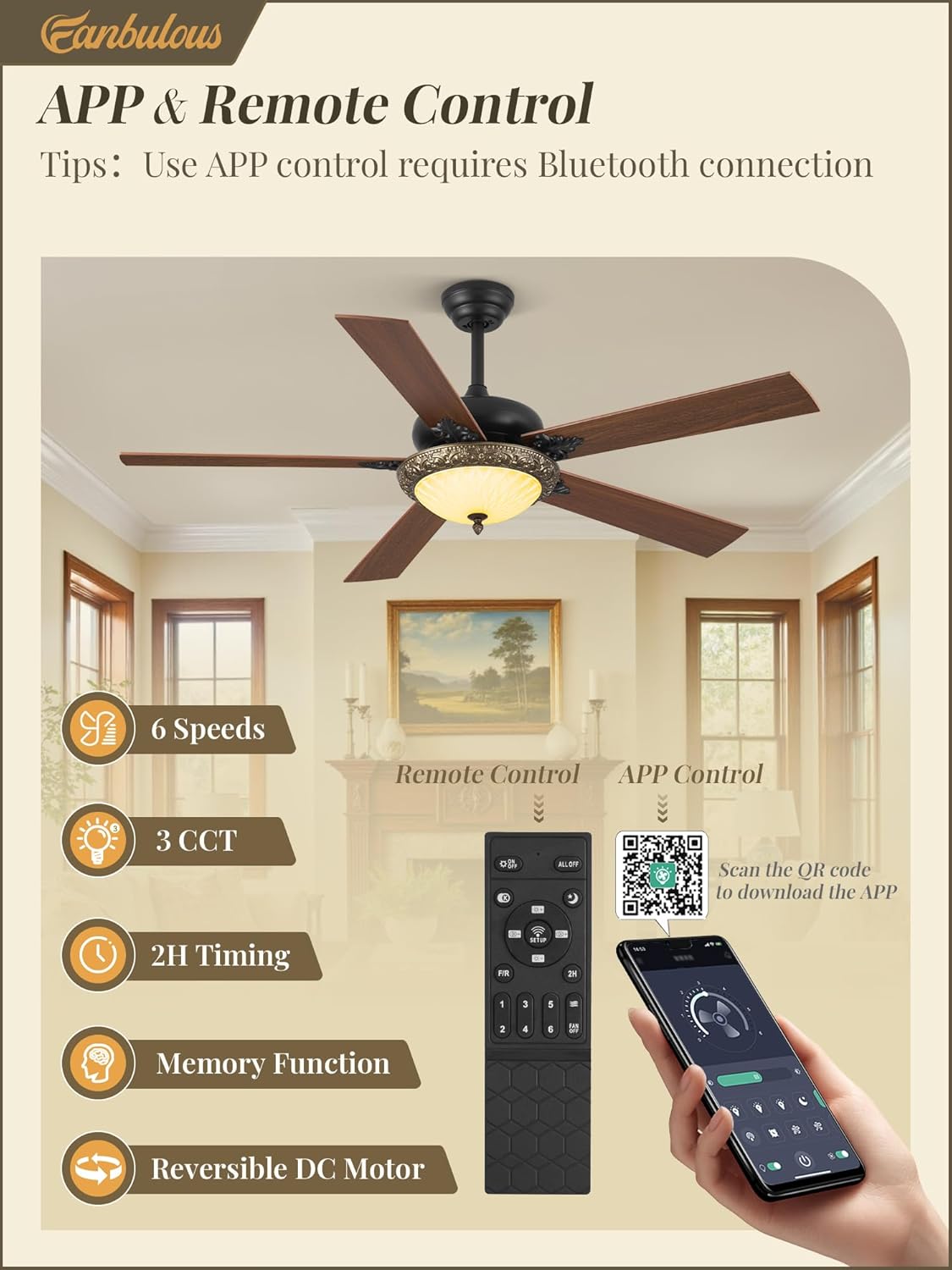
Figure 4: Remote control layout and mobile application interface for fan operation. Scan the QR code to download the app: http://www.jasonghost.com/fanlamppro/
2. Dimmable LED Light with 3-Color Temperature
The integrated LED light offers adjustable brightness from 10% to 100% and three color temperature options: warm white (3000K), natural light (4500K), and cool white (6000K). Use the remote or app to cycle through color temperatures and adjust brightness to suit your environment.

Figure 5: Visual representation of the adjustable light color temperatures and dimming capabilities.
3. Reversible DC Motor (Summer/Winter Mode)
The fan features a reversible DC motor for year-round comfort. In summer mode, the blades rotate counter-clockwise to deliver a cooling downward airflow. In winter mode, they rotate clockwise to circulate warm air upwards, distributing heat evenly throughout the room. Switch modes using the remote or app.

Figure 6: Explanation of the reversible motor function for seasonal use.
4. Memory Function
The fan is equipped with a memory function. Once you set your preferred light brightness, color temperature, wind speed, and fan steering, turn off the fan for at least 10 seconds. The fan will then remember these settings for your next use.
Maintenance
- Cleaning: To prevent damage to the finish, clean the fan with a soft, damp cloth. Do not use abrasive cleaners or solvents.
- Blade Care: Periodically check the blade attachments for tightness. Loose blades can cause wobbling and noise.
- Light Source: The LED light is integrated and designed for long life. Do not attempt to replace individual LED components.
Troubleshooting
| Problem | Possible Cause | Solution |
|---|---|---|
| Fan does not start | No power to the fan; Loose wire connections; Remote control battery low. | Check circuit breaker; Verify all wiring connections are secure; Replace remote control batteries. |
| Fan wobbles | Loose blade screws; Improperly balanced blades; Loose mounting bracket. | Tighten all blade screws; Use a balancing kit (not included) to balance blades; Ensure mounting bracket is securely fastened. |
| Light does not work | Loose wire connection to light kit; LED driver issue. | Check light kit wiring connection; Contact customer support if issue persists. |
| Remote/APP not responding | Battery low/dead; Pairing issue; Obstruction between remote and receiver. | Replace remote batteries; Re-pair remote/APP with fan (refer to pairing instructions); Ensure clear line of sight. |
Specifications
| Feature | Detail |
|---|---|
| Brand | Fanbulous |
| Model Name | F-GN56BK-1D01 |
| Item Model Number | GN-01 |
| Size | 56 inches |
| Color | Bronze |
| Style | Casual / Rustic |
| Power Source | AC/DC |
| Control Method | App, Remote |
| Light Source Type | LED (Dimmable, 3-Color Temperature) |
| Number of Blades | 5 (Dual Finish) |
| Fan Speeds | 6-Speeds |
| Motor Type | Reversible DC Motor |
| Item Weight | 14.3 pounds |
| Package Dimensions | 25.9 x 14.5 x 8.6 inches |
| Batteries Required | 2 AAA batteries (included for remote) |

Figure 7: Noise level comparison demonstrating the quiet operation of the Fanbulous ceiling fan.
Warranty and Support
Fanbulous is committed to providing exceptional after-sales service. This product comes with a 2-year warranty from the date of purchase.
Should you have any questions, concerns, or require technical assistance, please contact Fanbulous customer service. Refer to the packaging or the official Fanbulous website for the most current contact information.
For more information and support, you may visit the Fanbulous store on Amazon: Fanbulous Amazon Store.
Related documentsGN-01


Ask a question about this manual
Ask about setup, troubleshooting, compatibility, parts, safety, or missing instructions. Manuals+ will review the question and use this page’s manual context to help answer it.