
Husky HD5000PUO
Husky 5000lm LED Portable Work Light User Manual
Model: HD5000PUO
Introduction
Thank you for choosing the Husky 5000 Lumen LED Portable Work Light. This manual provides important information regarding the safe operation, setup, maintenance, and troubleshooting of your new work light. Please read this manual thoroughly before using the product and retain it for future reference.
The Husky 5000 Lumen LED Work Light is designed for versatility, offering powerful illumination for various tasks. It can be used independently or mounted on its included tripod, providing flexible lighting solutions. Its durable construction and long-lasting LED bulb ensure reliable performance.
Safety Information
Always follow basic safety precautions when using electrical appliances to reduce the risk of fire, electric shock, and personal injury.
- Do not look directly into the illuminated LED light.
- Ensure the power source matches the light's voltage requirements (55 Volts).
- Keep the work light away from flammable materials.
- Do not operate the light if the cord or plug is damaged.
- Do not immerse the light in water.
- Always unplug the light before cleaning or performing maintenance.
- Use only as intended for general illumination.
Package Contents
- Husky 5000lm LED Portable Work Light
- Adjustable Stand/Tripod Base
- Power Cord
- 2 AA batteries (included for remote, if applicable, or internal component)
Setup
Assembling the Work Light
- Carefully remove all components from the packaging.
- Unfold the adjustable stand base. Ensure the legs are fully extended for stability.
- Align the mounting hole on the work light with the screw on the stand.
- Securely attach the work light to the stand by tightening the knob.
- Adjust the angle of the light head as desired using the side adjustment knobs.

Figure 1: Front view of the Husky 5000lm LED Portable Work Light assembled on its stand.
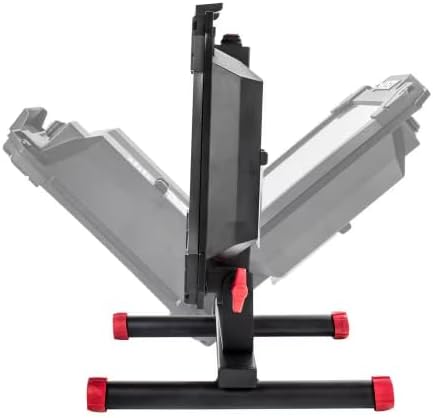
Figure 2: Side view illustrating the adjustable angle of the light head on its stand.
Detaching for Handheld Use
The work light can be easily detached from the stand for portable, handheld use.
- Loosen the knob securing the light to the stand.
- Carefully lift the light off the stand.
- The integrated easy-grip handle allows for comfortable transport and positioning.
Operating Instructions
Powering On/Off
- Ensure the work light is placed on a stable, level surface or held securely.
- Plug the power cord into a standard electrical outlet (120V AC, 60Hz).
- Locate the power switch, typically on the back or side of the unit.
- Press the power switch to turn the light ON.
- Press the power switch again to turn the light OFF.

Figure 3: Rear view of the work light, highlighting the power input and additional outlets.
Using Integrated Outlets (if applicable)
Some models may feature integrated power outlets or USB ports for convenience. Refer to Figure 3 for location.
- AC Outlet: For powering other tools or devices (e.g., 120V, 15A max). Do not exceed the maximum current rating.
- USB Port: For charging small electronic devices (e.g., 5V, 2.1A max).
Note: Using the integrated outlets may slightly reduce the overall brightness of the work light if the total power draw exceeds the unit's capacity.
Maintenance
Regular maintenance ensures the longevity and optimal performance of your Husky work light.
- Cleaning: Disconnect the power cord before cleaning. Use a soft, damp cloth to wipe down the exterior. Do not use abrasive cleaners or solvents.
- Storage: Store the work light in a cool, dry place when not in use. If storing for extended periods, ensure it is clean and free of debris.
- LED Bulb: The integrated LED bulb is designed for long life and does not require replacement.
- Cord Inspection: Periodically inspect the power cord for any signs of damage, cuts, or fraying. If damaged, discontinue use and have it repaired by a qualified technician.
Troubleshooting
| Problem | Possible Cause | Solution |
|---|---|---|
| Light does not turn on. | No power to the outlet. Power cord is damaged. Light switch is off. | Check the circuit breaker or try a different outlet. Inspect the cord for damage; discontinue use if damaged. Ensure the power switch is in the ON position. |
| Light flickers or is dim. | Low voltage. Overloaded circuit. | Ensure the power source is stable. Disconnect other devices from the same circuit or integrated outlets. |
| Light gets hot. | Normal operation. Insufficient ventilation. | The light is designed to be "cool to the touch" but some warmth is normal. Ensure adequate airflow around the unit. Do not cover the light. |
Specifications
| Feature | Detail |
|---|---|
| Model Number | HD5000PUO |
| Brightness | 5000 Lumens |
| Light Source Type | Integrated LED |
| Color Temperature | 4000 Kelvin |
| Power Source | Plug-In (AC) |
| Voltage | 55 Volts (Input assumed 120V AC, output to LED 55V) |
| Material | Aluminum |
| Dimensions (L x W x H) | 2" x 10.62" x 12.88" |
| Weight | (Not specified in input) |
| Batteries Included | 2 AA (for remote, if applicable, or internal component) |
| UPC | 819286019503 |
Warranty Information
Husky products are manufactured to high-quality standards and are warranted against defects in materials and workmanship. For specific warranty terms and conditions, please refer to the warranty card included with your product or visit the official Husky website.
Please retain your proof of purchase for warranty claims.
Customer Support
If you have any questions or require assistance with your Husky 5000lm LED Portable Work Light, please contact Husky Customer Service:
- Website: www.huskytools.com (Example link, actual link may vary)
- Phone: Refer to the product packaging or official website for contact numbers.
When contacting support, please have your model number (HD5000PUO) and purchase date available.
Related documentsHD5000PUO


Ask a question about this manual
Ask about setup, troubleshooting, compatibility, parts, safety, or missing instructions. Manuals+ will review the question and use this page’s manual context to help answer it.