
PGST PGST A01F
PGST Home Security Alarm System User Manual
Model: PGST A01F (5 PIECE KITS)
1. Introduction
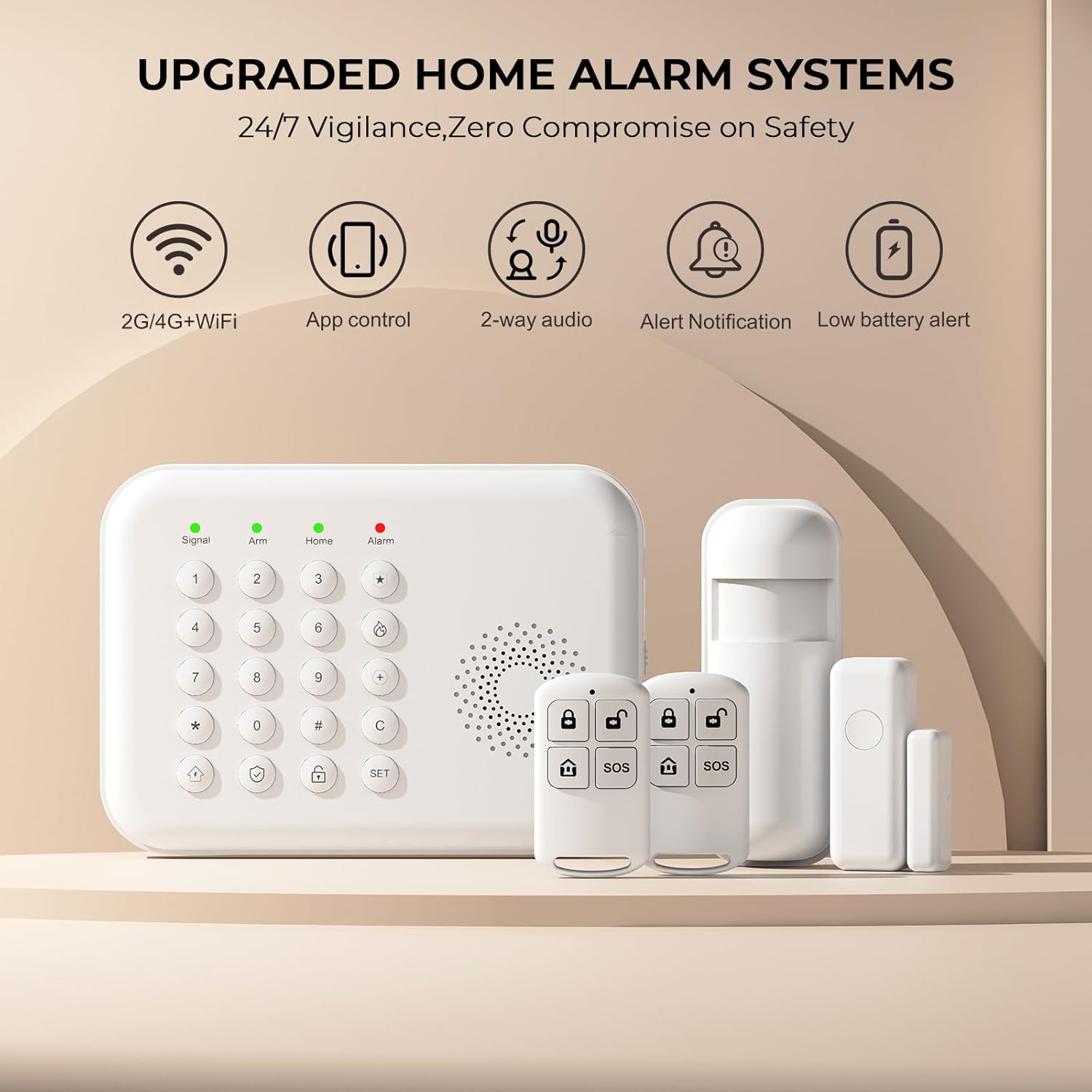
The PGST Home Security Alarm System is a comprehensive wireless solution designed to provide 24/7 monitoring and real-time alerts for your home. This 5-piece kit includes a smart keypad, door/window sensors, motion sensors, and remote controls, offering enhanced safety features for families and individuals. The system supports both 2.4GHz WiFi and 4G GSM connectivity, ensuring reliable communication and alerts via the Tuya or Smart Life mobile applications.

2. Package Contents
Please verify that all items listed below are included in your package:
- 1 x PGST A01F Smart Keypad Alarm Host
- 1 x Motion Sensor (PIR Detector)
- 1 x Door/Window Sensor
- 2 x Remote Controls
- 1 x Power Adapter
- Mounting Hardware (screws, anchors)
- 1 x User Manual
3. Setup and Installation
The PGST Home Security Alarm System is designed for easy DIY installation without complex steps. Follow these guidelines for a smooth setup:
3.1 Initial Setup
- Power On: Connect the keypad alarm host to a power outlet using the provided power adapter. Ensure the power switch on the side of the unit is set to 'ON'.
- App Download: Download the 'Tuya Smart' or 'Smart Life' app from your smartphone's app store.
- Account Registration: Register for a new account or log in if you already have one.
- Add Device: Follow the in-app instructions to add your PGST A01F Smart Keypad Alarm Host. Ensure your phone is connected to a 2.4GHz Wi-Fi network (5GHz Wi-Fi is not supported).
3.2 Connecting to Wi-Fi and Setting Alarm Numbers
The system supports both Wi-Fi (2.4GHz only) and a 4G GSM SIM card for alerts. You can receive app push notifications via Wi-Fi, and the 4G card enables calls or SMS messages during emergencies.

3.3 Adding Accessories (Sensors and Remotes)
The system is expandable, allowing you to add more sensors and accessories from the PGST store. Follow the pairing instructions below:

3.4 Sensor Placement
- Door/Window Sensors: Install these magnetic contacts on door and window frames. They detect when an opening occurs and send instant alerts.
- Motion Sensors (PIR Detectors): Place these in high-traffic areas like hallways or living rooms. They use infrared technology to sense movement and distinguish between human motion and other disturbances.

4. Operating the System
The PGST alarm system offers multiple ways to arm, disarm, and manage your home security.
4.1 Arming and Disarming
- Keypad: Use the keypad to enter your security code to arm or disarm the system.
- Remote Control: The included remote controls provide quick arm/disarm functionality.
- Mobile App: Arm or disarm the system remotely from anywhere using the Tuya Smart or Smart Life app.

4.2 Remote Monitoring and Alerts
The mobile app enables you to monitor and control your system from anywhere. You can check the status of sensors and receive real-time alerts on your smartphone. If an emergency occurs, the system can send app push notifications and, if a 4G SIM card is installed, make calls or send messages to preset numbers.


4.3 SOS Button Functionality
The SOS button is a crucial safety feature, especially beneficial for elderly family members or children. In case of an emergency, pressing the SOS button will trigger an immediate alert to the preset emergency contacts.

4.4 Voice Control Integration
The PGST alarm system is compatible with popular voice assistants like Amazon Alexa and Google Assistant, allowing for convenient voice commands to arm or disarm your system.

5. System Components
5.1 Smart Keypad Alarm Host
The central unit of your security system, featuring a compact design for easy wall mounting and a user-friendly keypad for operation.


6. Maintenance
6.1 Battery Information
The PGST A01F Home Alarm System is equipped with a built-in Lithium Polymer battery, allowing it to function normally even during a power outage. The system will provide a low battery alert when charging is needed.

6.2 General Care
- Keep the devices clean and free from dust.
- Avoid exposing the devices to extreme temperatures or humidity.
- Do not attempt to disassemble or repair the devices yourself. Contact customer support if issues arise.
7. Troubleshooting
This section addresses common questions and issues you might encounter with your PGST Home Security Alarm System.
7.1 Frequently Asked Questions (FAQs)
- Q: What network does this home security system support?
- A: It only supports 2.4GHz Wi-Fi (not 5G Wi-Fi) and a 4G GSM card. You can receive Tuya app alert pushes, while the 4G card can call you or send you a message if an emergency happens.
- Q: What should I do if I don't know how to set it up after receiving it?
- A: Refer to the detailed instructions in this manual and the mobile application. Additional operation videos can be provided if necessary. Contact customer support for further assistance.
- Q: Does this device support adding more sensors and accessories?
- A: Yes, the system is expandable. You can add more sensors and accessories, such as sirens or cameras, available from the PGST store.
7.2 Common Issues
- Sensors Disconnecting: Ensure sensors are within range of the alarm host and have fresh batteries. Re-pair them if necessary following the 'How to Add Accessories' instructions.
- No App Alerts: Check your Wi-Fi connection (ensure it's 2.4GHz), app notification settings on your phone, and ensure the app is running in the background. If using 4G, verify the SIM card is active and has credit.
- Keypad Unresponsive: Check the power connection and ensure the power switch is 'ON'. If battery-powered, check battery level.
8. Specifications
| Feature | Detail |
|---|---|
| Brand | PGST |
| Model Number | PGST A01F |
| Power Source | Battery Powered |
| Compatible Devices | Smartphone, Tablet |
| Item Dimensions (L x W x H) | 1 x 1 x 1 inches |
| Control Method | App |
| Battery Cell Composition | Lithium Polymer |
| Item Weight | 1.08 pounds |
| UPC | 735083581367 |
9. Warranty and Support
For warranty information and customer support, please refer to the official PGST website or contact the retailer where you purchased the product. The PGST Home Security Alarm System is designed to provide reliable security without recurring contract fees.

Related documentsPGST A01F


Ask a question about this manual
Ask about setup, troubleshooting, compatibility, parts, safety, or missing instructions. Manuals+ will review the question and use this page’s manual context to help answer it.