
LIGE FV4-D1 Sliver
LIGE Smart Watch for Women - User Manual
Brand: LIGE | Model: FV4-D1 Sliver
1. Introduction
This manual provides comprehensive instructions for setting up, operating, and maintaining your LIGE Smart Watch for Women (Model FV4-D1 Sliver). This smartwatch is designed with a 1.19-inch AMOLED display, features Bluetooth calling and message notifications, and includes various health monitoring and sport modes. Please read this manual carefully to ensure proper use and to maximize the functionality of your device.

Image: The LIGE Smart Watch, showcasing its elegant design with a diamond-studded bezel and two interchangeable bands (silver metal and beige silicone). The watch display shows time, date, and icons for call and message functions.
2. Setup Guide
2.1 Charging Your Smartwatch
Before first use, fully charge your smartwatch. Connect the magnetic charging cable to the charging points on the back of the watch and plug the USB end into a power adapter (not included) or a computer's USB port. A full charge typically takes approximately 2.5 hours.

Image: A visual representation of the smartwatch being charged using its magnetic charging cable, highlighting the connection points and the charging indicator on the watch screen.
A full charge provides approximately 5 days of working time and up to 30 days of standby time, depending on usage.
2.2 App Installation and Pairing
To unlock the full features of your smartwatch, you need to download and install the companion application on your smartphone. Refer to the quick start guide included in the packaging for the specific app name and QR code for download. Once installed:
- Enable Bluetooth on your smartphone.
- Open the companion app and follow the on-screen instructions to add your device.
- Select your smartwatch from the list of available Bluetooth devices.
- Confirm the pairing request on both your phone and the smartwatch.
Once paired, the watch will synchronize data with your phone, and you will be able to receive notifications and use calling features.
3. Operating Your Smartwatch
3.1 Basic Navigation
The LIGE Smart Watch features a 1.19-inch AMOLED full touch screen for intuitive navigation. Swipe left, right, up, or down to access different menus and functions. Press the side button to return to the home screen or to power on/off the device.

Image: A close-up of the smartwatch display, emphasizing its 1.19-inch AMOLED screen with vibrant colors and sharp detail, featuring a butterfly design.
3.2 Bluetooth Calling & Message Notifications
With Bluetooth 5.2 connectivity, your smartwatch allows you to make and receive calls directly from your wrist. It includes a 60-decibel speaker and a noise-cancelling microphone for clear communication. You can also view notifications from various apps such as SMS, Facebook, WhatsApp, Twitter, and TikTok.
- Making Calls: Access the dial keypad or contacts list on your watch to initiate a call.
- Answering Calls: When a call comes in, tap the green answer icon on the watch screen.
- Message Notifications: Ensure app notifications are enabled in your phone's settings and the companion app to receive alerts on your watch.

Image: A hand wearing the smartwatch, displaying various social media and communication app icons around it, illustrating the message notification capabilities. Insets show the dial keypad and incoming call screen.
3.3 Health Monitoring
The smartwatch provides comprehensive health tracking features to help you monitor your well-being.
- Heart Rate Monitoring: Continuously tracks your heart rate throughout the day.
- Blood Oxygen (SpO2) Monitoring: Measures your blood oxygen saturation levels.
- Sleep Monitoring: Analyzes your sleep patterns, including deep sleep, light sleep, and awake time.
- Women's Health Tracking: Features a menstrual cycle tracker, helping to predict menstrual and ovulation periods.

Image: A collage showing various health monitoring features: sleep tracking with different sleep stages, heart rate, blood oxygen saturation, and breath training exercises.

Image: Three panels illustrating the women's health features, including settings for female health, a menstrual reminder calendar, and a pregnancy period reminder displayed on the watch.
3.4 Sport Modes
The smartwatch supports over 120 sport modes, allowing you to track various activities such as running, cycling, badminton, basketball, football, golf, rugby, baseball, jump rope, and weight training. It records data like time, calories burned, steps, and distance.
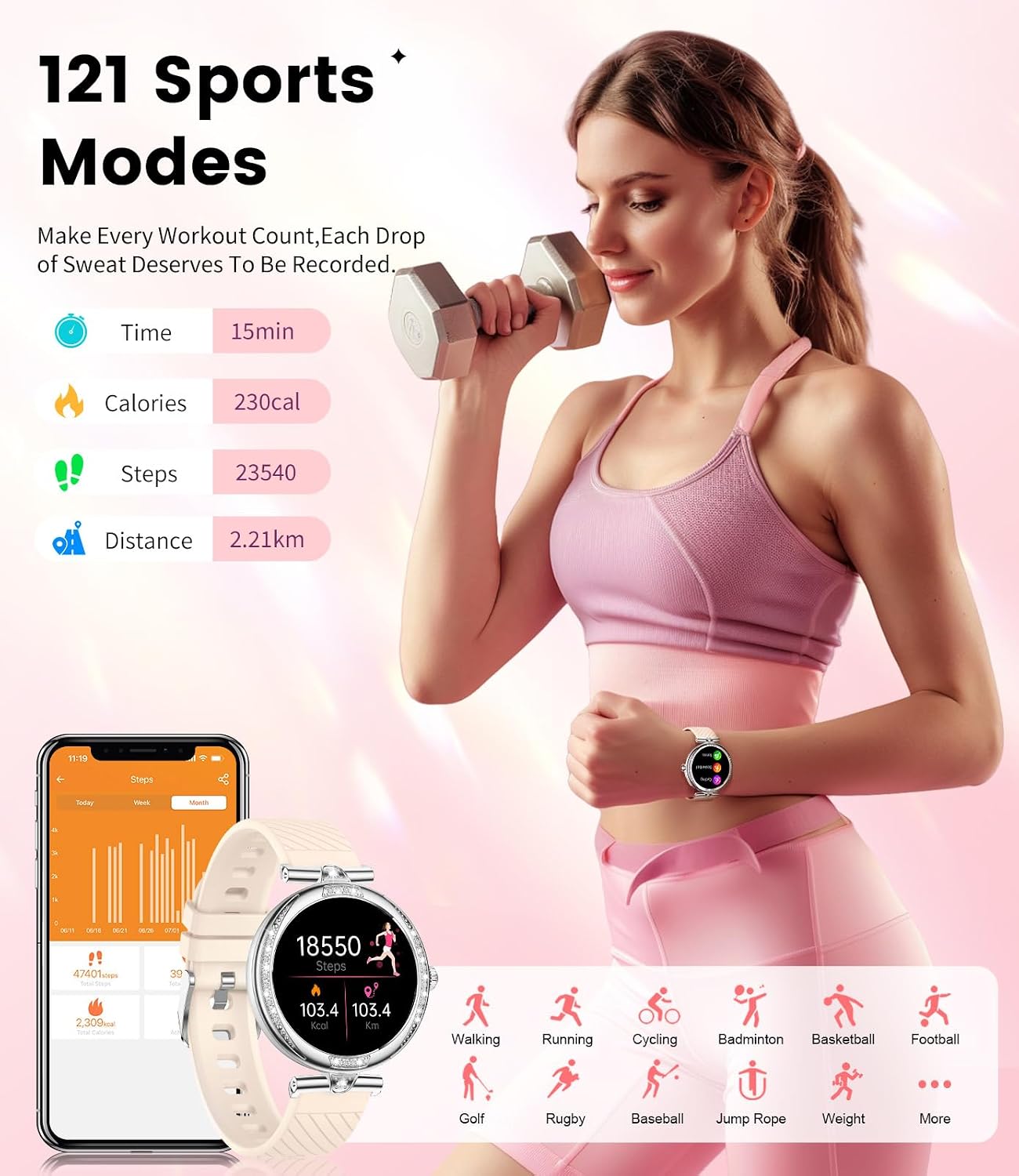
Image: A woman lifting weights, with an overlay showing the watch's display of steps, calories, and distance. Icons for various sports modes are also visible.
3.5 Customizing Watch Faces
Personalize your smartwatch with over 200 available watch faces. You can also create custom watch faces using your own photos through the companion app.

Image: The smartwatch displaying different digital and analog watch faces, alongside a smartphone screen showing options to select or create custom wallpapers.
3.6 Other Functions
Your LIGE Smart Watch offers a variety of additional useful features:
- Music Control: Control music playback on your smartphone directly from your watch.
- Alarm: Set alarms to wake you up or remind you of important events.
- Weather: Get real-time weather updates.
- Voice Assistant: Interact with your phone's voice assistant.
- Remote Camera: Use your watch as a remote shutter for your phone's camera.
- Find Phone: Locate your misplaced phone by making it ring.
- Calculator: Perform basic calculations on your wrist.
- Stopwatch & Timer: For timing activities.
- Password Protection: Secure your watch with a password.
- Calendar: View your schedule.

Image: A composite image displaying several features: music control with headphones, an alarm clock, weather forecast, a list of multifunctional icons (Find Phone, Calculator, Women's Health, Brightness Adjustment, Message Alerts, Stopwatch, Timer, Password, Calendar, More), a voice assistant interface, a remote camera function, and a person washing hands to demonstrate IP68 waterproofing.
4. Maintenance and Care
4.1 Water Resistance (IP68)
The LIGE Smart Watch is IP68 waterproof, meaning it can withstand splashes, hand washing, and swimming. However, it is not recommended for hot showers, saunas, or diving, as steam and hot water can damage the seals. Avoid prolonged submersion in water.

Image: A person in a swimming pool, illustrating the IP68 waterproof capability of the smartwatch, with icons for rain, handwashing, and swimming.
4.2 Cleaning
To keep your smartwatch clean, wipe it regularly with a soft, dry, lint-free cloth. If necessary, dampen the cloth slightly with water. Avoid using harsh chemicals or abrasive materials, as these can damage the watch's finish and components.
4.3 Battery Care
To prolong battery life, avoid fully discharging the watch frequently. Charge it when the battery level is low. Store the watch in a cool, dry place when not in use for extended periods.
5. Troubleshooting
If you encounter any issues with your LIGE Smart Watch, refer to the table below for common problems and their solutions.
| Problem | Possible Cause | Solution |
|---|---|---|
| Watch does not turn on or charge. | Low battery; improper charging connection; faulty charger/cable. | Ensure the magnetic charger is correctly aligned. Try a different USB port or power adapter. Allow it to charge for at least 30 minutes before attempting to turn it on. |
| Cannot pair with smartphone. | Bluetooth is off; watch not in pairing mode; app issues; interference. | Ensure Bluetooth is enabled on your phone. Restart both the watch and phone. Clear Bluetooth cache on your phone. Make sure the watch is discoverable. Reinstall the companion app if necessary. |
| Notifications not received. | App permissions not granted; notification settings off in app/phone. | Check notification permissions for the companion app in your phone's settings. Ensure notifications are enabled within the companion app for specific applications. |
| Screen flickering or unresponsive touchscreen. | Software glitch; water damage; physical damage. | Restart the watch. If the issue persists after exposure to water, ensure the watch is completely dry. If the problem continues, contact customer support. |
| Inaccurate health data (e.g., sleep tracking). | Improper fit; sensor obstruction; software calibration. | Ensure the watch is worn snugly but comfortably on your wrist. Clean the sensors on the back of the watch. Check for app updates or recalibration options within the app. |
6. Product Specifications
| Feature | Detail |
|---|---|
| Model Number | FV4-D1 Sliver |
| Product Dimensions | 10 x 1.97 x 0.98 inches |
| Item Weight | 0.035 ounces (1 Grams) |
| Screen Size | 1.19 Inches (AMOLED) |
| Operating System | Android (compatible) |
| Wireless Communication | Bluetooth 5.2 |
| Battery Type | Lithium Ion (included) |
| Charging Time | Approx. 2.5 Hours |
| Working Hours | Approx. 5 Days |
| Standby Time | Approx. 30 Days |
| Water Resistance | IP68 |
| Special Features | Phone Call, Health Monitoring (HR, SpO2, Sleep, Women's Health), 120+ Sport Modes, Message Notifications, Voice Assistant, Remote Camera, Music Control |

Image: A diagram illustrating the dimensions of the smartwatch (35mm diameter, 9mm thickness, 235mm band length) and details on battery life: 2.5 hours charging, 5 days working, 30 days standby.
7. Warranty and Support
LIGE is committed to providing excellent customer service and product quality. Your LIGE Smart Watch comes with the following:
- 24-Hour Online Service: For immediate assistance with any queries or issues.
- 6 Months Returns Service: For eligible returns within six months of purchase.
- 2 Years Guarantee: A comprehensive guarantee covering manufacturing defects for two years from the date of purchase.
For support, please refer to the contact information provided in your product packaging or visit the official LIGE website.
Related documentsFV4-D1 Sliver


Ask a question about this manual
Ask about setup, troubleshooting, compatibility, parts, safety, or missing instructions. Manuals+ will review the question and use this page’s manual context to help answer it.