
Toputure TP4
Toputure TP4 Treadmill User Manual
4-in-1 Foldable Electric Walking Pad with 9% Incline
1. Introduction and Safety Information
Thank you for choosing the Toputure TP4 Treadmill. This manual provides essential information for the safe and effective use, setup, operation, and maintenance of your new fitness equipment. Please read this manual thoroughly before first use and retain it for future reference.
Important Safety Instructions
- Always consult with a physician before starting any new exercise program.
- Read all instructions in this manual before operating the treadmill.
- Keep children and pets away from the treadmill during operation.
- Place the treadmill on a flat, stable surface with at least 0.6 meters (2 feet) of clear space around it.
- Wear appropriate exercise clothing and athletic shoes. Avoid loose clothing that could get caught in moving parts.
- Use the safety key at all times. Attach the clip to your clothing before starting your workout. In case of an emergency, the safety key will stop the treadmill.
- Do not operate the treadmill if it has a damaged cord or plug, or if it is not working properly.
- Do not attempt to service the treadmill yourself. Contact qualified service personnel for repairs.
- The maximum user weight for this treadmill is 130 kg (286 lbs).
2. Product Overview
The Toputure TP4 Treadmill is a versatile 4-in-1 fitness device designed for various exercise needs, from walking to running. Its compact and foldable design makes it suitable for home and office environments, allowing for easy storage and use under a standing desk or as a traditional treadmill.
Key Features
- 4-in-1 Functionality: Functions as a walking pad (1-8 km/h) and a running treadmill (8-12 km/h), adaptable for under-desk use or with the handrail.
- Manual 9% Incline: Features a single-level manual incline adjustment (4.3° or 9%) to increase workout intensity and calorie burn.
- Powerful and Quiet Motor: Equipped with a 2.5 HP motor for smooth operation, maintaining a noise level below 45dB.
- Dual LED Display: Two multi-function LED screens display real-time data including speed, distance, time, and calories.
- Remote Control: Conveniently adjust speed and mode via a remote control, which features magnetic storage on the handrail.
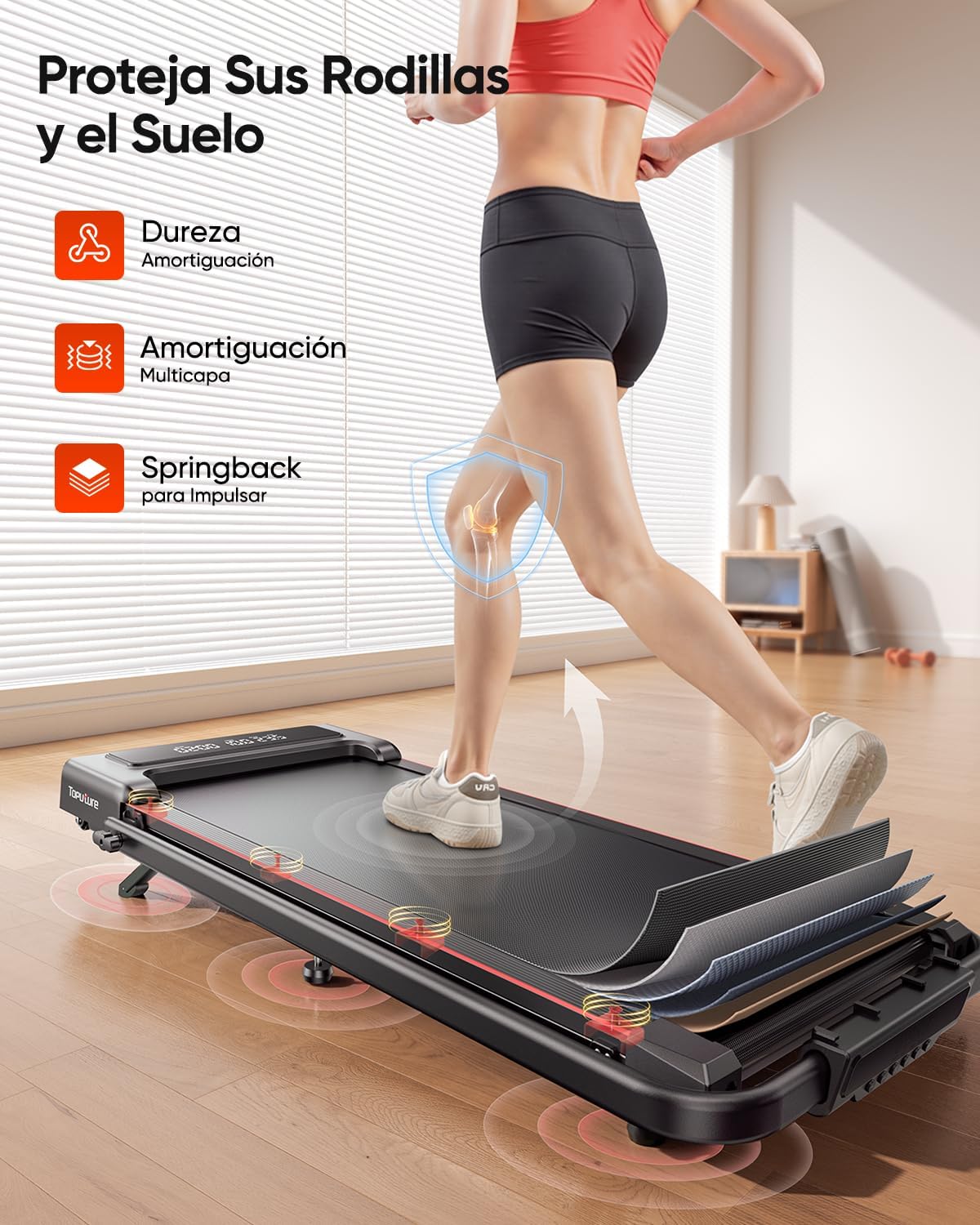
- Shock Absorption System: Multi-layer running belt with internal silicone columns to absorb impact, protecting knees and joints.
- Space-Saving Design: Foldable and portable with transport wheels for easy movement and storage under a sofa or table.
- App Connectivity: Compatible with applications like FITSHOW for guided workouts and data tracking.
Package Contents
- Toputure TP4 Treadmill
- User Manual (this document)
- Remote Control
- Safety Key
- Lubrication Oil (may be included separately or pre-applied)
- Tools for adjustment (e.g., Allen wrench for belt adjustment)
Product Diagram


3. Setup and Initial Use
Unpacking and Placement
- Carefully remove the treadmill from its packaging.
- Place the treadmill on a firm, level surface. Ensure there is adequate clear space around the unit for safe operation.
- Connect the power cord to a grounded electrical outlet.
No Assembly Required
The Toputure TP4 Treadmill features an advanced design that requires no complex assembly. Simply unfold the unit to prepare it for use.
Unfolding the Handrail
- Lift the handrail into its upright position.
- Secure the handrail by turning the locking buckle or mechanism until it clicks into place. Ensure it is firmly locked before use.
Adjusting the Manual Incline (9%)
The treadmill offers a fixed 9% manual incline to enhance your workout. To activate or deactivate the incline:

- To engage incline: Locate the footrest at the rear of the treadmill. Unfold it and insert the provided pin to secure it in the elevated position. Adjust the central footrest for stability.
- To disengage incline: Remove the pin and fold the footrest back into its flat position.
Always ensure the incline mechanism is securely set before starting your exercise.

4. Operating Instructions
Control Panel and Remote Control

The treadmill can be controlled via the integrated control panel or the wireless remote control. The remote control can be magnetically attached to the handrail for convenient access and storage.
Powering On/Off
- Power On: Plug in the treadmill and press the power button on the control panel or remote.
- Power Off: Press the power button again or remove the safety key.
Using the Safety Key
The safety key is a critical safety feature. Attach the clip of the safety key to your clothing before starting any exercise. If the safety key is detached from the treadmill, the machine will immediately stop, preventing potential injury.
Starting a Workout
- Ensure the safety key is properly attached.
- Press the START button on the control panel or remote. The treadmill will begin at a low speed.
- Gradually increase the speed to your desired level using the + or - buttons.
Speed Modes
- Walking Mode: Speed range of 1 to 8 km/h. Ideal for light exercise or under-desk use.
- Running Mode: Speed range of 8 to 12 km/h. Suitable for more intense cardio workouts.
Pause Function
During your workout, press the PAUSE button to temporarily stop the treadmill without losing your current workout data. Press START again to resume.
Dual LED Display
The two LED screens provide real-time feedback on your workout:
- Speed: Current speed in km/h.
- Distance: Total distance covered.
- Time: Duration of your workout.
- Calories: Estimated calories burned.
Pre-set Programs
The treadmill includes 12 pre-set programs. To select a program, press the MODE button on the control panel or remote. Each program offers varying speed and intensity profiles. Refer to the display for program details.
FITSHOW App Connectivity
The treadmill can connect to fitness applications like FITSHOW for enhanced workout tracking and guided sessions. Download the FITSHOW app from your device's app store and follow the in-app instructions to pair with your treadmill via Bluetooth.
5. Maintenance
Regular maintenance ensures the longevity and optimal performance of your Toputure TP4 Treadmill.
Lubrication of the Running Belt
The running belt requires periodic lubrication to reduce friction and wear. Use only silicone oil specifically designed for treadmills.

- Turn off and unplug the treadmill.
- Loosen the rear roller bolts slightly to lift the running belt.
- Apply a small amount of silicone oil evenly under the center of the running belt.
- Tighten the rear roller bolts.
- Plug in the treadmill and run it at a low speed (e.g., 3 km/h) for 5 minutes to distribute the lubricant.
Lubricate every 30-50 hours of use, or if the belt feels dry or makes excessive noise.
Cleaning
- Wipe down the treadmill surfaces with a damp cloth after each use. Avoid abrasive cleaners.
- Periodically vacuum dust from around the motor cover.
Running Belt Adjustment
If the running belt slips or moves off-center, it may need adjustment.
- Turn off and unplug the treadmill.
- For centering: If the belt drifts to the left, turn the left rear roller bolt clockwise in small increments. If it drifts to the right, turn the right rear roller bolt clockwise. Run the treadmill at a low speed to check alignment.
- For tension: If the belt slips during use, turn both rear roller bolts clockwise in equal small increments to increase tension. Do not overtighten.
Storage
The treadmill's foldable design allows for convenient storage.

- Ensure the treadmill is turned off and unplugged.
- Fold down the handrail by releasing the locking mechanism.
- Utilize the integrated transport wheels to move the treadmill to your desired storage location, such as under a sofa or against a wall.
6. Troubleshooting
If you encounter issues with your treadmill, refer to the following common problems and solutions:
| Problem | Possible Cause | Solution |
|---|---|---|
| Treadmill does not power on. | Power cord not plugged in; Safety key not in place; Power switch off. | Ensure power cord is securely plugged in; Insert safety key correctly; Turn on the power switch. |
| Running belt slips or hesitates. | Belt too loose; Insufficient lubrication. | Adjust belt tension (see Maintenance section); Lubricate the running belt (see Maintenance section). |
| Running belt drifts to one side. | Belt alignment issue. | Adjust belt alignment (see Maintenance section). |
| Unusual noise during operation. | Loose components; Lack of lubrication; Foreign object. | Check for and tighten any loose bolts; Lubricate the running belt; Inspect for and remove any foreign objects. |
| Remote control not working. | Battery depleted; Obstruction. | Replace remote control battery; Ensure no obstructions between remote and treadmill. |
If the problem persists after attempting these solutions, please contact customer support.
7. Specifications
| Feature | Detail |
|---|---|
| Brand | Toputure |
| Model Number | TP4 |
| Color | Gray |
| Dimensions (L x W x H) | 127 x 58 x 107 cm (50 x 22.8 x 42.1 inches) |
| Folded Dimensions (L x W x H) | Approx. 127 x 58 x 11.5 cm (50 x 22.8 x 4.5 inches) |
| Product Weight | 24 kg (52.9 lbs) |
| Frame Material | Alloy Steel |
| Motor Power | 2.5 HP |
| Speed Range | 1 - 12 km/h (0.6 - 7.5 mph) |
| Maximum Incline | 9% (Manual Adjustment) |
| Maximum User Weight | 130 kg (286 lbs) |
| Running Surface (L x W) | 1000 x 400 mm (39.4 x 15.7 inches) |
| Number of Programs | 12 Pre-set Programs |
| Display Metrics | Speed, Distance, Time, Calories Burned |
| Power Source | Electric Cable |
| Special Features | Transport Wheels, Magnetic Remote Storage, App Connectivity (FITSHOW) |
| Assembly Required | No |


8. Warranty and Support
Warranty Information
The Toputure TP4 Treadmill typically comes with a 2-year warranty. To ensure your warranty is active and for specific terms and conditions, it is recommended to register your product via email as instructed by the manufacturer or retailer at the time of purchase.
Customer Support
For any questions, technical assistance, or warranty claims, please contact Toputure customer support through the retailer where you purchased the product or refer to the contact information provided with your purchase documentation.
Related documentsTP4


Ask a question about this manual
Ask about setup, troubleshooting, compatibility, parts, safety, or missing instructions. Manuals+ will review the question and use this page’s manual context to help answer it.