
1. Introduction
This manual provides detailed instructions for the installation, operation, and maintenance of your PGST Smart PIR Motion Detector (Model P92R). This device is designed to enhance the security of your home or property by detecting human movement and integrating with compatible PGST home alarm systems such as the A103F, A105F, A107F, A108F, A109F, A01F, A02F, and A519W series.
The PIR (Passive Infrared) motion detector utilizes advanced technology to sense infrared radiation emitted by moving bodies, providing reliable detection and triggering alerts within your security system.
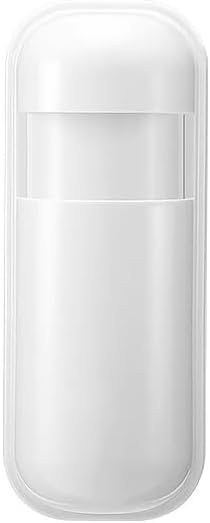

2. Product Features
The PGST Smart PIR Motion Detector is equipped with several features designed for effective and reliable security monitoring:
- Wide Detection Range: Offers a 110° motion coverage with a detection distance of up to 12 meters.
- Advanced Microprocessor: Utilizes a CMOS low-power microprocessor for efficient performance.
- Extended Battery Life: Designed for low power consumption, contributing to longer battery life.
- Low Voltage Alarm: Features a low voltage alarm function to alert users when the battery needs replacement.
- Intelligent Logic Analysis: Incorporates intelligent logic analysis to minimize false positives.
- Interference Resistance: Built with anti-white light and anti-high frequency interference capabilities.
- Real-time Alerts: Sends real-time notifications through the Tuya app when motion is detected (when paired with a compatible alarm system).


3. Package Contents
Verify that all items are present in your package:
- 1 x PGST P92R Motion Sensor
- Installation Bracket (pre-attached or separate)
- User Manual (this document)
Note: Batteries are included with the device, but may require insertion before first use.
4. Setup
4.1. Battery Installation
- Locate the battery compartment on the back of the motion detector.
- Open the compartment cover.
- Insert the included Lithium Polymer battery, ensuring correct polarity (+/-).
- Close the battery compartment cover securely.
4.2. Powering On
After battery installation, locate the power switch, typically found near the battery compartment or on the side of the device. Switch the device to the "ON" position. An indicator light may flash briefly to confirm power-on.

4.3. Pairing with PGST Alarm System
The PGST P92R Motion Detector is designed to work with PGST A103F, A105F, A107F, A108F, A109F, A01F, A02F, and A519W Home Alarm systems. Refer to your specific PGST alarm system's user manual for detailed instructions on how to add new wireless sensors. Generally, the process involves:
- Accessing the sensor pairing mode on your PGST alarm panel.
- Triggering the motion detector (e.g., by waving a hand in front of it) to send a signal to the alarm panel.
- Confirming successful pairing on the alarm panel display or through the associated mobile application (e.g., Tuya app).
For specific app-related setup, ensure your alarm system is connected to the 2.4GHz Wi-Fi network and the Tuya app is installed on your smartphone.
5. Installation
5.1. Choosing an Installation Location
Select a location that provides optimal coverage for motion detection. The detector is suitable for various indoor and semi-outdoor environments such as driveways, garages, gardens, lawns, sidewalks, terraces, and walkways. Avoid direct sunlight, heat sources, or areas with strong air currents that might cause false alarms.

5.2. Mounting the Detector
The PGST P92R is designed for wall mounting. Use the provided installation bracket and hardware (if included) to securely attach the detector to a wall. Ensure the detection window is unobstructed and facing the area you wish to monitor.
- Recommended Height: Typically 2.2 to 2.4 meters (7.2 to 7.9 feet) from the ground for optimal coverage.
- Angle Adjustment: Adjust the angle of the detector using its bracket to cover the desired area. The 110° detection angle and 12-meter range should be considered.

6. Operating Instructions
6.1. Motion Detection
Once powered on and paired with your PGST alarm system, the motion detector will continuously monitor its detection area. When a moving heat source (like a person) enters its 110° field of view within 12 meters, the detector will sense the change in infrared energy.
6.2. Alarm Triggering
Upon detecting motion, the P92R will transmit a signal to the connected PGST alarm panel. If the alarm system is armed, it will trigger the alarm sequence (e.g., siren activation, app notifications, calls/SMS via 4G GSM card if configured).
6.3. Low Battery Notification
The detector is equipped with a low voltage alarm function. When the battery level drops to a critical point, the detector will send a low battery report to your alarm system, which may then notify you via the Tuya app or the alarm panel display. Replace the battery promptly to ensure continuous protection.
7. Maintenance
7.1. Battery Replacement
When a low battery alert is received, replace the Lithium Polymer battery as soon as possible. Follow the battery installation steps outlined in Section 4.1. Always use the recommended battery type.
7.2. Cleaning
Periodically clean the detection window of the sensor with a soft, dry cloth to ensure optimal performance. Avoid using abrasive cleaners or solvents that could damage the device.
7.3. Testing
It is recommended to test the motion detector periodically (e.g., monthly) to ensure it is functioning correctly. Arm your alarm system and walk through the detection area to verify that the alarm is triggered and notifications are received.
8. Troubleshooting
| Problem | Possible Cause | Solution |
|---|---|---|
| Detector not responding / No motion detected |
|
|
| False alarms |
|
|
| Low battery alert persists after replacement |
|
|
If you encounter issues not covered here or require further assistance, please contact PGST customer support. Additional operation videos may be available upon request.
9. Specifications
| Feature | Detail |
|---|---|
| Brand | PGST |
| Model Number | PGST P92R |
| Power Source | Battery Powered |
| Battery Type | 1 Lithium Polymer battery (included) |
| Mounting Type | Wall Mount |
| Detection Angle | 110° |
| Detection Distance | Up to 12 meters |
| Compatible Devices | PGST A103F, A105F, A107F, A108F, A109F, A01F, A02F, A519W Home Alarm Systems, Smartphone (via Tuya app) |
| Product Dimensions | Approximately 5 x 4 x 3 inches (10.6 cm x 4.2 cm) |
| Item Weight | 2.64 ounces |
| Included Components | 1 X P92R Motion Sensor |
| UPC | 704444502365 |
| Date First Available | July 1, 2025 |

10. Warranty and Support
10.1. Warranty Information
Specific warranty details for the PGST Smart PIR Motion Detector are typically provided at the point of purchase or within the product packaging. Please retain your proof of purchase for warranty claims.
10.2. Customer Support
For technical assistance, troubleshooting, or any questions regarding your PGST Smart PIR Motion Detector, please contact PGST customer support. You may find contact information on the official PGST website or through your retailer. Additional operation videos can be provided if necessary to assist with setup and usage.
PGST is committed to providing reliable home security solutions. For more information, visit the PGST Store on Amazon.


