
SASKATE TA11B
SASKATE TA11B Voltage Tester User Manual
Model: TA11B
1. Introduction
The SASKATE TA11B is a versatile non-contact voltage tester designed for electrical professionals and DIY enthusiasts. It features an LCD display, high-sensitive sensor, and inductive testing capabilities for AC/DC voltage, breakpoints, microwave radiation, and leaks. Its compact pen-style design includes a built-in flashlight for convenience in low-light conditions.
This manual provides detailed instructions for the safe and effective use, maintenance, and troubleshooting of your TA11B Voltage Tester.
2. Safety Information
Always adhere to the following safety precautions to prevent personal injury or damage to the device:
- Do not attempt to measure voltage beyond the specified range (12V~1000V AC).
- Ensure the device is in good working condition before use. Do not use if damaged.
- Always assume circuits are live until proven otherwise.
- Wear appropriate personal protective equipment (PPE), such as insulated gloves and safety glasses, when working with electricity.
- Do not operate the device in wet environments or with wet hands.
- Keep out of reach of children.
- Refer to local electrical codes and safety standards.
Safety Level: CAT.III 1000V / CAT.IV 600V; CE certified.
3. Product Overview and Components
Familiarize yourself with the different parts of your SASKATE TA11B Voltage Tester:

Figure 3.1: Labeled components of the SASKATE TA11B Voltage Tester, showing the probe, flashlight, induction voltage indicator, LCD display, power key, flashlight/sensitivity adjustment key, portable pocket clip, and battery compartment.
- Probe: Used for non-contact voltage detection.
- Flashlight Lighting Light: Illuminates the work area.
- Induction Voltage Indicator: Visual indication of detected voltage.
- LCD Display: Shows voltage levels, sensitivity, and other information.
- Power Key: Turns the device ON/OFF.
- Flashlight/Sensitivity Adjustment Key: Activates flashlight and adjusts sensitivity.
- Portable Pocket Clip: For easy carrying.
- Battery Compartment: Houses the AAA batteries.
4. Setup
4.1 Battery Installation
The SASKATE TA11B requires AAA batteries (not included) for operation.
- Locate the battery compartment cap at the bottom of the tester.
- Twist or slide the cap to open the battery compartment.
- Insert the AAA batteries, ensuring correct polarity (+/-) as indicated inside the compartment.
- Close the battery compartment securely.

Figure 4.1: The SASKATE TA11B Voltage Tester, ready for use after battery installation.
5. Operating Instructions
5.1 Powering On/Off
- Press the Power Key (marked with a power symbol) to turn the tester ON. The LCD display will light up.
- To turn OFF, press and hold the Power Key until the display turns off.
- The device features an Automatic Shutdown function, turning off after approximately three minutes of no induction or inactivity to conserve battery life.
5.2 Non-Contact AC/DC Voltage Testing
This tester uses a non-contact method to detect AC/DC voltage, providing a safe way to identify live wires.
- Turn on the tester.
- Bring the probe tip close to the wire, outlet, or electrical component you wish to test.
- If voltage is detected, the tester will emit a sound alarm, the flashlight will flash, and the LCD display will show an analog bar indicating the strength of the detected voltage.
- The display will also indicate "FireWire" or "Neutral" for live and neutral wire identification.
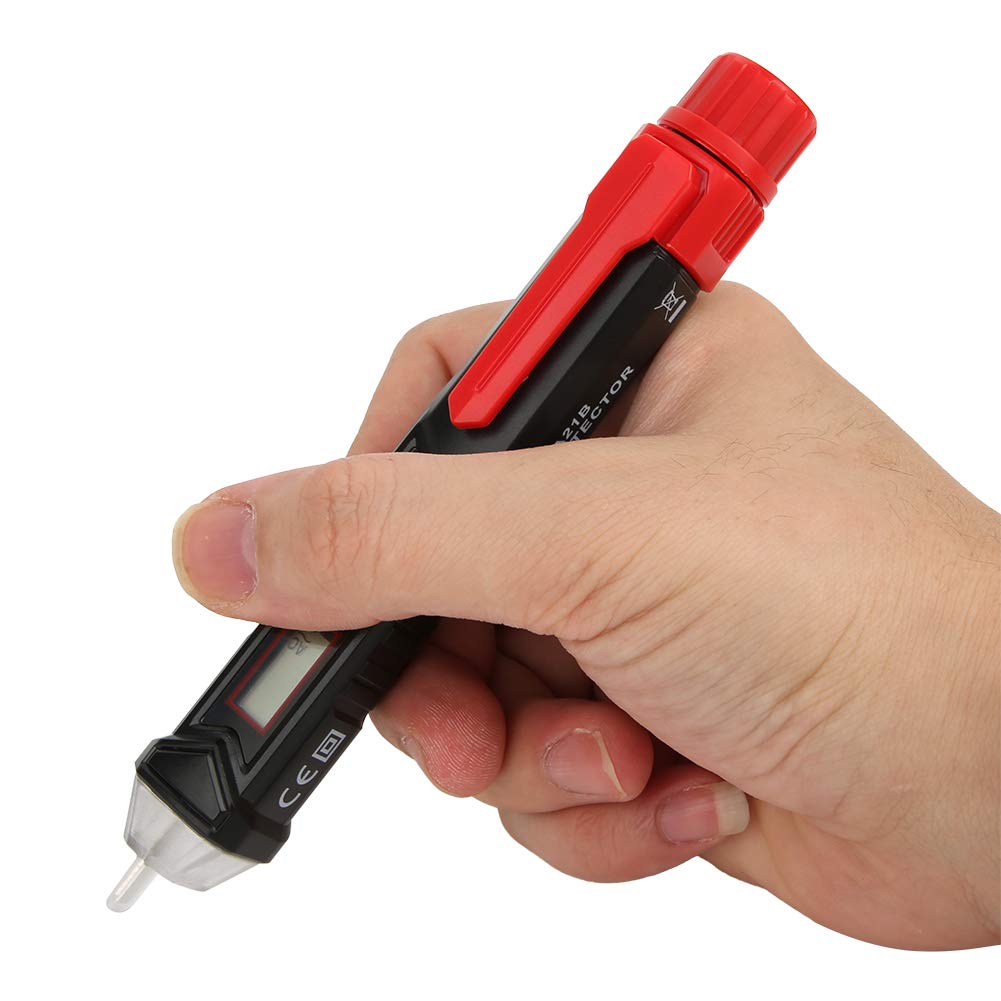
Figure 5.1: Demonstrating the SASKATE TA11B Voltage Tester being held for non-contact testing.
5.3 Adjusting Sensitivity
The tester features adjustable non-contact sensitivity for different testing scenarios.
- While the tester is ON, press the Flashlight/Sensitivity Adjustment Key (marked with 'S' or a sensitivity icon).
- Each press will cycle through different sensitivity levels, which will be indicated on the LCD display (e.g., "Lo" for low sensitivity, "Hi" for high sensitivity).
- Use higher sensitivity for detecting weaker signals or from a greater distance, and lower sensitivity to pinpoint exact locations or avoid false positives.
5.4 Inductive Testing for Breakpoints, Microwave Radiation, and Leaks
The inductive testing feature allows for detection of breaks in wires, microwave radiation, and electrical leaks.
- Turn on the tester and select an appropriate sensitivity level.
- Move the probe along the wire or area suspected of a breakpoint or leak. The absence of a signal where one is expected indicates a break.
- For microwave radiation or leaks, hold the probe near the source. The tester will indicate the presence of electromagnetic fields.
5.5 Using the Flashlight
The built-in flashlight is useful for illuminating dark work areas.
- While the tester is ON, briefly press the Flashlight/Sensitivity Adjustment Key.
- The flashlight will turn ON. Press the key again to turn it OFF.

Figure 5.2: The SASKATE TA11B Voltage Tester with its integrated flashlight active, providing illumination.
6. Maintenance
Proper maintenance ensures the longevity and accuracy of your voltage tester.
- Cleaning: Wipe the device with a dry, soft cloth. Do not use abrasive cleaners or solvents.
- Storage: Store the tester in a cool, dry place away from direct sunlight and extreme temperatures.
- Battery Replacement: Replace batteries promptly when the low battery indicator appears on the LCD. Remove batteries if the device will not be used for an extended period to prevent leakage.
- Inspection: Regularly inspect the device for any signs of damage, such as cracks in the casing or a damaged probe tip. Do not use if damaged.
7. Troubleshooting
| Problem | Possible Cause | Solution |
|---|---|---|
| Tester does not turn on. | Dead or incorrectly installed batteries. | Check battery polarity; replace batteries. |
| No detection or inconsistent readings. | Low battery; incorrect sensitivity setting; interference. | Replace batteries; adjust sensitivity; move away from strong electromagnetic fields. |
| Flashlight not working. | Low battery; flashlight LED failure. | Replace batteries. If issue persists, contact support. |
| Automatic shutdown too frequent. | No activity detected for 3 minutes. | This is a normal power-saving feature. Reactivate by pressing the power button. |
8. Specifications
| Feature | Detail |
|---|---|
| Model | TA11B |
| AC Voltage Range | 12V ~ 1000V AC |
| Frequency | 50HZ / 60HZ |
| Alarm Mode | Sound / Light / Analog Bar |
| Display | LCD Display |
| Flashlight | Yes |
| Probe Shape | Flat |
| Non-Contact Sensitivity | Adjustable |
| Automatic Shutdown | Approx. 3 minutes of inactivity |
| Safety Level | CAT.III 1000V / CAT.IV 600V; CE |
| Battery Type | AAA battery (not included) |
| Product Size | Approx. 159 x 21 x 20mm (6.3 x 0.8 x 0.8in) |
| Weight | Approx. 1.76 ounces (50g) |
9. Warranty and Support
For warranty information or technical support, please refer to the contact details provided with your purchase or visit the official SASKATE website. Keep your purchase receipt as proof of purchase.
Package Contents:
- 1 x SASKATE TA11B Voltage Tester
- 1 x User Manual (this document)
Ask a question about this manual
Ask about setup, troubleshooting, compatibility, parts, safety, or missing instructions. Manuals+ will review the question and use this page’s manual context to help answer it.