
1. Introduction
This manual provides detailed instructions for the setup, operation, and maintenance of your Locksworth AZ4330-PK 0.6 Cubic Feet Biometric Fingerprint Safe. Please read this manual thoroughly before using the safe to ensure proper functionality and security.
The Locksworth Biometric Safe offers multiple access methods, robust anti-theft features, and versatile storage solutions for your valuables. It is designed for secure storage of cash, documents, jewelry, handguns, and other important items in homes, offices, or hotels.
2. Product Features
- Biometric Quick Access: Precision fingerprint scanner with over 99.99% recognition accuracy, stores 20+ fingerprints, and unlocks in under 0.5 seconds. All biometric data is stored locally for privacy.
- Four Access Options: Open via fingerprint scan, 10-digit keypad (3-8 digit customizable codes), 2 backup keys, or Type-C emergency power port.
- Enhanced Security: Features dual 20mm steel locking bolts, a pry-resistant door, hidden hinges, and a seamless welded steel body. The exterior has a corrosion-resistant powder coating.
- Dual Alarm System: Activates an alarm upon continuous incorrect fingerprint/password entries or violent vibrations. A discreet silent mode is available for nighttime use.
- Versatile Interior: 0.6 cubic feet capacity with an inner removable shelf for flexible organization. Plush anti-scratch lining protects contents. Built-in LED light illuminates the interior.
- Fireproof Bag Included: An additional fire-resistant bag is provided to safeguard documents, cash, and other valuables during emergencies.
- Mounting Capability: Includes 2 mounting bolts for permanent installation in closets, bedrooms, or offices.
3. Setup Instructions
3.1 Initial Opening (First Use)
- Locate the emergency keyhole on the right side of the electronic keypad.
- Remove the cover from the emergency keyhole.
- Insert one of the provided emergency keys into the keyhole and turn it counter-clockwise.
- While holding the key turned, rotate the knob on the keypad clockwise to open the safe door.
Note: The safe is shipped in a default mode where any fingerprint can open it until you set up your own fingerprint. It is crucial to set up your personal fingerprint and password immediately after initial opening.

Figure 3.1: Four methods of opening the safe.
3.2 Battery Installation
The safe requires four (4) AA batteries (not included) for operation of the electronic keypad and biometric scanner.
- With the safe door open, locate the battery compartment on the inside of the door.
- Open the battery compartment cover.
- Insert four (4) AA alkaline batteries, ensuring correct polarity (+/-).
- Close the battery compartment cover.
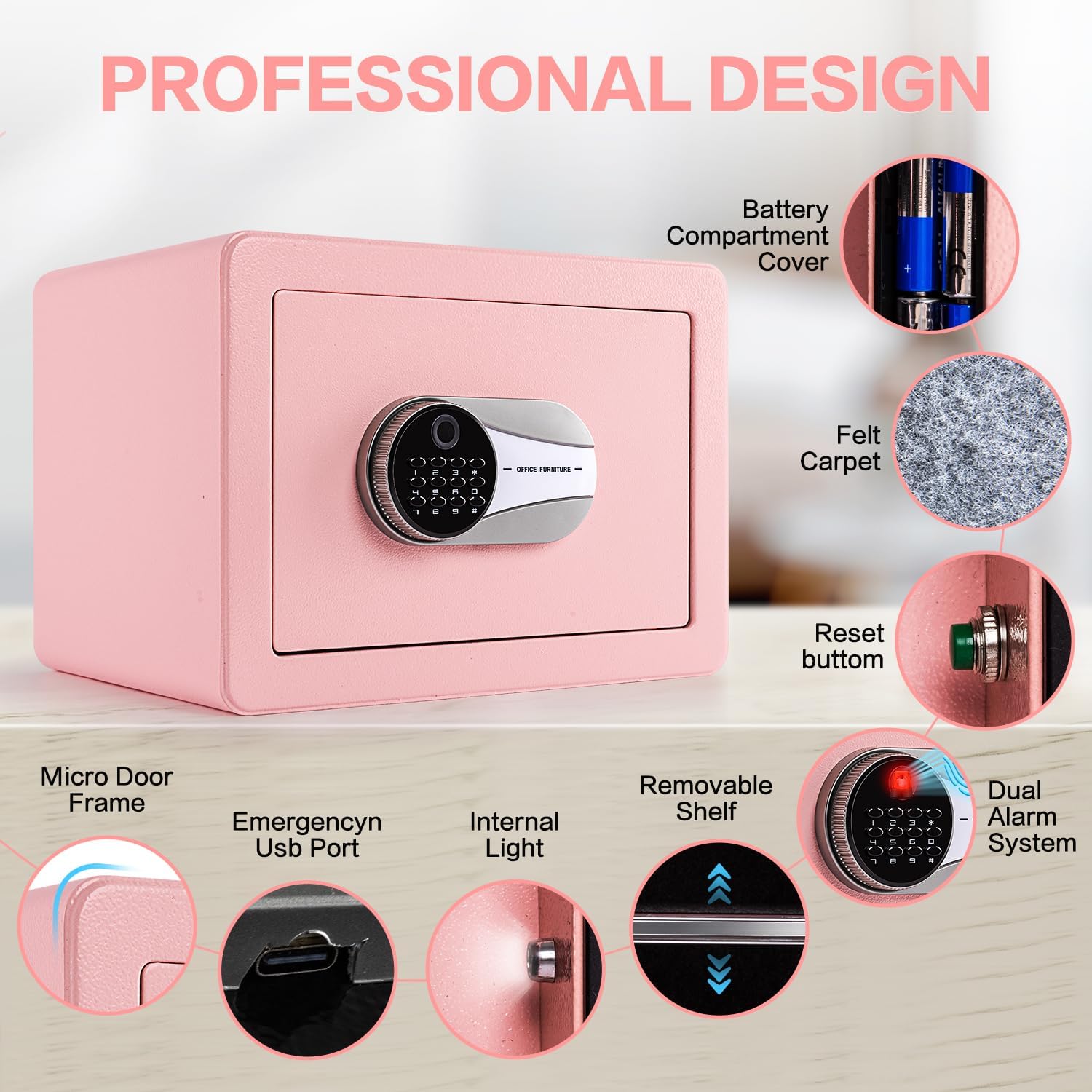
Figure 3.2: Battery compartment location.
3.3 Setting Your Password
- With the safe door open, press the green 'Setting Button' located on the inside of the door (next to the battery compartment). The buzzer will beep once.
- Enter your desired new 4-12 digit password on the keypad.
- Press the '#' key to confirm.
- Re-enter your new password.
- Press the '#' key again to confirm. The system will confirm successful registration.
- Press '*' to exit the setting mode.
3.4 Setting Your Fingerprint
It is highly recommended to register multiple fingerprints for convenience and as a backup.
- With the safe door open, press the green 'Setting Button' located on the inside of the door. The buzzer will beep once.
- Place your finger on the fingerprint window. The fingerprint window will light up, the buzzer will beep once, and the blue indicator light will turn on.
- Keep your finger on the sensor for 1 second, then lift it. Repeat this process four (4) times. The system will announce that the registration is successful.
- Press '*' to exit the setting mode.

Figure 3.3: Fingerprint registration process.
3.5 Mounting the Safe
The safe features pre-drilled holes on the back for secure mounting.
- Choose a suitable location for mounting (e.g., wall, floor, inside a cabinet).
- Mark the drilling points through the pre-drilled holes on the back of the safe onto the mounting surface.
- Drill pilot holes into the marked spots.
- Align the safe with the drilled holes and secure it using the provided expansion bolts.

Figure 3.4: Safe installation steps.
4. Operating Instructions
4.1 Opening with Fingerprint
- Place your registered finger on the fingerprint sensor.
- If the fingerprint is recognized, the indicator light will turn green, and the safe will unlock.
- Rotate the knob clockwise to open the door.
4.2 Opening with Password
- Enter your registered 4-12 digit password on the keypad.
- Press the '#' key. If the password is correct, the indicator light will turn green, and the safe will unlock.
- Rotate the knob clockwise to open the door.
4.3 Opening with Emergency Key
This method is used if batteries are depleted or if you forget your password/fingerprint.
- Remove the cover from the emergency keyhole.
- Insert the emergency key and turn it counter-clockwise.
- Rotate the knob clockwise to open the door.
4.4 Locking the Safe
- Close the safe door firmly.
- Rotate the knob counter-clockwise to engage the locking bolts. The safe is now locked.
Video 4.1: Demonstrates how to use the Locksworth Fingerprint Safe Box, including initial setup and daily operation.
Video 4.2: Overview of the Locksworth Fingerprint Safe Box features and functionality.
5. Maintenance
- Battery Replacement: Replace batteries when the low battery indicator appears or if the keypad/fingerprint scanner becomes unresponsive. Always use new AA alkaline batteries.
- Cleaning: Wipe the exterior and interior of the safe with a soft, damp cloth. Avoid abrasive cleaners or solvents that could damage the finish or electronic components.
- Key Storage: Always store emergency keys in a secure location outside the safe.
- Interior Light: The built-in LED light activates when the door is opened, providing visibility to contents.
6. Troubleshooting
- Safe does not open with fingerprint/password:
- Ensure batteries are not depleted. Replace if necessary.
- Verify correct password entry.
- Ensure your finger is placed correctly on the sensor during fingerprint scan.
- If the safe was not set up with your fingerprint, it may still be in default mode allowing any fingerprint. Follow setup instructions to register your own.
- Use the emergency key to open the safe if electronic access fails.
- Alarm sounds unexpectedly:
- The alarm activates after multiple incorrect entries or if the safe detects violent vibrations.
- Enter the correct password or use a registered fingerprint to disarm the alarm.
- Lost emergency keys: If both emergency keys are lost, contact Locksworth customer service for assistance.
- Emergency Power: If batteries are completely dead and emergency keys are unavailable, connect a Type-C cable to the emergency power port and a power source to temporarily power the safe for access.
7. Specifications
| Feature | Detail |
|---|---|
| Brand | Locksworth |
| Model Number | AZ4330-PK |
| Product Dimensions | 9.84"D x 13.78"W x 9.84"H |
| Interior Dimensions | 8.66"D x 13.38"W x 9.05"H |
| Capacity | 0.6 Cubic Feet |
| Lock Type | Biometric, Electronic Combination Lock, Key |
| Material | Alloy Steel |
| Item Weight | 14 Pounds |
| Power Source | 4 x AA Batteries (not included) |
| Special Features | Alarm System, Anti-Theft, Biometric Fingerprint, Combination Lock, Removable Shelf, Built-in LED Light |
| Mounting Type | Under Counter Mount, Wall Mount, Floor Mount |
| Included Components | 1 Biometric Safe box, 1 Fireproof bag, 2 Sets Expansion Bolts, 4 Floor Protectors, 2 Emergency Keys |
8. Warranty and Support
Locksworth is committed to providing quality products and customer satisfaction. Your Locksworth safe is backed by responsive customer service and a satisfaction guarantee. For any questions, technical support, or warranty claims, please contact Locksworth customer service through the retailer's platform or the official Locksworth website.