
Introduction
Thank you for choosing the Belkin Portable 20,000 mAh Power Bank. This device is designed to provide reliable and fast charging for your mobile devices, featuring an integrated USB-C cable and 30W Power Delivery. Its compact and lightweight design makes it ideal for travel, ensuring your devices stay powered wherever you go. This manual provides essential information on how to set up, operate, maintain, and troubleshoot your power bank.

Image: The Belkin Portable 20,000 mAh Power Bank in blue, showcasing its sleek design.
Key Features
- Integrated USB-C Cable: For convenient charging on the go.
- 30W Power Delivery: Enables fast charging for smartphones, tablets, and even some laptops like the MacBook Air.
- 20,000 mAh Capacity: Provides up to 87 hours of additional battery life for an iPhone 16 Pro, charging 0-50% in approximately 25 minutes.
- Simultaneous Charging: Charge up to three devices concurrently using the integrated USB-C cable, USB-C port, and USB-A port, with a shared output of 30W.
- LED Indicator: Displays the power bank's charging status.
- Pass-Through Charging: Charge your devices while the power bank itself is being recharged.
- Lightweight and Travel-Friendly: Weighing less than 395 grams, it meets aviation safety standards for carry-on luggage.
- Sustainable Design: Made from 72% post-consumer recycled materials with 100% plastic-free packaging.
Setup
Initial Charging of the Power Bank
Before first use, fully charge your Belkin Power Bank. Connect the power bank to a wall charger using a compatible USB-C cable (not included for recharging the power bank itself, only the integrated cable is for output). The LED indicators will show the charging progress. A full charge typically takes up to 12 hours.

Image: The power bank connected to a wall outlet for recharging, simultaneously charging a smartphone via its integrated cable. This illustrates pass-through charging.
Operating Instructions
Charging Your Devices
- Using the Integrated USB-C Cable: Extend the integrated USB-C cable from the power bank and connect it directly to your USB-C compatible device.
- Using the USB-C Port: Connect your device's USB-C charging cable to the power bank's USB-C output port.
- Using the USB-A Port: Connect your device's USB-A charging cable to the power bank's USB-A output port.

Image: The Belkin power bank connected to an iPhone via its integrated USB-C cable, demonstrating seamless high-speed charging.
Charging Multiple Devices
The power bank supports charging up to three devices simultaneously with a combined output of 30W. You can use the integrated USB-C cable, the USB-C port, and the USB-A port at the same time.
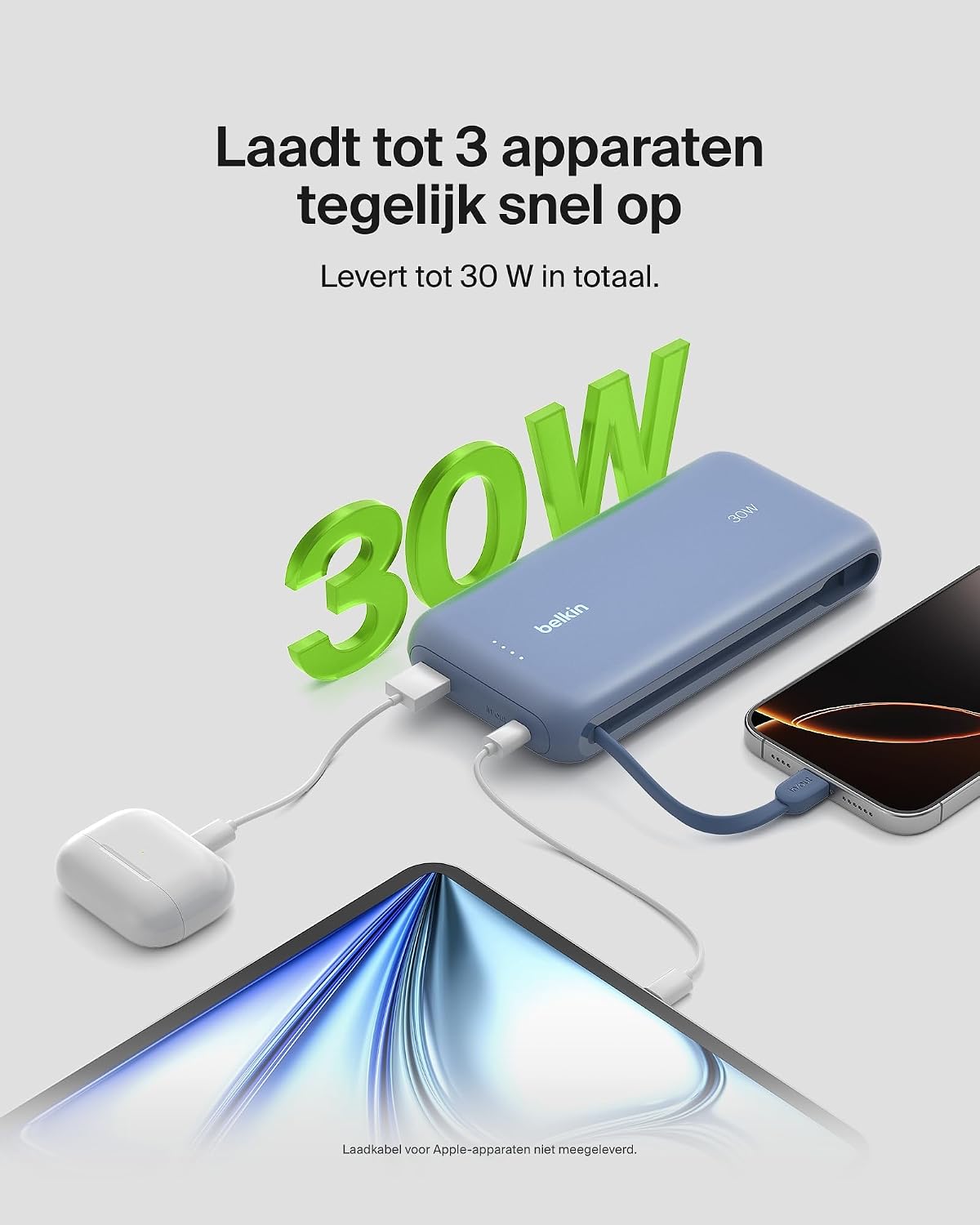
Image: The power bank simultaneously charging a smartphone, a tablet, and wireless earbuds, illustrating its capability to charge up to three devices with a total output of 30W.
LED Battery Status Indicator
The power bank features LED lights that indicate the remaining battery level and charging status. Refer to the table below for interpretation:
| LED Status | Meaning |
|---|---|
| All LEDs solid | Fully charged |
| LEDs blinking sequentially | Charging in progress |
| Fewer LEDs solid | Remaining battery capacity |
Maintenance
- Cleaning: Use a soft, dry cloth to clean the power bank. Avoid using harsh chemicals or abrasive materials.
- Storage: Store the power bank in a cool, dry place away from direct sunlight and extreme temperatures.
- Battery Care: To prolong battery life, avoid fully discharging the power bank regularly. Recharge it when the battery level is low.
- Integrated Cable Care: When not in use, ensure the integrated USB-C cable is properly stowed to prevent damage.
Troubleshooting
Common Issues and Solutions
- Device not charging:
- Ensure the power bank is charged. Check the LED indicators.
- Verify that the charging cable is securely connected to both the power bank and your device.
- Try a different charging cable or port on the power bank.
- Confirm your device is compatible with the power bank's charging specifications.
- Slow charging:
- Ensure your device supports fast charging (Power Delivery) to utilize the 30W output.
- If charging multiple devices, the total 30W output is shared, which may result in slower charging for individual devices.
- Check if the cable used supports fast charging.
- Power bank not recharging:
- Ensure the wall adapter and cable used for recharging the power bank are functional and properly connected.
- Try a different wall adapter or cable.
Belkin SmartProtect Safety Features
The Belkin Power Bank is equipped with SmartProtect technology, which includes multiple safety features to protect your devices and the power bank itself:
- Overcharge Protection
- Overcurrent Protection
- Overpower Protection
- Short-circuit Protection
- Output Overvoltage Protection
- Output High/Low Temperature Protection
- Input High/Low Temperature Protection
- Signal Interference Protection
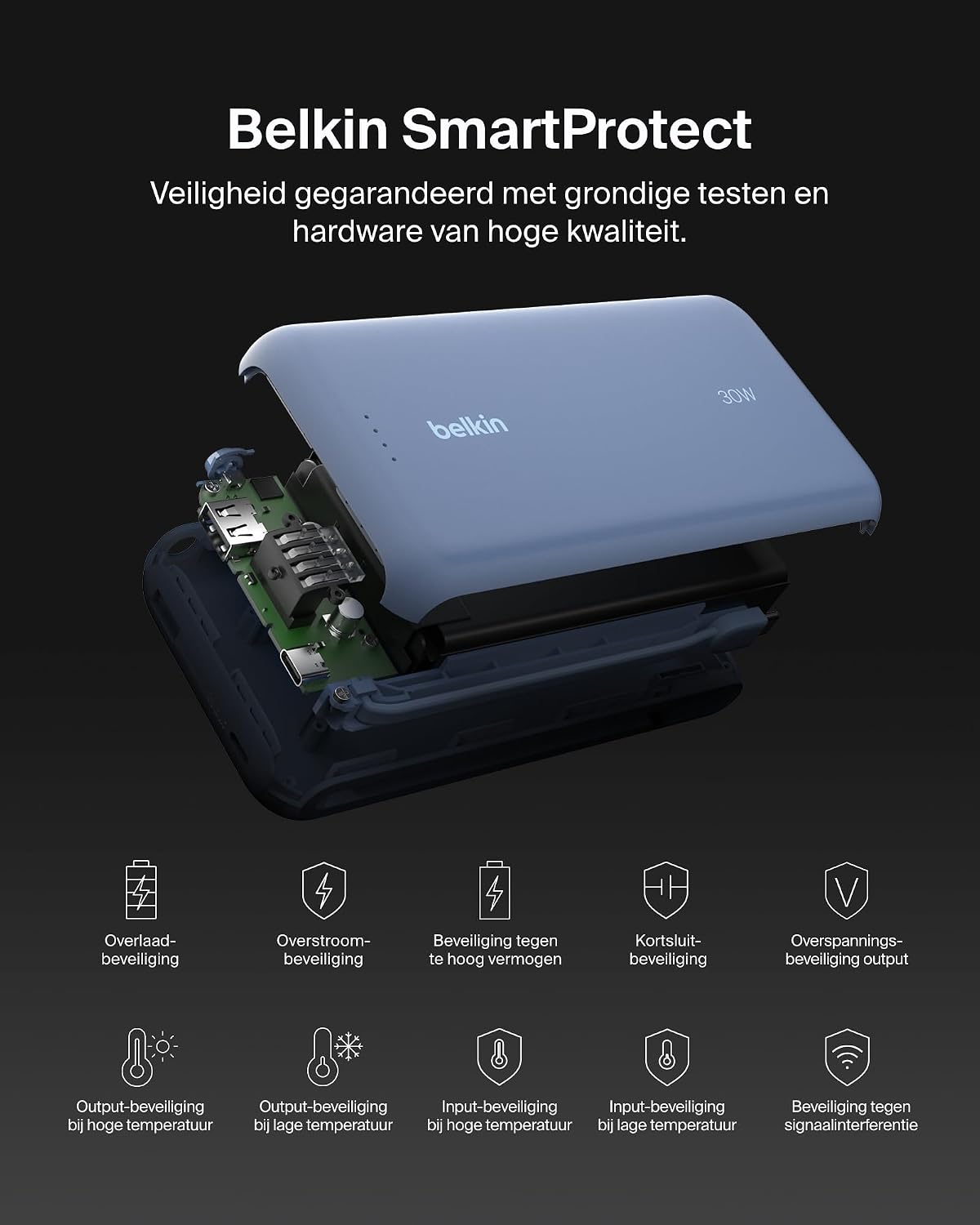
Image: An exploded view of the Belkin Power Bank, highlighting its internal components and the comprehensive Belkin SmartProtect safety features, including protection against overcharge, overcurrent, and short-circuits.
Specifications
| Feature | Detail |
|---|---|
| Model Number | BPB024hqBL |
| Battery Capacity | 20,000 mAh |
| Output Power | Up to 30W Power Delivery (shared) |
| Connector Type | Integrated USB-C cable, 1x USB-C port, 1x USB-A port |
| Voltage | 5 Volts |
| Amperage | 3 Ampere |
| Charging Time (Power Bank) | Approx. 12 hours |
| Product Dimensions | 15.4 x 7.62 x 2.51 cm |
| Item Weight | 395 grams |
| Battery Cell Composition | Lithium-ion |
| Compatible Devices | Apple iPhone 16 series, iPhone 15 series, iPhone 14 series, iPhone 13 series, Samsung Galaxy S22/S23/S24/S25 series, iPad Pro, iPad Air, iPad, iPad Mini, and other USB-C/USB-A compatible devices. |
Warranty and Support
Warranty Information
This Belkin Portable Power Bank comes with a 2-year manufacturer's warranty. Additionally, it includes a Connected Equipment Warranty, providing peace of mind for your connected devices. Please retain your proof of purchase for warranty claims.
Customer Support
For further assistance, technical support, or warranty inquiries, please visit the official Belkin support website or contact their customer service. You can find more information at www.belkin.com/support.


