
1. Introduction
The PRUNUS A10 Wireless Voice Amplifier is designed to amplify your voice for various settings such as classrooms, speeches, training sessions, and outdoor activities. It features a wireless lavalier microphone, a built-in charging case, and multiple connectivity options.
2. What's in the Box
- Voice Amplifier Unit
- Wireless Lavalier Microphone
- Pearl Chain
- Shoulder Strap
- USB Charging Cable
- Wired Headset Microphone (optional use)
3. Setup
3.1 Initial Charging
Before first use, fully charge both the voice amplifier and the wireless lavalier microphone.
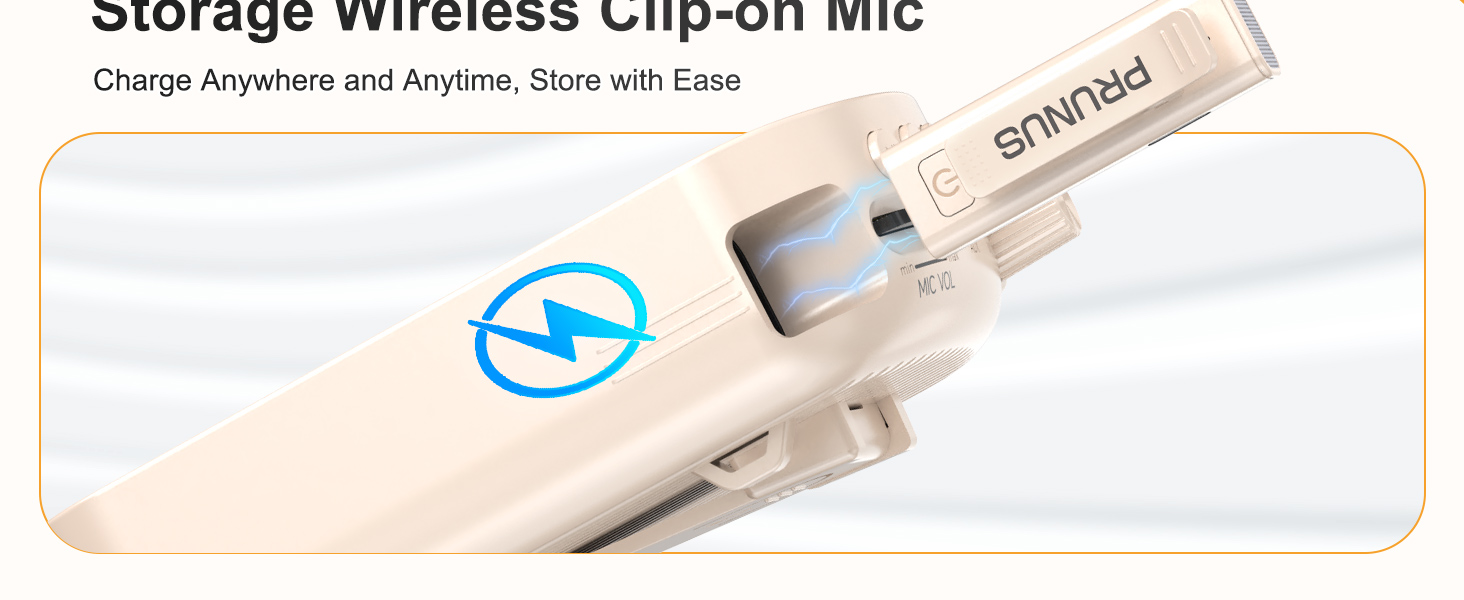
- Connect the USB charging cable to the amplifier's charging port.
- Insert the wireless microphone into its designated slot on the amplifier for charging.
- Ensure both devices indicate a full charge before proceeding.

3.2 Automatic Pairing
The wireless lavalier microphone and amplifier are designed for automatic pairing. Once both devices are powered on, they should connect automatically.
3.3 Wearing Options
The amplifier offers multiple ways to wear it for hands-free convenience:
- Pearl Chain: Wear it around your neck.
- Shoulder Strap: Use it crossbody or over the shoulder.
- Back Clip: Clip it to your waist or clothing.
4. Operating Instructions
4.1 Power On/Off
- To power on the amplifier, rotate the AUDIO VOL knob clockwise until the display illuminates.
- To power on the wireless microphone, press and hold its power button.
- To power off, rotate the AUDIO VOL knob counter-clockwise until the display turns off, and press and hold the microphone's power button.
4.2 Volume Adjustment
Adjust the volume for both the speaker and the microphone independently:
- Speaker Volume: Rotate the AUDIO VOL knob on the amplifier.
- Microphone Volume: Use the MIC VOL knob on the amplifier.

4.3 Mute/Unmute Function
The wireless lavalier microphone features a one-touch mute button for convenience:
- Press the mute button on the wireless microphone once to mute your voice.
- Press it again to unmute.
4.4 Connectivity Options
The amplifier supports various audio input methods:
- Bluetooth 5.0: Pair with compatible devices for wireless audio playback.
- AUX Input: Connect external audio sources using an AUX cable.
- TF Card Slot: Insert a TF card for direct audio playback.
- USB Player: Insert a USB drive for direct audio playback.

4.5 Usage Scenarios
The PRUNUS A10 is suitable for a range of applications:
- Teaching in classrooms.
- Public speaking and presentations.
- Tour guiding.
- Outdoor activities and events.

5. Maintenance
5.1 Battery Life and Charging
The amplifier features a 3000mAh battery, providing up to 12 hours of continuous use. The wireless microphone lasts up to 10 hours on a full charge.

5.2 General Care
- Keep the device clean by wiping it with a soft, dry cloth.
- Avoid exposing the device to extreme temperatures, moisture, or direct sunlight.
- Store the device in a cool, dry place when not in use.
6. Troubleshooting
6.1 Preventing Feedback or Distortion
To prevent audio feedback or distortion:
- Maintain a distance of at least 40 cm (15.7 inches) between the wireless microphone and the amplifier.
- Avoid placing the microphone directly in front of the amplifier speaker.

6.2 Connectivity Issues
- Ensure both the amplifier and microphone are powered on and fully charged.
- If using Bluetooth, ensure the amplifier is in Bluetooth mode and your device's Bluetooth is enabled and paired.
- For wired connections (AUX, headset mic), ensure cables are securely plugged into the correct ports.
7. Specifications
| Feature | Specification |
|---|---|
| Brand | PRUNUS |
| Model Number | A10 |
| Item Dimensions (L x W x H) | 3.54 x 1.73 x 5.28 inches |
| Item Weight | 0.45 Kilograms |
| Color | Beige |
| Connectivity Technology | Bluetooth, AUX, TF card |
| Compatible Devices | Laptop, MP3 Player, Smartphone, Tablet, Wired Microphone |
| Mounting Type | Portable |
| Power Source | Battery Powered |
| Connector Type | Auxiliary, RCA |
| Number of Channels | 1 |
| Audio Input | Wireless (Bluetooth), Wired (AUX) |
| Output Wattage | 15 Watts |
| Enclosure Material | Aluminum, Plastic |
8. Warranty
This product comes with a 1-Year Warranty. For detailed warranty information and claims, please refer to the official PRUNUS website or contact customer support.
9. Support
For further assistance, troubleshooting, or product inquiries, please visit the PRUNUS Store on Amazon or consult the contact information provided with your product packaging.