
1. Introduction
This manual provides detailed instructions for the installation, operation, and maintenance of your GreenYi AHD1080P Car Backup Camera. This camera features a dynamic trajectory guide line, AHD 1080P high-definition video, an adjustable fisheye lens, IP68 waterproof rating, and enhanced night vision capabilities. Please read this manual thoroughly before installation and use to ensure proper functionality and safety.
Key Features:
- Dynamic Trajectory Guide Line: Automatically adjusts according to the vehicle's moving direction.
- AHD 1080P High Definition: 1920*1080 pixels with 1054 sensor chip for clear images.
- Adjustable Fisheye Lens: 170-degree wide viewing angle with a rotatable camera body for optimal positioning.
- IP68 Waterproof Rating: Designed for reliable operation in extreme weather conditions.
- Superior Night Vision: 0.01 lux sensitivity for clear images in low-light environments.
- Versatile Video Output: Supports CVBS, AHD-1080P, and AHD-720P video signals via switcher cables.
2. Package Contents
Please verify that all items listed below are included in your package:
- Camera Body
- Metal Camera Holder with Accessories
- 26.2FT Double-shielded Video Cable
- 5FT 4Pin to RCA Power Cable
- Installation Kits (including nuts, spring washer, screws, double-sided adhesive, mini wrench)

Description: This image displays the complete set of components provided with the GreenYi backup camera, including the camera unit, different mounting brackets (metal and silicone), the video cable, power cable, and small installation tools like screws and a mini wrench.
3. Setup and Installation
3.1 Compatibility Requirements
- This camera requires a monitor that supports RCA connection.
- For AHD 1080P or AHD 720P video output, your monitor or head unit must support these formats.

Description: This image illustrates the RCA video output plug of the camera and a detailed diagram of the 4-pin female connector, indicating pin assignments (Undefined, Video, GND-, Power DC3.3V+). It also explicitly states that the camera is not suitable for direct connection to dash cams, GPS units, or mirror cams.
3.2 Wiring Diagram
Follow the wiring instructions carefully for proper installation:

Description: This diagram shows two main wiring configurations. The top section illustrates connecting the camera to a head unit, where the camera's trigger wire (C) connects to the head unit's trigger wire (A), and the camera's power cable (B) connects to reversing/brake/turning light positive or ACC. The bottom section shows connecting to a monitor without a trigger wire, where the camera's power cable connects directly to a power source (reversing light positive, brake light positive, turning light positive, or ACC) and ground. Both diagrams detail the 4-pin connection and RCA video cable.
- To a Head Unit (with Trigger Wire):
Connect the camera's trigger wire (C) to the head unit's trigger wire (A). The camera's power cable (B) should be connected to the reversing light positive, brake light positive, turning light positive, or ACC power source. - To a Monitor (without Trigger Wire):
The camera's power cable should be connected to the reversing light positive, brake light positive, turning light positive, or ACC power source, and the black wire to ground. The RCA video cable connects directly to the monitor's video input. - Important Note: For some aftermarket head units, you may need to wire the camera's red and black power wires to an accessory (ACC) and ground for continuous operation, not just during reverse.
3.3 Video Signal Configuration (Switcher Cables)
The camera generates a CVBS 30HZ/30FPS/NTSC video signal by default. You can modify the video output format by cutting specific switcher cables:
- Cut the Green Wire: Changes output to AHD-1080P-25HZ/25FPS/PAL video signal.
- Cut the White Wire: Changes output to AHD-720P-25HZ/25FPS/PAL video signal.
- Cut Both Green & White Wires: Reverts output to CVBS 30HZ/30FPS/NTSC video signal.
NOTE: Always unplug and reconnect the 4-pin power cable after cutting any wire to apply the changes.
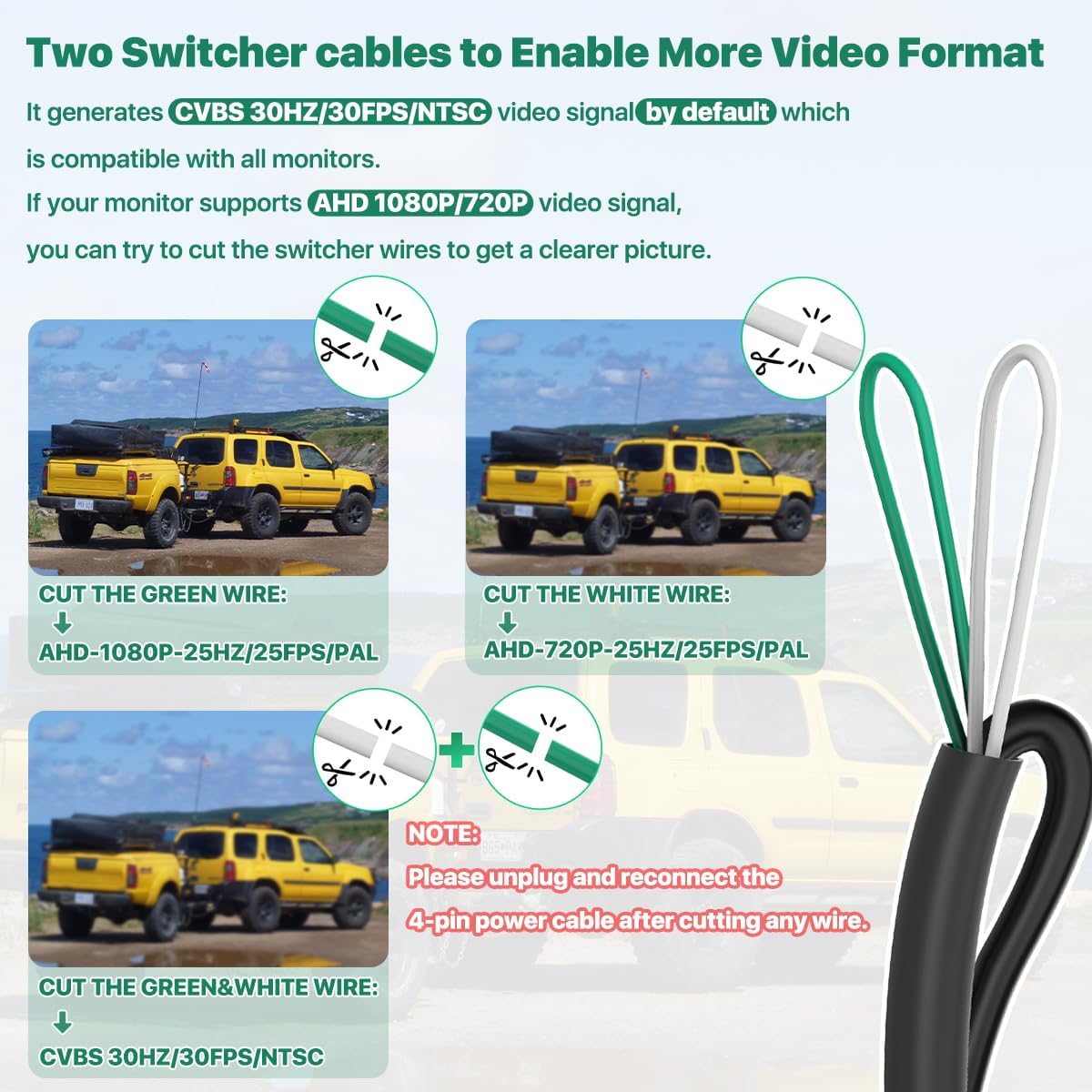
Description: This image illustrates the green and white switcher cables extending from the camera's wiring harness. It provides clear instructions on which cable(s) to cut to switch between CVBS 30HZ/30FPS/NTSC (default or both cut), AHD-1080P-25HZ/25FPS/PAL (green cut), and AHD-720P-25HZ/25FPS/PAL (white cut) video signals. A crucial note emphasizes unplugging and reconnecting the power cable after any cuts.
3.4 Checking AHD Compatibility
To check if your Android head unit supports the camera's AHD 1080P or AHD 720P modes:
- Go to Car Settings.
- Navigate to Factory Settings.
- Select Reverse (picture) / Video settings.
- Look for options to select AHD-1080P-25HZ/25FPS/PAL or AHD-720P-25HZ/25FPS/PAL.
ATTENTION: Our AHD backup camera only supports AHD-1080P-25HZ/25FPS/PAL or AHD-720P-25HZ/25FPS/PAL. If these options are not available, your monitor does not support our camera's AHD feature. In this case, do not cut any switcher cable or cut both switcher cables to apply its CVBS video signal.

Description: This image displays three screenshots of an Android head unit's settings interface. The first shows 'Reversing system selection', the second shows options like 'AHD 720P 30fps', and the third shows 'Frame' settings with various AHD and CVBS options. This helps users identify if their head unit supports the camera's AHD modes.
4. Operation
4.1 Dynamic Trajectory Guide Line
The camera features an intelligent chip that provides a dynamic trajectory guide line. This guide line automatically changes its curve based on the vehicle's movement, assisting with parking maneuvers. Note that this guide line is controlled by the car body's turning direction, not by the steering wheel.
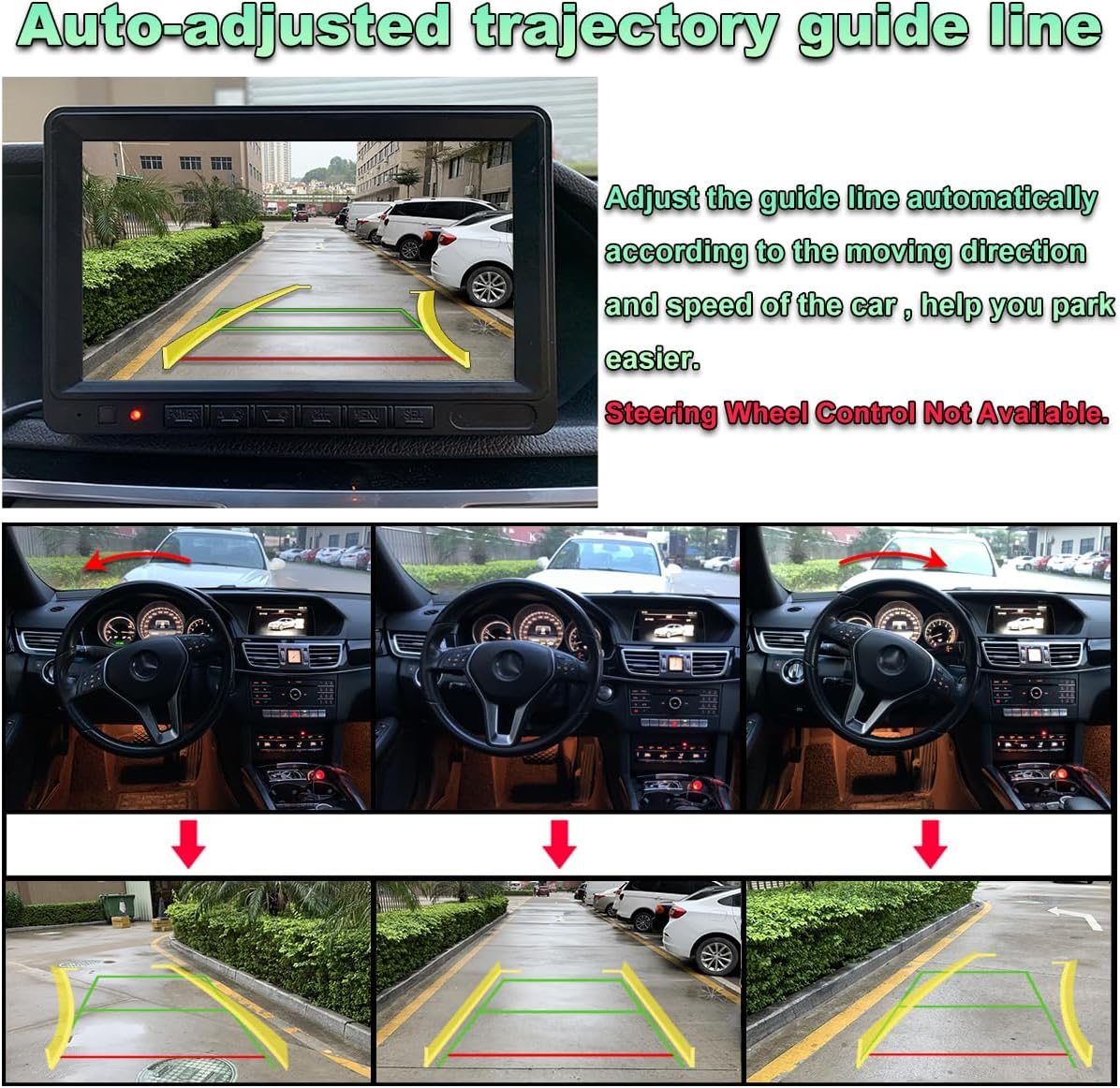
Description: This image shows a car's interior with a monitor displaying the rearview camera feed. The screen clearly shows dynamic guide lines that curve to indicate the vehicle's projected path as it reverses, demonstrating the auto-adjusted trajectory feature. Below, a sequence of three images shows the car reversing with the guide lines adapting to the car's changing direction.

Description: This image depicts a car reversing on a city street at night, with the GreenYi backup camera's dynamic guide lines overlaid on the rearview image. The text explicitly states: "NOTE: The dynamic guide line direction changes when car body turning right or left, not controlled by steering wheel."
4.2 Adjustable Camera Body
The camera features a built-in rotating metal body, allowing you to adjust the lens part to find the optimal viewing angle. Use the provided mini wrench to loosen, adjust, and then tighten the camera body to secure your desired angle.

Description: This image shows the GreenYi camera body with arrows indicating its adjustability: 360 degrees of rotation and 45 degrees of tilt. An inset shows a mini wrench being used to adjust a screw on the camera body, highlighting the mechanism for angle adjustment. Smaller images below show different mounting orientations.

Description: This image combines two visuals: one showing the camera's body with arrows indicating its 360-degree rotation and 45-degree tilt capabilities, and another showing the wide 170-degree field of view from the rear of a car, highlighting the camera's ability to cover a broad area behind the vehicle.
4.3 Night Vision
The camera is equipped with a 0.01 lux sensor chip, providing high-quality night vision images even in very low light conditions.

Description: This image features the GreenYi camera lens in the foreground, with a dark road and a car's headlights in the background, illustrating the camera's capability to capture clear, vivid images day or night thanks to its AHD 1080P resolution and super night vision.
5. Maintenance
The GreenYi backup camera is designed for durability and minimal maintenance. It features an IP68 waterproof rating, meaning it is fully protected against dust and can withstand immersion in water up to 1.5 meters for 30 minutes. This ensures proper function under various weather conditions.

Description: This image shows the GreenYi camera partially submerged in water, with ripples around it, visually confirming its IP68 waterproof rating and its ability to operate reliably in wet conditions.
- Cleaning: Periodically clean the camera lens with a soft, damp cloth to ensure a clear view. Avoid abrasive cleaners.
- Inspection: Regularly check the wiring connections for any signs of wear or damage.
6. Troubleshooting
If you encounter issues with your GreenYi backup camera, refer to the following common problems and solutions:
- No Image or Black Screen:
- Ensure all power connections are secure and receiving power.
- Verify the RCA video cable is correctly connected to the monitor's video input.
- Check if the monitor is set to the correct video input source.
- If using AHD mode, confirm your monitor supports AHD 1080P/720P and the switcher cables are cut correctly.
- If you cut switcher cables, ensure you unplugged and reconnected the 4-pin power cable afterward.
- Flickering or Distorted Image:
- Check for loose or damaged video cable connections.
- Ensure proper grounding for the camera's power supply.
- Verify that the video signal format (CVBS, AHD) matches your monitor's capabilities.
- Dynamic Guide Lines Not Appearing or Incorrect:
- The dynamic guide lines are integrated into the camera's chip and should appear automatically. Ensure the camera is powered correctly.
- Confirm the camera is mounted securely and oriented correctly.
- Radio Not Turning Off (Specific to some Head Units):
- If your radio does not turn off after connecting the camera, check the wiring of the yellow trigger wire. In some setups, connecting both ends of the yellow wire can cause this issue. Consult your head unit's manual or an automotive electrician.
- Difficulty with 4-Pin Connection:
- The camera uses a specific 4-pin harness. If you are replacing an old camera, ensure you use the GreenYi 4-pin harness provided with this kit, as pin configurations can vary between manufacturers.
For any issues not covered here, please refer to the user manual included in the package or contact GreenYi customer support via Amazon.
7. Specifications
| Feature | Specification |
|---|---|
| Model Number | GreenYi-392 |
| Product Dimensions | 1.26 x 1.22 x 0.94 inches |
| Item Weight | 2.08 ounces |
| Compatible Devices | Monitors with RCA Connector |
| Installation Type | Surface Mount, Horizontal or Vertical face |
| Optical Sensor Technology | CMOS |
| Lens Type | Fisheye |
| Real Angle of View | 170 Degrees |
| Connector Type | 4-Pin Mini DIN, RCA |
| Optical Sensor Size | 1/3 inch |
| Field Of View | 170 Degrees |
| Waterproof Rating | IP68 |
8. Warranty and Support
GreenYi is committed to providing quality products and customer satisfaction. While specific warranty details are not provided in this document, for any inquiries regarding warranty, technical support, or product assistance, please contact GreenYi directly through the Amazon platform. Our support team typically responds within 24 hours.


