
1. Product Overview
The KU XIU X38 Pro Max is a magnetic wireless charging stand designed for compatible iPad models. It features an adjustable, foldable arm, N52 magnets for secure tablet attachment, and integrated 18W fast wireless charging via Pin Smart Connectors and a USB-C port. Constructed from aluminum alloy, it offers stability and durability for various uses.

Image 1.1: The KU XIU X38 Pro Max Magnetic Wireless Charging Stand, showing its adjustable arm and clamp base.
2. Compatibility
This magnetic charging stand is compatible with the following iPad models:
- iPad Air 13" M2 (2024)
- iPad Pro 12.9" 3rd Generation (2018)
- iPad Pro 12.9" 4th Generation (2020)
- iPad Pro 12.9" 5th Generation (2021)
- iPad Pro 12.9" 6th Generation (2022)
Note:
- This stand is not compatible with other iPad versions or Android tablets.
- For optimal magnetic performance, remove your iPad case or use a compatible magnetic case.

Image 2.1: Visual representation of compatible iPad models for the KU XIU X38 Pro Max stand.
3. What's in the Box
Verify that all the following items are included in your package:
- 1x X38 iPad Magnetic Stand
- 1x USB-C Charging Cable (2 meters)
- 1x User Manual (this document)
4. Setup Instructions
4.1 Attaching the Clamp Base
- Identify a suitable surface for mounting, such as a desk or table edge. Ensure the surface thickness is within the maximum clamping distance of 1.96 inches (5 cm).
- Place the clamp base onto the edge of the surface.
- Tighten the screw mechanism on the clamp until the base is securely fastened. Ensure it is stable and does not wobble. The clamp features silicone cushioning to protect your table surface.

Image 4.1: The clamp base of the KU XIU X38 Pro Max stand, demonstrating its attachment to a desk and the silicone cushion.

Image 4.2: Close-up of the table-friendly clamp, highlighting the silicone cushion and maximum clamping distance.
4.2 Connecting the Charging Cable
- Connect the provided USB-C charging cable to the USB-C port located on the stand's base.
- Connect the other end of the USB-C cable to a suitable power adapter (not included).
- Utilize the integrated cable clips on the stand's arm to manage the cable and maintain a tidy workspace.
5. Operating Instructions
5.1 Attaching Your iPad
- Ensure your iPad is compatible with the stand (refer to Section 2).
- Carefully align the back of your iPad with the magnetic panel on the stand. The N52 magnets will securely attach the iPad.
- Once attached, the iPad's Pin Smart Connectors will engage with the stand, initiating wireless charging. A charging indicator on your iPad should confirm this.
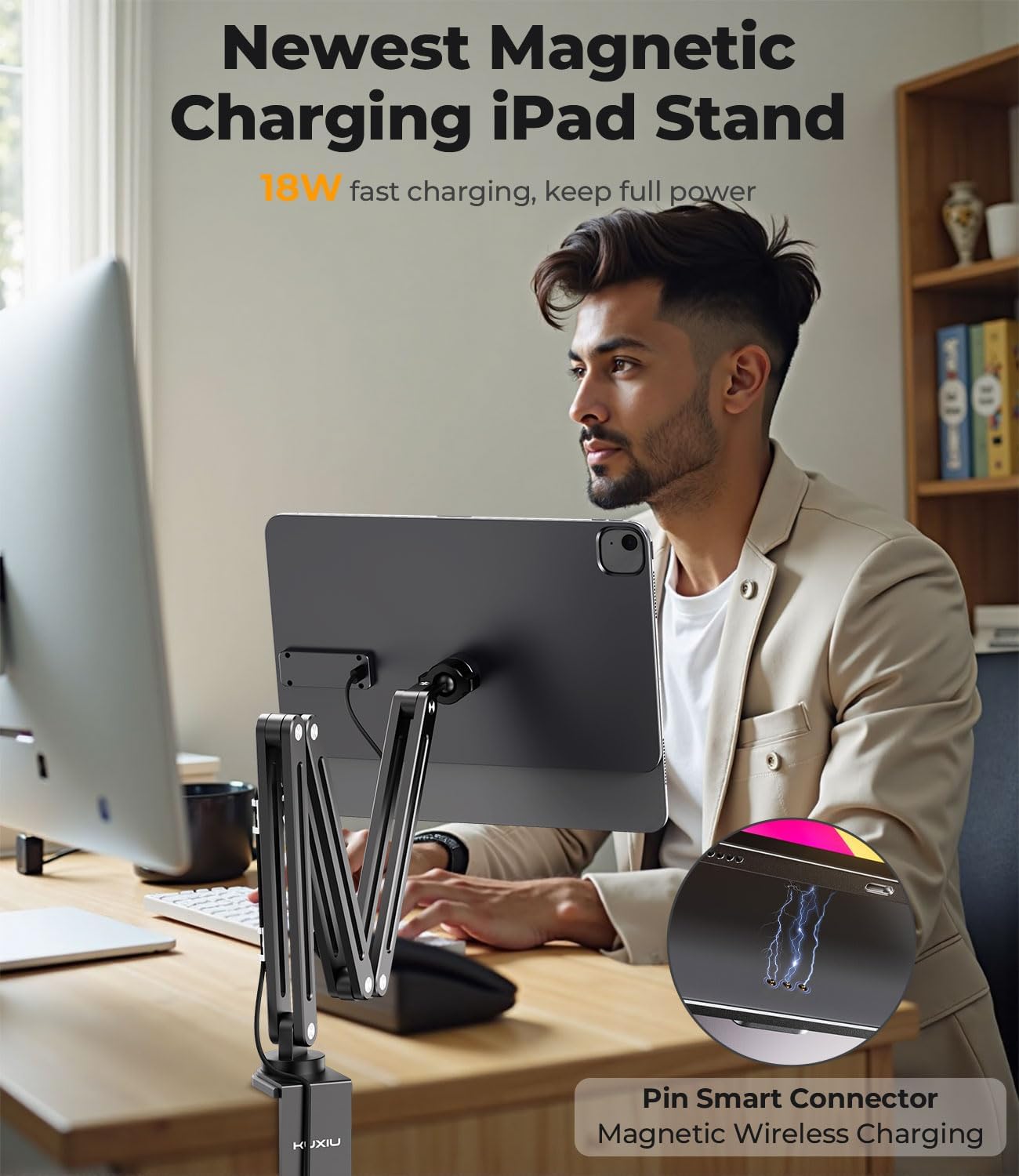
Image 5.1: An iPad attached to the KU XIU X38 Pro Max stand, illustrating the magnetic connection and wireless charging feature.

Image 5.2: Diagram illustrating the strong magnetic adsorption force provided by the 88 N52 neodymium magnets for secure iPad holding.
5.2 Adjusting the Arm and Viewing Angle
The stand features a three-stage adjustable arm with 5 adjustable angle joints, allowing for extensive positioning flexibility.
- Height Adjustment: The arm can extend up to 26.77 inches (68 cm) from the base and retract as low as 8.66 inches. Gently move the arm segments to achieve the desired height.
- Angle Adjustment: Each joint allows for 270-degree rotation, and the base joint offers 360-degree rotation. The magnetic panel itself can rotate 360 degrees, allowing for easy switching between portrait and landscape orientations.
- Foldable Design: For storage or when not in use, the arm can be folded compactly without disassembly.

Image 5.3: Illustration of the full range of adjustment for the KU XIU X38 Pro Max stand, showing various angles and extension capabilities.

Image 5.4: Detailed view of the precision-engineered stainless steel gear joints, enabling effortless angle adjustments.

Image 5.5: Comparison of the stand at its maximum (23.62 inches) and minimum (8.66 inches) adjustable heights.
6. Maintenance
- Cleaning: Wipe the stand with a soft, dry cloth. For stubborn marks, a slightly damp cloth can be used, followed by immediate drying. Avoid abrasive cleaners or solvents.
- Joints: The arm joints are designed to be firm for stability. If they become too stiff or loose over time, consult the manufacturer for guidance. Do not attempt to force adjustments or apply lubricants unless specifically instructed.
- Magnetic Panel: Keep the magnetic panel clean and free of debris to ensure a strong and secure connection with your iPad.
7. Troubleshooting
| Issue | Possible Cause | Solution |
|---|---|---|
| iPad not charging wirelessly. | 1. iPad not properly aligned. 2. USB-C cable not connected or faulty. 3. Incompatible iPad model. 4. iPad case interfering with magnetic connection. | 1. Re-align iPad on the magnetic panel. 2. Ensure USB-C cable is securely connected to the stand and power adapter. 3. Verify iPad model compatibility (Section 2). 4. Remove iPad case or use a compatible magnetic case. |
| Stand feels unstable or wobbles. | 1. Clamp not securely tightened. 2. Desk surface too thin or uneven. 3. Arm extended too far with heavy iPad. | 1. Re-tighten the clamp screw firmly. 2. Ensure the desk surface is suitable and within clamping specifications. 3. Adjust the arm to a more stable position, closer to the base if possible. |
| Arm joints are too stiff to adjust. | Joints are designed for firm hold; initial stiffness is normal. | Apply gentle, consistent force to adjust. Avoid excessive force. If stiffness persists or causes damage, contact customer support. |
| iPad does not attach magnetically. | 1. Incompatible iPad model. 2. iPad case interfering with magnetic connection. 3. Debris on magnetic panel. | 1. Verify iPad model compatibility (Section 2). 2. Remove iPad case or use a compatible magnetic case. 3. Clean the magnetic panel. |
8. Specifications
- Model: X38 Pro Max
- Brand: KU XIU
- Material: Aircraft-Grade Aluminum Alloy
- Magnetic Strength: 88 N52 Magnets
- Wireless Charging Output: Up to 18W
- Cable: 2M USB-C Charging Cable (included)
- Adjustable Arm Length: Up to 26.77 inches (68 cm)
- Minimum Height: 8.66 inches
- Load Capacity: 3.3 lbs (1.5 kg)
- Max Clamping Distance: 1.96 inches (5 cm)
- Item Weight: 3.54 pounds (1.6 kg)
- Package Dimensions: 16.45 x 7.76 x 2.91 inches

Image 8.1: The KU XIU X38 Pro Max stand demonstrating its 3.3 lbs (1.5 kg) weight-bearing capacity with a weighted object.
9. Warranty and Support
For warranty information, product support, or to inquire about replacement parts, please contact KU XIU customer service directly. Refer to the product packaging or the official KU XIU website for contact details.
This manual provides general instructions for the safe and effective use of the KU XIU X38 Pro Max Magnetic Wireless Charging Stand. Please retain this manual for future reference.