
Introduction
This manual provides detailed instructions for the installation, operation, and maintenance of your ELIVED EV3227 Ultrawide Monitor Arm. Designed for flat and curved screens from 17 to 49 inches, this heavy-duty gas spring desk mount supports monitors weighing between 2 kg and 20 kg. It is compatible with VESA 75x75mm and 100x100mm mounting patterns, making it suitable for a wide range of monitors including those from ASUS, Acer, Samsung, LG, HP, AOC, BenQ, MSI, Dell, and Lenovo.
The ELIVED EV3227 monitor arm offers a full range of motion for optimal ergonomic positioning, including tilt, swivel, and rotation. It features two installation options: C-clamp and grommet, and includes integrated cable management for a tidy workspace. Please read these instructions carefully before installation and use to ensure safe and correct operation.
Setup and Installation
1. Package Contents
Verify that all components are present before beginning installation. Refer to the included parts list in your product packaging.
2. Monitor Compatibility
Ensure your monitor meets the following specifications:
- Screen Size: 17 to 49 inches
- Weight Capacity: 2 kg to 20 kg (for flat monitors), 2 kg to 15 kg (for curved monitors)
- VESA Compatibility: 75x75mm or 100x100mm

Figure 1: Monitor compatibility details. This image illustrates the monitor arm supporting an ultrawide screen, highlighting its compatibility with 17-49 inch flat and curved displays, VESA 75x75mm and 100x100mm patterns, and weight capacities of 2-20 kg for flat monitors and 2-15 kg for curved monitors.
3. Mounting Options
The monitor arm offers two installation methods: C-clamp and Grommet mounting.
- C-Clamp Mounting: Requires a desk thickness between 10mm and 50mm. This method does not require drilling.
- Grommet Mounting: Requires a desk thickness between 10mm and 50mm and a hole diameter between 10mm and 60mm.

Figure 2: Two installation options. The image displays both the C-clamp and grommet mounting methods, detailing the required desk thickness (10-50mm for both) and hole diameter (10-60mm for grommet mounting).
4. Attaching the Monitor
The VESA plate is detachable, simplifying the process of attaching your monitor to the arm. Follow the instructions provided in the assembly guide to secure the VESA plate to your monitor, then slide it onto the arm's mounting head.
Operating and Adjustments
The ELIVED EV3227 monitor arm provides extensive adjustability to achieve an ergonomic viewing position.
1. Full Range of Motion
The arm allows for various movements to customize your monitor's position:
- Tilt: Adjust the screen angle up to +90° and down to -90°.
- Swivel: Rotate the arm horizontally up to ±180°.
- Rotation: Rotate the monitor 360° from landscape to portrait orientation.

Figure 3: Large range of motion. This image illustrates the monitor arm's ability to tilt (+90°/-90°), swivel (±180°), and rotate (360°) for flexible positioning.
2. Height Adjustment
The gas spring arm allows for smooth vertical adjustment. The arm can extend up to 551mm horizontally and reach a maximum height of 500mm, with an adjustable height range of 310mm (from a minimum height of 190mm).

Figure 4: Height adjustment. The diagram shows the maximum height (500mm), adjustable height range (310mm), minimum height (190mm), and maximum extension (551mm) of the monitor arm.
3. Gas Spring Tension Adjustment
The gas spring tension needs to be adjusted according to your monitor's weight to ensure stable positioning. Always hold the arm in a horizontal position when adjusting the gas spring.
- If the arm rises: Turn clockwise (“-”) by 360° to reduce tension for a lighter monitor.
- If the arm falls: Turn counter-clockwise (“+”) by 360° to increase tension for a heavier monitor.

Figure 5: Tension adjustment. This image provides instructions on how to adjust the gas spring tension using an Allen key. Turn clockwise (“-”) if the arm rises, and counter-clockwise (“+”) if the arm falls, to match your monitor's weight.
Maintenance
1. Cable Management
Utilize the integrated cable management system to keep your workspace tidy. Route cables through the removable covers on the arm to conceal them and prevent clutter.

Figure 6: Updated tilt structure and cable management. This image shows a cable neatly routed along the monitor arm, demonstrating the integrated cable management feature.
2. Gas Spring Longevity
The premium gas spring is designed for durability, having undergone over 20,000 test cycles. Proper tension adjustment and regular use within the specified weight limits will ensure a longer lifespan and smoother operation of the arm.
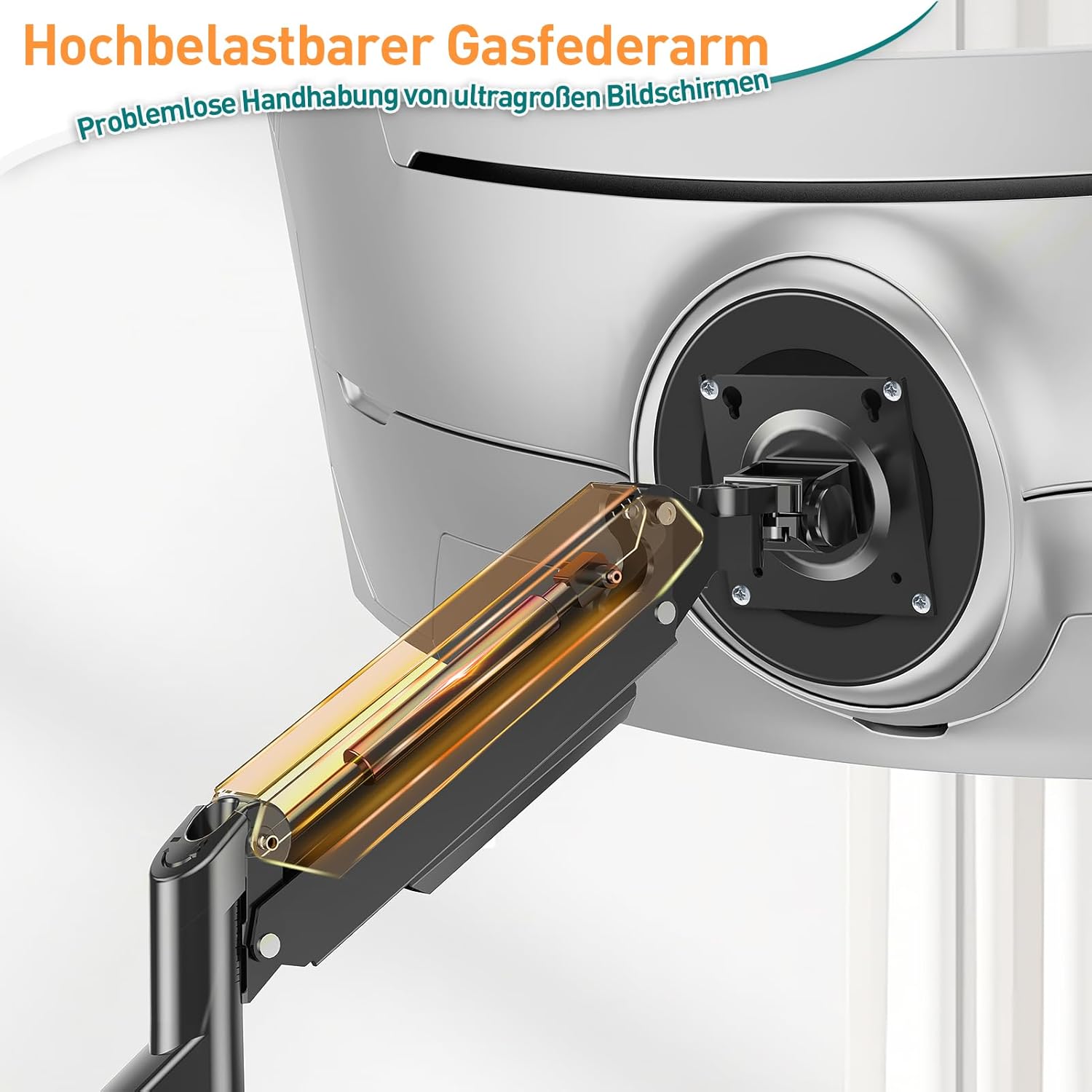
Figure 7: Heavy-duty gas spring arm. The image highlights the internal gas spring mechanism, emphasizing its robust design for effortless handling of large screens.
Troubleshooting
Monitor Tilting Forward
If your monitor tends to tilt forward or does not hold its angle, it may be due to insufficient tension in the tilt mechanism. The ELIVED EV3227 features a double-locking tilt mechanism to prevent this issue.
To resolve this, ensure the tilt mechanism screws are securely tightened. Refer to the assembly instructions for the exact location of these screws and tighten them using the appropriate tool until the monitor holds its desired angle firmly.

Figure 8: Double-locking tilt mechanism. This comparison shows the ELIVED arm's stable tilt mechanism (labeled 'OURS') compared to a generic arm that is prone to tilting forward (labeled 'OTHERS'), ensuring your monitor stays in place.
Specifications
| Feature | Specification |
|---|---|
| Brand | ELIVED |
| Model | EV3227 |
| Mounting Type | Desk Mount (C-Clamp, Grommet) |
| Movement Type | Rotational, Full Motion Gas Spring |
| Material | Metal |
| Color | Black |
| Compatible Devices | Monitor |
| Minimum Compatible Size | 17 inches |
| Maximum Compatible Size | 49 inches |
| Weight Capacity (Flat Monitor) | 2 kg - 20 kg |
| Weight Capacity (Curved Monitor) | 2 kg - 15 kg |
| VESA Compatibility | 75x75mm, 100x100mm |
| Maximum Tilt Angle | ±90 Degrees |
| Swivel Angle | ±180 Degrees |
| Rotation Angle | 360 Degrees |
| Maximum Arm Extension | 551 mm |
| Maximum Height | 500 mm |
| Adjustable Height Range | 310 mm |
| C-Clamp Desk Thickness | 10-50 mm |
| Grommet Desk Thickness | 10-50 mm |
| Grommet Hole Diameter | 10-60 mm |
Warranty Information
The ELIVED EV3227 Ultrawide Monitor Arm comes with a 10-year warranty. This warranty covers defects in materials and workmanship under normal use. Please retain your proof of purchase for warranty claims.
Customer Support
For any questions, concerns, or assistance with product installation or operation, our dedicated customer service team is ready to help. Please contact us through the retailer's platform or visit the official ELIVED website for support contact details.