
GLEDOPTO GL-C-218M
GLEDOPTO Matter RGBCCT LED Controller User Manual
Model: GL-C-218M
Brand: GLEDOPTO
Introduction
This user manual provides comprehensive instructions for the installation, operation, and maintenance of your GLEDOPTO Matter RGBCCT LED Controller (Model GL-C-218M). This controller is designed to manage RGBCCT LED strip lights, offering advanced control through Matter-compatible smart home ecosystems. Please read this manual thoroughly before use to ensure proper functionality and safety.
Key Features
- Matter Protocol Support: Seamless compatibility with major smart home ecosystems including Apple Home, Google Home, and Amazon Alexa, enabling effortless cross-platform control.
- Smart Voice & App Control: Control your lighting with voice commands via Siri, Alexa, and Google Assistant, or remotely manage scenes through HomeKit, Google Home, and other Matter-compatible applications.
- High Current Output: Capable of driving RGB + CCT (dual white) LED strips with a robust 20A total current output (15A max per channel), suitable for long, high-density installations.
- Reverse Polarity Protection: Built-in protection circuit prevents damage to the controller from incorrect wiring of the power input.
- Precision Lighting Control: Offers 16 million RGB colors, adjustable white temperature from 2200K to 6500K, and smooth 0-100% dimming capabilities.
- Quick-Connect Terminals: Features plug-and-play screw terminals for fast, solder-free installation, simplifying the setup process.
- PWM Dimmable: Designed for use with LED strips that support Pulse Width Modulation (PWM) dimming.
Package Contents
- 1 x GLEDOPTO Matter RGBCCT LED Controller (Model GL-C-218M)
- 1 x User Manual (this document)
Safety Information
- Ensure the power supply is disconnected before installation or maintenance.
- This device is designed for low-voltage DC LED strips (DC12-24V). Do not connect to AC power.
- Observe correct polarity when connecting power and LED strips. The controller has reverse polarity protection, but incorrect wiring can prevent normal operation.
- Do not exceed the maximum total output current of 20A.
- Install in a dry environment, away from moisture and extreme temperatures.
- Keep out of reach of children.
Setup
1. Wiring Diagram
Connect your LED strip and power supply to the controller using the quick-connect terminals. Ensure correct polarity for the power input (V+ and V-) and match the RGBCCT channels (R, G, B, C, W, V+) to your LED strip.

Image: Top view of the GLEDOPTO Matter RGBCCT LED Controller, showing input and output terminals, indicator light, and reset button.

Image: Detailed view highlighting key features: 1. Total Output Current 20A Max, 2. Matter High security, 3. Support for push button switch, 4. Quick wire connector for easy wiring.

Image: Illustration demonstrating the reverse connection protection circuit design of the GLEDOPTO controller, preventing damage from reversed V+/V- terminals, unlike other brands.
Important: This controller is designed for PWM (Pulse Width Modulation) dimmable RGBCCT or COB RGBCCT strip lights. It is not compatible with digital addressable LED strip lights.
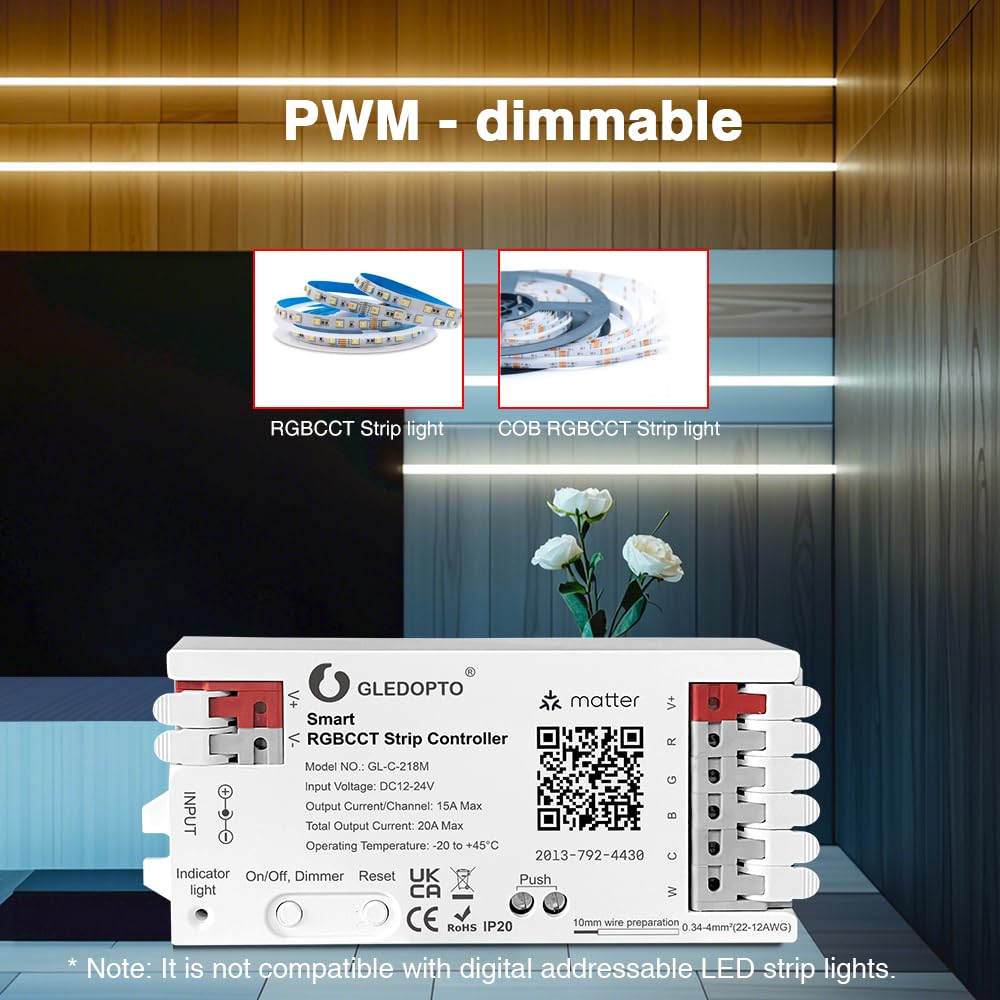
Image: Visual confirmation that the controller is PWM-dimmable and compatible with RGBCCT and COB RGBCCT strip lights, explicitly stating incompatibility with digital addressable LED strip lights.
2. Matter Pairing
A Matter-enabled hub (e.g., Apple HomePod, Amazon Echo Dot, Google Nest Mini) is required to connect and control the device. Ensure your hub is set up and connected to your home network.

Image: Illustrates the requirement of a Matter-enabled hub and the process of adding the accessory by scanning a QR code with a smartphone, with various smart home hubs in the foreground.
- Power on the GLEDOPTO Matter RGBCCT LED Controller.
- Open your preferred Matter-compatible smart home app (e.g., Apple Home, Google Home, Amazon Alexa app).
- Initiate the "Add Accessory" or "Add Device" process within the app.
- Scan the Matter QR code located on the controller. The QR code is also provided here for convenience: MT:8IXS140.03BGSD45W00.
- Follow the on-screen prompts in your app to complete the pairing process. The controller will connect to your Matter hub via Wi-Fi.
- If pairing fails, try resetting the controller by pressing and holding the "Reset" button for 5 seconds until the indicator light flashes.
Operating Instructions
1. Smartphone App Control
Once paired with your Matter hub, you can control the LED strip lights using your smart home app. This allows for precise adjustments of color, brightness, and color temperature.

Image: A smartphone displaying an app interface for controlling extended color lights, showing a slider for brightness and color selection options.
- Color Selection: Choose from 16 million RGB colors to create your desired ambiance.
- Brightness Adjustment: Smoothly dim the lights from 0% to 100%.
- Color Temperature Control: Adjust the white light from warm (2200K) to cool (6500K).
- Scene Management: Create and activate custom lighting scenes for different moods or activities.

Image: Collage demonstrating the controller's capabilities: 16 million color changes, adjustable color temperature (warm to cool white), and smooth brightness adjustment from 1% to 100%.
2. Voice Control
Integrate your controller with voice assistants like Siri, Amazon Alexa, or Google Assistant for hands-free control. Ensure your Matter hub and the controller are on the same network.

Image: Depicts a smart home environment with a smart speaker, illustrating voice commands such as "Hey Siri, Turn on the living room light" and "Hey Siri, Brightness increased to 70%," confirming compatibility with Apple HomeKit, Amazon Alexa, and Google Assistant.
- "Turn on/off [light name]."
- "Set [light name] to [color]."
- "Dim [light name] to [percentage]."
- "Change [light name] to warm white/cool white."
3. Push Button Operation
The controller features an "On/Off/Dimmer" button for basic control without the app or voice commands.
- Single Press: Toggles the light On/Off.
- Press and Hold: Dims or brightens the light continuously. Release to set the desired brightness.
Maintenance
- Keep the controller clean and free from dust. Use a soft, dry cloth for cleaning.
- Do not expose the device to water or excessive humidity.
- Ensure proper ventilation around the controller to prevent overheating.
- Regularly check wiring connections to ensure they are secure.
Troubleshooting
| Problem | Possible Cause | Solution |
|---|---|---|
| LED strip not lighting up. | No power, incorrect wiring, faulty LED strip. | Check power supply connection. Verify input and output wiring polarity. Test LED strip with another power source if possible. |
| Controller not pairing with Matter hub. | Incorrect QR code, hub not Matter-enabled, network issues, controller not in pairing mode. | Ensure you are scanning the correct QR code. Confirm your hub supports Matter. Check Wi-Fi network stability. Reset the controller by holding the "Reset" button for 5 seconds and try pairing again. |
| Lights flicker or behave erratically. | Insufficient power supply, loose connections, incompatible LED strip. | Ensure your power supply meets the voltage and current requirements of your LED strip. Secure all wiring connections. Confirm your LED strip is PWM dimmable and not digital addressable. |
| Voice control not working. | Controller and hub on different networks, voice assistant not configured. | Ensure both the controller and your Matter hub are connected to the same Wi-Fi network. Verify voice assistant settings in your smart home app. |
Specifications
| Parameter | Value |
|---|---|
| Model Number | GL-C-218M |
| Input Voltage | DC12-24V |
| Output Current/Channel | 15A Max |
| Total Output Current | 20A Max |
| Operating Temperature | -20 to +45°C |
| Product Dimensions | 2 x 4.7 x 10.9 cm |
| Item Weight | 54 g |
| Color | RGBCCT |
| Material | Plastic |

Image: The GLEDOPTO controller with an emphasis on its "Total Output Current 20A Max" capability, suitable for connecting 15-20 meters of ordinary light strips.
Warranty and Support
GLEDOPTO products are designed and manufactured to the highest quality standards. For warranty information and technical support, please refer to the official GLEDOPTO website or contact your local distributor. Keep your purchase receipt as proof of purchase.