
1. Introduction
The Northstar NP2+ Loop Detector is designed for reliable vehicle detection in gate opener and barrier control systems. This device utilizes advanced digital processing to accurately detect vehicles, providing essential input for automated access control. It features user-friendly configuration options for sensitivity, frequency, and output timing, ensuring optimal performance in various environmental conditions.
2. Safety Information
- Always disconnect power before installing or servicing the device.
- Installation should be performed by qualified personnel in accordance with local electrical codes.
- Ensure proper grounding to prevent electrical hazards.
- Do not expose the device to excessive moisture or extreme temperatures.
- Verify all connections are secure before applying power.
3. Package Contents
The Northstar NP2+ package typically includes:
- One (1) Northstar NP2+ Loop Detector unit
4. Product Overview
The Northstar NP2+ Loop Detector features a compact design with accessible controls for configuration and status monitoring. The front panel includes a digital display, sensitivity/program buttons, frequency/program buttons, and LED indicators for detection and relay status. The side panel houses a set of DIP switches for various settings, and the base features a multi-pin connector for wiring.
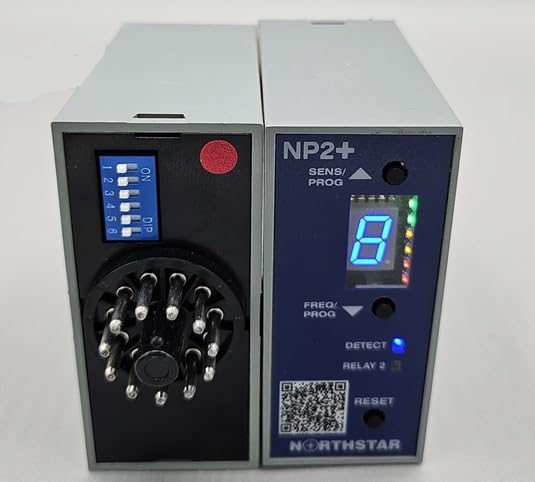
Figure 1: Northstar NP2+ Loop Detector. The left unit shows the 6-position DIP switch and multi-pin connector. The right unit displays the 'NP2+' model name, 'SENS/PROG' and 'FREQ/PROG' buttons, a digital display showing '8', and 'DETECT' and 'RELAY 2' LED indicators. A 'RESET' button and 'NORTHSTAR' branding are also visible.
Key Components:
- Digital Display: Shows current sensitivity, frequency, or diagnostic codes.
- SENS/PROG Buttons: Used to adjust sensitivity levels and navigate programming menus.
- FREQ/PROG Buttons: Used to adjust operating frequency and navigate programming menus.
- DETECT LED: Illuminates when a vehicle is detected by the loop.
- RELAY 2 LED: Indicates the status of Relay 2 output.
- RESET Button: Resets the detector or clears certain errors.
- DIP Switches (1-6): Configurable switches for various operational parameters such as presence time, pulse length, and other advanced settings.
- Multi-pin Connector: Provides connections for power, loop input, and relay outputs.
5. Setup and Installation
5.1 Power Requirements
The NP2+ Loop Detector operates on 12 to 24 Volts AC or DC. It is designed to be resilient; incorrect voltage will not damage the unit but will prevent it from functioning until the correct voltage is supplied. Ensure a stable power source within this range.
5.2 Wiring
Connect the power supply, detection loop, and relay outputs to the multi-pin connector at the base of the unit. Refer to the wiring diagram provided with your gate opener system or the specific wiring instructions for the NP2+ for detailed pin assignments. Ensure all connections are secure and properly insulated.
5.3 DIP Switch Configuration
The 6-position DIP switch located on the side of the unit allows for customization of various operational parameters. Each switch position (1 through 6) corresponds to a specific setting. The 'ON' position typically activates a feature, while the 'DIP' (down) position deactivates it or selects an alternative option. Consult the detailed configuration guide for your specific application to set these switches correctly for desired presence times, pulse lengths, and other advanced functions.
6. Operation
6.1 Sensitivity Adjustment
The NP2+ offers 10 sensitivity settings. Use the 'SENS/PROG' buttons to increase or decrease the detection sensitivity. Higher sensitivity settings allow for detection of smaller vehicles or vehicles at greater distances from the loop. The digital display will show the current sensitivity level.
6.2 Frequency Setting
The unit provides 4 frequency settings. Use the 'FREQ/PROG' buttons to select an operating frequency. This is particularly useful in installations with multiple loop detectors to prevent crosstalk or interference between adjacent loops. The digital display will indicate the selected frequency.
6.3 Output Timing
The NP2+ supports configurable output timing, including Extend and Delay functions. Additionally, selectable presence times and selectable pulse lengths can be configured via the DIP switches or programming menu to suit specific application requirements for gate operation.
6.4 Loop Diagnosis
The integrated Digital Bar Graph provides visual feedback for loop diagnosis, assisting in proper loop installation and troubleshooting. This feature helps identify issues such as incorrect loop inductance or short circuits.
7. Maintenance
The Northstar NP2+ Loop Detector is designed for minimal maintenance. Periodically inspect wiring connections for corrosion or damage. Ensure the unit is free from dust and debris. No user-serviceable parts are inside; refer servicing to qualified technicians.
8. Troubleshooting
- No Detection: Verify loop connections, check power supply, adjust sensitivity, ensure DIP switches are correctly set.
- False Detections: Reduce sensitivity, change operating frequency, check for external interference, ensure loop is properly installed and isolated.
- Unit Not Powering On: Confirm power supply voltage (12-24V AC/DC) and polarity. Check all power connections.
- Erratic Behavior: Perform a reset using the 'RESET' button. Check for stable power and proper loop inductance.
9. Specifications
| Model Number | NP2+ |
| Power Source | 12V - 24V AC or DC |
| Product Dimensions (L x W x H) | 3 x 3 x 1 inches |
| Style | Loop Detector |
| Manufacturer | Northstar |
10. Warranty Information
This Northstar NP2+ Loop Detector is covered by a limited manufacturer's warranty. Please refer to the warranty card included with your purchase or contact Northstar customer support for specific terms and conditions. Keep your proof of purchase for warranty claims.
11. Support
For technical assistance, troubleshooting, or further information regarding the Northstar NP2+ Loop Detector, please contact your authorized Northstar dealer or visit the official Northstar support website. Ensure you have your model number and any relevant purchase details available when seeking support.


