
1. Introduction
The BENKS ArmorPop Magnetic Phone Grip & Stand is a versatile accessory designed to enhance your smartphone experience. Crafted with durable materials and featuring MagSafe compatibility, it provides a secure grip and convenient stand functionality.
- Kevlar Tough, Built to Last: Crafted with DuPont Kevlar fiber and reinforced with durable alloy, the ArmorPop Phone Grip & Stand delivers military-grade strength in a sleek, minimalist form. Built to last without losing shape or style.
- Magnetic Snap-On Convenience: Designed for MagSafe, the ArmorPop Magsafe phone grip securely snaps onto your iPhone 16/15/14/13/12 series or MagSafe-compatible case. Strong N52 magnets keep it stable through daily use, yet easy to remove when it's time to charge. (Not compatible with non-MagSafe cases.)
- Grip It. Stand It. Flex It: Enjoy full control with 360° rotation and 180° flip. Use it as a MagSafe ring holder or a magnetic socket grip for your iPhone for a secure one-handed grip, or flip it into a stable phone stand—landscape or portrait—for the perfect viewing angle anywhere.
- Slimmer, Lighter, Better: At just 3.9mm thin and 22g light, this MagSafe stand grip is barely there until you need it. It keeps your phone slim, sleek, and comfortable to hold. No added bulk—just a clean, minimalist grip that stays out of the way when not in use.
- A Pop of Style, Your Way: Available in Dawn Gold, Aurora, 600D Black, and Prestige—each finish designed to complement your phone and elevate your everyday carry. Pair it with a matching BENKS Kevlar case to complete your MagSafe grip setup—sleek, strong, and fully coordinated.
2. Package Contents
- 1x BENKS ArmorPop Phone Grip & Stand (600D)
3. Setup & Installation
The ArmorPop Phone Grip & Stand is designed for easy attachment to MagSafe-compatible devices.
- Ensure Compatibility: Verify that your iPhone (12 series or newer) or phone case is MagSafe compatible. The grip will not securely attach to non-MagSafe cases or phones without MagSafe functionality.
- Align and Attach: Gently place the ArmorPop grip onto the back of your MagSafe-compatible iPhone or case. The strong N52 magnets will automatically align and snap the grip into place.
- Verify Secure Attachment: Lightly tug on the grip to ensure it is firmly attached and does not easily slide off.
- Non-MagSafe Devices: If your device is not MagSafe compatible, you may use a separate adhesive magnetic ring (not included with this product) to enable compatibility. Attach the adhesive ring to your phone or case, then attach the ArmorPop grip to the magnetic ring.

Image: The BENKS ArmorPop Magnetic Phone Grip securely attached to the back of an iPhone via MagSafe, highlighting its strong magnetic connection.
4. Operating Instructions
The ArmorPop grip offers multiple functionalities for enhanced phone usage.
- Using as a Phone Grip:
- Ring Holder: Flip out the outer metal ring and slide your finger through it for a secure one-handed grip. The ring rotates 360° for optimal comfort and positioning.
- Pop Socket Style Grip: Push out the central circular plate to create a pop-out grip. Insert your finger between the plate and the main body for a comfortable and secure hold. This central plate also rotates 360°.
- Using as a Phone Stand:
- Vertical Stand: Extend the outer metal ring and adjust its angle to prop your phone upright in portrait mode. The 180° flip capability allows for various viewing angles.
- Horizontal Stand: Extend the outer metal ring and adjust its angle to prop your phone horizontally in landscape mode. This is ideal for watching videos or video calls.
- Detaching the Grip: To remove the ArmorPop grip, slide it off the MagSafe area of your phone or case. Avoid pulling directly outwards to prevent potential damage or accidental drops.

Image: The ArmorPop grip demonstrating its 360° rotation and 180° flip features, allowing for flexible positioning as a grip or stand.
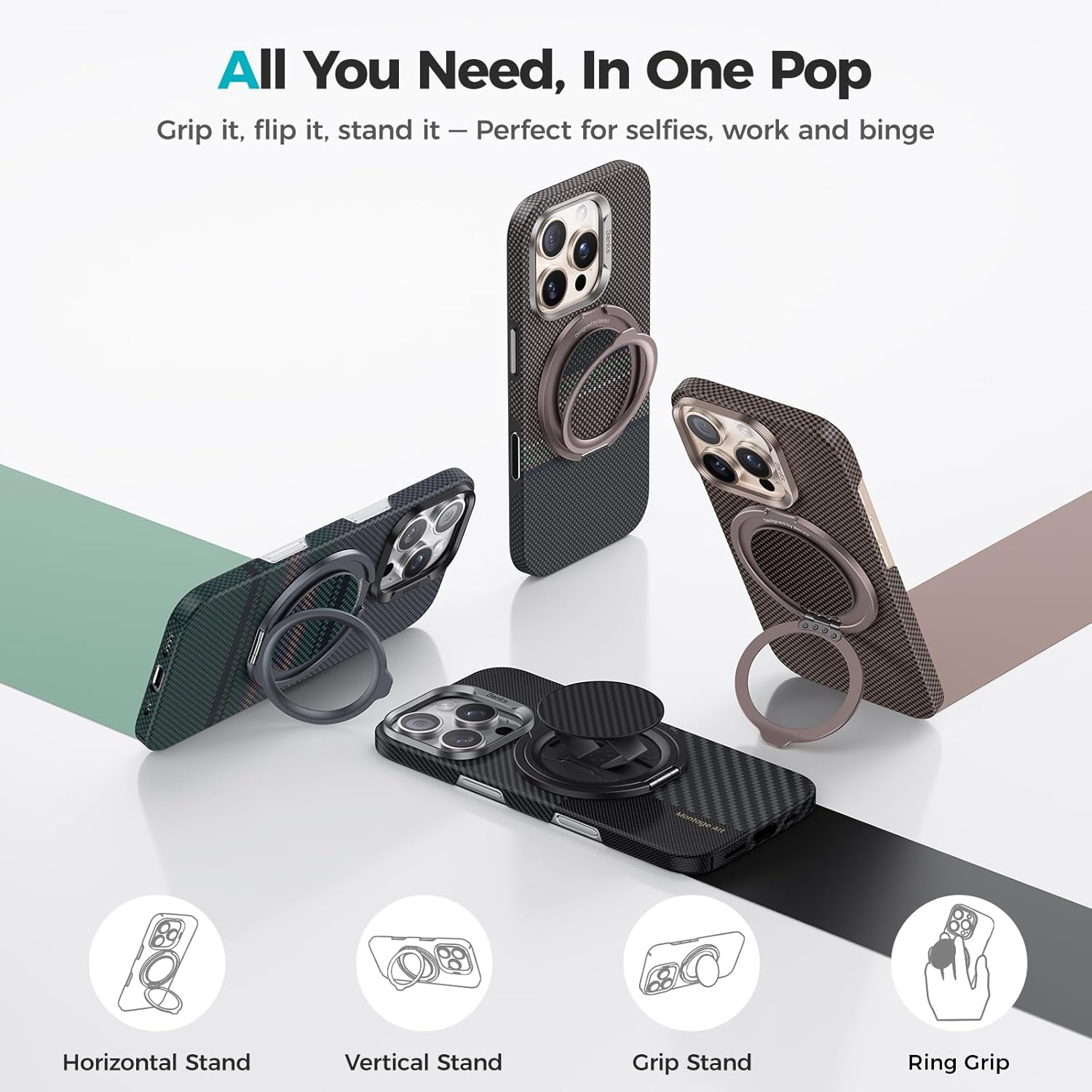
Image: Visual representation of the multiple ways to use the ArmorPop grip: horizontal stand, vertical stand, grip stand, and ring grip.

Image: A hand demonstrating the secure one-handed operation using the pop-out grip feature of the ArmorPop.
5. Maintenance
To ensure the longevity and optimal performance of your BENKS ArmorPop Phone Grip & Stand, follow these maintenance guidelines:
- Cleaning: Wipe the surface of the grip with a soft, dry cloth to remove dust or smudges. Avoid using harsh chemicals or abrasive materials, as these may damage the Kevlar design or alloy finish.
- Magnetic Surface: Keep the magnetic surface clean and free of debris to ensure a strong and consistent connection with your MagSafe device.
- Avoid Excessive Force: While durable, avoid applying excessive force when extending or retracting the ring and pop-out grip to prevent wear and tear on the hinges.
- Storage: When not in use, ensure the grip is fully retracted to maintain its slim profile and prevent accidental snagging.
6. Troubleshooting
If you encounter any issues with your ArmorPop Phone Grip & Stand, refer to the following common solutions:
- Grip is not attaching securely:
- Ensure your phone or case is MagSafe compatible. Non-MagSafe surfaces will not provide a strong magnetic hold.
- Check for any debris or obstructions between the grip and your phone/case that might weaken the magnetic connection.
- Ring or pop-out grip feels stiff:
- Apply gentle, consistent pressure to articulate the moving parts. They are designed to be sturdy and may require a slight break-in period.
- Ensure no foreign objects are lodged in the hinge mechanisms.
- Difficulty removing the grip:
- Slide the grip sideways off the MagSafe area rather than pulling directly outwards.
7. Specifications
| Brand | BENKS |
| Model | ArmorPop Phone Grip & Stand (600D) |
| Material | Aramid fiber, PC, PET, TPU, Magnet, Aluminum alloy |
| Dimensions | 5.51 x 3.7 x 1.02 inches (Package) |
| Item Weight | 0.317 ounces |
| Special Features | 2-IN-1 Phone Grip & Stand, 360° Rotation & 180° Flip, Magnetic, Upgraded with Aramid Fiber |
| Compatibility | iPhone 16/15/14/13/12 Series, MagSafe-compatible cases |

Image: The slim profile of the ArmorPop grip, highlighting its 3.9mm thickness and 22g weight, designed for minimal bulk.
8. Official Product Videos
ArmorPop Phone Grip & Stand (Aramid Fiber Made)
Video: An official product video from BenksOfficial showcasing the features and design of the ArmorPop Phone Grip & Stand, emphasizing its Aramid Fiber construction.
9. Warranty and Support
BENKS products are manufactured with high-quality materials and undergo strict quality control. For warranty information, technical support, or customer service inquiries, please visit the official BENKS website or contact their customer support team directly.
For further assistance, please refer to the BENKS Store on Amazon.