
Introduction
Thank you for choosing the Kisonli LED-805 Bluetooth Music Speaker. This manual provides essential information for the safe and efficient use of your new speaker. Please read these instructions carefully before operating the device and retain them for future reference.
The Kisonli LED-805 is a versatile soundbar designed to deliver rich, high-definition stereo sound with enhanced bass. Its compact and modern design makes it suitable for various environments, including living rooms, bedrooms, and offices. Enjoy multiple connectivity options, including Bluetooth, USB, and AUX, for seamless music playback from your preferred devices.
Product Overview
Speaker Components
The Kisonli LED-805 speaker features a sleek soundbar design with integrated controls and various input ports.
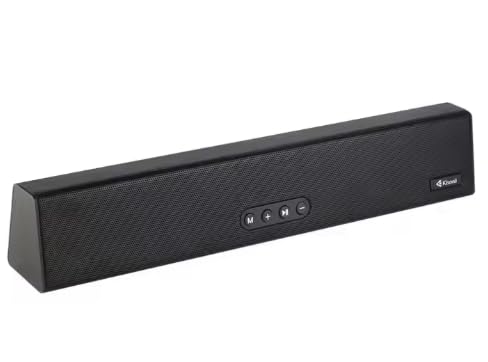
Figure 1: Front view of the Kisonli LED-805 Bluetooth Music Speaker.
Control Panel
The speaker is equipped with easy-to-use touch controls located on the front panel for convenient operation.
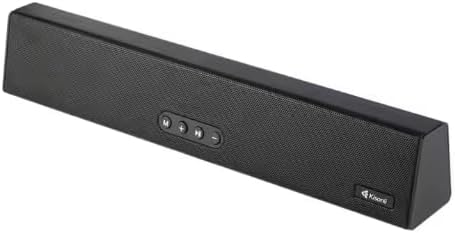
Figure 2: Top-down view highlighting the control buttons on the Kisonli LED-805 speaker.
- Power Button: Press and hold to turn the speaker on or off.
- Mode Button (M): Short press to switch between Bluetooth, USB, and AUX input modes.
- Volume Down (-): Short press to decrease volume. Press and hold for previous track (in Bluetooth/USB mode).
- Volume Up (+): Short press to increase volume. Press and hold for next track (in Bluetooth/USB mode).
- Play/Pause Button: Short press to play or pause audio.
Setup
Power Connection
- Connect the included power cable to the power input port on the back of the speaker.
- Plug the other end of the power cable into a standard electrical outlet.
- Press and hold the Power button on the speaker to turn it on. An indicator light will illuminate.
Initial Bluetooth Pairing
- Ensure the speaker is powered on and in Bluetooth mode. If not, press the 'M' (Mode) button until the Bluetooth indicator light flashes, indicating it's ready for pairing.
- On your device (smartphone, tablet, laptop), enable Bluetooth and search for available devices.
- Select "LED-805" from the list of found devices.
- Once paired, the Bluetooth indicator light on the speaker will stop flashing and remain solid. You can now play audio from your device through the speaker.
Operating Instructions
Switching Input Modes
Press the 'M' (Mode) button repeatedly to cycle through the available input modes: Bluetooth, USB, and AUX.
Bluetooth Mode
- After successful pairing, play music from your Bluetooth-enabled device.
- Use the Play/Pause button on the speaker to control playback.
- Press and hold the '-' button for the previous track.
- Press and hold the '+' button for the next track.
USB Mode
- Insert a USB flash drive containing audio files into the USB port on the speaker.
- Press the 'M' (Mode) button to select USB mode. The speaker will automatically begin playing audio from the USB drive.
- Use the Play/Pause, Volume Up, and Volume Down buttons to control playback and volume.
AUX Mode
- Connect one end of a 3.5mm audio cable (not included) to the AUX input port on the speaker.
- Connect the other end of the 3.5mm audio cable to the audio output jack of your external device (e.g., MP3 player, computer).
- Press the 'M' (Mode) button to select AUX mode.
- Control playback and volume directly from your connected external device.
Volume Control
Short press the '+' button to increase the volume. Short press the '-' button to decrease the volume.
Maintenance
- Cleaning: Use a soft, dry cloth to clean the speaker's surface. Do not use liquid cleaners or abrasive materials.
- Water Resistance: This speaker is NOT water-resistant. Avoid exposing it to water, moisture, or any liquids to prevent damage.
- Storage: When not in use for extended periods, store the speaker in a cool, dry place away from direct sunlight and extreme temperatures.
- Handling: Handle the speaker with care. Avoid dropping it or subjecting it to strong impacts.
Troubleshooting
| Problem | Possible Cause | Solution |
|---|---|---|
| Speaker does not power on. | No power supply or loose connection. | Ensure the power cable is securely connected to both the speaker and the power outlet. Check if the outlet is functional. |
| No sound from the speaker. | Incorrect input mode, low volume, or improper connection. | Verify the correct input mode (Bluetooth, USB, AUX). Increase the volume on both the speaker and the connected device. Check all cable connections. |
| Bluetooth pairing fails. | Speaker not in pairing mode, device too far, or interference. | Ensure the speaker is in Bluetooth pairing mode (flashing indicator). Move the device closer to the speaker. Turn off other Bluetooth devices to reduce interference. Try unpairing and re-pairing. |
| Sound distortion. | Volume too high or audio source quality is poor. | Reduce the volume on both the speaker and the connected device. Try a different audio source or file. |
Specifications
Below are the technical specifications for the Kisonli LED-805 Bluetooth Music Speaker:

Figure 3: Dimensions of the Kisonli LED-805 Bluetooth Music Speaker.
- Model Name: LED-805
- Speaker Type: Soundbar
- Audio Output Mode: Stereo
- Dimensions (L x W x H): 40 cm x 7 cm x 7 cm (approx. 375mm x 68mm x 56mm)
- Weight: 650 grams
- Wireless Connectivity: Bluetooth
- Wired Connectivity: USB, AUX
- Control Method: Touch buttons
- Power Source: Wired Electric
- Water Resistance: No
- Included Components: Power Cable
- Compatible Devices: TVs, Computers, Smartphones, Tablets, MP3 Players, Laptops
- Mounting Type: Tabletop
Warranty and Support
Warranty Information
Please refer to the warranty card included with your product for specific warranty terms and conditions. Keep your purchase receipt as proof of purchase for any warranty claims.
Customer Support
For technical assistance, troubleshooting beyond this manual, or service inquiries, please contact Kisonli customer support through the contact information provided on the product packaging or the official Kisonli website.