
1. Introduction and Overview
The BODEGACOOLER T36 is a versatile 38-quart (36L) portable electric compressor cooler designed for use in various environments, including RVs, cars, trucks, boats, and during camping or road trips. This dual-zone unit functions as both a refrigerator and a freezer, allowing independent temperature control for each compartment. It supports multiple power sources and offers convenient APP control for enhanced user experience.

Figure 1: BODEGACOOLER 38 Quart Dual Zone Portable Car Refrigerator.
2. Key Features
- Dual Zone Functionality: Two independent compartments with separate temperature controls, allowing simultaneous refrigeration and freezing. The middle plate can be removed to convert to a single zone.
- Wide Temperature Range: Capable of cooling from -4°F (-20°C) to 68°F (20°C).
- Multiple Power Options: Operates on 12V/24V DC (car cigarette lighter) and 100-240V AC (standard home outlet). Compatible with solar panels and power stations.
- APP Control: Connects via Wi-Fi/Bluetooth for convenient temperature monitoring and control from Android and iOS devices.
- Energy Efficient Compressor: Features a powerful compressor for rapid cooling and energy saving modes (ECO/MAX).
- Battery Protection System: Three levels (H/M/L) to prevent vehicle battery drain.
- Portable Design: Equipped with durable wheels and a retractable handle for easy transport. Side handles are also included and can be removed for permanent installation.
- Low Noise Operation: Engineered for quiet performance, ensuring a comfortable environment.
- User-Friendly Features: Includes a built-in LED light for visibility in low light, a bottom drain hole for easy cleaning, and a USB charging port for external devices.
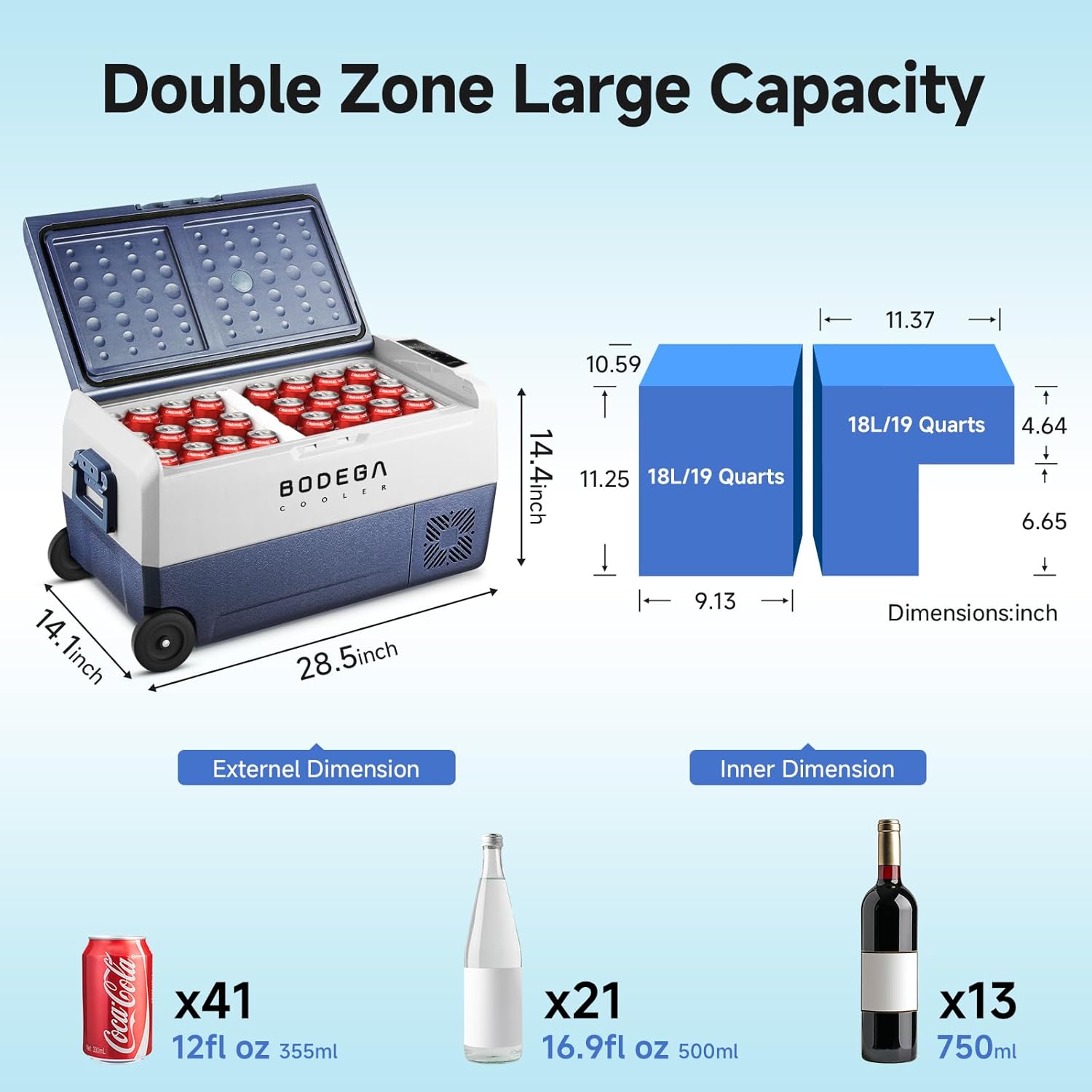
Figure 2: Internal capacity and external dimensions of the BODEGACOOLER T36. It can hold approximately 41 cans of cola, 21 bottles of water, or 13 bottles of red wine.

Figure 3: The BODEGACOOLER T36 can be powered by 12V/24V DC (car cigarette lighter), 100-240V AC (home outlet), or external power sources like solar panels and power stations.

Figure 4: The BODEGACOOLER T36 features integrated wheels and a retractable handle for easy portability. Side handles are also included for lifting.
3. Setup
- Unpacking: Carefully remove the refrigerator from its packaging. Ensure all accessories, including the cigarette lighter connector, wall plug, wall plug adapter, user manual, and basket, are present.
- Placement: Place the refrigerator on a stable, level surface. Ensure adequate ventilation around the unit, especially near the compressor and fan vents. If installing permanently in a vehicle, the side handles can be removed.
- Power Connection:
- For vehicle use, connect the 12V/24V DC cable to your vehicle's cigarette lighter socket.
- For home or AC power, use the provided 100-240V AC adapter and wall plug.
- Initial Cooling: For optimal performance, especially when storing frozen items, it is recommended to pre-cool the refrigerator for a few hours before loading it with contents.
- APP Control Setup:
- Download the official BODEGACOOLER APP (available for Android and iOS).
- Follow the in-app instructions to connect your smartphone to the refrigerator via Wi-Fi or Bluetooth. This allows remote temperature control and monitoring.
Video 1: A comprehensive review of the BODEGACOOLER 53-quart portable refrigerator/freezer, demonstrating its features, power consumption, and cooling capabilities. The video highlights its suitability for travel, truck, boat, and camping use, showcasing its quiet operation and rapid temperature drop.
4. Operating Instructions
- Power On/Off: Use the power button on the control panel to turn the unit on or off.
- Temperature Adjustment: Use the '+' and '-' buttons on the control panel or the mobile APP to set the desired temperature for each zone. The dual zones can be controlled independently.
- Cooling Modes (ECO/MAX):
- ECO Mode: Energy-saving mode for efficient operation over longer periods.
- MAX Mode: Provides maximum cooling power for rapid temperature reduction.
- Battery Protection: Select the appropriate battery protection level (H/M/L) based on your vehicle's battery condition to prevent excessive discharge. This system adjusts the startup and shutdown voltage thresholds.
- USB Charging Port: A built-in USB port allows you to charge small electronic devices, such as smartphones, directly from the refrigerator.
- Internal LED Light: The interior is equipped with an LED light for easy visibility of contents, especially in dark conditions.

Figure 5: The intuitive control panel allows for easy temperature adjustments and mode selection.
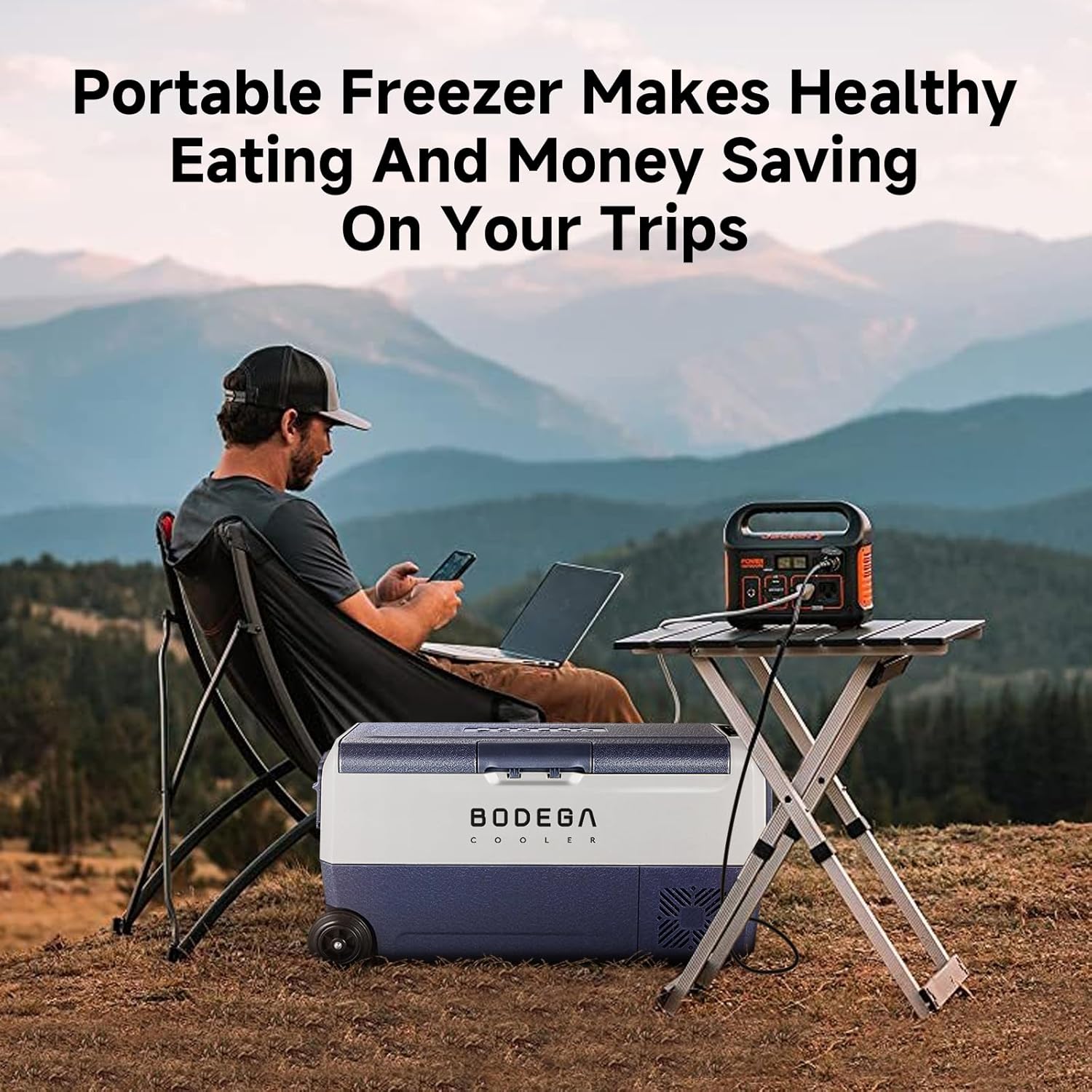
Figure 6: The integrated USB charging port provides convenient power for your mobile devices.
5. Maintenance
- Cleaning: Regularly clean the interior and exterior of the refrigerator. The bottom drain hole facilitates easy water drainage for cleaning or defrosting. Use a soft cloth and mild detergent; avoid abrasive cleaners.
- Defrosting: The unit features an automatic defrost system. For manual defrosting or thorough cleaning, unplug the unit and allow ice to melt naturally, then drain the water.
- Ventilation: Ensure that the air vents on the unit are clear of obstructions to maintain proper airflow and cooling efficiency.
- Storage: When not in use for extended periods, ensure the refrigerator is clean, dry, and stored in a well-ventilated area.

Figure 7: The interior of the BODEGACOOLER T36, showing the removable basket and the drain hole at the bottom for easy cleaning.
6. Troubleshooting
If you encounter issues with your BODEGACOOLER T36, please refer to the following common troubleshooting steps. For more detailed information or persistent problems, consult the full user manual or contact customer support.
- Unit Not Turning On:
- Check if the power cable is securely connected to both the unit and the power source.
- Verify that the power source (vehicle outlet, home outlet, power station) is functioning correctly.
- Ensure the battery protection level is not set too high, which might prevent the unit from starting if the input voltage is low.
- Insufficient Cooling:
- Confirm that the temperature settings are appropriate for your needs.
- Check if the unit is in ECO mode; switch to MAX mode for faster cooling.
- Ensure the vents are not blocked and there is sufficient space around the unit for heat dissipation.
- Avoid frequently opening the lid, as this can cause temperature fluctuations.
- Unusual Noise:
- A slight humming sound from the compressor is normal.
- Ensure the unit is on a stable, level surface to prevent rattling.
- Check for any loose items inside or around the refrigerator.
- APP Connectivity Issues:
- Ensure Bluetooth/Wi-Fi is enabled on your smartphone and the refrigerator.
- Restart both the APP and the refrigerator.
- Ensure your phone is within range of the refrigerator.
7. Specifications
| Feature | Specification |
|---|---|
| Brand | BODEGA |
| Model Number | T36 (US/YKS-T36-WF-2) |
| Capacity | 38 Quarts (36 Liters) |
| Product Dimensions (D x W x H) | 14.1 x 28.5 x 14.4 inches |
| Item Weight | 33 pounds (15 Kilograms) |
| Voltage | 12/24V DC, 100-240V AC |
| Temperature Range | -4°F (-20°C) to 68°F (20°C) |
| Installation Type | Freestanding |
| Defrost System | Automatic |
| Special Features | Portable, Bluetooth App Control, LED Display, Low Noise, USB charging port |
| Color | Dark Blue |
8. Warranty and Support
BODEGACOOLER offers the following warranty for this product:
- Compressor: 5 Years Life Span
- All Other Parts: 1 Year Warranty
For any issues, technical support, or warranty claims, please contact BODEGACOOLER customer support via Amazon. They aim to respond within 24 hours to ensure a satisfactory experience.


