
1. Introduction
This manual provides detailed instructions for the installation, operation, and maintenance of your OlideSmart Automatic Residential Sliding Door Window Operator. This system is designed to automate the opening and closing of residential sliding doors or windows, offering convenience through app control, voice commands, and RFID pet tag integration. Please read this manual thoroughly before installation and use to ensure proper function and safety.
2. Safety Information
- Ensure all power is disconnected before performing any installation or maintenance.
- Follow all local electrical codes and regulations.
- Keep hands and loose clothing clear of moving parts during operation.
- Do not allow children to play with the door operator or its controls.
- Regularly inspect the system for any signs of wear or damage.
- This device is for residential use only.
3. Package Contents
Verify that all components listed below are present in your package:
- 70-inch Rail
- Motor Unit
- Power Plug
- 2 x RFID Pet Tags
- Receiver Unit
- Mounting Accessories

Figure 3.1: Overview of the OlideSmart Automatic Sliding Door Window Operator components.
4. Product Overview
The OlideSmart Automatic Residential Sliding Door Window Operator is designed for ease of installation and smart home integration. Key features include:
- Easy Installation: The track attaches similarly to an adjustable telescopic rod, requiring no extensive drilling.
- Smart Control: Operate the motor via a dedicated mobile application.
- Voice Assistant Compatibility: Supports Amazon Alexa and Google Home for convenient voice control.
- Multi-Control System: Offers app control, voice control, and optional accessories like handicapped push switches or body sensors.
- RFID Pet Tag Integration: Allows pets with RFID tags to operate the door automatically.
4.1. Key Components

Figure 4.1: OlideSmart Intelligent Motor. This unit powers the sliding mechanism and integrates with smart home systems.

Figure 4.2: Mute Rail Design. Features an S-shaped rail and a mute belt for quiet operation.

Figure 4.3: Built-in Microchip. The device utilizes PCB double panel technology for reliable performance.
5. Setup and Installation
5.1. Preparation and Measurement
Before installation, accurately measure your door or window frame to ensure proper fit and operation. The rail length provided is 70 inches.

Figure 5.1: Measurement Guide. Measure the dimensions of your door or window frame according to the diagram. If the required rail length exceeds 2 meters or if there are more than two windows, consult for special solutions.
5.2. Mounting the Rail and Motor
The track is designed for easy attachment to your window or door frame, similar to an adjustable telescopic rod. No extensive drilling or professional workers are required for basic installation.
- Position the rail along the top of your sliding door or window frame.
- Secure the rail using the provided mounting accessories, ensuring it is level and firmly attached.
- Attach the motor unit to one side of the rail as indicated in the product diagrams.
5.3. Wiring Diagram
Connect the motor and receiver unit according to the following wiring diagram. Ensure all connections are secure before powering on the device.

Figure 5.2: Wiring Diagram. This diagram illustrates the connections between the OS210WN controller, OS101 terminals (yellow COM, white NO, red NC, black Stop), and the 504W RFID controller.
- Connect the power plug to the motor unit.
- Connect the receiver unit to the motor unit as shown in the diagram.
- Ensure correct polarity for all connections.
6. Operating Instructions
6.1. Power On/Off
Plug the power adapter into a standard electrical outlet to power on the device. The system will perform a self-check upon startup.
6.2. Mobile App Control
The OlideSmart system can be controlled via a dedicated mobile application. Download the app from your smartphone's app store (search for "OlideSmart").
- Install the OlideSmart app on your smartphone.
- Follow the in-app instructions to pair your device with the app.
- Once paired, you can control the door/window, set timers, activate lock functions, and configure anti-theft alarms.
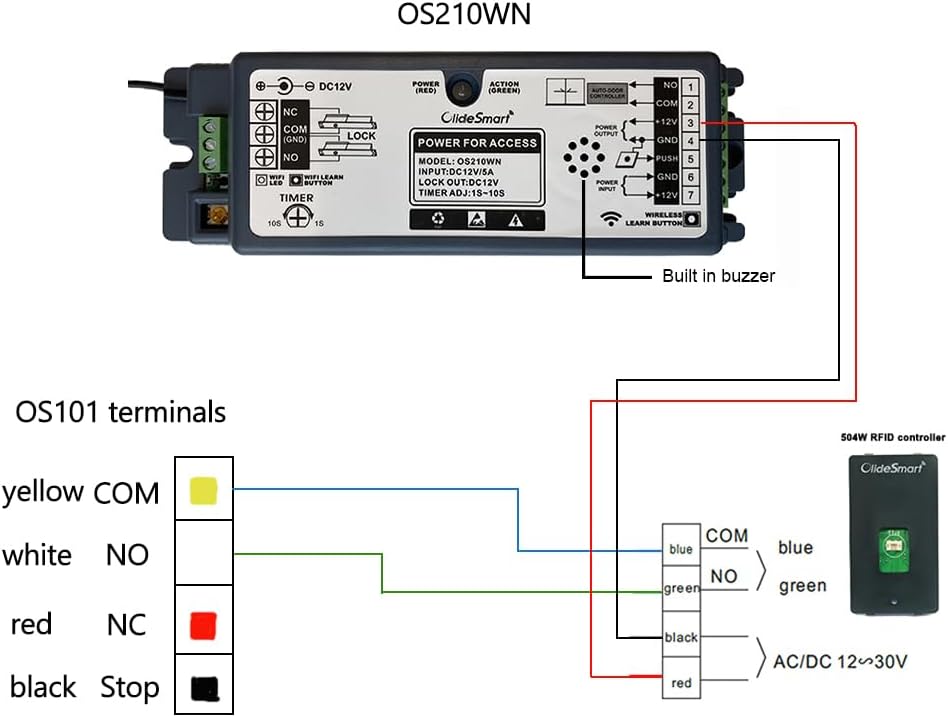
Figure 6.1: App Control Interface. The mobile app allows for comprehensive control of the door/window operator.

Figure 6.2: Mobile Phone Control. The app provides remote control capabilities, allowing you to manage your door/window from anywhere.
6.3. Voice Control (Amazon Alexa & Google Home)
The system is compatible with Amazon Alexa and Google Home for hands-free operation.
- Ensure your OlideSmart device is connected to the mobile app.
- Open the Amazon Alexa or Google Home app.
- Add the OlideSmart skill/service and link your OlideSmart account.
- You can now use voice commands such as "Alexa, open the sliding door" or "Hey Google, close the window."
6.4. RFID Smart Pet Tag Function
The included RFID pet tags allow your pets to automatically open the door/window when they approach.
- Attach an RFID tag to your pet's collar.
- Ensure the receiver unit is properly installed and connected.
- When your pet approaches the door/window, the RFID tag will trigger the operator to open.
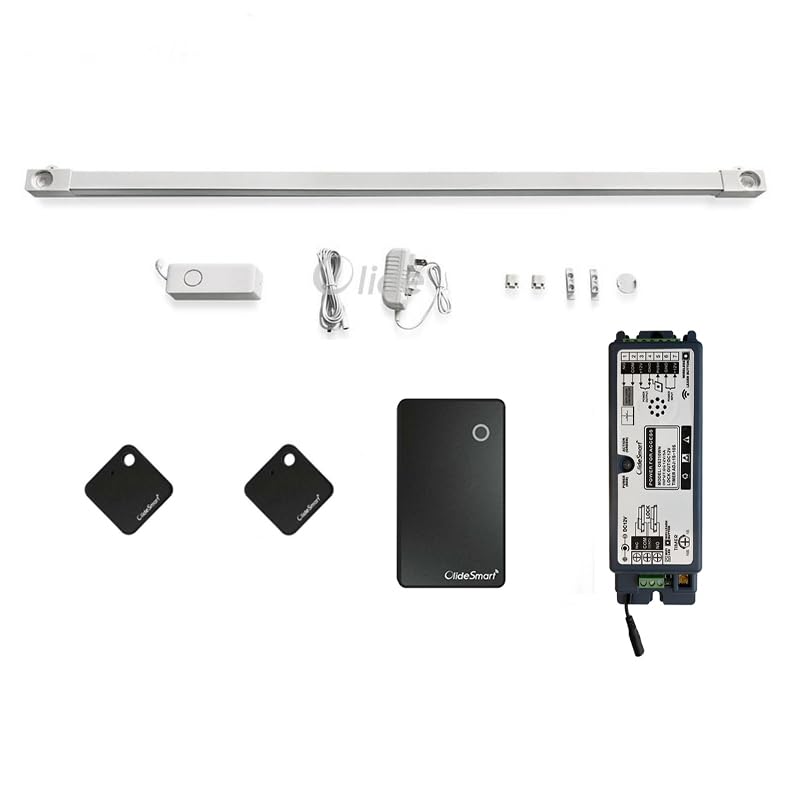
Figure 6.3: RFID Smart Pet Tag in action. A pet with the tag can trigger the door to open automatically.
6.5. Automatic Closing Function
The automatic closing function needs to be configured within the smart scene settings of the mobile application.
- Open the OlideSmart mobile app.
- Navigate to the 'Smart Scene' or 'Automation' settings.
- Set a condition, for example, "when door open 99% for 5 minutes, then close."
- Save the smart scene. The door will now close automatically based on your defined conditions.
7. Maintenance
Regular maintenance ensures the longevity and optimal performance of your OlideSmart door operator.
- Cleaning: Periodically wipe down the rail and motor unit with a soft, damp cloth. Avoid abrasive cleaners or solvents.
- Inspection: Regularly check the rail for any obstructions, debris, or signs of wear. Ensure the belt is free from damage.
- Connections: Verify that all electrical connections remain secure.
- Lubrication: The rail and moving parts are designed for low maintenance. Avoid applying excessive lubricants unless specified by the manufacturer.
8. Troubleshooting
If you encounter issues with your OlideSmart Automatic Residential Sliding Door Window Operator, refer to the following troubleshooting guide:
| Problem | Possible Cause | Solution |
|---|---|---|
| Motor does not respond to commands. | No power; App not connected; Device not paired. | Check power connection. Ensure Wi-Fi is active. Re-pair device with the app. |
| Door/window does not slide smoothly. | Obstruction in rail; Rail not level; Damaged belt. | Clear any obstructions. Verify rail is level. Inspect belt for damage. |
| RFID pet tag not working. | Tag not recognized; Receiver issue; Tag damaged. | Ensure tag is correctly attached. Check receiver connection. Test with another tag if available. |
| Automatic closing function not activating. | Smart scene not configured correctly; App settings issue. | Review and adjust smart scene settings in the mobile app. Ensure conditions are met. |
| Voice control not working. | Incorrect voice command; Skill not linked; Internet connectivity issue. | Use correct commands. Verify OlideSmart skill is linked in Alexa/Google Home app. Check internet connection. |
If the problem persists after attempting these solutions, please contact customer support.
9. Specifications
| Feature | Detail |
|---|---|
| Brand | OlideSmart |
| Model Number | OS101 with OS701W |
| Material | Metal, Plastic |
| Color | White |
| Product Dimensions (L x W x H) | 70"L x 4"W x 4"H |
| Included Components | 70inch rail, motor, plug, 2 pcs tags, receiver and mounting accessory |
| Installation Type | Self-Adhesive (track attachment) |
| Recommended Uses | Residential homes, smart homes, assistive living environments |
| UPC | 782003420473 |
10. Warranty and Support
For warranty information and technical support, please refer to the official OlideSmart website or contact their customer service directly. Keep your purchase receipt as proof of purchase.
OlideSmart Customer Service: Visit the OlideSmart Store on Amazon