
SinoTrack US-901L-4G
SinoTrack ST-901L 4G GPS Tracker User Manual
Introduction
This user manual provides comprehensive instructions for the installation, operation, and maintenance of your SinoTrack ST-901L 4G GPS Tracker. This device is designed to offer precise global positioning, real-time tracking, and security features for a wide range of vehicles including cars, motorcycles, trucks, and taxis. Please read this manual carefully before using the device to ensure optimal performance and safety.
What's in the Box
Upon opening the package, please verify that all components are present and in good condition:
- SinoTrack ST-901L 4G GPS Tracker (1 unit)
- Relay (1 unit)
- User Manual (1 unit)
- Double-sided sticker (1 unit)

Image: Contents of the SinoTrack ST-901L 4G GPS Tracker package, showing the main unit, relay, wiring harness, user manual, and double-sided adhesive pad.
Initial Setup
Before installation, the GPS tracker requires a 4G SIM card (not included) for network connectivity. Ensure the SIM card is active and supports 4G data services in your region.
- Unscrew and Open the Lid: Carefully unscrew the small screws on the side of the tracker and open the protective lid to access the SIM card slot.
- Plug-in SIM Card: Insert the 4G SIM card into the designated slot. Ensure it is inserted correctly according to the diagram on the device or in the manual.

Image: Step-by-step guide illustrating how to open the tracker's lid and insert the SIM card.
Installation Guide
The SinoTrack ST-901L is designed for hardwired installation. It is recommended that installation be performed by a qualified professional. The device operates on a 12V or 24V battery system.
Wiring Diagram and Connections:
- Red Wire: Connect to the positive terminal of the vehicle's power supply (Power +). This should be a constant 12V/24V supply.
- Black Wire: Connect to the negative terminal of the vehicle's power supply (Power -) or a suitable ground point.
- Orange Wire: Connect to the ACC (Accessory) port. This wire detects when the vehicle's ignition is on.
- Yellow Wire: Connect to the relay for remote engine cut-off functionality. Ensure the relay is correctly wired into the vehicle's fuel pump or ignition circuit as per the relay's instructions.
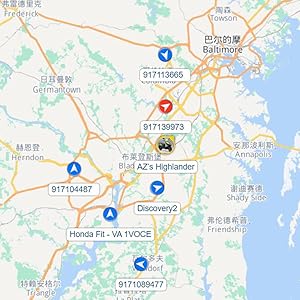
Image: Wiring diagram illustrating the connections for the GPS tracker, including power, ACC, and the relay for engine cut-off.
After wiring, secure the device in a discreet location within the vehicle using the provided double-sided sticker or other suitable mounting methods. Ensure the device has a clear line of sight to the sky for optimal GPS signal reception.
Operation
The SinoTrack ST-901L GPS Tracker can be operated via the SinoTrackPRO mobile application (available for iOS and Android) or through the web tracking system.
1. Real-Time Tracking
Monitor your vehicle's location in real-time on Google Maps through the SinoTrackPRO App or web platform. The interface displays current speed, signal strength, and device status.

Image: SinoTrackPRO app interface demonstrating real-time tracking and geofence functionality.
2. History Route Playback
Review past routes and activities for up to six months. This feature allows you to playback the vehicle's movement history, including stops and speeds, providing a comprehensive overview of its usage.

Image: SinoTrackPRO app displaying the history route playback feature, showing a vehicle's past travel path on a map.
3. Geo-Fence
Set up virtual boundaries (geo-fences) on the map. You will receive alerts via SMS notifications when the vehicle enters or exits these predefined areas, enhancing security and monitoring.
4. Remote Engine Cut-Off
In case of theft, you can remotely cut off the vehicle's engine by sending a specific SMS command from your phone. The vehicle will stop moving when its speed drops below 20 km/h (approximately 12 mph) after receiving the command. The command to restore power is also sent via SMS.

Image: Depiction of the remote engine cut-off function, where a user sends an SMS command to the tracker to disable the vehicle's engine.
5. Alert Notifications
The device provides various alerts via SMS, including overspeed alerts, geo-fence crossing alerts, movement alerts, and low battery notifications, keeping you informed of critical events.
Specifications
| Feature | Detail |
|---|---|
| Product Dimensions | 3.54 x 2.04 x 0.66 inches |
| Item Weight | 5.3 ounces |
| Model Number | US-901L-4G |
| Batteries | 1 Lithium Polymer battery (included) |
| Connectivity Technologies | GPS, LTE (4G Network Only) |
| Special Features | Waterproof, Remote Engine Cut-Off, Real-Time Tracking, Alert Notification, Geo-Fence, History Route Playback, Rechargeable |
| Supported Application | SinoTrack PRO (iOS, Android, Web APP) |
| Manufacturer | SinoTrack |
| Country of Origin | China |
Troubleshooting
- Device Offline: Ensure the SIM card is correctly inserted, active, and has sufficient data balance. Check if the device is receiving power. Verify 4G network coverage in the device's location.
- Inaccurate Location: Ensure the device has a clear view of the sky for optimal GPS signal reception. Avoid installing it under metal objects or in enclosed spaces that can block signals.
- No Alerts Received: Check your SMS notification settings in the SinoTrackPRO app or web platform. Ensure your phone number is correctly registered for alerts.
- Remote Cut-Off Not Working: Verify that the yellow wire and relay are correctly installed and wired into the vehicle's fuel or ignition system. Ensure the vehicle speed is below 20 km/h when attempting the cut-off.
- Battery Draining Quickly: While the device has a built-in battery, it primarily relies on vehicle power. Ensure stable power supply from the vehicle. If the vehicle is parked for extended periods, consider a voltage monitor with automatic shutoff to prevent full battery drain.
Maintenance
- Keep the device clean and free from dust and debris.
- Avoid exposing the device to extreme temperatures or direct sunlight for prolonged periods.
- Though waterproof, avoid submerging the device in water.
- Regularly check the wiring connections to ensure they are secure and free from corrosion.
- Ensure your SinoTrackPRO app and device firmware are updated to the latest versions for optimal performance and new features.
Warranty and Support
For warranty information, technical support, or service inquiries, please refer to the contact details provided on the SinoTrack official website or the purchase platform. Keep your proof of purchase for warranty claims.
Related documentsUS-901L-4G


Ask a question about this manual
Ask about setup, troubleshooting, compatibility, parts, safety, or missing instructions. Manuals+ will review the question and use this page’s manual context to help answer it.