
1. Introduction
This manual provides essential instructions for the proper installation, operation, and maintenance of the Bloepum GM67 1D/2D USB UART Barcode Scanner Module. This device is designed for efficient scanning of 1D and 2D barcodes from various surfaces, including labels, paper, mobile phone screens, and computer displays. Please read this manual thoroughly before using the product.
2. Key Features
- 1D/2D Barcode Scanning: Capable of capturing both 1D and 2D codes.
- USB and UART Interface: Compatible with both USB and UART communication protocols for versatile integration.
- Buzzer Feedback: Provides audible confirmation for successful scans.
- High-Efficiency Recognition: Utilizes advanced decoding algorithms for superior reading performance and high upload speed.
- Configurable Options: Over 180 configurable options, including macro support to replace strings in barcodes, and programmable preamble, postamble, and termination strings.
3. Package Contents
The standard package includes the following items:
- GM67 Scanning Module (3 units)
- USB Cable (3 units)
- Serial Port Cable (3 units)
4. Setup and Installation
The GM67 module supports both USB and UART interfaces for connection to a host system. Ensure the module is powered off before making any connections.
4.1 Connecting via USB
To connect the module using the USB interface:
- Locate the USB port on the GM67 module.
- Connect one end of the provided USB cable to the module's USB port.
- Connect the other end of the USB cable to an available USB port on your host computer or device.
- The system should automatically detect the device. If necessary, install the appropriate drivers (usually available from the manufacturer's website or provided with the module).
4.2 Connecting via UART
To connect the module using the UART interface:
- Locate the UART pins on the GM67 module.
- Connect the provided serial port cable to the UART pins on the module.
- Connect the other end of the serial port cable to the UART interface on your host device, ensuring correct pin assignments (TX, RX, GND, VCC).
- Configure your host device's serial communication settings (baud rate, data bits, parity, stop bits) to match the module's default or configured settings.

Image: Bottom view of the GM67 module, highlighting the USB and UART connection pads for integration.
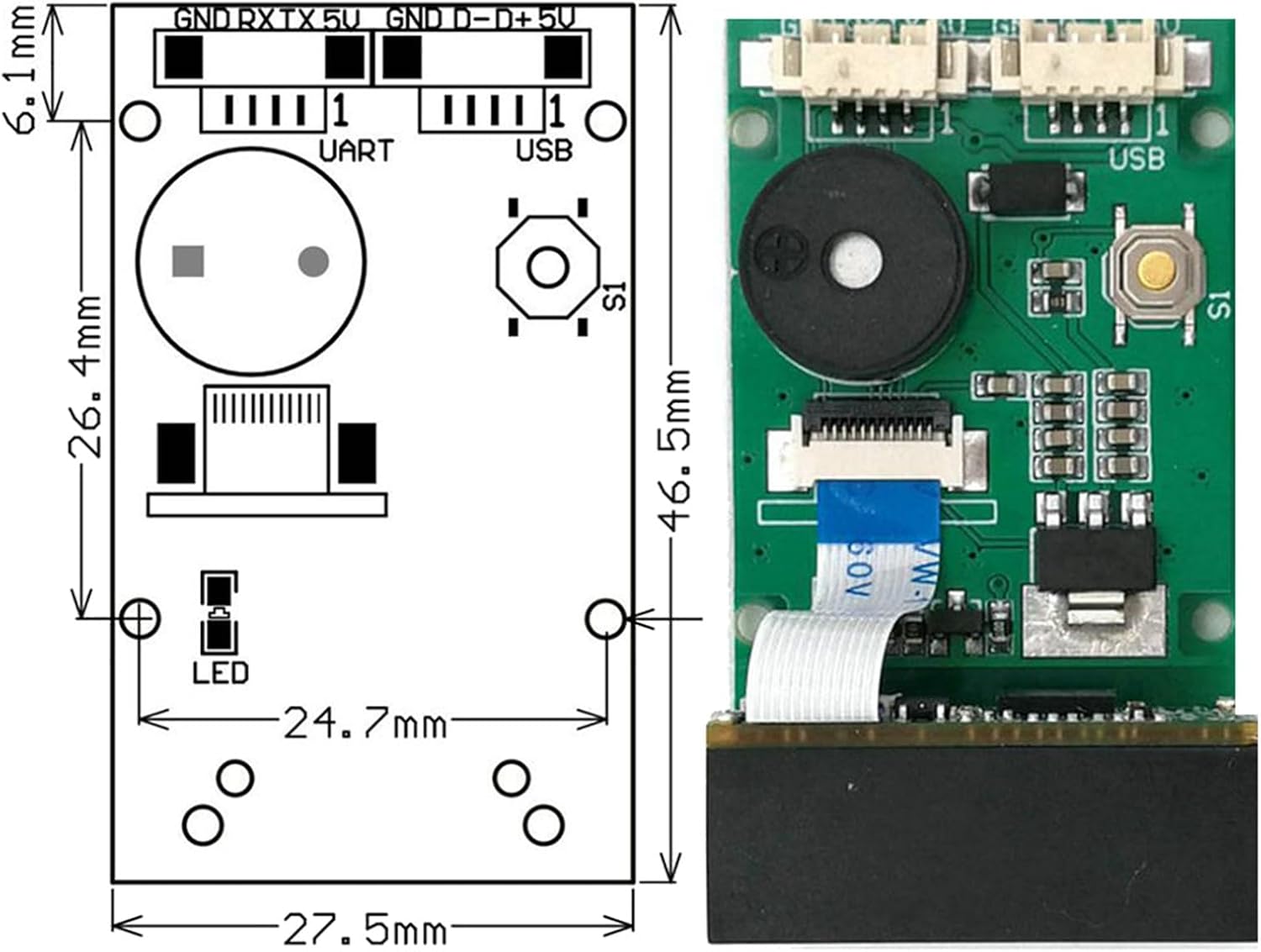
Image: Technical drawing illustrating the dimensions and pinout labels for the GM67 module, useful for integration.
5. Operation
Once the GM67 module is properly connected and powered, it is ready for scanning operations.
5.1 Basic Scanning
- Point the scanner module's optical window towards the barcode you wish to scan.
- Ensure the barcode is within the module's scanning range and field of view.
- Upon a successful scan, the module will emit a short beep from its integrated buzzer, and the decoded data will be transmitted to the connected host device via the configured interface (USB or UART).
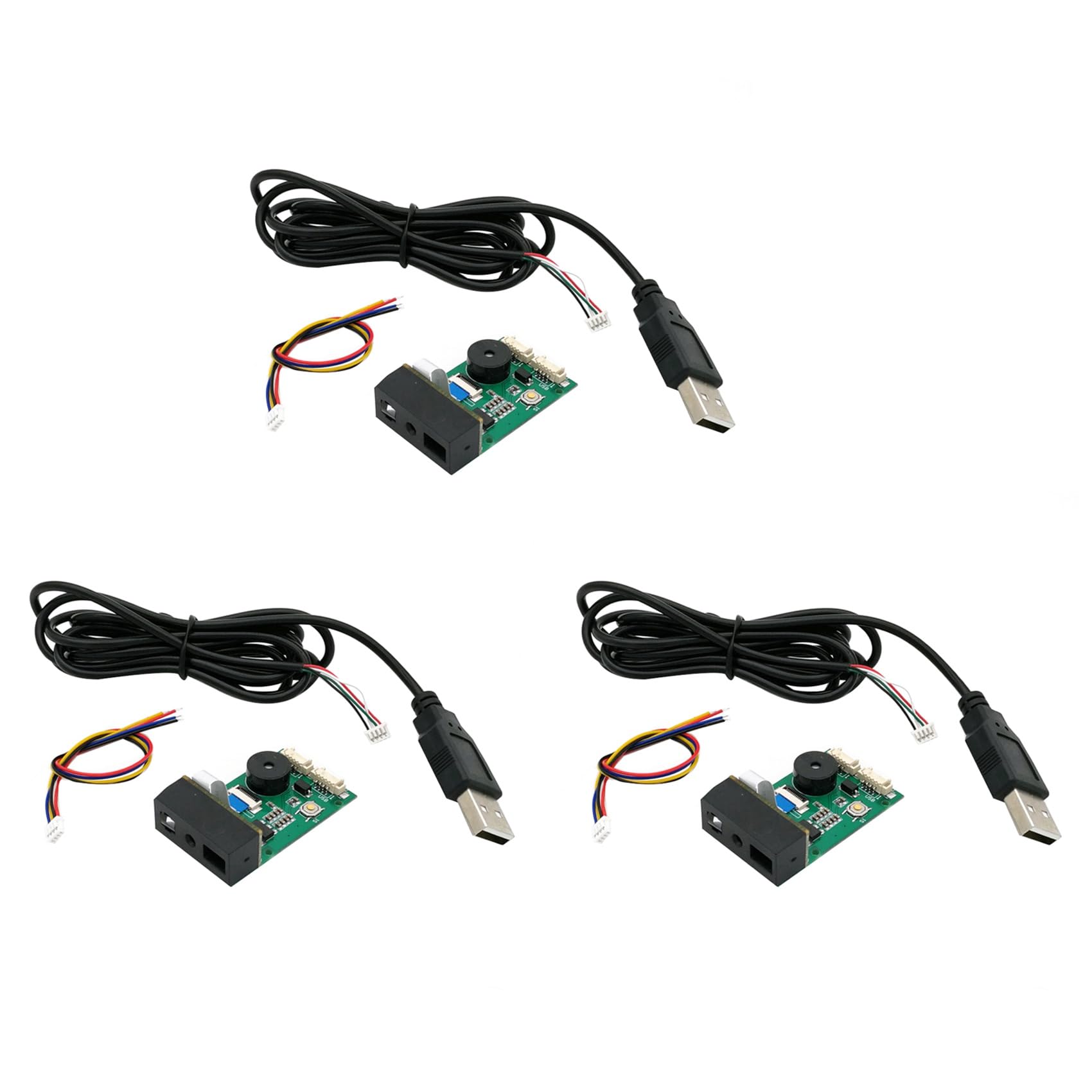
Image: The Bloepum GM67 barcode scanner module, illustrating its compact design and key components like the scanner head and buzzer.
5.2 Advanced Configuration
The GM67 module offers extensive configuration options to customize its behavior, including:
- Data Formatting: Adjust preamble, postamble, and termination strings.
- Macro Support: Define rules to replace specific strings within scanned barcode data.
- Symbology Enable/Disable: Enable or disable specific 1D and 2D barcode symbologies.
- Buzzer Settings: Adjust buzzer volume or disable it.
For detailed instructions on configuring these advanced settings, please refer to the comprehensive user manual available for download from the manufacturer's provided link: GM67 User Manual (Dropbox).

Image: A top-down perspective of the GM67 module, detailing the arrangement of its electronic components on the circuit board.
6. Maintenance
To ensure optimal performance and longevity of your GM67 barcode scanner module, follow these maintenance guidelines:
- Cleaning: Gently wipe the optical window and the module's surface with a soft, dry, lint-free cloth. Avoid using abrasive cleaners, solvents, or excessive moisture, which can damage the components.
- Storage: Store the module in a cool, dry environment, away from direct sunlight, extreme temperatures, and high humidity.
- Handling: Handle the module with care to prevent physical damage. Avoid dropping or subjecting it to strong impacts.
- Cable Inspection: Regularly inspect USB and serial cables for any signs of wear, fraying, or damage. Replace damaged cables immediately to prevent connectivity issues.

Image: Side view of the GM67 module, showing the flexible ribbon cable connecting the scanner head to the main circuit board.
7. Troubleshooting
If you encounter issues with your GM67 barcode scanner module, refer to the following common problems and solutions:
- No Scan Output:
- Ensure the module is properly connected to the host device and powered on.
- Verify that the barcode is clean, undamaged, and within the scanner's field of view.
- Check if the correct interface (USB/UART) is selected and configured on the host device.
- Confirm that the required barcode symbology is enabled in the module's settings.
- Incorrect Data Output:
- Review the module's configuration settings for data formatting (preamble, postamble, termination strings, macros).
- Ensure the host application is correctly interpreting the received data.
- No Buzzer Sound:
- Check the module's configuration to ensure the buzzer is enabled and its volume is set appropriately.
- Confirm that a successful scan is actually occurring.
- Module Not Detected by Host:
- For USB connection, try a different USB port or cable. Reinstall USB drivers if necessary.
- For UART connection, verify pin connections (TX/RX/GND/VCC) and serial port settings (baud rate, etc.).
- Ensure the module is receiving adequate power.
If problems persist after attempting these solutions, consult the detailed GM67 user manual or contact Bloepum customer support.
8. Specifications
| Specification | Value |
|---|---|
| Product Dimensions | 3.94 x 2.76 x 3.54 inches |
| Item Weight | 4.3 ounces |
| Item Model Number | 750140119 |
| Manufacturer | Bloepum |
| Interface | USB, UART |
| Scanning Capability | 1D, 2D (QR Code) |
9. Warranty and Support
The Bloepum GM67 Barcode Scanner Module is manufactured by Bloepum. For specific warranty information, please refer to the documentation provided with your purchase or contact your retailer. For technical support or further inquiries, please reach out to Bloepum customer service through their official channels.