
PGST PGST107F-US-A
PGST Home Security System User Manual
Model: PGST107F-US-A
1. Introduction
The PGST Home Security System is a comprehensive, DIY wireless WIFI/4G burglar alarm system designed to provide real-time alerts and enhance the security of your home or business. This system offers advanced features such as instant notifications, customizable protection zones, and compatibility with smart home platforms like Alexa and Google Assistant, all without recurring monthly fees.
It is highly customizable and expandable, allowing you to add various sensors and devices to meet your evolving security needs. The system is designed for easy installation and user-friendly operation, making it accessible for all users.

Image: The PGST Home Security System offers no subscription fees, providing a cost-effective security solution.
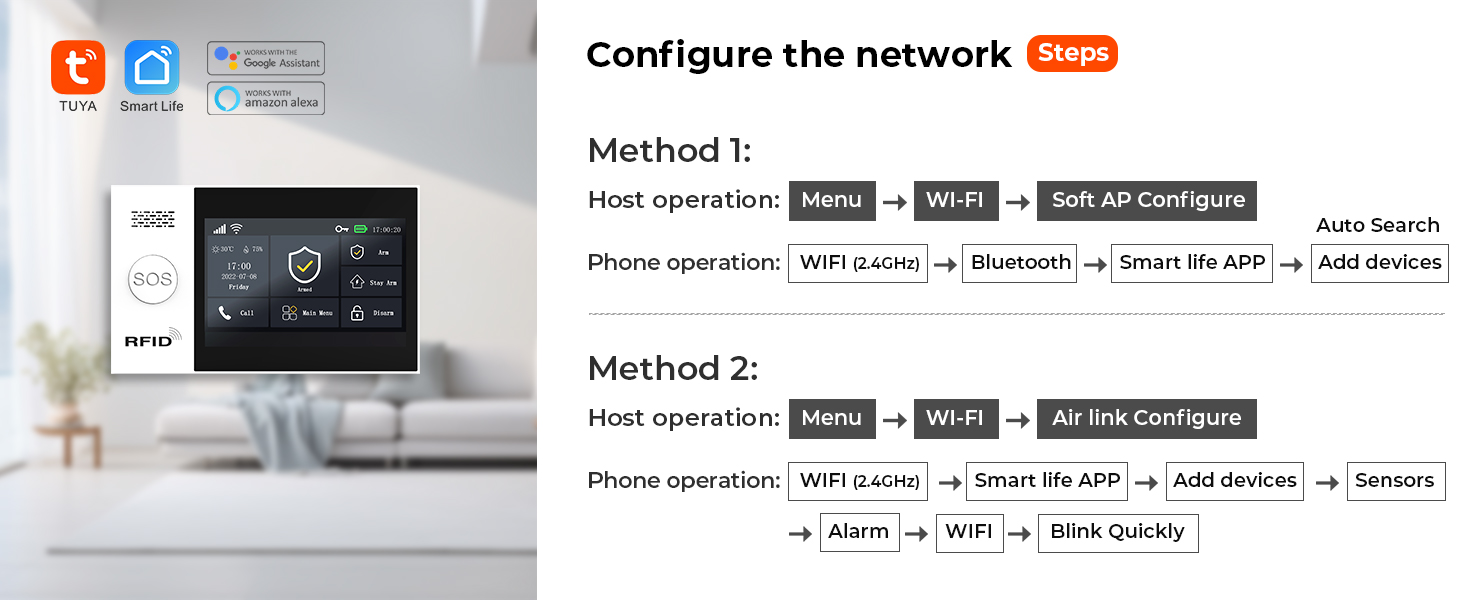
Image: The system is versatile and can be used in various environments, including homes, offices, warehouses, and supermarkets.
2. Components
Your 8-Piece PGST Home Security System kit includes the following components:
- 1 x PGST107F Alarm Host (Main Control Panel)
- Door/Window Sensors (Multiple, quantity depends on kit)
- PIR Motion Detectors (Multiple, quantity depends on kit)
- Remote Controls (Key fobs)
- RFID Tags
- Power Adapter
- Mounting Hardware

Image: Overview of the PGST 8-Piece Home Security System components, including the main panel, motion sensor, door sensor, remote controls, and RFID tags.

Image: A detailed view of the door/window sensor, which uses magnetic field technology to detect opening and closing.

Image: A PIR motion detector, designed to detect intruder movement within its wide-angle detection range.
3. Setup and Installation
The PGST Home Security System is designed for easy DIY installation. Follow these steps to set up your system:
3.1 Main Control Panel Installation
- Choose a central location for the alarm host, preferably near a power outlet and within Wi-Fi range.
- Mount the host securely to a wall using the provided screws or place it on a flat surface.
- Connect the power adapter to the host and plug it into a power outlet.
- The 4.3-inch TFT colorful display screen will light up.

Image: The 4.3-inch TFT colorful display screen of the main control panel, which provides multi-function capabilities including APP notification and voice intercom.
3.2 Sensor Installation
Install door/window sensors and motion detectors in key areas of your home:
- Door/Window Sensors: Attach the two parts of the sensor to a door/window frame and the door/window itself, ensuring they are aligned and close to each other when the door/window is closed.
- PIR Motion Detectors: Mount motion detectors in corners or areas with high traffic, ensuring they have a clear line of sight to detect movement. The detection angle is approximately 110 degrees.

Image: The system supports voice control via Alexa and Google Assistant, allowing for convenient arming and disarming.
3.3 Network Configuration
Connect your alarm host to your home network using the Smart Life or Tuya APP:
Method 1: Soft AP Configure
- On the host: Go to Menu → Wi-Fi → Soft AP Configure.
- On your phone: Open the Smart Life APP, go to WIFI (2.4GHz) → Bluetooth → Smart life APP → Add devices.
Method 2: Airlink Configure
- On the host: Go to Menu → Wi-Fi → Airlink Configure.
- On your phone: Open the Smart Life APP, go to WIFI (2.4GHz) → Smart life APP → Add devices → Sensors → Alarm → WIFI → Blink Quickly.

Image: The system supports voice control via Alexa and Google Assistant for convenient arming and disarming.

Image: The system allows you to preset up to five family numbers to ensure no alert is missed, enhancing home safety.
4. Operating the System
The PGST Home Security System offers multiple ways to control and monitor your home security.
4.1 Arming and Disarming
- Via Smart Life/Tuya APP: You can arm or disarm the system anytime, anywhere, directly from your smartphone.
- Via Control Panel: Use the touch screen interface on the alarm host to arm, disarm, or set to stay arm mode.
- Via Remote Control: Use the included key fobs for quick arming and disarming.
- Voice Control: Integrate with Alexa or Google Assistant to arm or disarm using voice commands (e.g., "Alexa, Disarm my home!").

Image: The system allows for scheduled arming and disarming via the app, saving time and effort for daily routines.
4.2 Real-Time Alerts and Notifications
The system provides instant alerts to your smartphone when motion is detected or sensors are triggered.
- APP Push Notifications: Receive immediate alerts directly to your Smart Life/Tuya APP.
- Preset Alarm Calls: The system can dial up to 5 preset numbers in case of an alarm, ensuring no critical information is missed.
- SMS Notifications: If a SIM card is installed (optional), the system can send text messages for alerts.

Image: The system can dial up to 5 preset numbers sequentially if a busy line is encountered, ensuring alarm information is not missed.

Image: When an entry attempt is detected by a door sensor or PIR detector, the system pushes alerts to your phone via the app and can initiate calls.
4.3 SOS Function
The system includes an SOS button on the main panel and remote controls for emergency situations. Pressing the SOS button will trigger an immediate alarm and notify preset contacts.

Image: The SOS button provides an easy way for elderly individuals or children to send an emergency alert if unexpected events occur.
4.4 Anti-Demolition Alarm
The alarm host features an anti-demolition function. If the host is detached from its mounting position, it will trigger an alarm and send a call or text message to the host.

Image: The anti-demolition feature ensures that if the alarm host is tampered with or removed, an immediate alert is sent.
4.5 Voice Intercom (with linked cameras)
If compatible cameras are linked to your system, you can use the voice intercom feature via the app to communicate and deter intruders.
Video: This video demonstrates the voice intercom feature, showing how linked cameras can be used to scare away potential intruders by allowing two-way audio communication through the app.
5. Maintenance
Regular maintenance ensures the optimal performance of your PGST Home Security System.
- Battery Check: Monitor the battery levels of your wireless sensors. The system will notify you via the app when a sensor's battery is low.
- Cleaning: Periodically clean the alarm host and sensors with a soft, dry cloth. Avoid using abrasive cleaners or solvents.
- Software Updates: Ensure your Smart Life/Tuya APP and alarm host firmware are up to date for the latest features and security enhancements.

Image: The system provides alerts for low battery levels in wireless sensors, pushing notifications to your app for timely replacement.
6. Troubleshooting
If you encounter issues with your PGST Home Security System, refer to the following common troubleshooting steps:
- No Connection to Wi-Fi:
- Ensure your Wi-Fi network is 2.4GHz. The system does not support 5GHz networks.
- Check your Wi-Fi password for accuracy.
- Move the alarm host closer to your Wi-Fi router.
- Restart your router and the alarm host.
- Sensors Not Triggering Alarm:
- Verify that the sensors are properly paired with the alarm host. Refer to the pairing instructions in the app.
- Check sensor battery levels.
- Ensure door/window sensors are correctly aligned when closed.
- For motion detectors, ensure no obstructions are blocking the detection area.
- No App Notifications:
- Check your phone's notification settings for the Smart Life/Tuya APP to ensure notifications are enabled.
- Verify that the alarm host is connected to the internet.
- Ensure the app is running in the background or has necessary permissions.
- False Alarms:
- Adjust the sensitivity settings of motion detectors if available in the app.
- Ensure motion detectors are not placed near heat sources, direct sunlight, or areas with drafts that could cause false triggers.
- Check for loose or improperly installed sensors.
For persistent issues, please contact PGST customer support.
7. Specifications
| Feature | Detail |
|---|---|
| Brand | PGST |
| Model Number | PGST107F-US-A |
| Color | White |
| Power Source | Corded Electric |
| Compatible Devices | Smartphone, Tablet (Smart Life/Tuya APP), Alexa, Google Assistant |
| Connectivity Technology | Wireless (WIFI/4G) |
| Installation Type | Screw-In |
| Alert Type | Audio & Motion, APP Push, Call, SMS |
| Control Method | App, Remote, Voice |
| Item Dimensions (L x W x H) | 8.6 x 5.9 x 3.9 inches |
| Item Weight | 1.2 pounds |
| Display Screen | 4.3-inch TFT Colorful Display |
| Supported Languages | 10 languages (Chinese, English, German, Russian, Spanish, Polish, Italian, French, Portuguese, Greek) |

Image: The system supports 10 languages for menu display, voice operation prompts, and alarm SMS settings, offering flexibility for users.
8. Warranty and Support
PGST offers a 1-Year Warranty for the PGST Home Security System. This warranty covers manufacturing defects and ensures your product functions as intended under normal use.
If you have any questions, require technical assistance, or need to claim warranty service, please contact PGST customer support through the following channels:
- Refer to the contact information provided in your product packaging.
- Visit the official PGST store on Amazon: PGST Store
- Contact the seller directly via your Amazon order history.
Please have your product model number (PGST107F-US-A) and purchase details ready when contacting support.
Related documentsPGST107F-US-A


Ask a question about this manual
Ask about setup, troubleshooting, compatibility, parts, safety, or missing instructions. Manuals+ will review the question and use this page’s manual context to help answer it.