
1. Introduction
This manual provides essential information for the safe and effective operation of your ION Audio Retro Glow Boombox. This device combines classic audio playback with modern connectivity, featuring an AM/FM radio, cassette player/recorder, Bluetooth 5.3, USB, and SD card playback capabilities. Please read this manual thoroughly before use and retain it for future reference.
2. Safety Information
- Do not expose the unit to water or moisture.
- Avoid placing the unit near heat sources or in direct sunlight.
- Ensure proper ventilation; do not block any ventilation openings.
- Use only attachments/accessories specified by the manufacturer.
- Unplug the unit during lightning storms or when unused for long periods.
- Refer all servicing to qualified service personnel.
3. What's Included
Upon unpacking, ensure all items listed below are present and in good condition:
- ION Audio Retro Glow Boombox
- Power Cable
- Quickstart Guide
4. Product Overview
The Retro Glow Boombox features a translucent housing with multi-colored LED lights that synchronize with music. It includes dual full-range speakers for robust audio output.
Front Panel

Figure 1: Front view of the Retro Glow Boombox, showcasing the cassette deck, radio tuner, and illuminated dual speakers.
Top Controls

Figure 2: Detailed view of the top panel, including volume, bass, treble controls, cassette function buttons (Pause, Stop/Eject, F.FWD, REW, Play, REC), and mode selectors (Tape, Aux, Radio, Bluetooth/USB/SD).
Side Panel and Rear
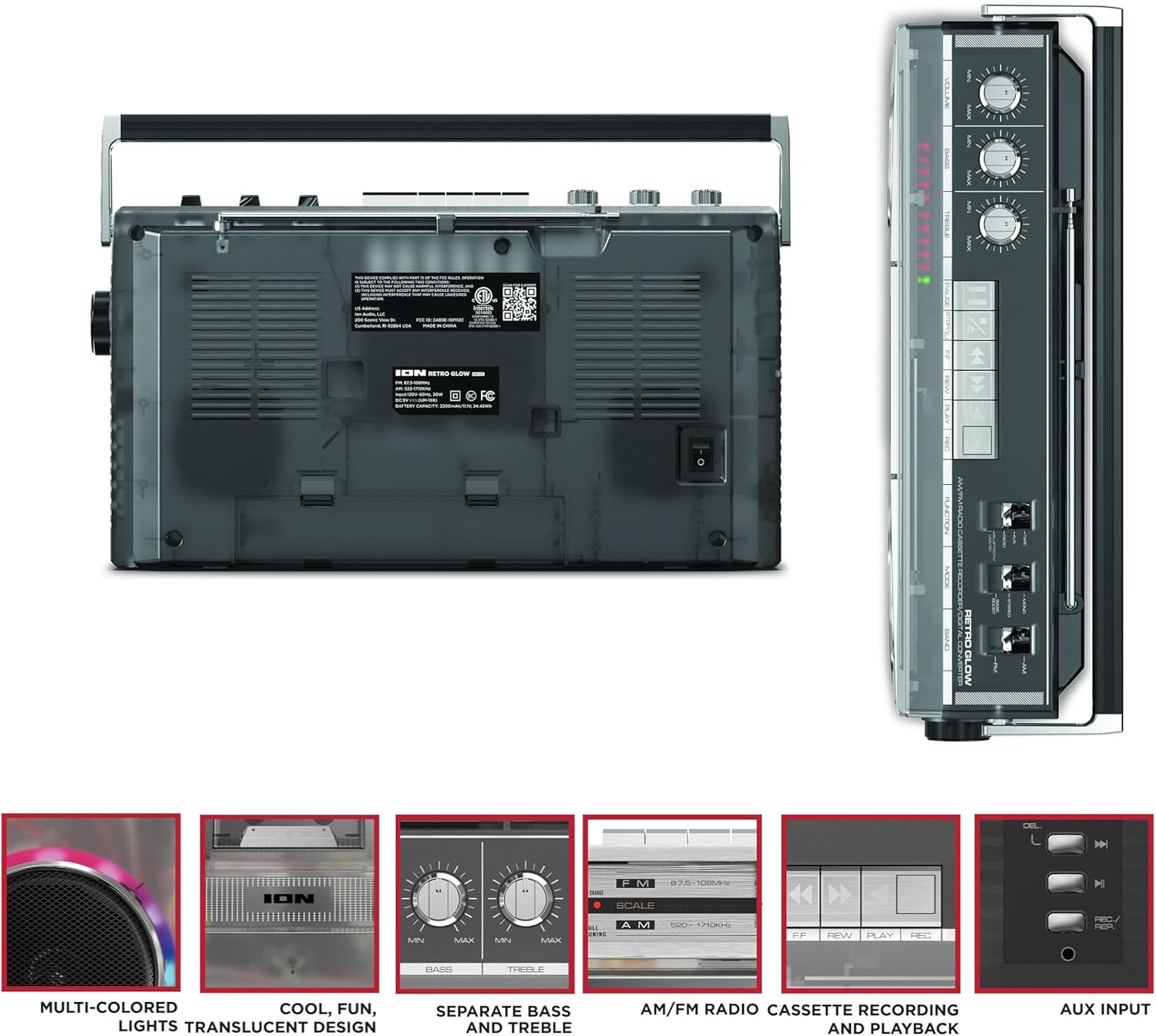
Figure 3: Side panel illustrating the USB port, SD card slot, and playback control buttons. The rear panel includes the power input and battery compartment.
5. Setup
Powering the Boombox
The Retro Glow Boombox can be powered via the included AC power cable or by batteries for portable use.
- AC Power: Connect the power cable to the AC input on the rear of the unit and then to a wall outlet.
- Battery Power: Open the battery compartment on the rear and insert the required batteries (type and quantity specified in specifications).

Figure 4: Rear view of the boombox, highlighting the power input and the battery compartment for portable operation.
6. Operating Instructions
General Operation
- Power On/Off: Use the power switch to turn the unit on or off.
- Volume Control: Adjust the 'VOLUME' knob on the top panel to increase or decrease the sound level.
- Tone Control: Use the 'BASS' and 'TREBLE' knobs to customize the audio output to your preference.
- LED Lights: The multi-colored LED lights around the speakers dance in sync with the music. Refer to the Quickstart Guide for specific controls to change light modes or turn them off.
Radio Functionality
- Switch the 'FUNCTION' selector to 'RADIO'.
- Select 'AM' or 'FM' using the 'BAND' switch.
- Extend the telescopic antenna for optimal FM reception. For AM, rotate the unit for best reception.
- Use the 'TUNING' knob to scan for stations.
Cassette Player/Recorder
- Playback: Press the 'STOP/EJ' button to open the cassette door. Insert a cassette tape and close the door. Press 'PLAY' to begin playback.
- Recording: To record from the radio, built-in microphone, or an external source (via Aux input), ensure a blank cassette is inserted. Select the desired source using the 'FUNCTION' switch. Press the 'REC' button (often simultaneously with 'PLAY') to start recording.
- Fast Forward/Rewind: Use the 'F.FWD' and 'REW' buttons for tape navigation.
Bluetooth Connectivity
- Switch the 'FUNCTION' selector to 'BLUETOOTH/USB/SD'. The unit will enter pairing mode.
- On your Bluetooth-enabled device, search for 'Retro Glow Boombox' and select it to pair.
- Once paired, you can stream audio wirelessly to the boombox.
USB and SD Card Playback
- Insert a USB drive or SD card into the respective slot on the side panel.
- Switch the 'FUNCTION' selector to 'BLUETOOTH/USB/SD'. The unit should automatically detect and begin playing audio files from the inserted media.
- Use the playback control buttons (play/pause, skip forward/backward) on the side panel to manage your audio.
Auxiliary Input
- Connect an external audio device (e.g., smartphone, MP3 player) to the 'AUX' input using a 3.5mm audio cable (not included).
- Switch the 'FUNCTION' selector to 'AUX'. Audio from your external device will play through the boombox speakers.
7. Maintenance
- Cleaning: Use a soft, dry cloth to clean the exterior of the unit. Do not use abrasive cleaners or solvents.
- Cassette Deck Care: Regularly clean the tape heads and pinch rollers with a cotton swab lightly dampened with isopropyl alcohol to ensure optimal sound quality and prevent tape damage.
- Storage: When not in use, store the boombox in a cool, dry place away from direct sunlight and extreme temperatures.
8. Troubleshooting
No Power
- Ensure the power cable is securely connected to both the unit and a working power outlet.
- If using batteries, check if they are inserted correctly and are not depleted.
No Sound
- Check the volume level on the boombox and the connected audio source (if applicable).
- Ensure the correct function mode (Radio, Tape, Bluetooth, USB/SD, Aux) is selected.
- For cassette playback, verify the tape is inserted correctly and the heads are clean.
Bluetooth Pairing Issues
- Make sure the boombox is in Bluetooth pairing mode.
- Ensure your Bluetooth device is within range (typically 30 feet or 10 meters).
- Try unpairing and re-pairing the device.
9. Specifications
| Product Dimensions | 9.25 x 16.25 x 5.25 inches |
| Item Weight | 8.93 pounds |
| Connectivity Technology | Bluetooth 5.3, USB, SD Card, Aux Input |
| Speaker Type | Stereo, Full-Range |
| Power Source | AC Power Cable, Rechargeable Battery (approx. 10-hour life) |
| Special Features | AM/FM Radio, Cassette Player/Recorder, Multi-colored LED Lights, Retro VU Meters, Separate Bass and Treble Controls |
10. Warranty and Support
For warranty information or technical support, please refer to the Quickstart Guide included with your product or visit the official ION Audio website. Keep your purchase receipt as proof of purchase may be required for warranty claims.