
EUHOMY OL12-D081AAN2
Euhomy 12L Dehumidifier User Manual
Model: OL12-D081AAN2
1. Introduction
Thank you for choosing the Euhomy 12L Dehumidifier. This manual provides essential information for the safe operation, installation, maintenance, and troubleshooting of your appliance. Please read it thoroughly before use and retain it for future reference.
This dehumidifier is designed to efficiently remove excess moisture from your indoor environment, helping to prevent mold, mildew, and musty odors. Its features include a powerful 12L/day dehumidification capacity, quiet operation (36dB sleep mode), continuous drainage option, and smart controls.
2. Safety Instructions
To reduce the risk of fire, electric shock, or injury, always follow these basic safety precautions:
- Read all instructions before using the appliance.
- Do not operate the dehumidifier with a damaged cord or plug. If the supply cord is damaged, it must be replaced by the manufacturer, its service agent, or similarly qualified persons to avoid a hazard.
- Ensure the appliance is placed on a stable, level surface to prevent tipping.
- Do not block air inlets or outlets. Maintain at least 20 cm (8 inches) clearance around the unit for proper airflow.
- Do not insert fingers or foreign objects into the air inlets or outlets.
- Unplug the dehumidifier before cleaning, moving, or performing any maintenance.
- Do not use the appliance near water or in excessively wet environments (e.g., bathrooms without proper ventilation).
- This appliance is not intended for use by persons (including children) with reduced physical, sensory or mental capabilities, or lack of experience and knowledge, unless they have been given supervision or instruction concerning use of the appliance by a person responsible for their safety.
- Children should be supervised to ensure that they do not play with the appliance.
- The appliance uses R290 refrigerant. Do not puncture the refrigerant circuit.
3. Product Overview
3.1 Components
Familiarize yourself with the main parts of your Euhomy dehumidifier:

Figure 3.1: Front view of the Euhomy 12L Dehumidifier, showing the main unit and the continuous drain hose connected to the side.

Figure 3.2: Detailed view of the dehumidifier's portability features, including a carrying handle, smooth-rolling casters, and a visible water level indicator on the removable tank. Dimensions are shown as 45.5cm height, 25cm depth, and 20cm width.
3.2 Control Panel
The control panel allows you to manage all functions of the dehumidifier.

Figure 3.3: Top-down view of the control panel, featuring a digital display showing the current humidity level (e.g., 50%). Buttons include Lock, Speed, Timer, Set, Mode, and Power. Indicators for humidity levels (Low, Med, High) are also shown.
- Power Button: Turns the unit on or off.
- Mode Button: Selects operating modes (e.g., Auto, Continuous, Sleep, Drying).
- Set Button: Adjusts the desired humidity level.
- Timer Button: Sets the auto-on or auto-off timer.
- Speed Button: Adjusts fan speed (High/Low).
- Lock Button: Activates/deactivates the child lock function.
- Digital Display: Shows current humidity, set humidity, or timer settings.
4. Setup
4.1 Unpacking
- Carefully remove the dehumidifier from its packaging.
- Remove all packing materials, including any tape or protective films.
- Check for any damage during transit. If the unit is damaged, do not operate it and contact customer support.
4.2 Placement
For optimal performance, place the dehumidifier in a location where air can circulate freely.
- Ensure the unit is on a firm, level surface.
- Maintain at least 20 cm (8 inches) of space around the unit to allow for proper airflow.
- Avoid placing the unit near heat sources, such as radiators or ovens, or in direct sunlight.
- Do not place the unit in areas where it may be exposed to splashing water.
4.3 Drainage Options
Your dehumidifier offers two drainage methods: manual emptying of the water tank or continuous drainage.
4.3.1 Manual Drainage
When the water tank is full, the unit will automatically shut off, and an indicator light will illuminate. Carefully remove the water tank and empty it. Reinsert the tank securely to resume operation.

Figure 4.1: Illustration showing the removable 1.8L water tank being detached from the dehumidifier and the connection point for the continuous drain hose (1.0m length).
4.3.2 Continuous Drainage
For extended operation without needing to empty the water tank, you can use the included drain hose for continuous drainage.
- Locate the continuous drain outlet on the back or side of the unit.
- Remove the rubber stopper (if present).
- Connect one end of the provided drain hose to the outlet. Ensure a secure connection to prevent leaks.
- Direct the other end of the hose to a suitable drain, such as a floor drain or a large container. Ensure the hose is sloped downwards to allow water to flow by gravity. Do not allow the hose to be kinked or blocked.
5. Operating Instructions
5.1 Power On/Off
Press the Power button to turn the dehumidifier on or off.
5.2 Setting Desired Humidity
- With the unit powered on, press the Set button.
- The digital display will flash the current humidity setting.
- Use the Set button repeatedly to cycle through desired humidity levels (e.g., 30% to 80% RH). The unit will automatically maintain the set humidity level.
5.3 Mode Selection
Press the Mode button to cycle through available operating modes:
- Auto Mode: The unit automatically adjusts fan speed and dehumidification based on the set humidity level.
- Continuous Dehumidification: The unit runs continuously regardless of the humidity level, ideal for very damp conditions or drying clothes.
- Sleep Mode: Operates at a lower fan speed and dims display lights for quiet operation, suitable for bedrooms.
- Drying Mode: Optimized for drying clothes, providing continuous powerful dehumidification.

Figure 5.1: The dehumidifier operating in a bedroom, demonstrating its quiet 36dB sleep mode, suitable for nighttime use.

Figure 5.2: The dehumidifier positioned in a laundry area, actively drying clothes. This image highlights the extended drying mode, effective for areas up to 15-25 square meters.
5.4 Fan Speed Adjustment
Press the Speed button to switch between High and Low fan speeds.
5.5 Timer Function
The timer allows you to set the unit to automatically turn on or off after a specified period (1-24 hours).
- Press the Timer button.
- Use the Timer button repeatedly to select the desired number of hours. The timer will start counting down.
5.6 Child Lock
Press and hold the Lock button for 3 seconds to activate or deactivate the child lock. When activated, other buttons will not respond to prevent accidental changes to settings.
5.7 Smart Features

Figure 5.3: Icons representing the smart features of the dehumidifier: Automatic Defrost Function, Automatic Shut-off, Power-off Memory Function, and Automatic Humidity Control.
- Automatic Defrost: The unit automatically defrosts when frost builds up on the evaporator coils, ensuring efficient operation in cooler temperatures.
- Automatic Shut-off: The unit will automatically turn off when the water tank is full or when the set humidity level is reached.
- Power-off Memory: The unit remembers your last settings in case of a power interruption.
- Automatic Humidity Control: The unit intelligently maintains the desired humidity level.
6. Maintenance
Regular maintenance ensures optimal performance and extends the lifespan of your dehumidifier.
6.1 Cleaning the Air Filter
The dehumidifier is equipped with a washable nylon filter. A clean filter improves air quality and unit efficiency.
- Unplug the dehumidifier from the power outlet.
- Locate the air filter, usually at the back or side of the unit.
- Carefully remove the filter.
- Wash the filter with warm, soapy water. Rinse thoroughly and allow it to air dry completely before reinserting.
- Reinsert the dry filter back into the unit.
It is recommended to clean the filter every two weeks or more frequently depending on usage and air quality.
6.2 Emptying the Water Tank
If not using continuous drainage, empty the water tank when the 'Tank Full' indicator illuminates.
- Gently pull out the water tank from the unit.
- Pour out the collected water.
- Clean the tank with mild detergent and water if necessary, then rinse thoroughly.
- Reinsert the empty tank firmly into the unit until it clicks into place.
6.3 Cleaning the Unit Exterior
- Unplug the dehumidifier.
- Wipe the exterior with a soft, damp cloth. Do not use harsh chemicals, abrasives, or solvents.
- Ensure no water enters the control panel or other electrical components.
6.4 Storage
If storing the unit for an extended period:
- Unplug the unit and empty the water tank completely.
- Clean the air filter and the exterior of the unit.
- Allow the unit to dry for at least 24 hours in a well-ventilated area to prevent mold growth.
- Store the unit upright in a cool, dry place, away from direct sunlight and extreme temperatures.
7. Troubleshooting
Before contacting customer support, please refer to the following troubleshooting guide for common issues:
| Problem | Possible Cause | Solution |
|---|---|---|
| Unit does not turn on | No power supply Power cord not plugged in Water tank full or not properly inserted | Check power outlet Ensure power cord is securely plugged in Empty water tank and reinsert correctly |
| No dehumidification | Air filter clogged Room temperature too low Humidity setting too high Air inlets/outlets blocked | Clean the air filter Dehumidifiers are less effective below 5°C (41°F) Lower the desired humidity setting Ensure proper clearance around the unit |
| Unit is noisy | Unit not on a level surface Air filter clogged Foreign object inside | Place on a flat, stable surface Clean the air filter Turn off and unplug, then check for obstructions |
| Water leaks | Water tank not properly inserted Continuous drain hose loose or kinked | Reinsert water tank securely Check hose connection and ensure it's not kinked or blocked |
| Frost on coils | Room temperature too low | The unit has an automatic defrost function. If frost persists, increase room temperature or move to a warmer area. |
8. Specifications
Refer to the following technical specifications for the Euhomy 12L Dehumidifier, Model OL12-D081AAN2:
| Feature | Specification |
|---|---|
| Model Number | OL12-D081AAN2 |
| Dehumidification Capacity | 12 Liters/day |
| Water Tank Volume | 1.8 Liters |
| Recommended Coverage Area | Up to 25 square meters |
| Product Dimensions (L x W x H) | 23.9 cm x 30.5 cm x 49.5 cm |
| Product Weight | 9.5 Kilograms |
| Special Functions | Automatic Shut-off, Child Lock, Adjustable Humidity Control, Removable Tank, Continuous Drainage, Washable Filter, Water Level Indicator, Automatic Defrost, Sleep Mode, Digital Display, Portable, Auto Restart, Timer |
| Refrigerant | R290 (Eco-friendly) |
| Included Components | Drain Hose, User Manual |
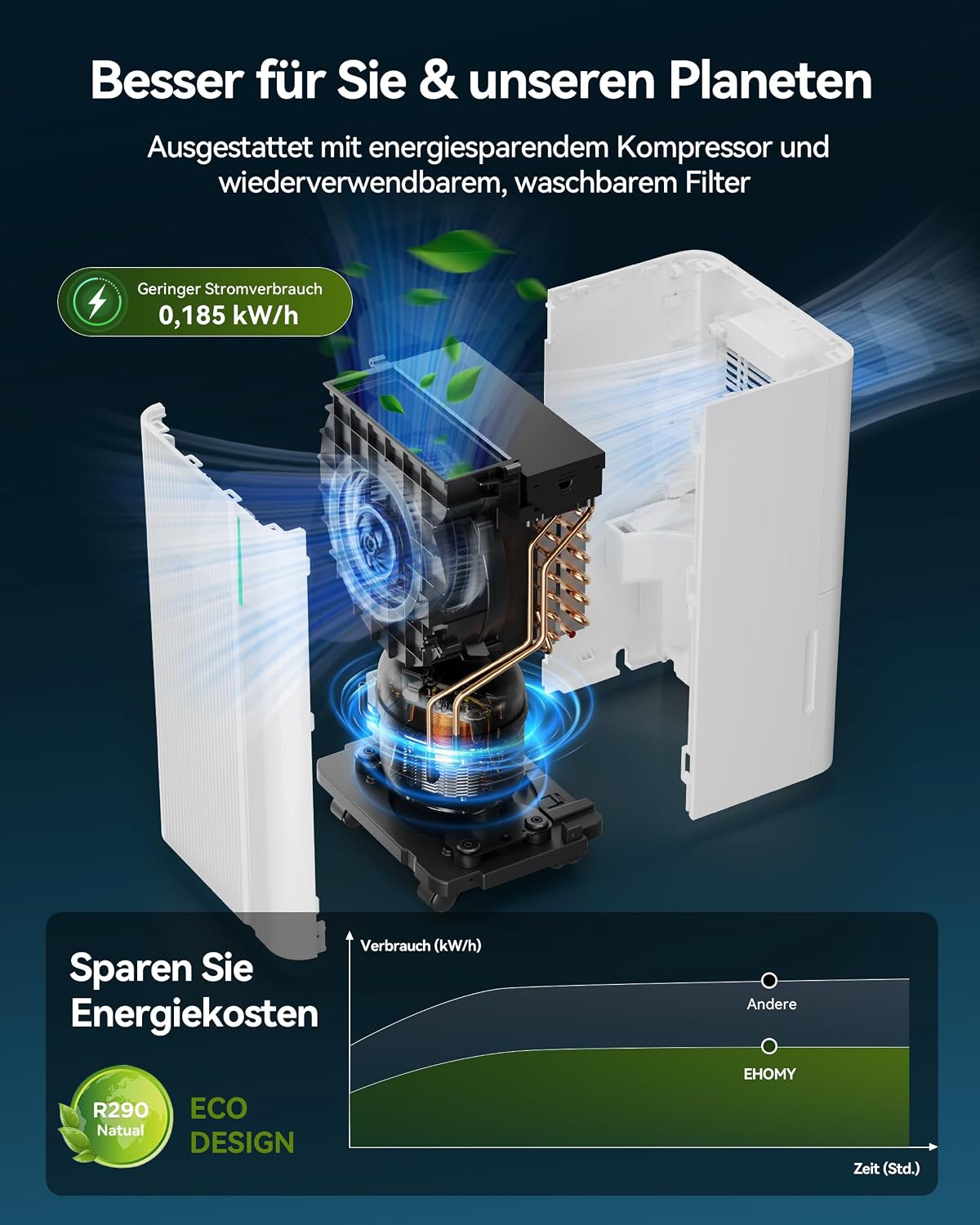
Figure 8.1: Illustration highlighting the energy-saving compressor and eco-friendly R290 refrigerant, with a power consumption of 0.185 kWh.

Figure 8.2: Detailed view of internal components, including the multi-chip module, condenser tube, high-efficiency compressor, precise humidity detection (±5% accuracy), child lock, removable and washable nylon filter, 100 m³/h maximum air volume, and a 945 rpm motor.
9. Warranty and Support
Euhomy products are manufactured to the highest quality standards. For warranty information, please refer to the warranty card included with your purchase or visit the official Euhomy website.
If you encounter any issues or have questions regarding your Euhomy 12L Dehumidifier, please contact our customer support team. Have your model number (OL12-D081AAN2) and purchase details ready when contacting support.
Related documentsOL12-D081AAN2


Ask a question about this manual
Ask about setup, troubleshooting, compatibility, parts, safety, or missing instructions. Manuals+ will review the question and use this page’s manual context to help answer it.