
1. Introduction
The Elitech GSP-6 Bluetooth Data Logger is designed for precise temperature and humidity monitoring, particularly suitable for environments such as refrigerators, pharmacies, and vaccine storage. This device features Bluetooth connectivity for data transfer, a clear 3.3-inch display, and a large storage capacity for up to 100,000 data points. It includes a Pharmacy DDL with a Calibration Certificate, meeting current CDC/VFC requirements and FDA 21 CFR Part 11 compliance for vaccine storage and monitoring.
This manual provides detailed instructions for the setup, operation, and maintenance of your GSP-6 data logger to ensure accurate and reliable performance.
2. Product Overview and Features
The GSP-6 data logger offers advanced features for comprehensive environmental monitoring:
- Bluetooth Connectivity: Enables wireless parameter settings, data reading, and report exporting via the Elitech iCold app.
- High Capacity Data Storage: Stores up to 100,000 data points, allowing continuous recording for extended periods.
- Shadow Data Recording: Passively records data to ensure data integrity, even if the logger is stopped or started inadvertently.
- High Precision Probe: Accurately senses small changes in temperature with a precision of ±0.3℃ (±0.6℉) and humidity with ±3%RH.
- Wide Measurement Range: Temperature range from -40℉ to 185℉ (-40℃ to 85℃), and humidity range from 0%RH to 100%RH.
- Dual Power Options: Operates on AA batteries for up to one year of continuous recording (at 15-minute intervals with alarm off) or via USB power.
- Calibration Certificate: Includes a Pharmacy DDL with Calibration Certificate, meeting industry standards.
- Magnetic Backing: Features a built-in strong magnet for easy attachment to metallic surfaces like refrigerator doors.

Image: Elitech GSP-6 Bluetooth Data Logger with its external temperature and humidity probe.

Image: Diagram illustrating the components of the Elitech GSP-6 Pro, including the LCD display, LED indicator, button, probe interface, USB interface, AA battery compartment, and strong magnet.
Image: A comparison table highlighting the upgraded features of the GSP-6 Pro over the standard GSP-6, including Bluetooth, increased capacity, shadow data, improved accuracy, larger screen, and AA battery power.
3. What's in the Box
Upon unpacking, verify that all the following items are included:
- Elitech GSP-6 Data Logger
- External Probe (Temperature and Humidity)
- AA Battery (pre-installed or separate)
- USB Cable
- Calibration Certificate
4. Setup
4.1 Battery Installation
- Locate the battery compartment on the back of the data logger.
- Open the battery cover.
- Insert the provided AA battery, ensuring correct polarity (+/-).
- Close the battery cover securely.
4.2 Connecting the External Probe
- Identify the probe interface on the right side of the data logger.
- Carefully insert the external temperature and humidity probe connector into the interface until it is firmly seated.
- Position the probe in the desired monitoring location. The logger can be magnetically attached to a refrigerator exterior, with the probe extended inside.

Image: The Elitech GSP-6 Pro data logger magnetically attached to the exterior of a refrigerator, with its external probe extending into the interior for precise temperature and humidity measurement.
5. Operation
5.1 Powering On/Off
Press and hold the central button on the device to power it on or off.
5.2 Display Interface Navigation
The GSP-6 features a clear LCD display. Press the central button briefly to cycle through different display interfaces, which may include:
- Main Interface (current temperature, humidity, log points)
- Maximum Value
- Minimum Value
- Mean Kinetic Temperature (MKT) Value
- Average Value
- Alarm Upper Limit
- Alarm Lower Limit

Image: Various display screens of the Elitech GSP-6 Pro, showing main interface, maximum/minimum values, MKT value, average value, and alarm limits, accessible via a single button press.
5.3 Bluetooth Connectivity and App Usage
The Elitech GSP-6 connects to your smartphone or tablet via Bluetooth using the Elitech iCold app.
- Download the Elitech iCold app from your device's app store.
- Ensure Bluetooth is enabled on your mobile device.
- Open the Elitech iCold app and follow the on-screen instructions to search for and connect to your GSP-6 data logger.
- Through the app, you can configure parameters (e.g., logging interval, alarm thresholds), read real-time data, view historical graphs, and export data reports.

Image: Illustration of the Elitech GSP-6 Pro connecting to a mobile application via Bluetooth, enabling configuration, data reading, export, and printing.

Image: A flowchart demonstrating the efficient data management process within the Elitech iCold app, from viewing logging details and graphs to exporting and sharing data reports.
5.4 Data Export via App or Software
Data can be exported in various formats for analysis and record-keeping:
- Via Elitech iCold App: Export data as PDF reports directly from your mobile device.
- Via Elitechlog Software: Connect the data logger to a computer using the provided USB cable. Use the Elitechlog software to configure settings, download data, and export reports in PDF, Excel, or TXT formats.

Image: The Elitech GSP-6 Pro displaying data, with icons indicating data export options via app (PDF) or software (PDF, Excel, TXT).

Image: The Elitech GSP-6 Pro data logger connected to a laptop via USB, illustrating the process of exporting data reports through the Elitechlog software.
6. Maintenance
6.1 Battery Replacement
When the battery indicator on the display shows low power, replace the AA battery following the steps in Section 4.1. Ensure the device is powered off before replacing the battery.
6.2 Cleaning
Wipe the device and probe with a soft, dry cloth. Do not use abrasive cleaners or immerse the device in water. The probe has an IP64 waterproof rating, but the main unit is not waterproof.
6.3 Calibration
Regular calibration is recommended to maintain measurement accuracy. Refer to the provided calibration certificate for details and recommended recalibration intervals.

Image: The Elitech GSP-6 Pro data logger displayed alongside its Manufacturer's Certificate of Validation, detailing temperature and humidity accuracy and validation results.
7. Troubleshooting
- Device Not Powering On: Check battery installation and ensure the battery has sufficient charge. Try replacing the battery.
- Bluetooth Connection Issues: Ensure Bluetooth is enabled on both the data logger and your mobile device. Restart both devices and try connecting again. Make sure the Elitech iCold app is up to date.
- Inaccurate Readings: Verify the probe is correctly connected and positioned. Ensure the probe is not obstructed or exposed to extreme conditions outside its specified range. Consider recalibration if issues persist.
- Data Not Logging: Check if the device is powered on and if logging has been initiated via the app or software. Ensure sufficient memory capacity is available.
8. Specifications
| Feature | Specification |
|---|---|
| Model Number | GSP-6Pro-THE |
| Temperature Range | -40℃ to 85℃ (-40℉ to 185℉) |
| Temperature Accuracy | ±0.3℃ (±0.6℉) |
| Humidity Range | 0%RH to 100%RH |
| Humidity Accuracy | ±3%RH |
| Data Capacity | 100,000 points |
| Power Supply | 1 AA battery (included), USB power option |
| Battery Life | Up to 1 year (15-min interval, alarm off) |
| Display | 3.3-inch LCD |
| Connectivity | Bluetooth, USB |
| Dimensions | 6.14 x 4.21 x 2.09 inches |
| Weight | 10.93 ounces |
| Manufacturer | Elitech |
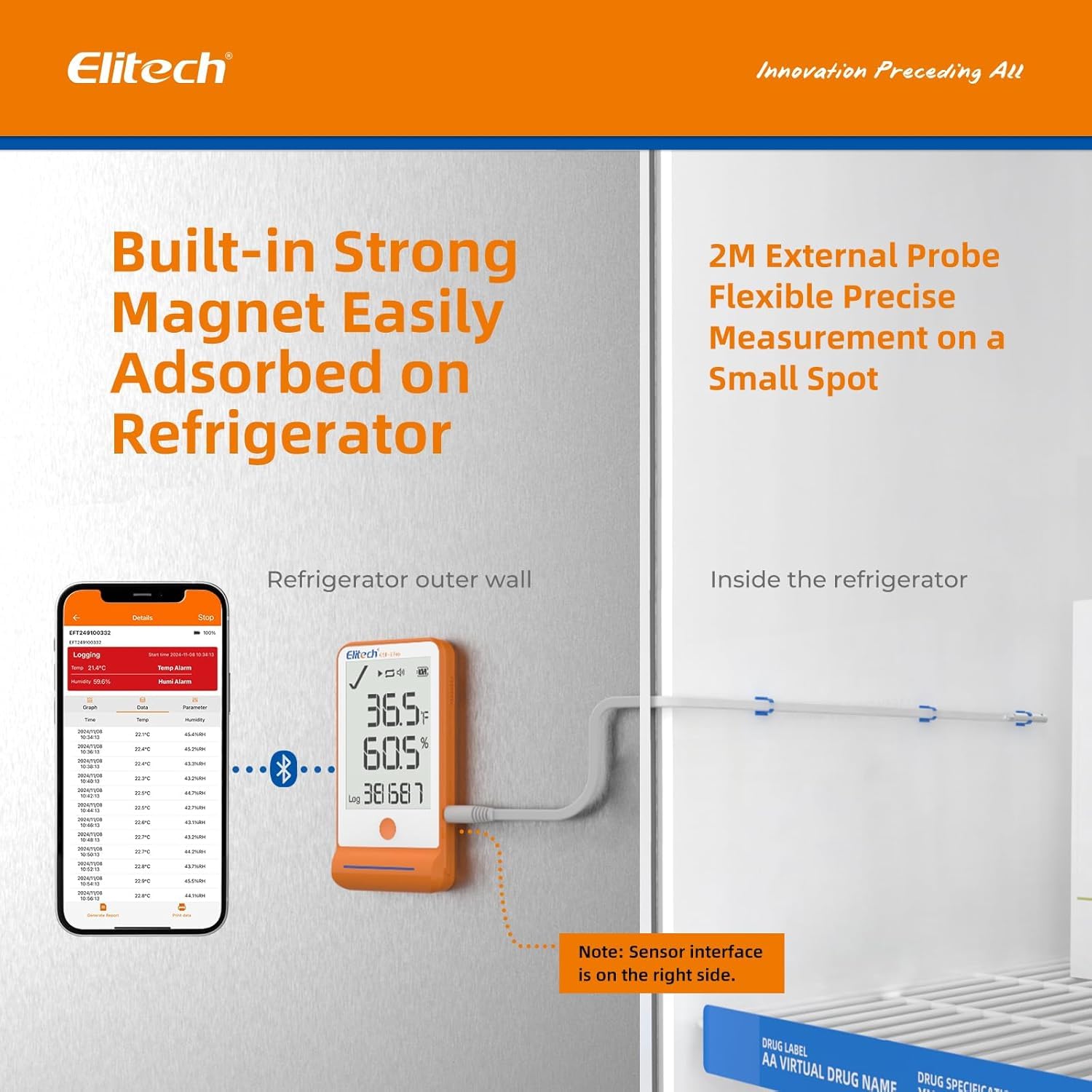
Image: Detailed specifications for the Elitech GSP-6 Pro's high-precision temperature and humidity probe, including accuracy, measurement range, and IP64 waterproof rating.
9. Warranty and Support
For warranty information, technical support, or service inquiries, please contact Elitech Technology Inc. directly. Refer to the product packaging or Elitech's official website for the most current contact details and warranty terms.


