
1. Product Overview
The CHOETECH B695 is a versatile 10000mAh magnetic power bank designed for convenient charging of multiple devices. It features both wireless charging capabilities and multiple wired output options, including built-in USB-C and Lightning cables. Its compact design and integrated safety features make it an ideal portable power solution.

Image: Front and back view of the CHOETECH B695 Magnetic Power Bank, showcasing its compact design and various ports.
Key Features:
- 10000mAh Capacity: Provides ample power for multiple charges.
- 2-in-1 Charging: Supports both magnetic wireless charging and wired charging.
- Built-in Cables: Integrated USB-C and Lightning cables for direct device connection.
- Multiple Outputs: Includes USB-A, Type-C (input/output), and dedicated wireless charging for phones and watches.
- Magnetic Alignment: Ensures secure and efficient wireless charging for compatible devices.
- LED Digital Display: Clearly indicates remaining battery percentage.
- Comprehensive Safety Protection: Built-in safeguards against overcharge, overdischarge, overcurrent, overvoltage, temperature, short circuit, overpower, recovery, and electromagnetic field issues.
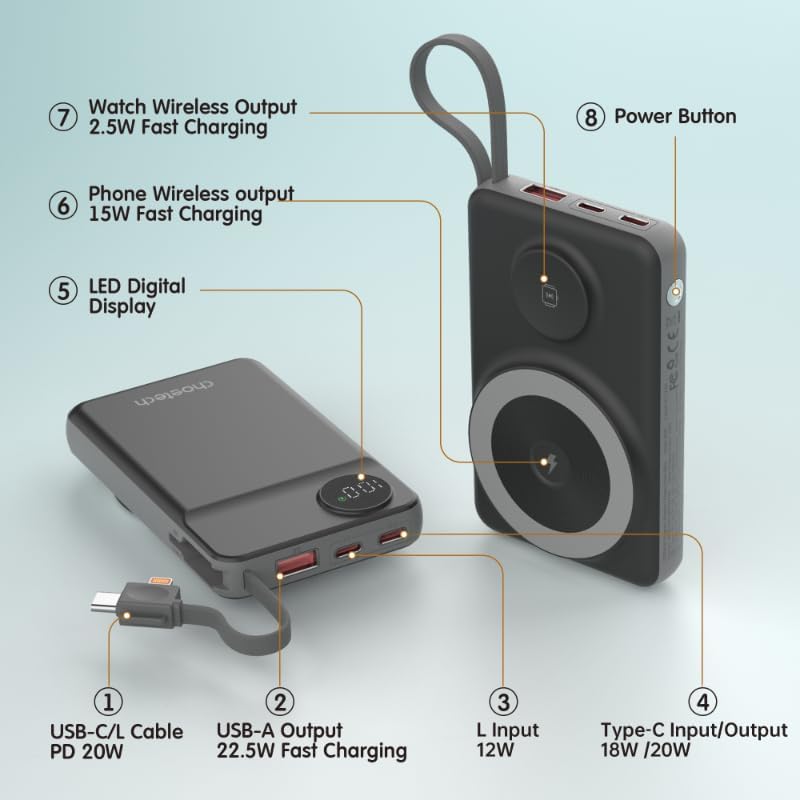
Image: Detailed diagram labeling the ports and features of the CHOETECH B695, including USB-C/L cable, USB-A output, L input, Type-C input/output, LED display, phone wireless output, watch wireless output, and power button.
2. Getting Started: Setup
2.1 Charging the Power Bank
Before initial use, fully charge your CHOETECH B695 power bank. This ensures optimal performance and battery longevity.
- Connect a compatible USB-C charging cable (not included) to the Type-C Input/Output port (4) on the power bank.
- Connect the other end of the cable to a USB wall adapter (not included).
- The LED Digital Display (5) will show the charging progress. It will display "100" when fully charged.
- Alternatively, you can use the built-in Lightning input (3) to charge the power bank with a Lightning cable and adapter.
Note: For fastest charging of the power bank, use a PD (Power Delivery) compatible wall adapter with the Type-C port.
3. Operating Instructions
3.1 Checking Battery Level
Press the Power Button (8) once to activate the LED Digital Display (5), which will show the current battery percentage.
3.2 Wired Charging
The CHOETECH B695 offers multiple wired charging options:
- Using Built-in USB-C/L Cable (1):
- Pull out the integrated USB-C or Lightning cable from its storage slot.
- Connect the appropriate cable end to your device's charging port.
- Charging will begin automatically.
- Using USB-A Output (2):
- Connect your device's USB charging cable to the USB-A Output port (2).
- Connect the other end of your cable to your device.
- Charging will commence.
- Using Type-C Input/Output (4):
- Connect your device's USB-C charging cable to the Type-C Input/Output port (4).
- Connect the other end of your cable to your device.
- Charging will commence.

Image: The CHOETECH B695 power bank connected to a smartphone via its built-in USB-C cable, demonstrating wired charging.
3.3 Wireless Charging (Phone)
The power bank supports magnetic wireless charging for compatible smartphones (e.g., iPhone 12 series and newer, or Android phones with magnetic cases).
- Ensure the power bank is sufficiently charged.
- Align your compatible smartphone with the larger magnetic charging pad (6) on the power bank.
- The phone should snap into place magnetically, and wireless charging will begin.

Image: A smartphone magnetically attached to the larger wireless charging pad and a smartwatch on the smaller pad of the CHOETECH B695, illustrating simultaneous wireless charging.
3.4 Wireless Charging (Watch)
The power bank includes a dedicated smaller magnetic charging pad for smartwatches.
- Ensure the power bank is sufficiently charged.
- Place your compatible smartwatch onto the smaller magnetic charging pad (7).
- The watch should align magnetically, and wireless charging will begin.
3.5 Simultaneous Charging
The CHOETECH B695 can charge multiple devices simultaneously using a combination of its wired and wireless outputs.

Image: The CHOETECH B695 power bank connected to and wirelessly charging multiple devices, including smartphones and a smartwatch, demonstrating its multi-output capability.
4. Safety Information and Protection Features
The CHOETECH B695 is equipped with multiple safety mechanisms to protect your devices and the power bank itself.
- Overcharge Protection: Prevents the battery from being charged beyond its capacity.
- Overdischarge Protection: Protects the battery from being fully depleted, extending its lifespan.
- Overcurrent Protection: Safeguards against excessive current flow.
- Overvoltage Protection: Protects against voltage surges.
- Temperature Protection: Monitors and regulates the internal temperature to prevent overheating.
- Short Circuit Protection: Automatically shuts down in case of a short circuit.
- Overpower Protection: Prevents power output beyond safe limits.
- Recovery Protection: Allows the device to recover from protection states.
- Electromagnetic Field Protection: Shields against harmful electromagnetic interference.

Image: An infographic detailing the nine safety protection features integrated into the CHOETECH B695 power bank, including overcharge, overdischarge, overcurrent, overvoltage, temperature, short circuit, overpower, recovery, and electromagnetic field protection.
Important: Do not expose the power bank to extreme temperatures, direct sunlight, or water. Do not disassemble or attempt to repair the device. Keep out of reach of children.
5. Maintenance
- Cleaning: Use a soft, dry cloth to clean the power bank. Avoid liquid cleaners.
- Storage: Store the power bank in a cool, dry place away from direct sunlight and extreme temperatures.
- Battery Health: To maintain battery health, fully charge and discharge the power bank at least once every three months if not in regular use.
- Cable Care: Handle the built-in cables gently. Avoid excessive bending or pulling to prevent damage.
6. Troubleshooting
6.1 Power Bank Not Charging
- Ensure the charging cable is securely connected to both the power bank's input port and the wall adapter.
- Verify that the wall adapter is functioning correctly and plugged into a live power outlet.
- Try a different USB-C or Lightning charging cable and wall adapter.
6.2 Device Not Charging from Power Bank
- Wired Charging:
- Check if the power bank has sufficient charge (refer to the LED display).
- Ensure the charging cable is securely connected to both the power bank's output port and your device.
- Try a different charging cable or a different output port on the power bank.
- Press the power button once to activate output if necessary.
- Wireless Charging:
- Ensure your device is compatible with magnetic wireless charging.
- Remove any thick cases or metallic objects from your device that might interfere with wireless charging.
- Ensure your device is correctly aligned with the magnetic charging pad on the power bank.
- Check if the power bank has sufficient charge.
6.3 Slow Charging
- Ensure you are using a fast-charging compatible cable and adapter for both charging the power bank and charging your devices.
- Some devices may limit charging speed when multiple devices are connected simultaneously.
- Environmental factors (e.g., high temperature) can affect charging efficiency.
6.4 LED Display Not Working
- Press the power button firmly.
- If the power bank is completely depleted, the display may not light up until it receives some charge.
7. Specifications
| Model | B695 |
| Battery Capacity | 10000mAh |
| Built-in Cable Output | USB-C/L Cable PD 20W |
| USB-A Output | 22.5W Fast Charging |
| Type-C Input/Output | 18W / 20W |
| Lightning Input | 12W |
| Phone Wireless Output | 15W Fast Charging |
| Watch Wireless Output | 2.5W Fast Charging |
| Dimensions (L x W x Thickness) | 7.7L x 9.7W x 16.2Th centimeters |
| Item Weight | 0.05 Kilograms (50g) |
| Color | Black |
8. Warranty and Support
CHOETECH products are designed and manufactured to the highest quality standards. For warranty information and customer support, please refer to the warranty card included with your purchase or visit the official CHOETECH website.
If you encounter any issues or have questions regarding your CHOETECH B695 power bank, please contact CHOETECH customer service for assistance.
