
EF ECOFLOW EF-DL-H15-3
EF ECOFLOW DELTA 3 1500 Solar Generator
User Manual
1. Introduction
Thank you for choosing the EF ECOFLOW DELTA 3 1500 Solar Generator. This comprehensive system combines a powerful portable power station with a high-efficiency 220W solar panel, providing a reliable and sustainable energy solution for various applications, from home backup to outdoor adventures. This manual provides essential information on setup, operation, maintenance, and troubleshooting to ensure optimal performance and longevity of your device.

Image: The DELTA 3 1500 power station paired with the 220W solar panel, illustrating a complete solar generator system.
2. Product Overview and Key Features
The DELTA 3 1500 is engineered for versatility and performance. It features a robust 1536Wh LiFePO4 battery, capable of powering a wide range of devices with its 1800W AC output, expandable to 2200W with X-Boost technology. The included 220W solar panel ensures efficient recharging using renewable energy.
- Ultra-Fast Charging: Recharges from 0-100% in just 1.5 hours via 1500W AC input.
- X-Boost Mode: Supports resistive devices up to 2200W, compatible with 99% of household appliances.
- Ultra-Quiet Operation: Operates at 35dB for loads under 600W and 45dB for up to 1200W, ensuring minimal noise.
- Built-in UPS: Provides an Uninterruptible Power Supply with a transfer time of less than 15ms for critical devices.
- Durable LiFePO4 Battery: Offers 3,000 charge cycles to 70% capacity, ensuring up to 10 years of daily use.
- Expandable Capacity: Can be expanded up to 5.5 kWh by connecting additional DELTA 3, DELTA Pro 3, or DELTA 2 Max batteries.
- IP54 Certification: The battery pack is resistant to water splashes and dust, enhancing durability.
- BMS (X-Guard) Protection: Features over 40 protective measures against current, voltage, temperature, and circuit risks.

Image: A visual summary of the DELTA 3 1500's core functionalities and benefits.
3. Setup
Before first use, ensure all components are present and undamaged. Unpack the DELTA 3 1500 power station and the 220W solar panel. Place the power station on a flat, stable surface with adequate ventilation. For solar charging, unfold the solar panel and position it to maximize exposure to direct sunlight.
- Unpacking: Carefully remove the power station and solar panel from their packaging.
- Initial Charge: It is recommended to fully charge the DELTA 3 1500 before its first use. Refer to the 'Charging Methods' section for details.
- Solar Panel Deployment: For solar charging, unfold the 220W solar panel and use its integrated kickstand to angle it towards the sun. Connect the solar panel to the power station's solar input port.
- Ventilation: Ensure the power station's vents are unobstructed during operation and charging to prevent overheating.

Image: The DELTA 3 1500 power station and 220W solar panel set up for use.
4. Operating Instructions
The DELTA 3 1500 is designed for intuitive operation. The front display provides real-time information on battery level, input/output wattage, and remaining run/charge time.
- Powering On/Off: Press and hold the main power button for a few seconds to turn the unit on or off.
- AC Output: Press the AC power button to enable or disable the AC outlets. Ensure the AC output is enabled before connecting AC appliances.
- DC Output: Press the DC power button to enable or disable the DC (USB, Car Power) outputs.
- Connecting Devices: Plug your devices into the appropriate ports (AC, USB-A, USB-C, DC5521, Car Power). The unit will automatically detect and begin powering them.
- X-Boost Function: The X-Boost feature is automatically enabled when the output exceeds the rated 1800W, allowing the unit to power devices up to 2200W by lowering the voltage and current. This is suitable for resistive loads like heating elements.
- UPS Mode: When the DELTA 3 1500 is plugged into an AC wall outlet and devices are connected to its AC outputs, it functions as an Uninterruptible Power Supply (UPS). In case of a power outage, it will automatically switch to battery power within 15ms.

Image: The DELTA 3 1500 highlighting its various output ports, including USB-A, USB-C, DC5521, and AC outlets.
5. Charging Methods
The DELTA 3 1500 offers multiple charging options to suit your needs, ensuring you're always powered up.
5.1. AC Charging
Utilize the included AC charging cable to plug the DELTA 3 1500 directly into a standard wall outlet. With 1500W AC input, it can charge from 0% to 100% in approximately 1.5 hours.

Image: The DELTA 3 1500 being charged from a standard AC wall outlet.
5.2. Solar Charging
Connect the 220W solar panel to the DELTA 3 1500 for clean, renewable energy charging. A single 220W solar panel can fully charge the unit in approximately 7.3 hours under optimal sunlight conditions. The bifacial design of the solar panel allows it to collect up to 28% more energy from the rear side.

Image: The DELTA 3 1500 being charged by solar panels outdoors.
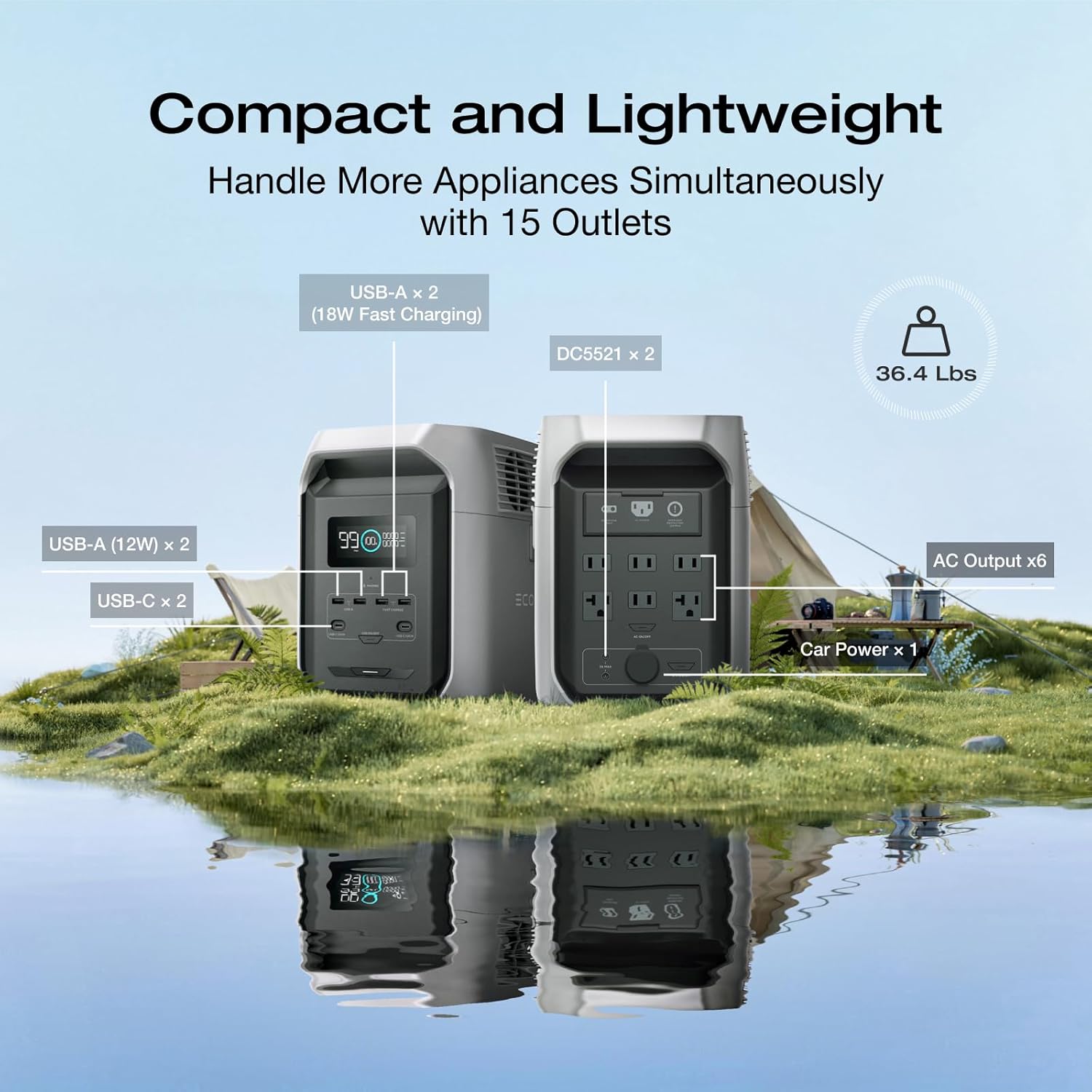
Image: Illustration of the solar panel's bifacial design, capturing light from both sides for increased efficiency.
5.3. Car Charging
Charge your DELTA 3 1500 on the go using your vehicle's 12V car outlet. With an 800W car power source, it takes approximately 2.1 hours to fully charge the unit.

Image: The DELTA 3 1500 being charged inside a car trunk.
5.4. Multi-Charging (AC + Solar)
Combine AC and solar charging for the fastest possible recharge. With a 1500W max input from both sources, the DELTA 3 1500 can be fully charged in just 1.5 hours.

Image: The DELTA 3 1500 charging simultaneously from an AC outlet and solar panels.
5.5. Generator Charging
The DELTA 3 1500 can also be charged using a compatible generator, providing a full charge in 1.5 hours with 1500W AC input.

Image: The DELTA 3 1500 being charged by a generator.
6. Power Output and Appliance Compatibility
The DELTA 3 1500 provides a continuous 1800W AC output, with an X-Boost mode that can power resistive devices up to 2200W. This makes it compatible with approximately 99% of common household appliances.

Image: The DELTA 3 1500 powering various appliances, demonstrating its 1800W output and 1536Wh capacity.

Image: Visual examples of the DELTA 3 1500's application for both outdoor and home use, powering various devices.
7. Expandable Capacity
The DELTA 3 1500's capacity can be expanded to meet greater power demands. By adding compatible DELTA 3, DELTA Pro 3, or DELTA 2 Max extra batteries, the total capacity can reach up to 5.5 kWh.

Image: Illustration demonstrating how to expand the DELTA 3 1500's capacity by connecting additional battery modules.
8. Uninterruptible Power Supply (UPS) Function
The DELTA 3 1500 features a built-in UPS function, providing seamless power backup for your essential devices. In the event of a power outage, the unit automatically switches to battery power in less than 15 milliseconds, ensuring continuous operation for connected electronics.

Image: The DELTA 3 1500 acting as a UPS, providing continuous power to a workstation during an outage.
9. Smart App Integration
Manage and monitor your DELTA 3 1500 remotely with the EcoFlow app. The app provides real-time energy insights, allows you to control outputs, and receive regular firmware updates for an optimized user experience.
- Monitor: View battery status, input/output wattage, and remaining time live from your smartphone.
- Control: Remotely turn on/off AC and DC outputs, and adjust charging parameters.
- Updates: Receive firmware updates to enhance performance and add new features.

Image: Screenshots illustrating the EcoFlow app's interface for monitoring and controlling the power station.
10. Durability and Protection
The DELTA 3 1500 is built with advanced technologies to ensure long-lasting performance and safety.
10.1. LiFePO4 Battery Cells
Equipped with third-generation LiFePO4 (LFP) cells, the DELTA 3 1500 offers fast charging capabilities without compromising longevity. These cells provide 3000 cycles to 70% capacity, translating to up to 10 years of reliable daily use.

Image: An internal view of the DELTA 3 1500, highlighting its long-lasting LiFePO4 battery cells.
10.2. IP54 Battery Pack
The IP54-rated battery pack resists water splashes and dust, making the DELTA 3 1500 suitable for diverse environments and built to withstand harsh conditions.

Image: A visual representation of the IP54 rating, indicating the battery pack's resistance to water splashes and dust.
10.3. BMS (X-Guard) Protection Technology
The intelligent Battery Management System (BMS) with X-Guard technology provides over 40 protective measures against current, voltage, temperature, and circuit risks, ensuring maximum safety and preventing explosions and fires.

Image: A detailed diagram of the BMS (Battery Management System) and its X-Guard protection technology.
11. Maintenance
Proper maintenance ensures the longevity and optimal performance of your DELTA 3 1500. Follow these guidelines:
- Regular Cleaning: Keep the unit clean and free of dust. Use a dry, soft cloth to wipe surfaces. Ensure vents are clear of obstructions.
- Storage: Store the unit in a dry, well-ventilated area away from direct sunlight and extreme temperatures. For long-term storage, maintain the battery charge between 30% and 80%.
- Battery Cycling: To maintain battery health and warranty, it is crucial to completely discharge and then fully recharge the battery every six months. This helps calibrate the battery management system and prolong its lifespan.
- Solar Panel Care: Keep the solar panel surface clean to maximize efficiency. Wipe off any dirt, dust, or debris regularly.
12. Troubleshooting
If you encounter issues with your DELTA 3 1500, refer to the following common troubleshooting steps. For more complex problems, contact customer support.
- Unit Not Turning On: Ensure the battery is charged. If not, connect to an AC outlet for charging.
- AC Output Not Working: Check if the AC output button is enabled. Ensure the connected appliance's wattage does not exceed the unit's capacity (1800W continuous, 2200W with X-Boost).
- Slow Charging: Verify that the charging source (AC, solar, car) is providing adequate power. For solar charging, ensure panels are in direct sunlight and clean. Check cable connections.
- Unusual Noise/Overheating: Ensure all vents are clear and unobstructed. If the issue persists, discontinue use and contact support.
- App Connectivity Issues: Ensure Bluetooth/Wi-Fi is enabled on your device and the DELTA 3 1500. Restart both the unit and the app.
13. Specifications
| Feature | Specification |
|---|---|
| Brand | EF ECOFLOW |
| Model Name | EF-DL-H15-3 |
| Battery Capacity | 1536Wh (LiFePO4) |
| AC Output | 6 x 1800W (2200W X-Boost) |
| Max Device Power (X-Boost) | 2200W |
| AC Input | 1500W Max |
| Solar Input | 220W (Included Panel) |
| Car Charge Input | 800W Max |
| Charging Time (AC) | 1.5 Hours (0-100%) |
| Charging Time (220W Solar) | 7.3 Hours (0-100%) |
| UPS Transfer Time | < 15ms |
| Noise Level | 35dB (<600W), 45dB (<1200W) |
| Dimensions (L x W x H) | 16"L x 8"W x 12"H |
| Weight | 36 Pounds |
| Certifications | IP54 (Battery Pack) |
14. Warranty and Support
The EF ECOFLOW DELTA 3 1500 Solar Generator comes with a 5-year warranty, ensuring peace of mind regarding your investment. For technical support, warranty claims, or any inquiries, please contact EF ECOFLOW customer service through their official website or the contact information provided with your product packaging. Please retain your proof of purchase for warranty validation.
Related documentsEF-DL-H15-3


Ask a question about this manual
Ask about setup, troubleshooting, compatibility, parts, safety, or missing instructions. Manuals+ will review the question and use this page’s manual context to help answer it.