
1. Introduction
Thank you for choosing the TVON Floor TV Stand with Power Outlet. This stand is designed to securely hold 32-60 inch televisions weighing up to 88 lbs, featuring VESA patterns from 100x100mm to 400x400mm. It includes an integrated power strip, height adjustment, and a swivel function for optimal viewing. This manual provides essential information for safe assembly, operation, and maintenance of your TV stand.
2. Safety Information
Please read all instructions carefully before assembly and use. Failure to follow these instructions may result in property damage, serious injury, or death.
- Weight Capacity: Do not exceed the maximum weight capacity of 88 lbs (40 kg) for the TV mount.
- TV Size: This stand is suitable for TVs between 32 and 60 inches.
- VESA Compatibility: Ensure your TV's VESA mounting pattern is within 100x100mm to 400x400mm.
- Stability: Always ensure the stand is placed on a flat, stable surface. The reinforced wooden base and anti-tipping design with 2 TV base foot supports enhance stability and prevent tipping.
- Power Outlet: The integrated power strip has 4 AC outlets (125V/12A). Do not overload the power strip. Use the master switch to turn off power when not in use, especially around children and pets.
- Assembly: Assemble the product according to the instructions provided. Do not use power tools for assembly unless specified.
- Children and Pets: Keep children and pets away from the assembly area. Small parts can be a choking hazard.
- Moving the Stand: When moving the stand with a TV mounted, do so slowly and carefully, especially on uneven surfaces.
- Cable Management: Utilize the cable management system to prevent tripping hazards and keep cables organized.
If you have any questions or concerns, please contact TVON customer support.
3. Package Contents
Before assembly, verify that all parts listed below are present and undamaged. If any parts are missing or damaged, do not proceed with assembly and contact customer service.
| Part | Description | Quantity |
|---|---|---|
| Base | Reinforced wooden base with anti-tipping design | 1 |
| Main Support Pole | Vertical pole for TV mount and shelves | 1 |
| TV Mounting Brackets | Brackets to attach TV to the stand | 2 |
| Storage Shelf | Adjustable shelf for media devices | 1 |
| Power Strip | Integrated 4-outlet AC power strip | 1 |
| Hardware Kit | Assorted screws, washers, and tools for assembly | 1 set |
| Cable Clips | For cable management | Several |
| Instruction Manual | This document | 1 |
4. Specifications
- Product Dimensions: 19.7"(L) x 11.8"(W) x 54"(H)
- Recommended TV Size: 32-60 inches
- Weight Capacity (TV Mount): 88 lbs (40 kg)
- VESA Compatibility: 100x100mm to 400x400mm
- Material: Alloy Steel & Wood
- Color: Black
- Height Adjustment: Multiple settings from 40.4" to 44.4" (center of bracket to ground)
- Swivel Range: 35° left or right (70° total)
- Power Outlet: 4 AC outlets, 125V/12A, 6.5ft 16AWG pure copper power cord, master switch
- Media Shelf Capacity: 11 lbs
5. Setup & Assembly
Follow these steps to assemble your TVON Floor TV Stand. It is recommended to have two people for TV mounting. No drilling into walls is required.
Step 5.1: Assemble the Base and Main Pole
- Carefully unpack all components and lay them out on a soft, clean surface to prevent scratches.
- Attach the main support pole to the reinforced wooden base using the provided screws and tools. Ensure all connections are secure. The base includes two foot supports at the back to prevent tipping.
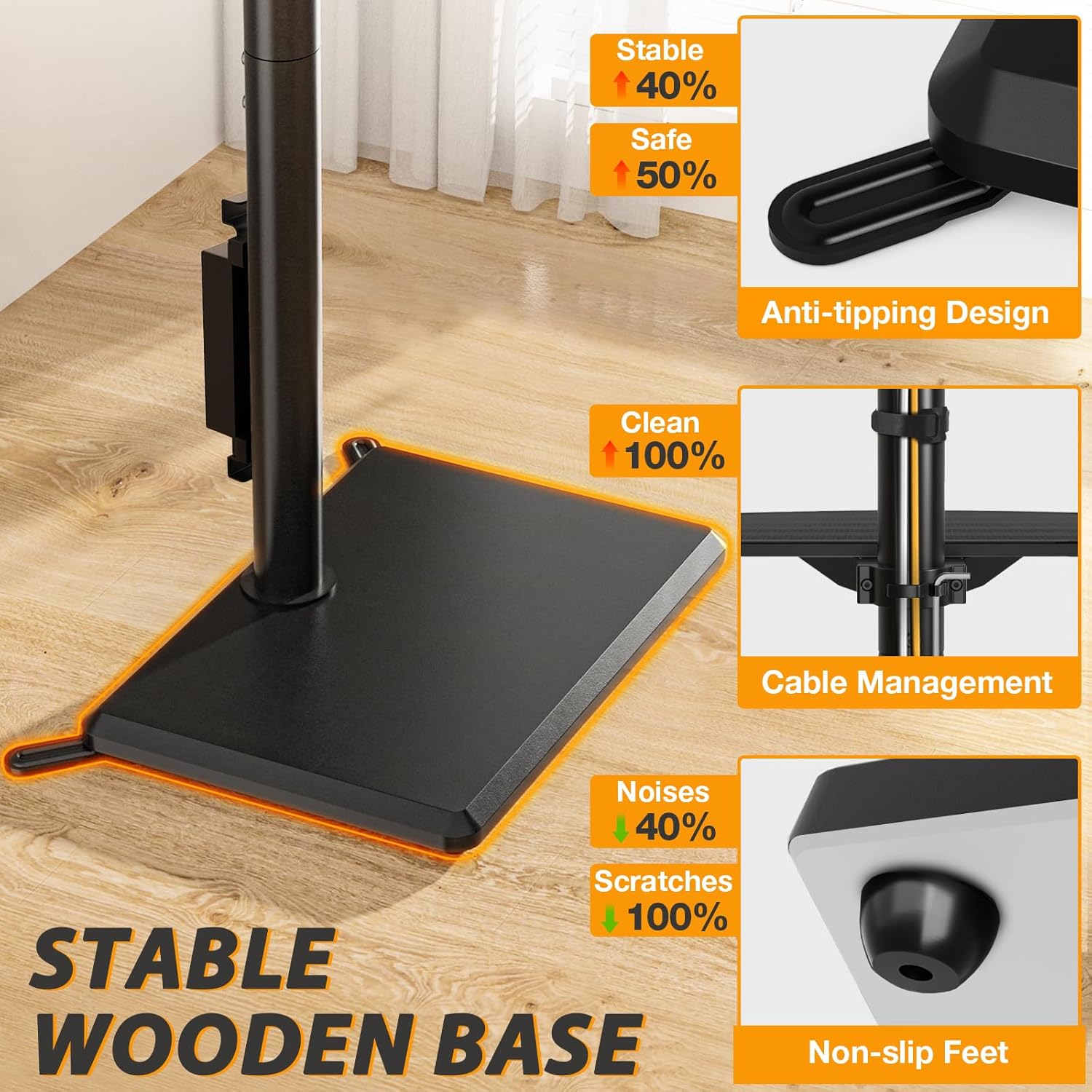
The image shows the sturdy wooden base and the main pole assembled, demonstrating the robust foundation of the TV stand. Note the anti-tipping design and non-slip feet for enhanced safety.
Step 5.2: Install the Storage Shelf
- Slide the storage shelf onto the main support pole. Adjust its height to your desired position and secure it using the locking mechanism.

This image displays the adjustable storage shelf, which can be moved up or down the main pole to accommodate various media devices or accessories. The arrows indicate the range of height adjustment.
Step 5.3: Attach the Power Outlet
- Mount the integrated power strip to the designated area on the main support pole. Ensure it is firmly attached and the power cord is routed safely.

The image highlights the built-in power strip, showing its four AC outlets, thickened wire, and master switch for convenient and safe power access for your devices.
Step 5.4: Mount the TV Brackets
- Attach the TV mounting brackets to the back of your television using the appropriate screws and spacers from the hardware kit. Refer to your TV's manual for specific VESA mounting hole locations.
- Ensure the brackets are securely fastened to the TV and are level.
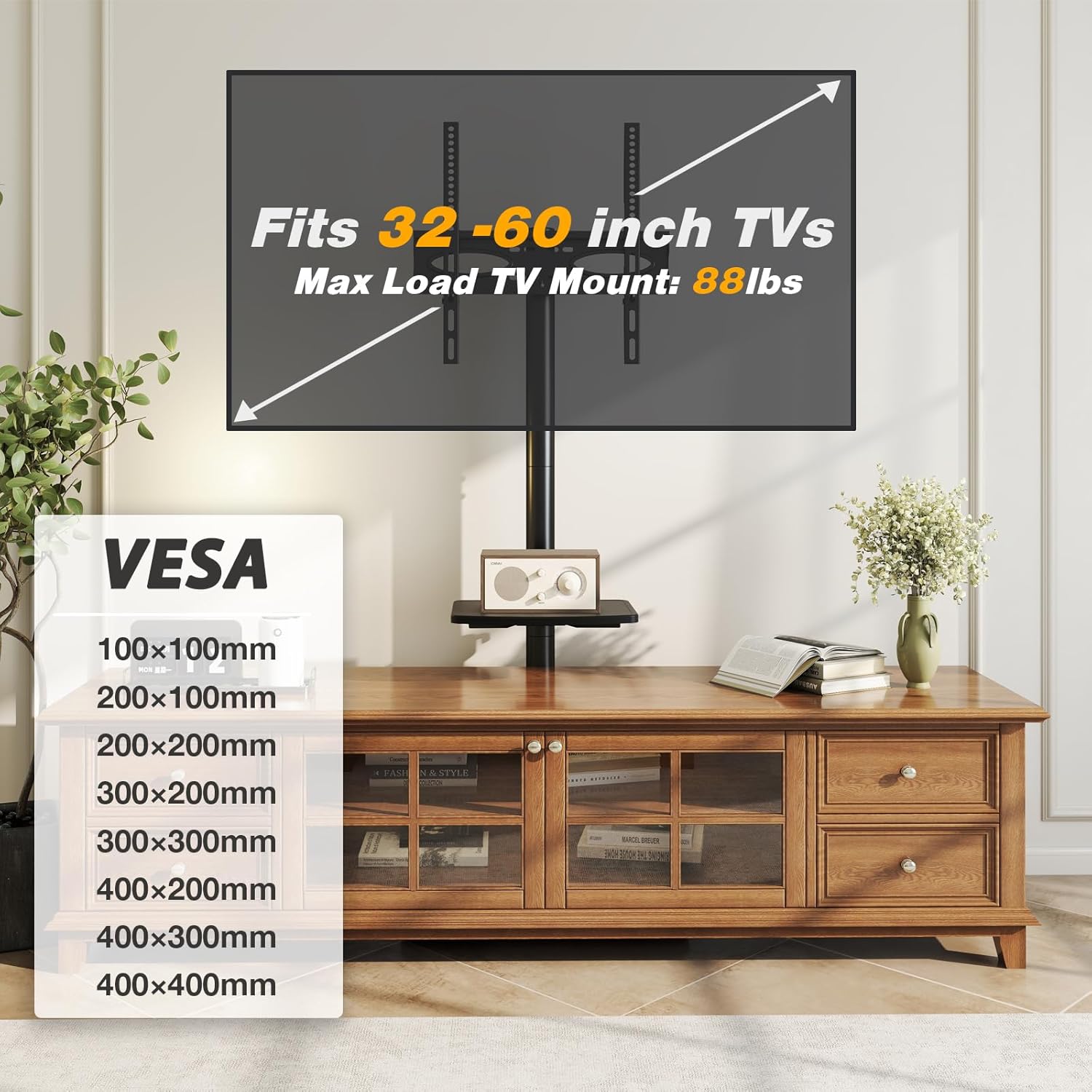
This image illustrates the VESA compatibility of the TV stand, showing various hole patterns from 100x100mm to 400x400mm, ensuring it fits a wide range of 32-60 inch TVs.
Step 5.5: Hang the TV on the Stand
- With assistance, carefully lift the TV and hook the mounted brackets onto the main support pole's TV mount.
- Engage the safety bracket lock designed to protect your TV from falling down or slipping aside.
This video provides a visual guide to the TVON TV Floor Stand, showcasing its adjustable height, swivel capabilities, integrated power outlet, and the overall assembly process. It helps in understanding the product's functionality and ease of setup.
6. Operating Instructions
6.1: Adjusting TV Height
The TV mount allows for multiple height settings. To adjust the TV height, loosen the securing bolts on the main support pole, carefully raise or lower the TV to your desired viewing level, and then firmly tighten the bolts to secure it in place. The height can be adjusted from 40.4" to 44.4" (distance from the center of the bracket to the ground).
This image visually represents the height adjustment capability of the TV stand, showing the range from 47.8" to 54.1" (total height) and how it can be customized for optimal viewing comfort.
6.2: Using the Swivel Function
The TV mount can swivel 35° left or right, providing a total of 70° of swivel range. Gently push the TV to the desired angle. This feature allows you to achieve the best viewing angle from various positions in the room without moving the entire stand.

The image demonstrates the 70° swivel capability of the TV stand, allowing the screen to be angled 35° to the left or right for flexible viewing from different parts of a room.
6.3: Utilizing the Integrated Power Outlet
The stand features an integrated power strip with 4 AC outlets. Plug your TV and other media devices into these outlets. Use the master switch on the power strip to easily turn all connected devices on or off. This helps conserve energy and provides a convenient power source.
This image provides a detailed view of the integrated power strip, highlighting its four AC outlets, the robust 6.5ft power cord, and the master switch for easy control and safety.
6.4: Cable Management
Use the provided cable clips and the internal routing options along the main pole to organize and conceal all cables. This creates a neat appearance and prevents cables from becoming a tripping hazard.

This image shows the TV stand in a compact setting, illustrating how its design and cable management system help save space and maintain a tidy environment, even in corners.
7. Maintenance
- Cleaning: Wipe the stand with a soft, damp cloth. Avoid using abrasive cleaners or harsh chemicals that could damage the finish.
- Inspections: Periodically check all screws and connections to ensure they remain tight and secure. Retighten if necessary.
- Cable Check: Regularly inspect cables for any signs of wear or damage. Replace damaged cables immediately.
- Power Strip: Ensure the power strip is free from dust and debris. Do not expose it to moisture.
8. Troubleshooting
| Problem | Possible Cause | Solution |
|---|---|---|
| TV is not stable/wobbles | Loose connections; uneven surface; TV weight exceeds capacity | Check and tighten all screws. Ensure the stand is on a flat, level surface. Verify TV weight is within 88 lbs limit. |
| Cannot adjust TV height | Securing bolts are too tight; obstruction | Loosen the height adjustment bolts before attempting to move the TV. Check for any obstructions. |
| Power outlets not working | Master switch off; power cord unplugged; overloaded circuit | Ensure the master switch on the power strip is ON. Check if the stand's power cord is securely plugged into a wall outlet. Reduce the number of devices if overloaded. |
| Cables are messy | Cable management not utilized | Use the provided cable clips and route cables along the main pole for a tidy setup. |
9. Warranty & Support
Warranty: The TVON Floor TV Stand comes with a 5-year warranty from the date of purchase. This warranty covers manufacturing defects and material flaws under normal use. It does not cover damage caused by improper installation, misuse, accidents, or unauthorized modifications.
Customer Support: For technical assistance, missing parts, or warranty claims, please contact TVON customer service. You can find contact information on the TVON official website or through your purchase platform.
Please have your model number (B0DZCTH3B2) and proof of purchase ready when contacting support.