
1. Introduction
Thank you for choosing the Bestier G200 42-Inch Flow Vibe Gaming Desk. This manual provides essential information for the safe assembly, operation, and maintenance of your new desk. Please read it thoroughly before use and retain it for future reference.
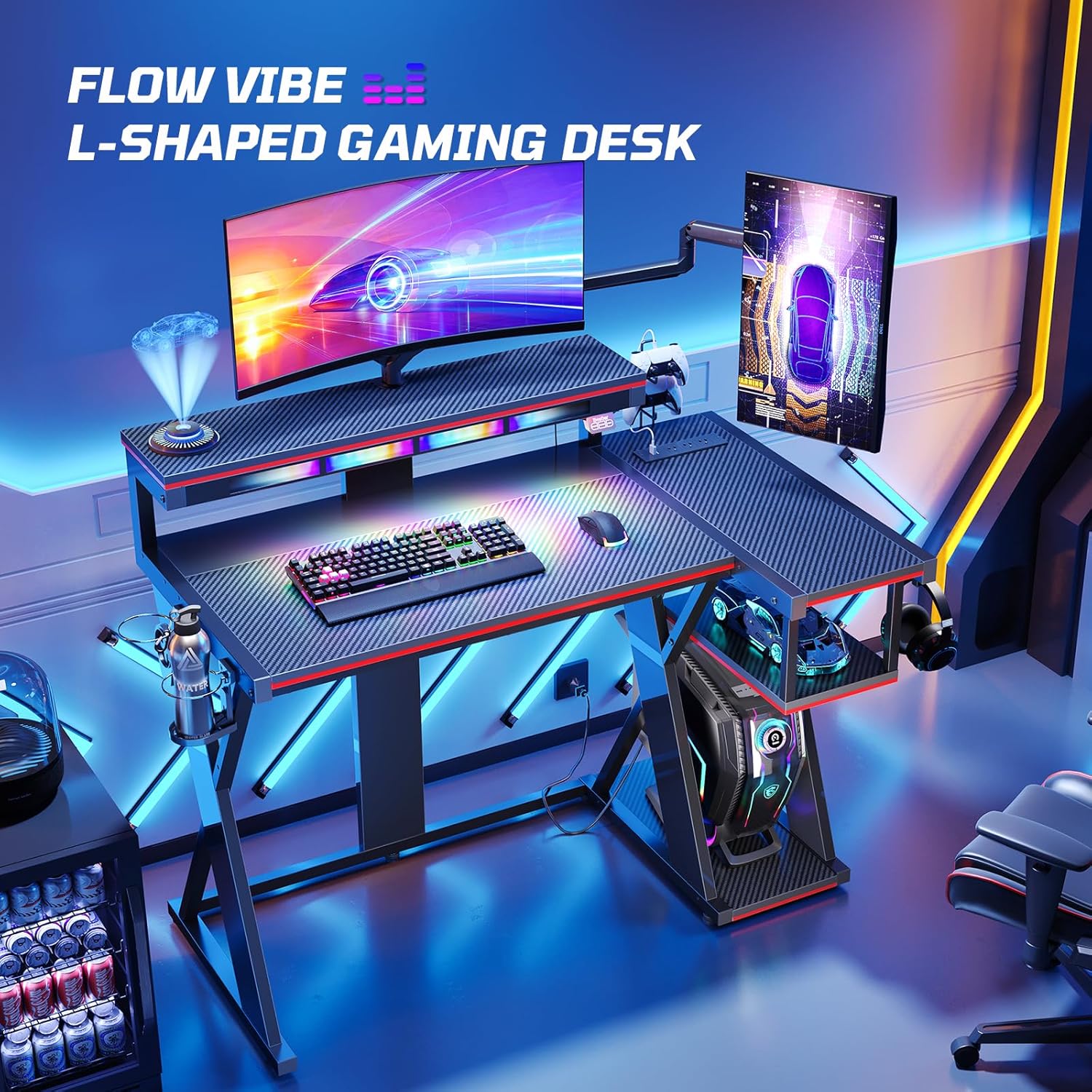
Image: The Bestier G200 Flow Vibe Gaming Desk in a gaming setup, showcasing its L-shaped design, monitor stand, and vibrant LED lighting.
2. Important Safety Warnings
- Always assemble the desk according to the provided manual.
- Do not exceed the weight limit of 1500W for the built-in power outlets.
- Keep the desk and its components away from heat sources and liquids.
- Always unplug the desk from the power source before cleaning or performing any maintenance.
- Do not use the desk if any of its components are damaged or missing.
3. Package Contents
Before beginning assembly, ensure all parts listed in the assembly diagram are present and undamaged. Refer to the visual guide below for a complete overview of components.

Image: An exploded diagram showing all individual components and hardware included with the Bestier G200 42-Inch Flow Vibe Gaming Desk.
4. Setup & Assembly
Assembly of the Bestier G200 desk is designed to be straightforward. All components are clearly labeled, and necessary hardware is included. For a detailed step-by-step visual guide, please refer to the official installation video below.
4.1. Assembly Video Guide
Video: Official installation video for the Bestier G200 42-Inch Flow Vibe Gaming Desk. This video provides a comprehensive, step-by-step guide to assembling your desk.
4.2. Key Assembly Steps (Refer to manual for full details)
- Unpack and Identify Parts: Lay out all components and hardware. Match them against the parts list in the included manual.
- Assemble the Frame: Begin by connecting the main steel frame components using the provided screws and tools. Ensure all connections are secure.
- Attach Desktop Panels: Secure the main desktop and the L-shaped extension panels to the frame. Pay attention to alignment for a flush surface.
- Install Monitor Stand: Mount the monitor stand to the designated area on the main desktop.
- Integrate Power Outlet: Install the built-in power outlet unit into its recess on the desktop. Connect its power cable.
- Attach Accessories: Secure the cup holders, headset hooks, and any storage shelves as per the instructions.
- Connect LED Lights: Carefully attach the LED light strip and connect it to the control unit and power source.
- Final Checks: Verify all screws are tightened, and the desk is stable before placing any equipment on it.
5. Operating Instructions
5.1. Music Sync LED System
The Bestier G200 features an upgraded Music Sync LED System with 6 colors and Flow Vibe multi-color options across 7 dynamic modes. These lights can move and flow to the beat of your racing game, music, and gaming audio, personalizing your ambient lighting.
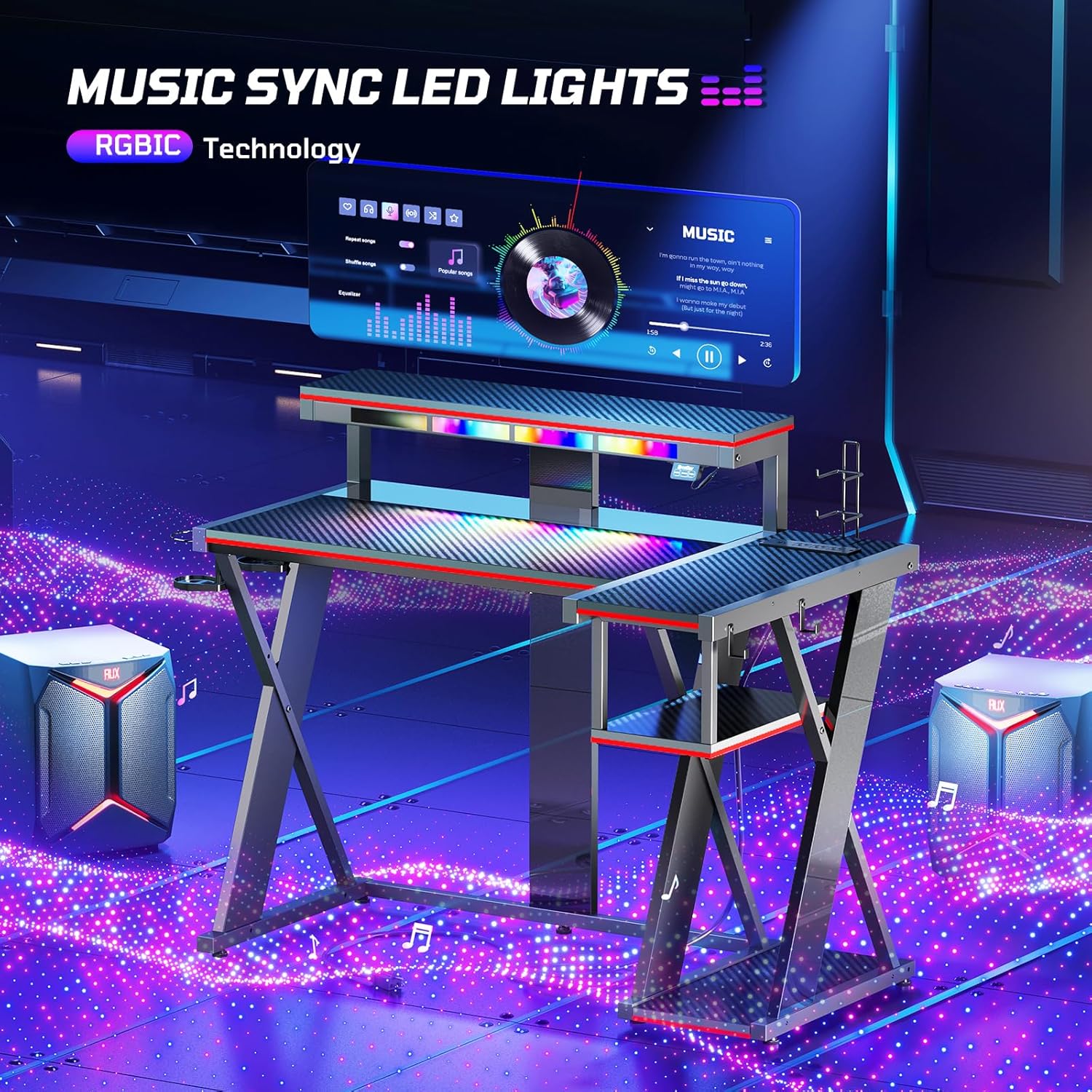
Image: Close-up of the Bestier G200 desk's LED lights, showcasing the vibrant colors and dynamic effects.
- Control Panel: The LED lights are controlled via a small panel located on the monitor stand. This panel typically includes buttons for power, color selection, and mode changes.
- Dynamic Modes:
- Flash & Fade: Syncs with engine revs and collisions in games.
- Left/Right Pulse: Mimics pit lane signals for rhythmic intensity.
- Left/Right Chase: Reacts to tire screeches and boost pickups for realistic racing immersion.
- Flow Mode: Dynamic light waves simulate speed streaks.
- Music Sync: For full music synchronization, you may need to download a companion app (if available) or ensure your audio output is correctly routed to allow the desk's system to detect sound.
Video: Demonstration of the Flow Vibe LED lights syncing to music, showcasing various dynamic lighting modes.
5.2. Power Outlet Usage
The desk features a built-in power outlet with 3 AC outlets, 1 USB port, and 1 Type-C charging port. This allows for convenient powering and charging of your gaming equipment and devices directly from your desk.
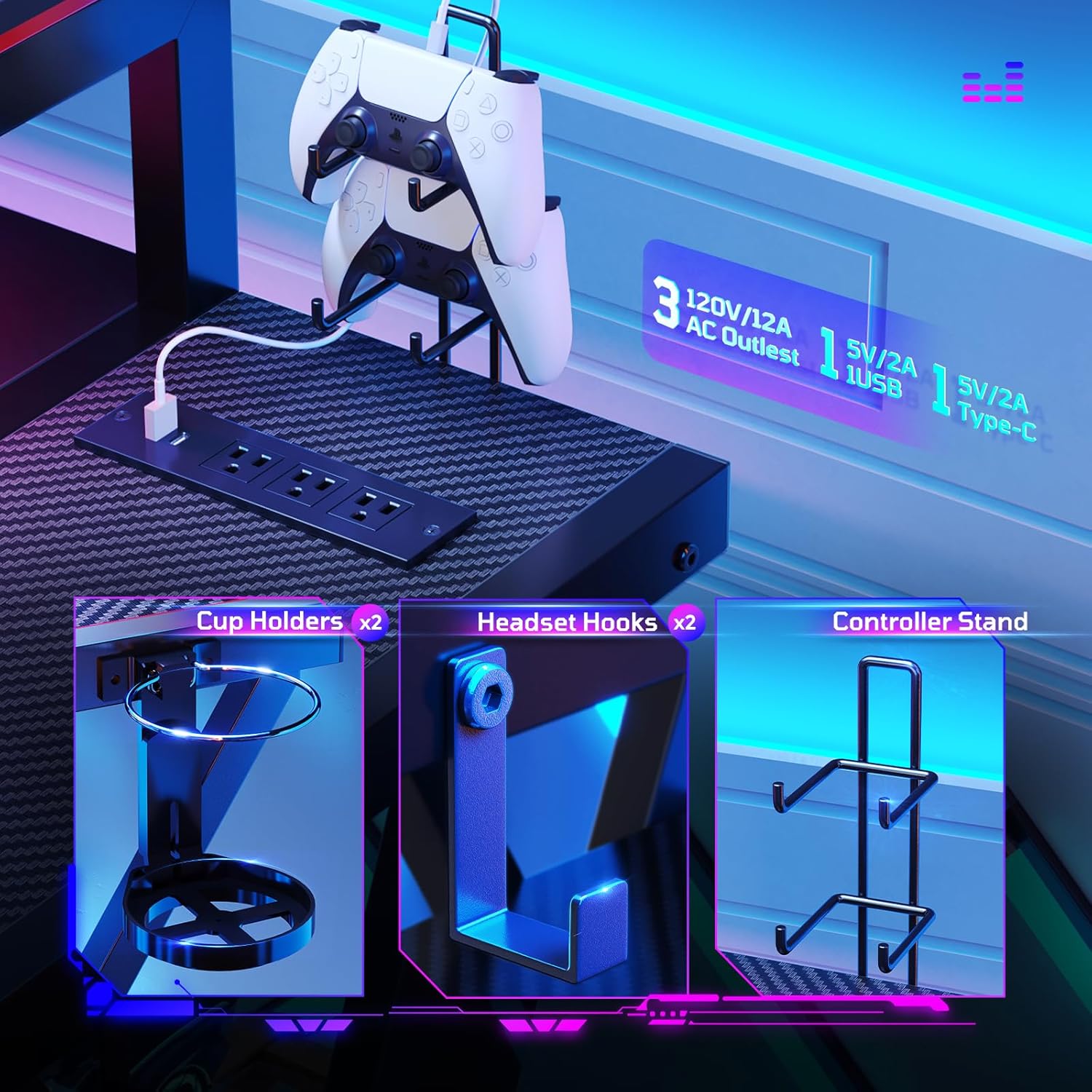
Image: Overview of the integrated power outlet, cup holders, headset hooks, and controller stand on the Bestier G200 desk.
- AC Outlets: 120V/12A. Use for monitors, PCs, and other standard electronics.
- USB Port: 5V 2A. Ideal for charging smartphones, tablets, and other USB-powered accessories.
- Type-C Port: 5V 2A. For modern devices requiring Type-C charging.
- Rated Power: The entire unit is rated for 1500W. Do not exceed this limit to prevent electrical overload.
6. Maintenance
- Cleaning: Wipe surfaces with a soft, damp cloth. Avoid harsh chemicals or abrasive cleaners that could damage the laminated finish.
- Dusting: Regularly dust the desk, especially around the LED lights and power outlets, to prevent buildup.
- Tighten Fasteners: Periodically check and tighten all screws and fasteners to ensure the desk remains stable.
- Cable Management: Utilize the included cable management features to keep wires tidy and prevent damage.
7. Troubleshooting
- LED Lights Not Working:
- Ensure the desk is properly plugged into a wall outlet.
- Check that the LED light strip is securely connected to the control unit.
- Verify the control unit's power button is pressed.
- Power Outlets Not Supplying Power:
- Confirm the main power plug is fully inserted into a functioning wall outlet.
- Check if the total wattage of connected devices exceeds the 1500W limit. Unplug some devices if overloaded.
- Desk Instability:
- Inspect all assembly points and tighten any loose screws or bolts.
- Ensure the desk is placed on a flat, even surface.
8. Specifications
| Feature | Detail |
|---|---|
| Brand | Bestier |
| Model Number | G200 |
| Shape | L-Shape |
| Product Dimensions | 28"D x 42"W x 36"H |
| Color | Black Red |
| Style | Gaming |
| Base Material | Metal (Steel Frame) |
| Top Material Type | Engineered Wood (Laminated) |
| Special Features | Built-In USB Outlet, Monitor Stand, Scratch Resistant, Music Sync LED Lights, Cup Holders, Headset Hooks |
| Power Outlet | 3 AC outlets + 1 USB + 1 Type C charging ports (Rated Power: 1500W; AC Outlet: 120V/12A; USB Port: 5V 2A) |
| Item Weight | 37 Pounds |
| Number of Shelves | 1 (plus monitor stand and PS5 storage shelves) |
| UPC | 840408616317 |
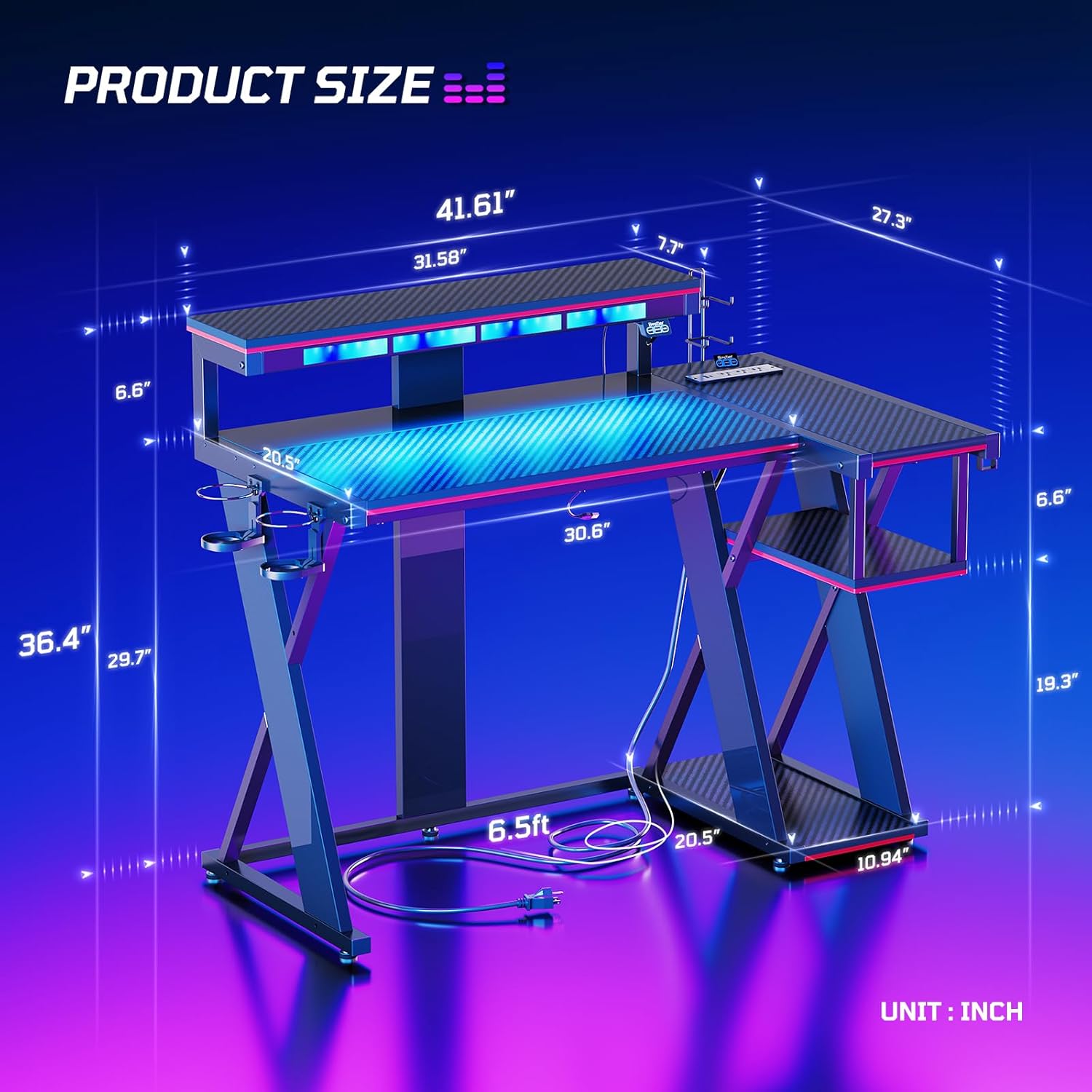
Image: A diagram illustrating the precise dimensions of the Bestier G200 42-Inch Flow Vibe Gaming Desk.
9. Warranty Information
The Bestier G200 Flow Vibe Gaming Desk comes with a Lifetime Warranty. For specific terms and conditions, please refer to the warranty documentation included with your product or contact Bestier customer support.
10. Customer Support
For any questions, assistance, or to report missing/damaged parts, please contact Bestier Direct customer support. Professional after-sales service is available to ensure your satisfaction.
- North American Support: 888-666-1086 | Service.US@bestier.net
- European Support: Service.UK@bestier.net, Service.DE@bestier.net, Service.FR@bestier.net, Service.IT@bestier.net, Service.ES@bestier.net
- Asian Support: 04-8888-0283 | Service.JP@bestier.net
- General Inquiries: Service@bestier.net
You can also visit the Bestier Store on Amazon for more information and products.


