
1. Introduction
This manual provides essential instructions for the safe and effective use of your GT POWER AC Adapter Power Supply, Model 97. This power supply is specifically designed for compatibility with Celestron Advanced GT Equatorial Mounts, providing reliable power for your astronomical equipment.
Please read this manual thoroughly before operating the device to ensure proper setup, operation, and maintenance. Keep this manual for future reference.
Safety Information
- Ensure the power supply is connected to a compatible voltage source (100-240VAC, 50/60Hz).
- Do not expose the power supply to moisture or extreme temperatures.
- Avoid disassembling the unit. Refer servicing to qualified personnel.
- The unit features Over Voltage Protection (OVP), Over Current Protection (OCP), and Short Circuit Protection (SCP) to safeguard your devices.
- This product is for indoor use only.
2. Product Overview
The GT POWER AC Adapter Power Supply Model 97 is a robust power solution for your Celestron Advanced GT Equatorial Mount. It delivers a stable 12 Volts DC at 5 Amps, ensuring consistent performance for your equipment.

Figure 2.1: The GT POWER AC Adapter Power Supply, Model 97, showing the main unit and connected output cable with a locking connector.
Key Features:
- Input Voltage: World Wide Input Voltage 100-240VAC 50/60Hz.
- Output: 12 Volts DC, 5 Amps.
- Connector: Locking Connector Design to prevent accidental disconnections.
- Protection: Built-in Over Voltage Protection (OVP), Over Current Protection (OCP), and Short Circuit Protection (SCP).
- Compatibility: Specifically designed for Celestron Advanced GT Equatorial Mounts.
3. Setup Instructions
Follow these steps to correctly set up your GT POWER AC Adapter Power Supply:
- Unpack: Carefully remove the power supply and its components from the packaging. Ensure all parts are present: the power adapter unit and the AC input power cord.
- Connect AC Input: Plug the detachable AC input power cord into the power supply unit. Ensure it is firmly seated.
- Connect to Mount: Locate the power input port on your Celestron Advanced GT Equatorial Mount. Connect the output cable of the GT POWER adapter to this port. The locking connector design requires you to push and then twist the connector to secure it, preventing accidental disconnections.
- Connect to Power Outlet: Plug the AC input power cord into a standard wall outlet.

Figure 3.1: The detachable AC input power cord, typically a two-prong or three-prong cable, used to connect the adapter to a wall outlet.
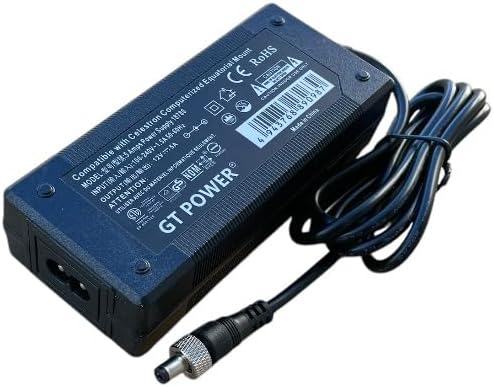
Figure 3.2: An angled view of the power adapter, illustrating where the AC input cord connects to the main unit.
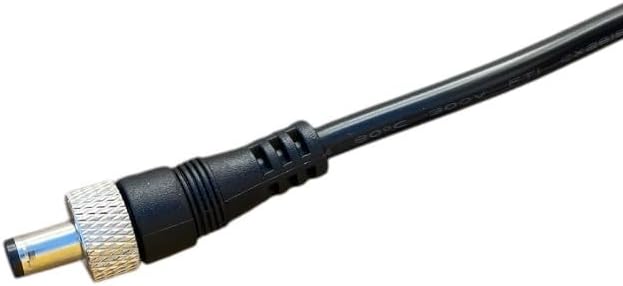
Figure 3.3: A close-up view of the locking DC output connector, designed to provide a secure connection to the equatorial mount.

Figure 3.4: The locking DC output connector shown securely inserted into a compatible power input port.
4. Operating Instructions
Once properly connected, the power supply is ready for operation.
- Power On: After plugging the AC input cord into a wall outlet, the power supply will automatically begin providing power.
- LED Indicator: The power supply unit features an LED indicator. When the unit is receiving power and operating correctly, this LED will illuminate.
- Power Off: To power off the device, simply unplug the AC input power cord from the wall outlet.
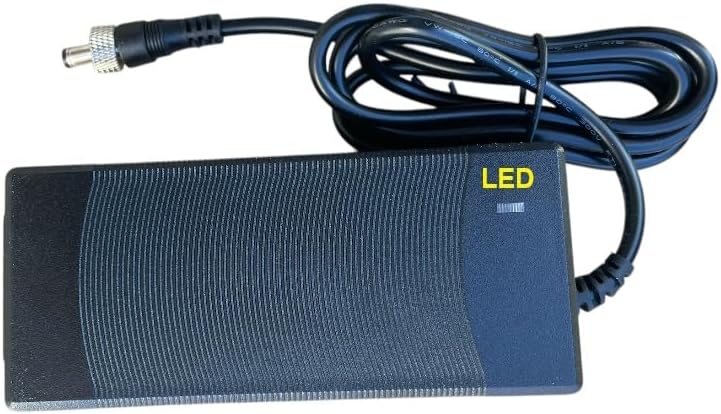
Figure 4.1: The GT POWER AC Adapter showing the location of the LED indicator, which glows when the unit is powered.
Note: Always ensure your Celestron Advanced GT Equatorial Mount is powered off or in a safe state before connecting or disconnecting the power supply to prevent potential damage to your equipment.
5. Maintenance
The GT POWER AC Adapter Power Supply is designed for durability and requires minimal maintenance. Follow these guidelines to ensure its longevity:
- Cleaning: Use a soft, dry cloth to clean the exterior of the power supply. Do not use liquid cleaners or solvents.
- Storage: When not in use, store the power supply in a cool, dry place, away from direct sunlight and extreme temperatures.
- Cable Care: Avoid bending or crimping the power cables excessively. Do not place heavy objects on the cables.
- Inspection: Periodically inspect the cables and connectors for any signs of damage. If damage is observed, discontinue use and replace the unit.
6. Troubleshooting
If you encounter issues with your GT POWER AC Adapter Power Supply, refer to the following common troubleshooting steps:
- No Power / LED Not Lit:
- Ensure the AC input power cord is securely plugged into both the power supply and a working wall outlet.
- Verify that the wall outlet is functional by testing it with another device.
- Check for any visible damage to the power supply unit or cables.
- Intermittent Power:
- Confirm that the locking DC output connector is fully and securely engaged with the Celestron Advanced GT Equatorial Mount.
- Inspect cables for loose connections or damage.
- Device Not Functioning Correctly:
- Ensure the power supply's output specifications (12V DC, 5A) match the requirements of your Celestron Advanced GT Equatorial Mount.
- The power supply includes Over Voltage Protection (OVP), Over Current Protection (OCP), and Short Circuit Protection (SCP). If these protections are triggered, the unit may temporarily cease operation to prevent damage. Disconnect and reconnect the power supply after a few moments. If the issue persists, consult the support section.
If troubleshooting steps do not resolve the issue, please contact customer support.
7. Specifications
| Feature | Detail |
|---|---|
| Brand | GT POWER |
| Model Number | 97 |
| Input Voltage | 100-240VAC, 50/60Hz |
| Output Voltage | 12 Volts DC |
| Output Current | 5 Amps |
| Connector Type | Thread Locking DC Connector |
| Compatible Devices | Celestron Advanced GT Equatorial Mount |
| Protection Features | OVP (Over Voltage Protection), OCP (Over Current Protection), SCP (Short Circuit Protection) |
| Included Components | 1 x Power Supply Unit |
8. Warranty and Support
Warranty Information
This GT POWER AC Adapter Power Supply comes with a One Year Warranty from the date of purchase. Additionally, a 30-Day Money Back Guarantee is offered. This warranty covers defects in materials and workmanship under normal use.
The warranty does not cover damage caused by misuse, accident, unauthorized modification, or connection to improper voltage sources.
Customer Support
For technical assistance, warranty claims, or further inquiries, please contact GT POWER customer support through your retailer or the official GT POWER website. Please have your product model number (97) and purchase information ready when contacting support.


