
WORKPRO B0DZ6FFS5V
WORKPRO Cordless Grass Shear & Shrubbery Trimmer and Grass Shears Handheld User Manual
Model: B0DZ6FFS5V
1. Introduction
Thank you for choosing the WORKPRO Cordless Grass Shear & Shrubbery Trimmer and WORKPRO Grass Shears Handheld. This manual provides essential information for the safe and efficient operation, maintenance, and care of your new tools. Please read this manual thoroughly before first use and keep it for future reference.

Figure 1.1: Overview of the WORKPRO Cordless Grass Shear & Shrubbery Trimmer and Handheld Grass Shears, including the main unit, interchangeable blades, and charging cable.
2. Safety Information
Always observe basic safety precautions to reduce the risk of fire, electric shock, and personal injury. Keep this manual handy for quick reference.
General Safety Warnings
- Read all instructions: Familiarize yourself with the controls and proper use of the tool.
- Keep work area clean and well lit: Cluttered or dark areas invite accidents.
- Do not operate power tools in explosive atmospheres: Such as in the presence of flammable liquids, gases, or dust.
- Stay alert: Watch what you are doing and use common sense when operating a power tool.
- Dress properly: Do not wear loose clothing or jewelry. Keep hair and clothing away from moving parts.
- Use personal protective equipment: Always wear eye protection, non-skid safety shoes, and hearing protection when appropriate.
- Avoid accidental starting: Ensure the switch is in the off-position before connecting to battery pack, picking up or carrying the tool.
- Do not overreach: Keep proper footing and balance at all times.
- Maintain tools with care: Keep cutting tools sharp and clean for better and safer performance.
- Disconnect the battery pack: Before making any adjustments, changing accessories, or storing power tools.
Specific Safety Warnings for Trimmers
- Keep hands away from blades: Blades are sharp and can cause injury.
- Do not operate without guards in place: Ensure all safety guards are properly installed before use.
- Check for foreign objects: Before trimming, inspect the area for wires, rocks, or other debris that could be thrown or damage the blades.
- Use both hands: For the cordless trimmer, use both hands to maintain control, especially during operation.
- Secure the safety lock: For the handheld shears, always engage the safety lock when not in use or during storage.
3. Package Contents
Please check the package contents upon receipt to ensure all items are present and undamaged:
- WORKPRO Cordless Grass Shear & Shrubbery Trimmer Main Unit
- Grass Shear Blade Attachment
- Shrubbery Trimmer Blade Attachment
- WORKPRO Grass Shears Handheld
- USB-C Charging Cable
- User Manual (this document)
4. Components and Parts Identification
Cordless Trimmer
- Main Unit: Contains the motor, battery, and handle.
- Blade Release Button: For quick and easy blade attachment changes.
- Safety Lock Button: Located at the top of the handle, must be pressed before operating the trigger.
- Power Trigger: Activates the motor.
- USB-C Charging Port: For charging the internal battery.

Figure 4.1: The ergonomic safety lock on the cordless trimmer is designed for easy one-handed operation, located conveniently at the top of the handle.
Handheld Grass Shears
- Blades: PTFE-coated sharp blades for clean cuts.
- Ergonomic Handle: Designed for comfortable grip with a hand guard.
- 360° Rotation Mechanism: Allows blades to rotate for various cutting angles.
- Safety Latch: Mechanism to lock the blades closed for safe storage.

Figure 4.2: The handheld grass shears feature an ergonomic handle with a hand guard for comfort and safety, along with durable PTFE-coated sharp blades.
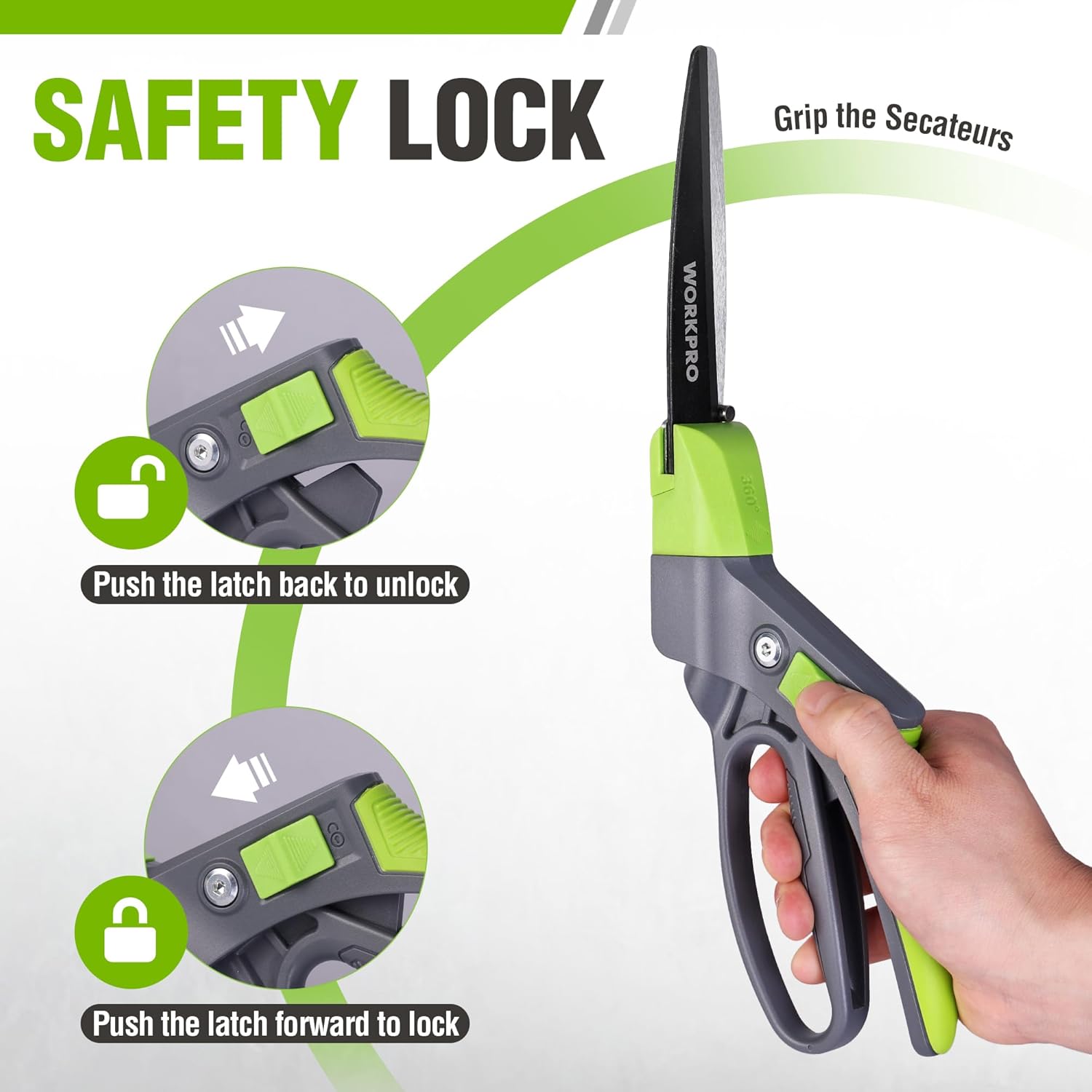
Figure 4.3: The safety lock on the handheld shears is operated by pushing the latch forward to lock the blades and backward to unlock them, ensuring safe handling and storage.
5. Setup
Charging the Cordless Trimmer
- Locate the USB-C charging port on the cordless trimmer unit.
- Connect the provided USB-C charging cable to the trimmer.
- Plug the other end of the USB-C cable into a compatible 5V/2A USB power source (e.g., mobile phone charger, laptop/PC, car USB port, power bank).
- Allow approximately 2-3 hours for a full charge. The charging indicator light will change to indicate a full charge.

Figure 5.1: The cordless trimmer is equipped with an upgraded motor and a 2000mAh lithium-ion battery, providing extended operation time after a full charge.
Attaching/Detaching Blades (Cordless Trimmer)
The cordless trimmer features a 2-in-1 design allowing quick switching between grass shear and shrubbery trimmer modes.
- Ensure the trimmer is turned OFF and the safety lock is engaged.
- To remove a blade, locate the blade release button (usually on the side or top of the blade housing) and press it firmly.
- Gently pull the blade attachment away from the main unit.
- To attach a blade, align the new blade attachment with the slots on the main unit.
- Push the blade attachment firmly into place until you hear a click, indicating it is securely locked.

Figure 5.2: The cordless trimmer offers two cutting modes: a grass shear with a max cutting width of 2.95 inches (75mm) and a hedge trimmer with a max cutting length of 4.65 inches (118mm) and max cutting thickness of 0.31 inches (7.8mm).
6. Operating Instructions
Operating the Cordless Trimmer
- Ensure the correct blade attachment is securely installed and the battery is charged.
- Hold the trimmer firmly with one hand. The design is lightweight (0.82 lbs) for easy handling.
- Press the safety lock button located at the top of the handle.
- While holding the safety lock button, press the power trigger to start the trimmer.
- Guide the trimmer smoothly over the grass or shrubbery you wish to trim. For grass, use a sweeping motion. For shrubs, trim evenly across the surface.
- Release the power trigger to stop the trimmer.
- Always engage the safety lock when not in use.

Figure 6.1: The cordless trimmer is exceptionally lightweight at only 0.82 pounds, reducing hand fatigue and allowing for longer periods of use.
Operating the Handheld Grass Shears
- Disengage the safety latch by pushing it backward.
- Position the blades around the grass or small plants you wish to cut.
- Squeeze the handles together to make a clean cut.
- 360° Rotation: To adjust the cutting angle, rotate the blade housing. The shears feature 14 cutting positions for maximum flexibility.
- After use, push the safety latch forward to lock the blades in the closed position for safe storage.

Figure 6.2: The handheld grass shears feature a 360° rotation design, allowing users to effortlessly adjust the blade angle for precise trimming in various positions, including horizontal and vertical cuts.

Figure 6.3: The 360° rotating blades of the handheld shears provide maximum flexibility, enabling precise trimming of various plants and grasses from any angle.
7. Maintenance
Blade Care and Cleaning
- Always disconnect power: For the cordless trimmer, ensure it is off and the battery is disconnected before cleaning or performing maintenance. For handheld shears, ensure the safety latch is engaged.
- Clean blades after each use: Use a stiff brush or cloth to remove grass clippings, sap, and debris from the blades.
- Lubricate blades: Periodically apply a light machine oil or blade lubricant to the cutting edges to prevent rust and ensure smooth operation.
- Sharpening: If blades become dull, they can be professionally sharpened or replaced. Refer to the manufacturer's guidelines for blade replacement.
- Storage: Store tools in a dry, secure place out of reach of children. Ensure blades are clean, lubricated, and protected (e.g., with blade covers or by engaging safety locks).
Battery Care (Cordless Trimmer)
- Charge regularly: To prolong battery life, charge the battery regularly, even if the tool is not used frequently.
- Avoid extreme temperatures: Do not store or charge the battery in extremely hot or cold conditions.
- Do not overcharge/over-discharge: The built-in battery management system helps prevent this, but avoid leaving it on charge for excessively long periods after it's full, or completely draining it before recharging.
8. Troubleshooting
| Problem | Possible Cause | Solution |
|---|---|---|
| Cordless trimmer does not start. | Battery is low or depleted. Safety lock not engaged correctly. Blade attachment not properly installed. | Charge the battery fully. Ensure the safety lock button is pressed before the trigger. Re-attach the blade until it clicks securely into place. |
| Blades are not cutting cleanly or are jamming. | Blades are dull or dirty. Excessive debris caught in blades. Attempting to cut material too thick. | Clean blades thoroughly and lubricate. Sharpen or replace blades if necessary. Remove debris carefully (ensure power is off). Only cut material within the specified cutting thickness (refer to specifications). |
| Handheld shears are stiff or hard to open/close. | Dirt or sap accumulation. Lack of lubrication. | Clean blades and pivot points thoroughly. Apply a light machine oil to the pivot and blade surfaces. |
| Battery life seems short. | Battery not fully charged. Operating in very dense material. Battery reaching end of life. | Ensure battery is fully charged (2-3 hours). Avoid forcing the tool through thick material; make multiple passes if needed. Contact customer support for battery replacement options if tool is old. |
9. Specifications
| Feature | Specification |
|---|---|
| Product Model | B0DZ6FFS5V |
| Cordless Trimmer Motor Speed | Upgraded High Speed 1100rpm |
| Cordless Trimmer Battery | 2000mAh Lithium-ion |
| Cordless Trimmer Charging Time | Approx. 2-3 hours (via USB-C 5V/2A) |
| Cordless Trimmer No-Load Operation Time | Up to 40 minutes |
| Cordless Trimmer Weight | 0.82 lbs (approx. 0.37 kg) |
| Grass Shear Max Cutting Width | 2.95 inches (75mm) |
| Hedge Trimmer Max Cutting Length | 4.65 inches (118mm) |
| Hedge Trimmer Max Cutting Thickness | 0.31 inches (7.8mm) |
| Handheld Shears Blade Material | PTFE-Coated Carbon Steel |
| Handheld Shears Rotation | 360° with 14 cutting positions |
10. Warranty and Support
For warranty information, technical support, or to purchase replacement parts, please contact WORKPRO customer service through the official WORKPRO website or your point of purchase. Please have your product model number (B0DZ6FFS5V) and purchase date available when contacting support.
Visit the official WORKPRO store for more information: WORKPRO Store on Amazon
Related documentsB0DZ6FFS5V


Ask a question about this manual
Ask about setup, troubleshooting, compatibility, parts, safety, or missing instructions. Manuals+ will review the question and use this page’s manual context to help answer it.